
More project photos (2)
The problem
Most large recruiters filter applications through Applicant Tracking Systems before any human reads them. These systems parse resume text, extract skills and sections, and rank candidates against the job description's keyword set — and many strong resumes are rejected at this machine stage for fixable reasons: missing keywords, unparseable formatting, or absent sections. Students usually discover this only after silent rejections. An ATS compatibility checker demystifies the process: paste the resume and the job description, and the tool reports a compatibility score with the exact matched and missing keywords, section coverage and formatting risks — the same dimensions a parser evaluates. Because the analyzer is rule-based and fully transparent, the student can explain every line of its logic in a viva.
How it works
- The student pastes resume text and the target job description into the two input panes (pre-seeded with a realistic fresher resume and posting).
- Both texts are normalized — lowercased, punctuation stripped — and tokenized, exactly like a parser's first stage.
- The job description is scanned against the 21-skill dictionary to build the posting's keyword set.
- Each keyword is classified as hit or miss against the resume tokens; section checks run via pattern matching (contact, education, experience, skills).
- Formatting risks are evaluated (tables, graphics, heading styles) to produce the format sub-score.
- The weighted composite — skills 55%, sections 25%, format 20% — renders as the animated score ring with a verdict.
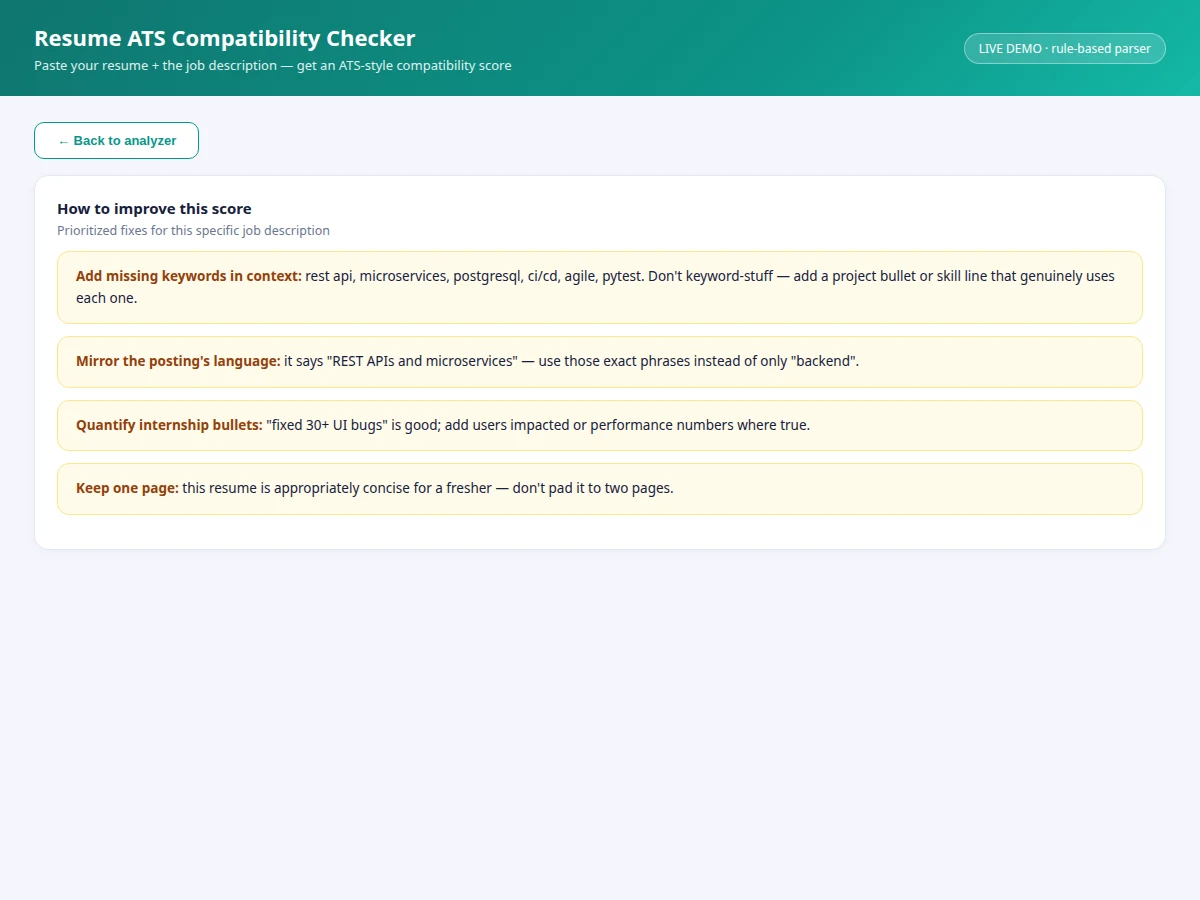
- The tips view generates prioritized fixes from the actual keyword gaps for that specific posting.
Tech stack:
- HTML5, CSS3, JavaScript (ES6)
- Single-file app — runs fully offline
- Rule-based text analysis (tokenizer + keyword dictionary)
- SVG score-ring visualization
- No external libraries, no network calls
| Parameter | Value |
|---|---|
| Application type | Single-page web analyzer |
| Demo delivery | Single HTML file, runs offline in any modern browser |
| Skill dictionary | 21 curated skills (languages, frameworks, tools, practices) |
| Scoring formula | Skills 55% · sections 25% · format 20% (documented, deterministic) |
| Analysis time | Under 4 seconds staged pipeline (expected, demo) |
| Data handling | 100% client-side — no resume text leaves the browser |
| Seeded demo | 1 fresher resume + 1 backend job posting |
Project features
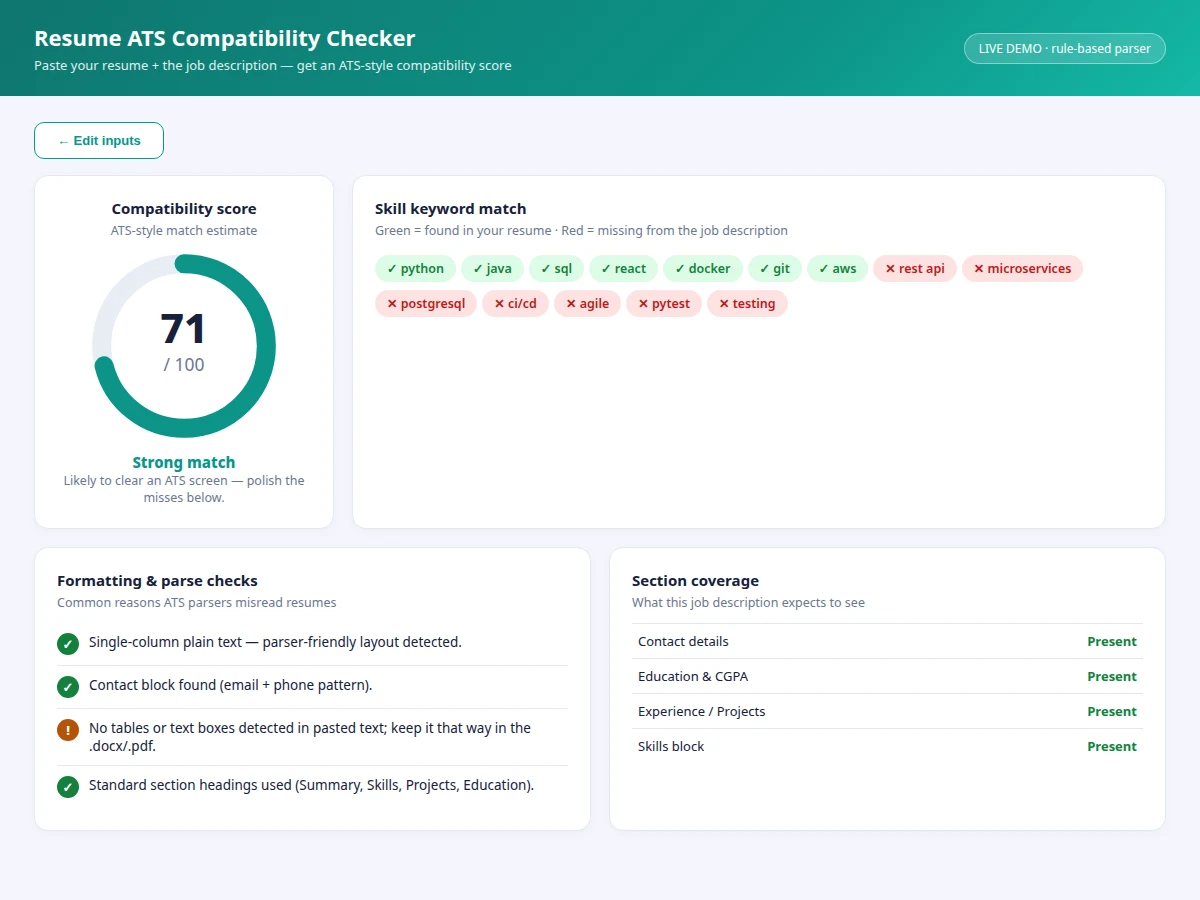
- [Compatibility score ring] Animated 0–100 score with a verdict band (strong / moderate / weak match) computed from a weighted, explainable formula.
- [Skill keyword extraction] The job description is scanned against a curated 21-skill dictionary (languages, frameworks, tools, practices) — deterministic, no black box.
- [Hit/miss keyword chips] Every posting keyword shown green (found in resume) or red (missing), so gaps are visible instantly.
- [Formatting & parse checks] Flags the classic parser killers: tables, graphics, non-standard headings, missing contact blocks.
- [Section coverage table] Checks for contact details, education, experience/projects and skills block — what postings expect to see.
- [Prioritized improvement tips] Posting-specific fixes generated from the actual misses: which keywords to add in context, phrasing to mirror, bullets to quantify.
- [Staged analysis pipeline] Parse → extract → format-check → score, with progress feedback showing what the analyzer is doing at each step.
What is included
- Working ATS compatibility checker web app
- Complete source code with comments
- Project report PDF (background, ATS concepts, analyzer design, scoring rationale)
- PPT presentation for final review
- Viva Q&A preparation document (parsing, tokenization, scoring, limitations)
Limitations & prerequisites
- The score is a learning-oriented estimate, not a replica of any commercial ATS product — vendors don't publish their algorithms.
- The 21-skill dictionary is curated and finite; niche domains need dictionary extension (documented as future scope).
- No synonym handling yet — "JS" won't match "JavaScript" unless both appear; a synonym map is listed as future scope.
- Paste-as-text only in the demo; PDF/DOCX upload with real text extraction is future scope.
- No resume is stored or compared against other candidates — single-document analysis only.
- Formatting checks apply to pasted text; layout risks in the original file need the user's judgment.
Frequently Asked Questions
Is this how real ATS software works?
It models the documented stages — parsing, keyword extraction, section detection, ranking — with transparent rules. Real vendors keep exact algorithms private, so this is an educational simulator, stated honestly throughout.
Why rule-based instead of machine learning?
Transparency. Every point of the score traces to a specific keyword or check, which makes the tool trustworthy for students and defensible in a viva — a black-box model couldn't offer that.
Does my resume leave my computer?
No. All analysis runs locally in the browser; there is no server and no network call. The report highlights this as a privacy design point.
Can it check against any job posting?
Yes — paste any posting text and the analyzer builds that posting's keyword set on the fly. The tips then target that specific posting's gaps.
What won't it catch?
Design quality, truthfulness of claims, and PDF layout issues beyond text content. It checks what machines check: words, sections and parseability.
Is this project suitable for a final-year project?
Yes — for Computer Science, IT and Web Development programs. It demonstrates text processing, algorithm design, explainable scoring and a polished single-page web app. Suitable for B.E./B.Tech final-year projects in Computer Science, IT and Web Development.
Components & software requirements
- HTML5, CSS3, JavaScript (ES6)
- Single-file app — runs fully offline
- Rule-based text analysis (tokenizer + keyword dictionary)
- SVG score-ring visualization
- No external libraries, no network calls
Delivery information
Built-to-order project. Delivery timeline is shared after order confirmation based on current queue.
Support terms
Complete documentation, setup guide, and viva preparation included. Support for setup and explanation provided.