
More project photos (2)
The problem
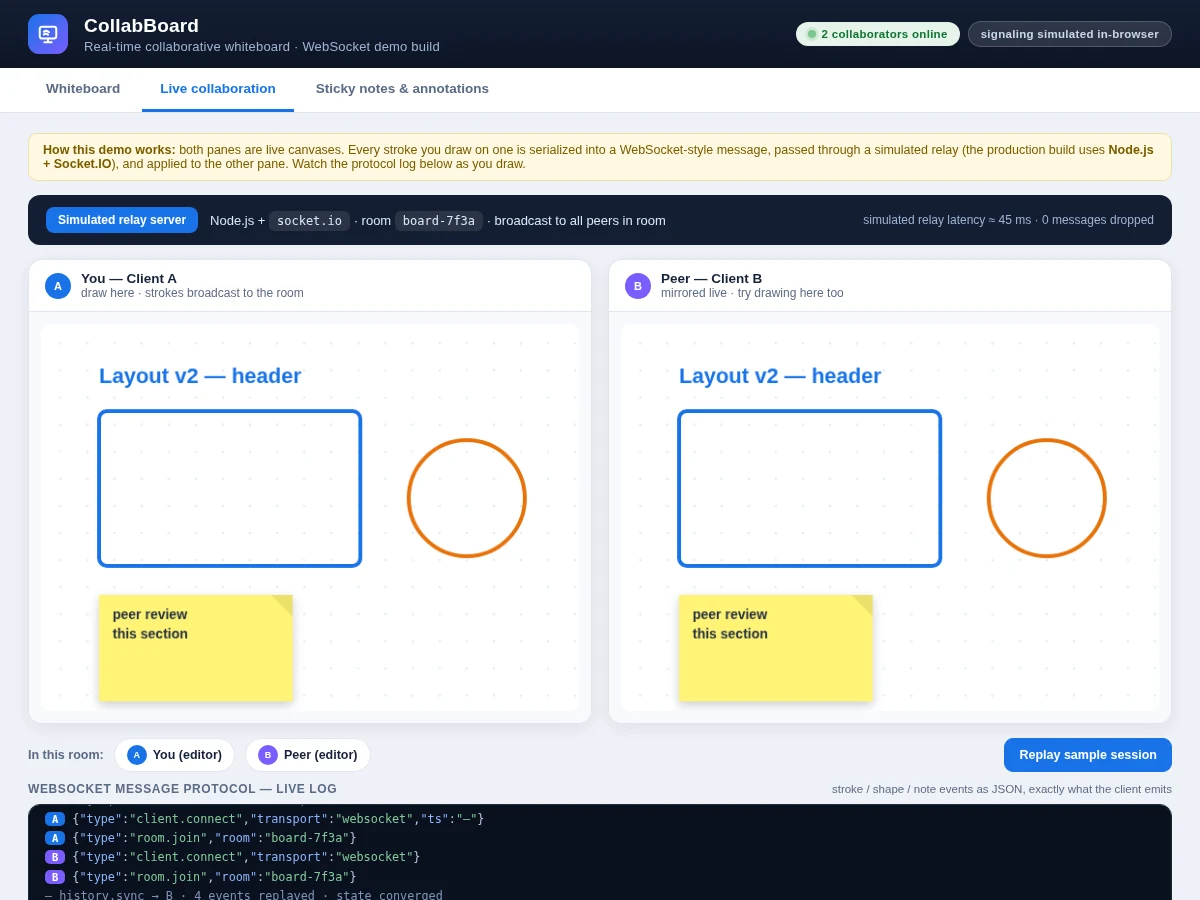
Remote teams, study groups and classrooms constantly need to sketch ideas together, yet the usual options fall short: screen-sharing is view-only, and the popular online whiteboards are closed SaaS products that teach nothing about how real-time collaboration actually works. A student who wants to understand the underlying technology — persistent connections, event broadcast, room state, late-joiner sync — has to build it. This project is exactly that build: a multi-user whiteboard where every pen stroke, shape, sticky note and text label drawn by one participant is serialized into a JSON event, pushed over a WebSocket connection to a Node.js server, and broadcast to every other participant in the same room. The result is a shared canvas that stays converged across browsers with no refresh and no polling. Because the protocol, the room model and the sync logic are all implemented from scratch with standard web technology, the student can explain and defend every layer of the system in the viva.
How it works
- A participant draws on the HTML5 canvas; pointer events are captured and lightly decimated so only meaningful points become stroke data.
- The client serializes the stroke into JSON messages — stroke.start (tool, color, width, stroke id), a stream of stroke.point (x, y) messages, then stroke.end — and emits them over the persistent Socket.IO connection.
- The Node.js + Express server receives each event, appends it to the room's in-memory event log, and broadcasts it to every other socket in the same room (socket.to(room).emit).
- Each receiving client applies the event to its own canvas through the identical render path — remote strokes are drawn segment-by-segment as their points arrive, so the drawing appears live.
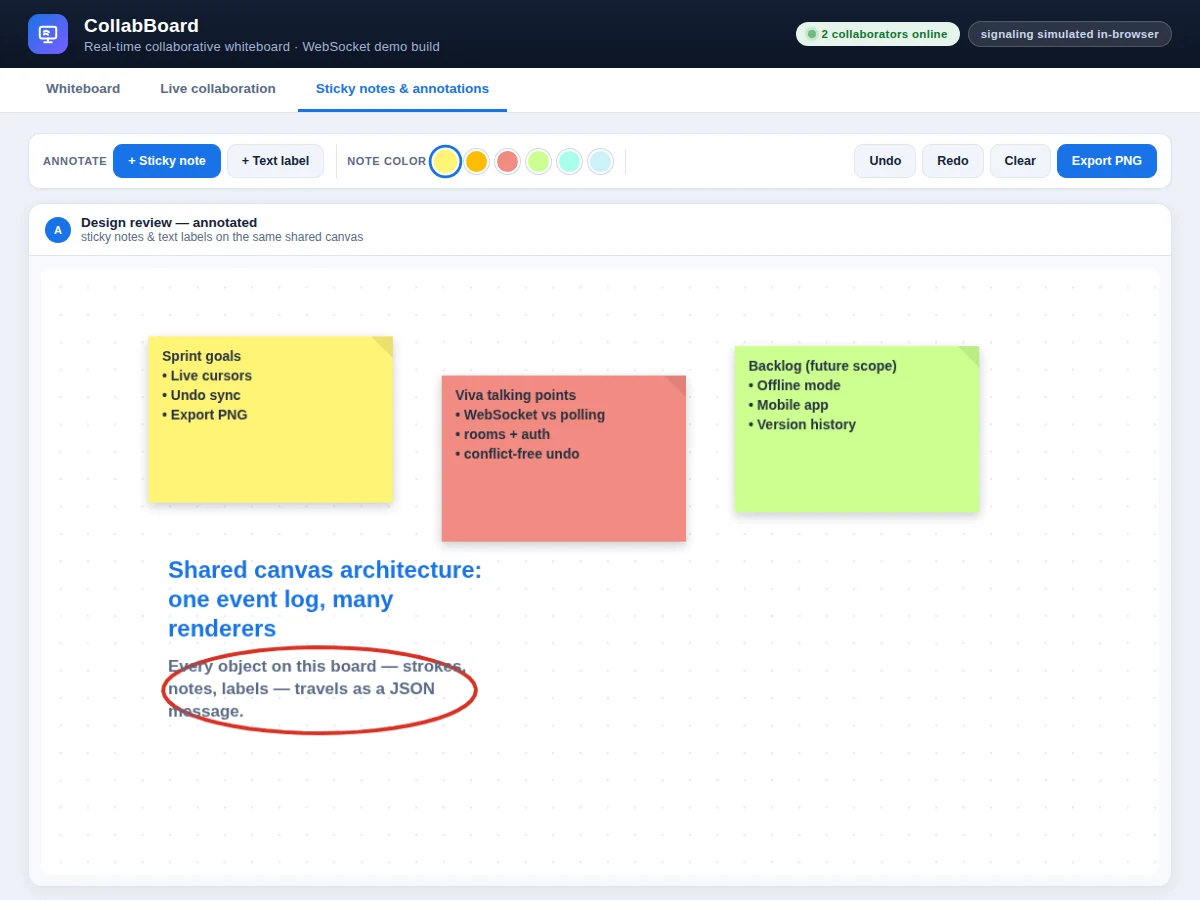
- Shapes, sticky notes and text labels travel as single discrete events (shape.add, note.add, text.add); undo and clear travel as board.undo and board.clear events and are applied by every client.
- Presence works the same way: room.join and disconnect events update the collaborator list on all screens.
- A newcomer triggers history sync — the server sends the stored event log, and the client replays it in order to reconstruct the exact current board before receiving live events.
- Export renders the converged canvas to a data URL and downloads it as a PNG; nothing leaves the browser for this step.
Tech stack:
- Node.js 18 + Express (signaling and room server)
- Socket.IO 4 (WebSocket transport with HTTP long-polling fallback)
- HTML5 Canvas API (rendering engine)
- Vanilla JavaScript ES6 (client logic, no framework)
- JSON event protocol (stroke/shape/note/text/undo/clear messages)
- CSS3 (responsive whiteboard UI)
- npm (dependency management)
| Parameter | Value |
|---|---|
| Transport | WebSocket via Socket.IO 4, with HTTP long-polling fallback (automatic) |
| Message format | JSON events: stroke.start / stroke.point / stroke.end, shape.add, note.add, text.add, board.clear, board.undo |
| Sync model | Server broadcast per room; delivery speed is a design target of tens of milliseconds on a LAN — actual latency depends on the network and is verified by the buyer during testing |
| Collaborators per room | Design target: 10+ concurrent editors on a single Node.js instance (expected; scales with server resources) |
| Stroke data | Client-side point decimation; points emitted per animation frame (design target) |
| History | In-memory per-room event log, replayed to late joiners (persistence is future scope) |
| Board export | PNG at full canvas resolution via the canvas API |
| Browser support | Any modern browser with WebSocket and Canvas support (Chrome, Edge, Firefox, Safari) |
| Server footprint | Modest — runs on a laptop or a small VPS (expected) |
Project features
- [Real-time stroke synchronization] Pen and eraser strokes are captured on the HTML5 canvas, serialized as JSON events (stroke.start / stroke.point / stroke.end) and broadcast over WebSockets, so every participant sees the drawing as it happens.
- [Shape tools] Line, rectangle and circle tools with adjustable stroke width and an 8-color palette, drawn as vector objects that sync to the room exactly like freehand strokes.
- [Sticky notes & text labels] Color-coded sticky notes and text annotations are first-class canvas objects — they move through the same event protocol, undo cleanly, and export with the board.
- [Room-based collaboration] Each board lives in an isolated Socket.IO room addressed by a room id, so multiple independent sessions can run on the same server without interfering.
- [Presence tracking] Join and leave events keep a live collaborator list, with a distinct color identity per client shown in the room UI.
- [Synchronized undo/redo] Undo and redo are broadcast as events, so one participant's undo removes the stroke on every screen — the boards stay converged.
- [Join-late history replay] The server keeps the room's event log in memory; a client that joins mid-session receives the full log and replays it to reach the current board state.
- [One-click PNG export] The entire board exports to a PNG image at full canvas resolution via the canvas API, for submission or sharing.
What is included
- Complete Node.js + Express + Socket.IO server source (rooms, broadcast, presence, history replay)
- Whiteboard client source (canvas engine, pen/eraser/shapes/notes/text tools, undo/redo, PNG export)
- Working demo build of the whiteboard, as shown in the screenshots
- Room link scheme and presence UI implementation
- Project report PDF (WebSocket fundamentals, protocol design, system architecture, testing procedure the buyer runs)
- PPT presentation for the final review
- Viva Q&A preparation document (WebSockets vs polling, rooms and namespaces, event ordering, scaling, conflict handling)
- Setup guide (running locally, exposing on a LAN, and deploying to a small VPS)
Limitations & prerequisites
- No user authentication as shipped — rooms are join-by-link, so anyone with the link can draw; adding auth is listed as future scope.
- Room history lives in server memory — restarting the server clears all boards; persistent storage (Redis or a database) is future scope.
- Undo is board-level last-action undo, not per-user selective undo of one's own strokes.
- No offline support — a dropped connection pauses sync until the socket reconnects; queued-stroke resend across reconnects is future scope.
- Concurrent edits resolve last-writer-wins on shared object state; there is no operational-transform or CRDT conflict resolution.
- All performance figures above are design targets, stated honestly — the report documents the buyer's own measured figures after the testing procedure is run.
- The in-browser demo page simulates the relay for illustration; the shipped build is a real Node.js + Socket.IO client-server system.
Frequently Asked Questions
How is this different from screen-sharing a drawing app?
Screen-sharing is view-only — one person draws, everyone else watches. Here every participant has a live, editable canvas: strokes, shapes and notes from all users merge onto one shared board in real time, which is the actual engineering problem this project solves.
Why WebSockets instead of polling or AJAX?
Polling re-asks the server every second or two, which adds delay and wastes bandwidth. A WebSocket keeps one persistent two-way connection open, so the server pushes each drawing event the instant it arrives — the standard approach for real-time collaboration, and a strong viva topic.
What happens when two people draw at the same time?
Both stroke streams are broadcast and rendered independently, so both drawings appear. For overlapping edits to the same object, the last received state wins — the report documents this honestly and lists conflict-free replicated data types (CRDTs) as future scope.
Do I need paid hosting to run or demo this?
No. It runs on a laptop for development and demos, on a college LAN by exposing the port, and on any small VPS for public access. The setup guide covers all three.
How does a late joiner see what's already drawn?
The server stores every event of the room in an in-memory log. On joining, the new client receives the full log and replays it in order, reconstructing the exact current board before live events start flowing.
Is this project suitable for a final-year project?
Yes — for Computer Engineering and Information Technology programs. It demonstrates full-stack development, the WebSocket protocol, event-driven architecture, room-based real-time sync, and a genuinely usable multi-user product. Suitable for B.E./B.Tech final-year projects in Computer Engineering and Information Technology.
Components & software requirements
- Node.js 18 + Express (signaling and room server)
- Socket.IO 4 (WebSocket transport with HTTP long-polling fallback)
- HTML5 Canvas API (rendering engine)
- Vanilla JavaScript ES6 (client logic, no framework)
- JSON event protocol (stroke/shape/note/text/undo/clear messages)
- CSS3 (responsive whiteboard UI)
- npm (dependency management)
Delivery information
Built-to-order project. Delivery timeline is shared after order confirmation based on current queue.
Support terms
Complete documentation, setup guide, and viva preparation included. Support for setup and explanation provided.