
More project photos (3)

The problem
A point of sale system for retail shops is the software a neighbourhood kirana store runs at its billing counter, and this project builds one with PHP and MySQL: the cashier searches or scans a product, the cart totals the bill with per-item GST, and the system takes cash or UPI, works out the change, prints a GST bill and updates stock in one step. Most small shops still bill by hand: totals are slow, GST is worked out roughly or skipped, cash change is miscounted, and nobody knows what is in stock until a shelf is empty. Handwritten bills give the owner no record of the day's sales, so reordering is guesswork and fast-moving items run out while slow stock piles up. A point of sale system fixes the whole chain: every sale is recorded, tax is split into CGST and SGST, and the stock count stays honest because it falls only when a sale completes.
Builder note from the demo build: the demo catalogue holds 25 products across 4 categories, and a sample bill of 1 Aashirvaad Atta 5 kg (₹289, GST 5%), 1 Tata Tea Gold 500 g (₹265, GST 5%) and 2 Colgate Toothpaste 200 g (₹145 each, GST 18%) totals exactly ₹923.90 — subtotal ₹844.00 plus GST ₹79.90 (CGST ₹39.95 + SGST ₹39.95) — and a ₹1,000 cash tender returns ₹76.10 change. That arithmetic is computed live by the demo, not typed in, and it is the first-principles check that the GST logic is correct: tax is charged per item at its own slab, never as a flat rate on the total.
Searches, types a SKU or scans a barcode at the shop counter.
Follow the working sequence
How it works
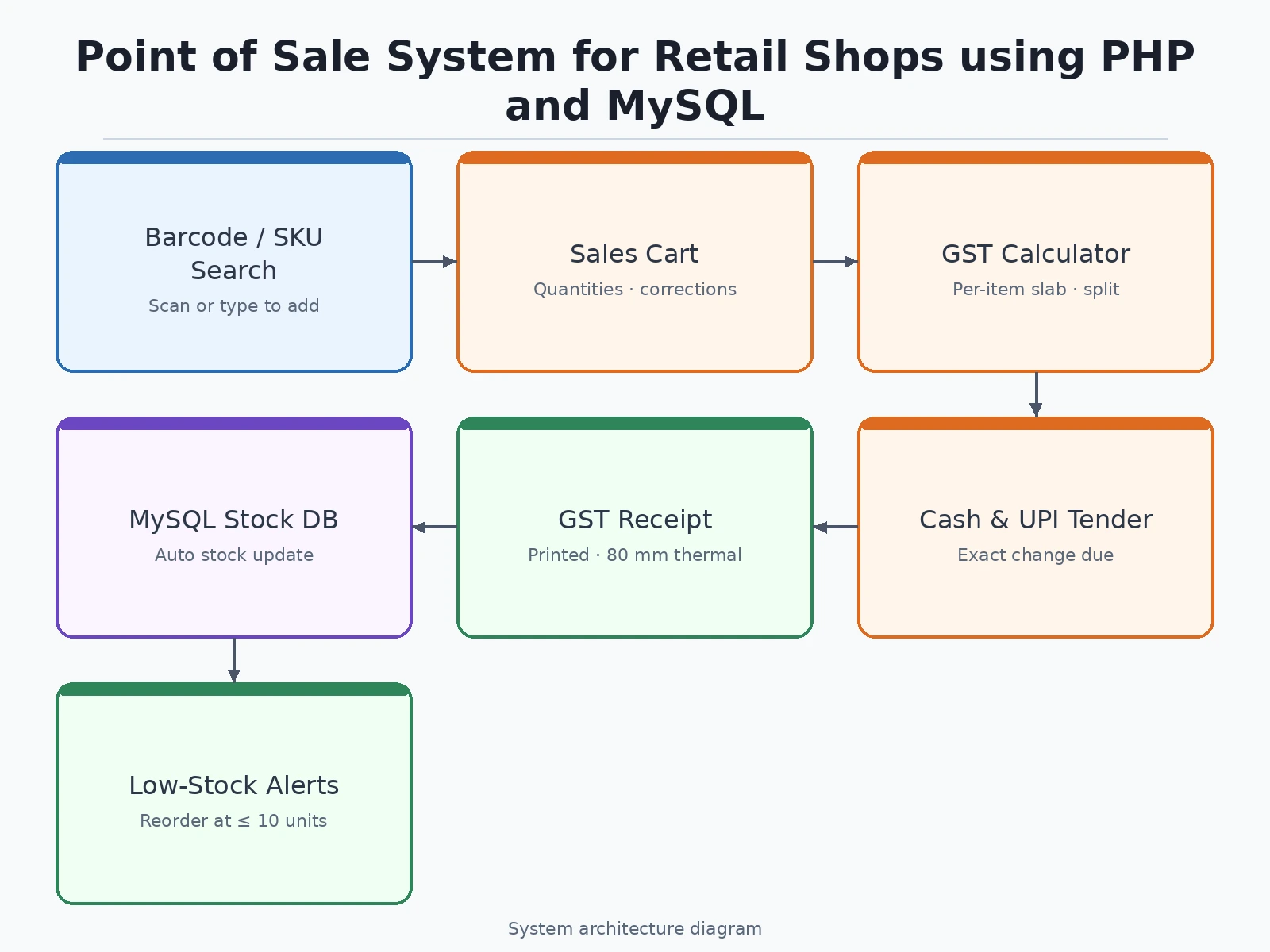
The cashier starts a new bill and adds products by searching, typing a SKU or scanning a barcode, and each item joins the cart with its price and GST slab already attached. Quantities are adjusted with plus and minus controls, and a percentage discount can be applied to the pre-GST subtotal when the shop offers one. The system then totals the bill: subtotal minus discount, plus GST charged per item at its own slab and split equally into CGST and SGST. The customer pays by cash or UPI — for cash the cashier enters the amount tendered and the system shows the exact change due, and for UPI the payment is recorded in full. Completing the sale prints the GST receipt and reduces stock for every item sold, and the next bill starts with a fresh sequential bill number.
- The cashier opens a new bill and adds products by barcode scan, SKU or name search from the 25-product demo catalogue.
- Quantities are adjusted in the cart, and an optional percentage discount is applied to the pre-GST subtotal.
- The system computes the subtotal, subtracts the discount, and adds GST per item at its configured slab (0%, 5%, 12% or 18%).
- GST is split equally into CGST and SGST and shown as separate lines on the bill, as an Indian retail GST bill requires.
- The customer pays by cash or UPI; for cash the cashier enters the amount tendered and the system shows the exact change due.
- Completing the sale prints the GST receipt with bill number, items, tax split, tender and change.
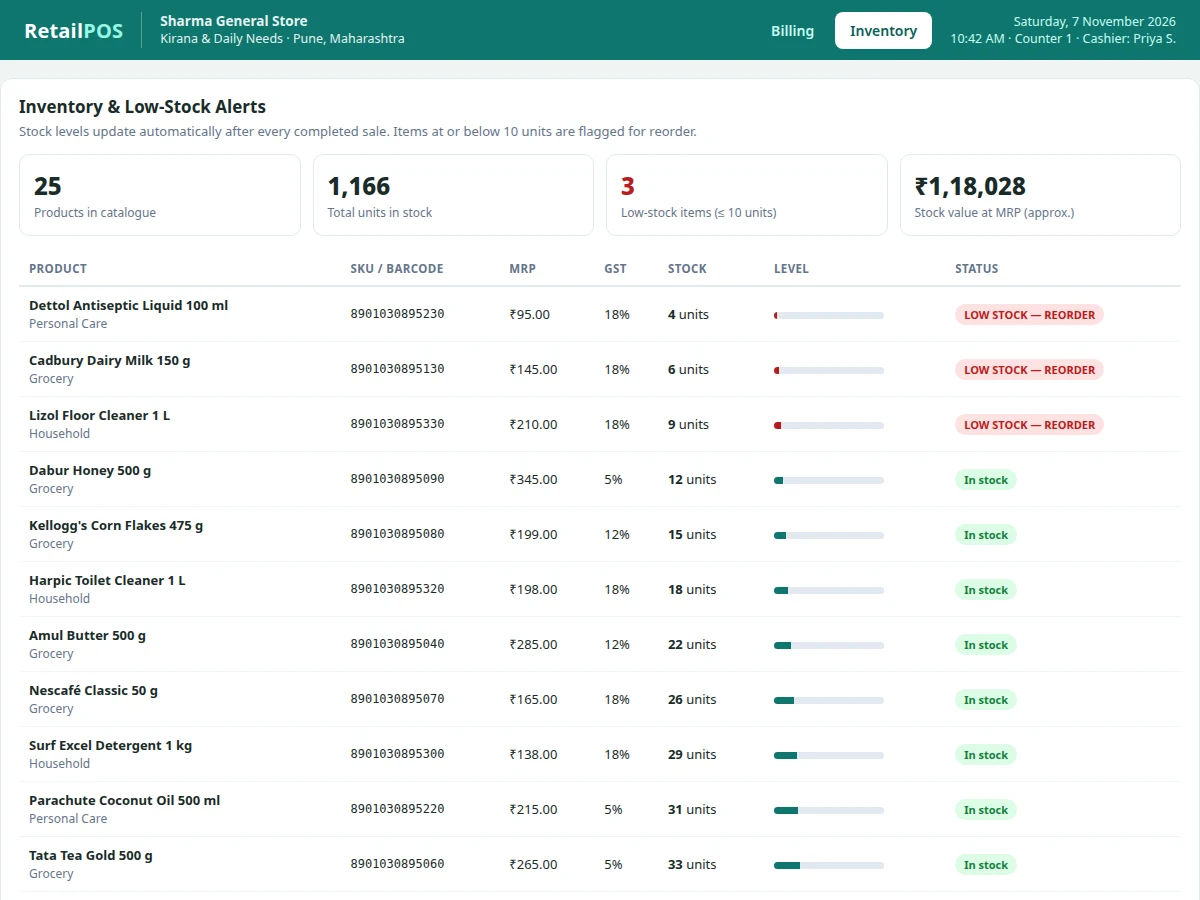
- Stock is reduced for every item sold and the low-stock list updates, so the owner sees what needs reordering.
Tech stack:
- PHP 8
- MySQL
- HTML · CSS · JavaScript
- Apache (XAMPP)
- phpMyAdmin
- USB barcode scanner
- Thermal receipt printer (80 mm)
- Git
| Parameter | Value |
|---|---|
| Demo catalogue | 25 products across 4 categories (demo configuration) |
| GST slabs | 0%, 5%, 12% and 18% per item (demo configuration) |
| Sample bill total | ₹923.90 for 4 items (demo measurement: subtotal ₹844.00 + GST ₹79.90) |
| Sample bill GST split | CGST ₹39.95 + SGST ₹39.95 (demo measurement) |
| Change due on sample bill | ₹76.10 on a ₹1,000 cash tender (demo measurement) |
| Low-stock threshold | 10 units, configurable (design target) |
| Demo stock value | Approximately ₹1,18,028 at MRP (demo measurement) |
| Demo stock units | 1,166 units in total (demo measurement) |
| User roles | 2 roles — cashier and admin (design target) |
| Database tables | Approximately 8 tables (design target): products, categories, sales, sale items, stock, customers, users, settings |
| Bill numbering | Sequential, starting at Bill #1042 (demo configuration) |
| Receipt format | 80 mm thermal-print layout (design target) |
| Runtime | PHP 8 with MySQL on Apache/XAMPP (expected) |
Project features
The strongest capabilities of this point of sale system are its fast barcode billing, its per-item GST handling, and its automatic stock control. Barcode or SKU search pulls a product into the bill in one step, and quantity controls let the cashier correct a bill without starting over, so a queue at the counter moves quickly even at peak hours. GST is charged per item at its own configured slab — 0%, 5%, 12% or 18% as set in the demo — and split equally into CGST and SGST on the printed bill, which is how a real Indian retail bill must read. Every completed sale reduces stock automatically and a low-stock list flags items at or below 10 units for reorder, while cash and UPI tender with exact change due closes the loop at the counter. Together these capabilities make the build a complete shop counter system, not just a billing form.
- [Barcode and SKU search] Type a product name, SKU or barcode — or scan with a USB barcode scanner — and the item joins the bill in one step, with quantity controls to correct mistakes without restarting the bill.
- [Per-item GST with CGST and SGST split] Each product carries its own GST slab (0%, 5%, 12% or 18% as configured in the demo); the bill shows CGST and SGST as equal halves of the GST total, exactly as an Indian retail GST bill requires.
- [Discount on the bill] A percentage discount applies to the pre-GST subtotal, so festival offers and regular-customer discounts are handled at the counter without manual calculation.
- [Cash and UPI tender with change due] The cashier enters the amount tendered and the system shows the exact change due for cash, or records a UPI payment in full, and refuses to complete a sale that is short of the total.
- [Printable GST receipt] Every completed sale produces a formatted bill with shop details, GSTIN, item-wise GST, CGST/SGST split, tender and change, ready to print on a standard or 80 mm thermal printer.
- [Automatic stock update] Stock falls only when a sale is completed — not while items sit in an open cart — so the inventory count always matches what actually left the shop.
- [Low-stock alerts and inventory view] An inventory screen lists every product with stock levels and flags items at or below 10 units for reorder, so the owner can restock before a shelf empties.
What is included
- Complete PHP and MySQL source code with database schema and demo data (25 products across 4 categories)
- Working billing demo (single-file demo app) wired to the same GST, discount, tender and stock logic as the delivered build
- GST bill/receipt print template in an 80 mm thermal format
- Setup instructions for XAMPP (Apache + MySQL) and database import
- Project report PDF (background, billing workflow, GST logic, methodology, results)
- PPT presentation for final review
- Viva Q&A preparation document (PHP sessions, MySQL design, GST slabs, billing and stock flow)
- Request a quotation on WhatsApp: share this project name, whether you need barcode-scanner and thermal-printer support, and your needed delivery date, and Projectech will confirm the scope, the price and the delivery timeline before the build starts.
Limitations & prerequisites
- The demo runs billing logic in the browser; the delivered PHP and MySQL build needs a local XAMPP server — it is not a hosted cloud POS as shipped.
- GST slabs are configured per product in the demo (0%, 5%, 12% or 18%); the owner must set the correct slab for each product — the system does not look up HSN codes automatically.
- No payment-gateway or live UPI verification is included: UPI payments are recorded on the cashier's confirmation, not verified against a bank API.
- Stock is reduced only on completed sales; cancelled or returned bills need a manual stock adjustment, which is a listed customization.
- The base build supports one counter and one shop; multi-branch stock synchronisation is not included.
- Barcode scanning needs a USB HID scanner (or a typed SKU); the system does not generate barcodes for unlabelled stock as shipped.
- The demo catalogue of 25 products is sample data; a real shop's full catalogue must be imported from the owner's price list.
Frequently Asked Questions
Is this project suitable for a final-year project?
Yes — for Computer Science and Information Technology students, this is a strong final-year project because it combines PHP, MySQL database design, a real billing workflow, GST calculation and stock management in one working system that a real shop could use. It demonstrates CRUD operations, session handling, server-side calculation and receipt generation, and the GST arithmetic and low-stock logic give clear, testable behaviour to present and defend in a viva.
How is GST calculated on a bill?
GST is charged per item at that item's own configured slab — 0%, 5%, 12% or 18% as set in the demo — never as a flat rate on the total, and the bill splits it equally into CGST and SGST. The demo proves the logic: Atta at 5%, tea at 5% and toothpaste at 18% give ₹79.90 GST on an ₹844.00 subtotal, as CGST ₹39.95 plus SGST ₹39.95.
Does it work without internet?
Yes — the PHP and MySQL build runs on a local XAMPP server, so billing, GST, stock and printing all work with no internet connection at all, and only the customer's own UPI payment needs their phone and mobile data while the POS itself never depends on being online.
Can it print bills on a thermal printer?
Yes — the receipt template is laid out for an 80 mm thermal printer (design target) and prints from the browser, so any printer the counter computer can see works, and a USB barcode scanner is likewise optional because without one the cashier simply types the SKU or searches by product name.
What do I need to run it?
A Windows or Linux computer with XAMPP (Apache + MySQL + PHP 8), a web browser, and the supplied database import — no paid software is required — plus, optionally, a USB barcode scanner and an 80 mm thermal printer to make counter billing faster. Both peripherals are supported as configured hardware, not as extra software to buy.
Can this project be customized?
Yes — common customizations are sales returns with automatic stock reversal, a day-end sales report, multi-counter support, barcode label printing for unlabelled stock, and a customer mobile-number ledger for credit sales, and the catalogue, GST slabs, discount rules and receipt header can also be matched to a specific shop. Additional features are developed based on project requirements, technical feasibility and timeline.
Components & software requirements
- PHP 8
- MySQL
- HTML · CSS · JavaScript
- Apache (XAMPP)
- phpMyAdmin
- USB barcode scanner
- Thermal receipt printer (80 mm)
- Git
Delivery information
Built-to-order project. Delivery timeline is shared after order confirmation based on current queue.
Support terms
Complete documentation, setup guide, and viva preparation included. Support for setup and explanation provided.
Download free synopsis (PDF)
Enter your name and WhatsApp number — the synopsis PDF downloads immediately. We may send occasional project updates on WhatsApp; no spam.