
More project photos (2)
The problem
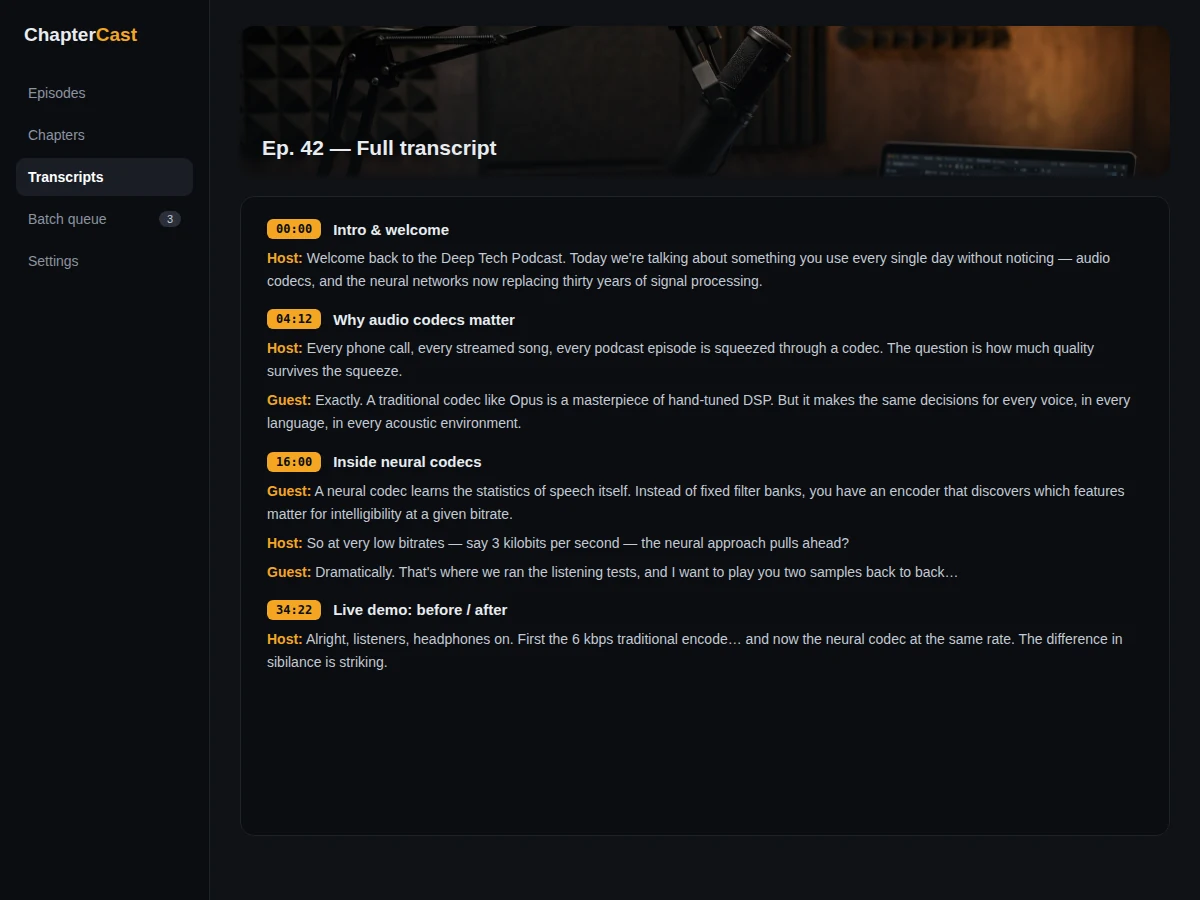
Podcast episodes routinely run one to three hours, yet most players offer nothing better than a scrub bar — listeners cannot jump to the interview segment or skip the sponsor read. Creators know chapters fix this, but hand-writing timestamps for every episode is tedious enough that most skip it. Speech recognition changed the economics: Whisper produces timestamped transcripts good enough to work from, and topic shifts in the transcript reveal natural chapter boundaries. This project wires that into a complete pipeline — transcribe, segment, title, review on a waveform, export — so a creator uploads an episode and gets ready-to-paste chapters. The listing is careful about what is automated and what is not: transcription quality depends on the audio, and chapter boundaries are heuristic suggestions the user reviews, not perfect cuts.
How it works
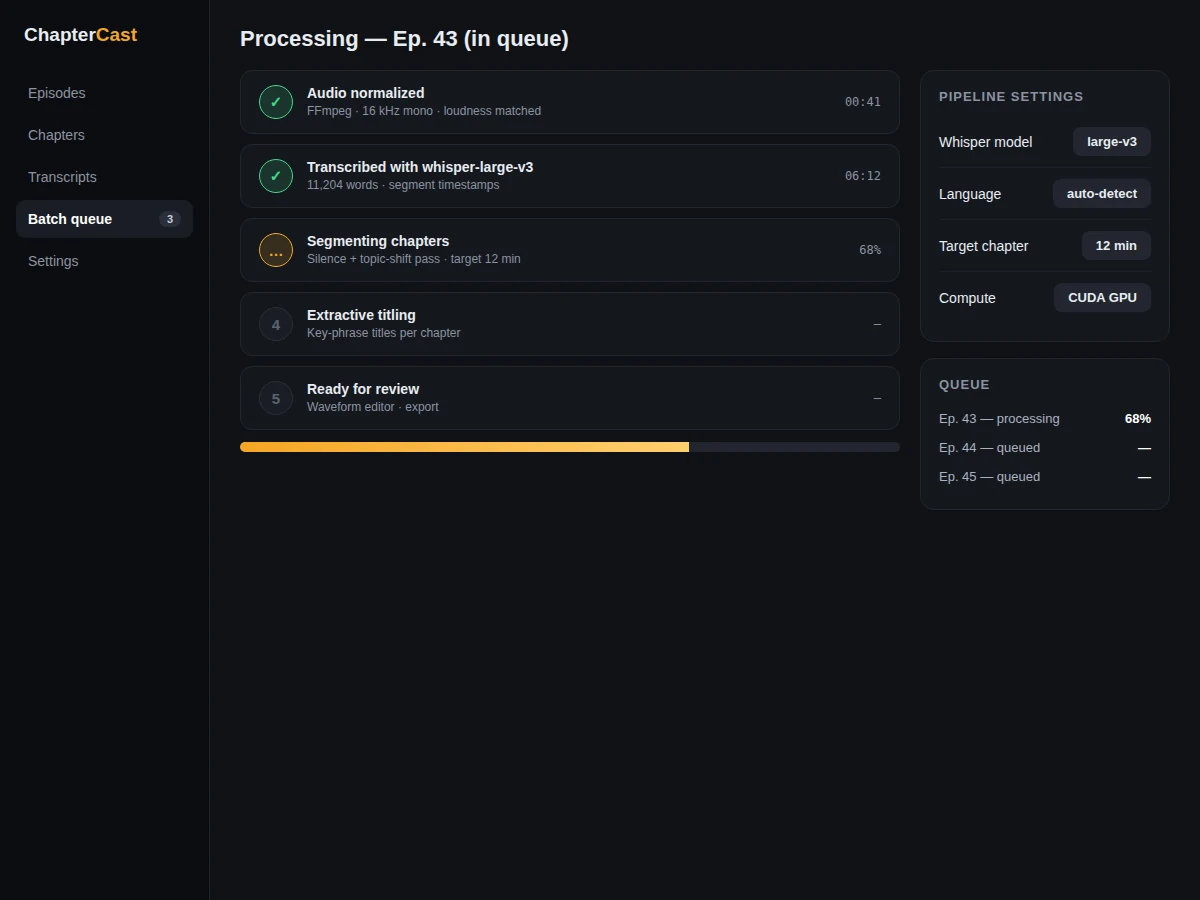
- The user uploads an MP3/WAV episode; FFmpeg normalizes it to the 16 kHz mono format Whisper expects.
- faster-whisper runs the selected pre-trained Whisper model and returns segments with start/end timestamps.
- A segmentation stage combines long silences with topic-shift signals in the transcript to propose chapter boundaries near the target length.
- Each proposed chapter receives an extractive title from its most distinctive phrases.
- The web UI renders the waveform with chapter regions; the user drags boundaries, splits, merges and retitles as needed.
- Export writes YouTube-format chapter text, MP3 chapter tags and JSON from the reviewed chapter list.
Tech stack:
- Python 3.10, faster-whisper (CTranslate2 runtime)
- OpenAI Whisper pre-trained weights (open-source; downloaded once)
- FFmpeg (audio normalization and chapter tagging)
- Flask backend, HTML/CSS/JS waveform editor frontend
| Parameter | Value |
|---|---|
| Transcription model | Whisper pre-trained (tiny/base/small/medium/large selectable) |
| Training required | None — pre-trained weights are used as-is |
| Input | MP3/WAV podcast audio, any length |
| Output | Timestamped transcript, titled chapters, YouTube/MP3/JSON exports |
| Chapter titles | Extractive (from segment phrases), user-editable |
| Runtime | CPU supported; GPU strongly recommended for large models |
| Transcription quality | Depends on audio quality, accents, crosstalk and music — no WER claimed |
Project features
- [Whisper transcription] Pre-trained Whisper models (tiny through large, selectable) transcribe any episode with segment-level timestamps; no model training is required.
- [Automatic chapter segmentation] Long silences and topic shifts in the transcript are combined to propose chapter boundaries, with a configurable target chapter length.
- [Extractive chapter titles] Each proposed chapter gets a title drawn from its most distinctive phrases — transparent and inspectable, not a black-box generator.
- [Interactive waveform editor] The episode renders as a chapter-colored waveform; boundaries can be dragged, chapters split, merged and retitled before export.
- [Multi-format export] One click produces YouTube description chapters, MP3 ID3 chapter tags and a JSON chapter file for other players.
- [Batch queue] Drop in several episodes and process them sequentially, with per-episode status and logs.
- [Configurable pipeline] Model size, language hint, silence thresholds and target chapter length are all adjustable from the UI.
What is included
- Complete source code (transcription pipeline, segmentation, web UI, exporters)
- Setup guide (Python environment, Whisper weight download, FFmpeg, running the UI)
- Project report PDF (background, Whisper overview, segmentation method, evaluation procedure)
- PPT presentation for final review
- Viva Q&A preparation document (speech recognition, transformers, timestamp alignment, segmentation heuristics)
- Demo guidance with a sample episode workflow
Limitations & prerequisites
- Transcription errors rise with heavy accents, crosstalk, background music and poor microphones — the UI is built for reviewing, not blind trust.
- Chapter boundaries are heuristic suggestions; topic shifts in casual conversation do not always match, so human review matters.
- Large Whisper models need significant RAM/VRAM and time on CPU; the tiny/base models are provided as fast fallbacks.
- Very long episodes (3+ hours) need patience and disk space for intermediate files.
- The pipeline does not separate overlapping speakers; it chapters topics, not diarized speakers.
Frequently Asked Questions
Which model is used?
OpenAI's Whisper, using its published pre-trained weights (tiny through large). No training is done in this project — it is applied transcription, not model development.
Does it need training data?
No. Whisper arrives pre-trained; the project's own contribution is the segmentation, titling, waveform review UI and exporters.
Is the transcription accuracy guaranteed?
No. Quality depends on the recording — clear studio speech transcribes well, while noisy, accented or music-heavy audio degrades. The report documents this openly.
Do I need a GPU?
Not strictly — CPU works with the smaller models, but medium/large models are much faster on a CUDA GPU. Expected runtimes for each model size are documented.
Which languages are supported?
Whisper is multilingual; the language can be hinted or auto-detected. Chapter titling works best on English and should be reviewed for other languages.
Is this project suitable for a final-year project?
Yes — for Computer Science, AI/ML and Data Science programs. It demonstrates applied speech AI, audio processing, heuristic segmentation and full-stack product thinking. Suitable for B.E./B.Tech final-year projects in Computer Science, AI/ML and Data Science.
Components & software requirements
- Python 3.10, faster-whisper (CTranslate2 runtime)
- OpenAI Whisper pre-trained weights (open-source; downloaded once)
- FFmpeg (audio normalization and chapter tagging)
- Flask backend, HTML/CSS/JS waveform editor frontend
Delivery information
Built-to-order project. Delivery timeline is shared after order confirmation based on current queue.
Support terms
Complete documentation, setup guide, and viva preparation included. Support for setup and explanation provided.