
More project photos (2)
The problem
House hunting in Indian cities usually means scrolling through scattered listings across broker groups, classifieds and social media posts, where prices, locations and property details are inconsistent and the same property appears under different descriptions. The Online Property Listing Platform with Map Search and Agent Enquiries answers that scattered search with one searchable catalogue: every listing carries a fixed set of fields covering city, area, property type, BHK count, built-up area, price and the listing agent, so a buyer can compare like with like instead of re-reading vague posts. A map view adds the missing spatial question, showing where listings sit relative to a preferred area, while filters narrow the catalogue by city, price, type and BHK before any agent is contacted. Enquiries go to the correct agent with the property attached, so follow-up starts from a specific home rather than a general question. All demo prices are sample listings, not live market rates.
How it works
An agent listing enters the catalogue with a fixed field set covering city, area, property type, BHK count, built-up area, price, photos and agent contact, and the catalogue is indexed by city and property type so filters do not rescan every record on each search. A buyer opens the listing grid, applies city, type, BHK, price and keyword filters, or taps a map pin to restrict results to one city, and the grid re-renders from the index. Opening a card shows the detail page with photos, area and agent details, and the enquiry form on the same flow validates the buyer name, mobile number and message before saving the enquiry against that listing. The agent then sees the enquiry with the property attached and follows up by phone, closing the loop from search to site-visit conversation.
- A listing is stored with a fixed field set: city, area, property type, BHK count, built-up area, price, photos and the listing agent.
- The catalogue is indexed by city and property type. Builder note from the demo build: filters run against a pre-built index keyed by city and property type, so combining city, type, BHK and price filters re-renders the grid without a new fetch.
- The buyer applies city, type, BHK, maximum price and keyword filters on the search bar, and the grid shows only the matching listings with an updated result count.
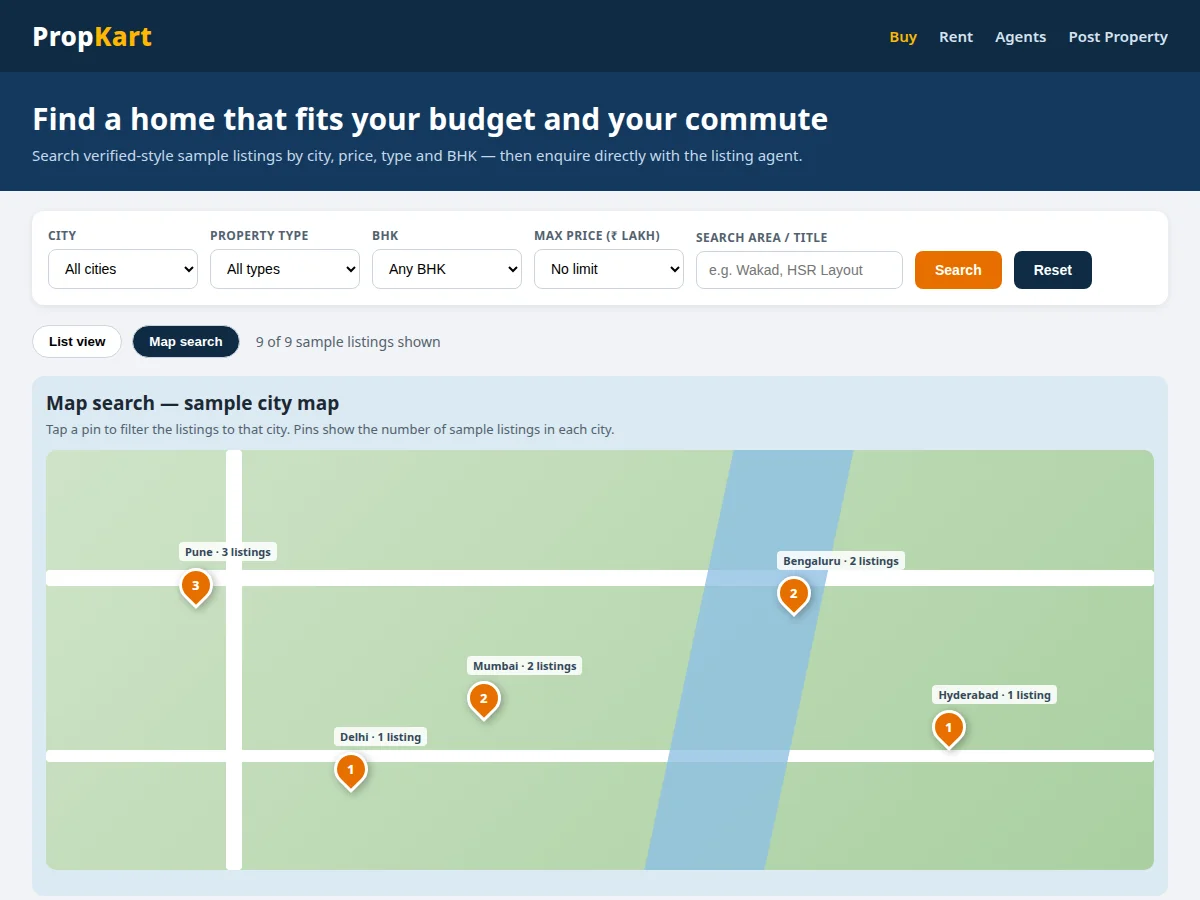
- The buyer switches to map search and taps a city pin, which filters the catalogue to that city and shows the matching cards below the map.
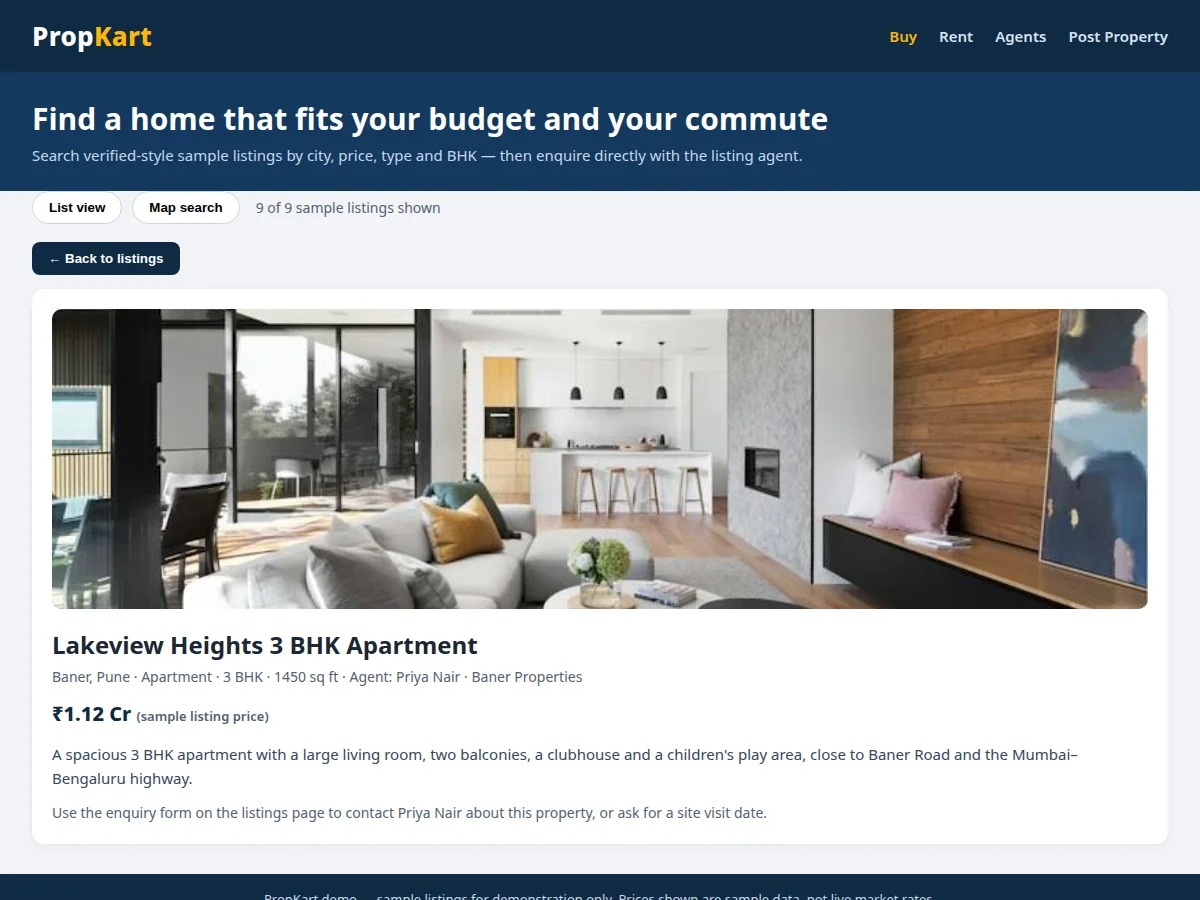
- The buyer opens a property card to reach the detail page, which shows the large photo, area, BHK count, built-up area, price and agent details.
- The buyer fills the enquiry form with a name, a mobile number and a message; the form rejects a short name, an empty message, or a mobile number that is not a valid 10-digit Indian mobile format starting with 6, 7, 8 or 9.
- The accepted enquiry is saved against that listing and appears in the saved enquiry list, so the agent can call the buyer back about that specific property.
Tech stack:
- HTML5 · CSS3 · JavaScript for the frontend
- Node.js · Express for the listing API
- MongoDB · property and enquiry collections
- Interactive map view · city pins and area filter
- Responsive card layout · desktop and mobile views
- Form validation · mobile-number and message checks
- REST API design · listing and enquiry endpoints
- Browser storage · saved enquiries in the demo
| Parameter | Value |
|---|---|
| Listing catalogue | 9 sample listings (sample data count) |
| Filter fields | 5 filter fields (implemented count) |
| Map pins | 5 city pins (implemented count) |
| Detail fields | 8 fields per listing (implemented count) |
| Enquiry validation | 10-digit mobile format starting with 6 to 9 (validation rule) |
| Built-up area range | 850–2600 sq ft (sample data range) |
| Sample price range | ₹68 lakh–₹1.98 crore (sample data range) |
| Filter behaviour | Grid re-renders from the index without a new fetch (design target) |
| Platform | Web browser · desktop and mobile layouts (design target) |
| Not included | Live map tiles · payment gateway · verified listings (not in this build) |
Project features
Four capabilities carry the platform: searchable listings with city, price, type and BHK filters that narrow a large catalogue to a shortlist; a map search view where pins grouped by city filter the catalogue to one area; property detail pages that gather photos, area, price and agent details in one place; and agent enquiries that attach the buyer message and contact details to a specific listing. Around those four, the platform adds a saved enquiry list for the agent, a responsive card layout for phones and desktops, and a fixed listing field set that keeps every property comparable. Together they replace scattered broker posts with a catalogue a buyer can search, compare and act on without losing the property context between steps. The demo runs all four on sample data across five Indian cities, so the flow can be shown end to end without any live account.
- [Search and filters] City, property type, BHK, maximum price and keyword filters combine on one bar and re-render the listing grid to the matching properties. Implemented in the demo.
- [Map search] A map-style view shows one pin per city, and tapping a pin filters the catalogue to that city so location becomes a search input rather than a text field. Implemented in the demo.
- [Property detail pages] Each card opens a detail page with a large photo, area, city, BHK count, built-up area, price and the listing agent in one place. Implemented in the demo.
- [Agent enquiry forms] The enquiry form collects the buyer name, mobile number, property and message, and validates the mobile format before saving the enquiry against that listing. Implemented in the demo.
- [Saved enquiry list] Every accepted enquiry appears in a saved list under the form, showing the buyer name, mobile number and property so the agent can follow up. Implemented in the demo.
- [Fixed listing field set] Every listing uses the same fields for city, area, type, BHK, built-up area, price and agent, so properties stay comparable across the whole catalogue. Implemented in the demo.
- [Agent posting form] An agent-side form for adding a new listing with the same fixed field set, so new properties enter the catalogue in the correct format. Optional customisation, not in the demo.
- [Live map provider] Replacing the schematic demo map with live map tiles and street-level pins from a mapping provider, so buyers can search by neighbourhood boundaries. Future scope, not in the current build.
What is included
- Complete source code for the listing platform: search and filters, map search view, property detail pages and agent enquiry forms
- Database setup for property and enquiry collections with the fixed listing field set
- Demo data with sample listings across five Indian cities, labelled as sample data
- Setup instructions for running the platform locally and hosting it online
- Project report PDF (background, catalogue design, filter indexing, map search, enquiry flow, limitations)
- PPT presentation for final review
- Viva Q&A preparation document (filter design, map search limits, validation rules, hosting and scaling limits)
Limitations & prerequisites
- All demo prices and listings are sample data, not live market rates or verified properties, and must not be presented as real homes for sale.
- The demo map is schematic, with one pin per city, not a live street map: live map tiles and neighbourhood boundaries are a future scope item.
- Listings are not verified in this build: no ownership check, site-visit verification or agent identity check is included.
- In the demo, enquiries are saved in the browser; the full build stores them server-side, and a hosted version needs a server and database to keep enquiries across devices.
- No payment gateway is included: booking amounts, token payments and payment confirmation would be a separate integration with production approval.
- The platform needs internet connectivity in its hosted form, and any live map provider used later may carry usage limits and credential requirements.
Frequently Asked Questions
Is this project suitable for a final-year project?
Yes. It suits Computer Science and IT students because it combines a searchable catalogue, map-based filtering, detail pages and form validation into one complete web system, with a clear demonstration flow that an examiner can follow from search to a saved enquiry without extra setup. The build demonstrates frontend layout, API design, database collections, filter indexing and input validation, and the demo gives a concrete flow to present: search, filter by map pin, open a detail page and submit a validated enquiry.
What is the main technology used?
The core stack is a JavaScript web frontend with a server API and a database, using HTML, CSS and JavaScript for the interface, a Node.js and Express API for listings and enquiries, and MongoDB collections for properties and enquiries. The demo runs the same flows in the browser with sample data, while the full build moves listing storage and enquiry storage to the server API and database.
Can the map search use a live map provider?
Yes, as a future scope addition, by replacing the schematic demo map with live map tiles and street-level pins from a mapping provider, so buyers can search by neighbourhood boundaries. The current build keeps the schematic map deliberately, because the catalogue logic, city filtering and detail flow are the examinable parts, and a live provider adds credentials, usage limits and network dependence.
What will I receive with the project?
You receive the complete source code, the database setup, sample demo data, setup instructions, the project report, a PPT presentation and a viva Q&A document. The code covers search and filters, the map search view, property detail pages and agent enquiry forms, and the report explains the catalogue design, filter indexing, map search and enquiry flow in matching terms.
What are the main limitations?
The main limitations are sample-only demo data, a schematic rather than live map, no listing verification, no payment gateway, and browser-only enquiry storage in the demo. The full build moves enquiry storage server-side, but verification of listings and agents, live map tiles and any payment integration remain separate scope items that need their own credentials and approvals.
Components & software requirements
- HTML5 · CSS3 · JavaScript for the frontend
- Node.js · Express for the listing API
- MongoDB · property and enquiry collections
- Interactive map view · city pins and area filter
- Responsive card layout · desktop and mobile views
- Form validation · mobile-number and message checks
- REST API design · listing and enquiry endpoints
- Browser storage · saved enquiries in the demo
Delivery information
Built-to-order project. Delivery timeline is shared after order confirmation based on current queue.
Support terms
Complete documentation, setup guide, and viva preparation included. Support for setup and explanation provided.
Download free synopsis (PDF)
Enter your name and WhatsApp number — the synopsis PDF downloads immediately. We may send occasional project updates on WhatsApp; no spam.