
More project photos (2)
The problem
An online blood bank management system with donor registry and blood unit inventory solves a record-keeping problem that decides whether blood is available when a hospital asks for it. Many small blood banks still use paper registers for donors and spreadsheets for stock, so nobody can see at a glance how many usable units each group holds, which units expire this week, or who can give today. The costs are real: usable units expire unnoticed while a hospital waits for the same group, staff phone donors who cannot yet give, and urgent requests are answered from memory, not from a live count. Blood cannot be manufactured or ordered on demand; every unit comes from a volunteer, and every unit has a fixed shelf life — 35 days for whole blood and 42 days for red cells. One system linking donors, units and requests gives the bank a trustworthy stock picture and a defensible way to issue the oldest units first.
This is not a donation-camp app. The live "Online Blood Donation Camp Management Web App with Donor Scheduling" organises one-off camps — creating a camp, opening time slots, registering donors for a day and issuing certificates. This system is different: it runs a permanent blood bank, keeping a standing donor registry, a unit-by-unit inventory with collection and expiry dates, and hospital requests that are fulfilled from stock, with alerts when a group runs low or units approach expiry. The two systems solve different problems and share no workflow.
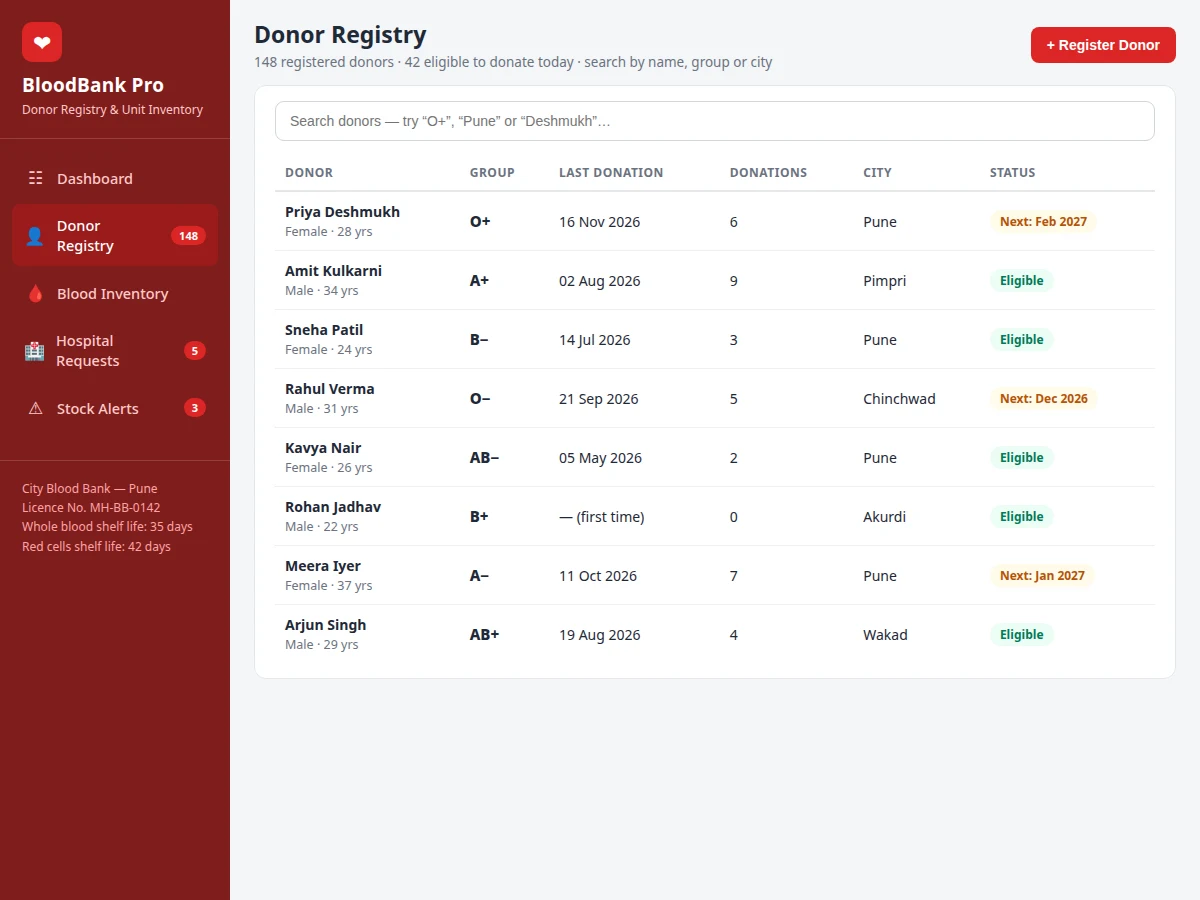
Donor registers once with blood group, contact details and donation history.
Follow the working sequence
How it works
A donor registers once and stays in the registry for life, while every unit they give becomes a tracked record that lives until it is issued or expires. When a donation is collected, the system creates a unit record with its blood group, component and collection date, then computes the expiry date from the shelf life (35 days for whole blood, 42 for red cells) and adds the unit to that group's stock. When a hospital requests blood, staff check the group's live count, confirm the request can be covered, and issue the oldest units first, so units nearest expiry leave the shelf before newer ones. Each issue decrements stock, logs the unit IDs against the hospital, and re-checks the thresholds: a group below 5 units raises a low-stock alert, and any unit within 7 days of expiry raises a near-expiry alert. Staff then rebuild low groups by calling donors whose last donation was at least 90 days ago.
- A donor registers through the staff screen with name, blood group, contact details and donation history; the system checks the phone number to prevent duplicate records.
- When the donor gives blood, staff record the collection and the system creates a unit record with a unique unit ID, blood group, component type and collection date.
- The expiry date is computed automatically from the shelf life — 35 days for whole blood and 42 days for red cells — and the unit is added to its group's available count.
- The dashboard shows live stock for all 8 blood groups, with groups below the 5-unit threshold flagged as low stock and units within 7 days of expiry flagged for priority issue.
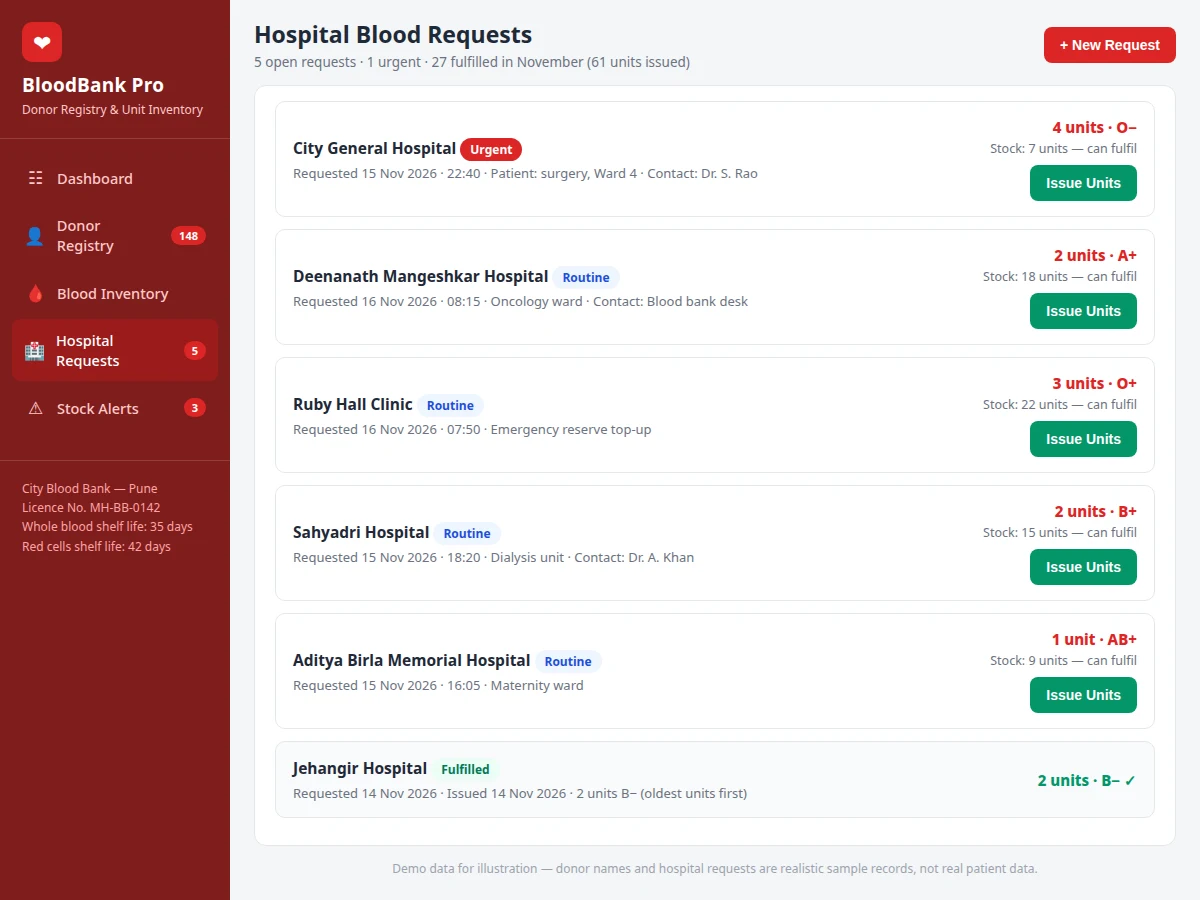
- A hospital submits a request with the blood group, number of units and urgency (urgent or routine); staff see the group's live stock beside the request before deciding.
- Staff fulfil the request and the system issues the oldest units of that group first, decrements the stock, records the unit IDs against the hospital and marks the request Fulfilled.
- If a request asks for more units than the group holds, the stock guard blocks the issue before anything is written, so inventory can never go negative and the shortfall stays visible.
- Staff rebuild low groups by searching the registry for eligible donors — those whose last donation was at least 90 days ago — and contacting them for the next collection.
Tech stack:
- PHP 8 · Laravel
- MySQL 8
- HTML5 · CSS3 · JavaScript
- Bootstrap 5
- Apache · XAMPP
- phpMyAdmin
- Git
| Parameter | Value |
|---|---|
| Blood groups tracked | 8 groups: A+ · A- · B+ · B- · AB+ · AB- · O+ · O- |
| Registered donors in demo data | 148 donors (sample data set) |
| Units in demo inventory | 84 units (sample data set) |
| Whole blood shelf life | 35 days (standard blood-bank practice) |
| Red cell shelf life | 42 days (standard blood-bank practice) |
| Minimum gap between donations | 90 days for men · 120 days for women (Indian donor guidelines) |
| Low-stock threshold | 5 units per group (configurable) |
| Near-expiry alert window | 7 days before expiry (configurable) |
| Units issued in demo month | 61 units across 27 fulfilled requests (sample data) |
| Open requests in demo data | 5 requests · 1 urgent · 4 routine (sample data) |
| User roles | 3 roles: admin · staff · hospital requester |
| Hosting | Shared hosting or local XAMPP (expected) |
| Page response | Design target: under 2 seconds per page on local hosting |
Project features
The Online Blood Bank Management System is built around four capabilities that work as one flow: a permanent donor registry with eligibility checking, a unit-level inventory tracked by blood group and expiry date, hospital request fulfilment that issues the oldest units first, and alerts that flag low stock and near-expiry units before they become a problem. Around those four sit role-based access for admin, staff and hospital requesters, a live dashboard that shows all 8 blood groups at a glance, and search and reporting that replace the paper register entirely. The registry, the inventory and the requests are linked by design: a donor's record feeds the eligibility check, a unit's record feeds the stock count, and a request's fulfilment updates both. Everything listed below is implemented in the base project; SMS reminders and a mobile app are optional customisations, and barcode scanning is future scope.
- [Permanent donor registry] Every donor is stored once with name, blood group, contact details, donation history and last donation date. The registry is the single source of truth for who can be called, and duplicate entries are prevented by checking the phone number before a new record is saved.
- [Automatic donor eligibility check] A donor is marked eligible only when at least 90 days have passed since their last donation, following the standard minimum gap between whole-blood donations (90 days for men; 120 days for women under Indian donor guidelines — the rule is configurable). Staff see "Eligible" or the next eligible date, so nobody wastes calls on donors who cannot donate yet.
- [Unit-level blood inventory] Every collected unit gets its own record with a unit ID, blood group, component type, collection date and expiry date. Stock is counted per group across all 8 blood groups, and the dashboard shows the level of each group against a configurable low-stock threshold of 5 units.
- [Near-expiry alerts] Units expiring within 7 days are listed first and flagged in the alerts panel, so staff issue them before they are wasted. In the demo data, 6 units expire within 7 days — 3 O+ on 18 Nov, 2 A+ on 19 Nov and 1 B+ on 20 Nov 2026.
- [Hospital request and fulfilment] Hospitals submit requests stating the blood group and number of units, marked urgent or routine. Staff fulfil a request from stock, and the system issues the oldest units of that group first (FIFO), updates the count immediately and records which unit IDs were issued to which hospital.
- [Stock guard on issue] A request cannot be issued for more units than the group has in stock — the check runs before any record is written, so the inventory can never go negative. Builder note: while building the demo, issuing the 4-unit O- request for City General Hospital dropped O- stock from 11 units to 7 units, and an attempted issue above the available count was refused by this guard, verified live in the demo rather than assumed.
- [Role-based access and dashboard] Admin, staff and hospital requester roles see different screens: staff manage donors and inventory, hospitals can only place and track their own requests, and the admin sees the full dashboard with stock, alerts and monthly issue totals.
What is included
- Complete source code (PHP/Laravel backend, MySQL database, Bootstrap frontend)
- Database schema with donor, unit, request and issue tables plus sample data (148 donors, 84 units)
- Working demo of the full flow: register donor, record collection, request blood, issue units, view alerts
- Project report PDF (background, system design, database design, methodology, testing, limitations)
- PPT presentation for final review
- Viva Q&A preparation document (database design, FIFO issue logic, eligibility rules, stock guard)
- Setup guide for XAMPP/local hosting and database import
Limitations & prerequisites
- The system tracks blood units and donors; it does not test, screen or certify blood — screening results are recorded as entered by trained staff, and the system is an academic prototype, not certified medical software.
- No SMS or email reminders are included in the base project; donor follow-up is by phone from the registry, and SMS integration is an optional customisation.
- Blood-group compatibility matching (which groups can receive which) is a lookup shown at issue time, not an automated cross-match — clinical cross-matching remains the hospital's responsibility.
- The demo data (148 donors, 84 units, 5 requests) is realistic sample data for demonstration; the delivered system ships with an empty database and the same sample data as an optional import.
- Donor medical eligibility beyond the 90-day gap (weight, haemoglobin, recent illness) is not checked by the system and must be verified by staff at collection.
- The project is designed for a single blood bank; multi-branch stock sharing across banks is future scope.
Frequently Asked Questions
How is this different from a blood donation camp app?
This system runs a permanent blood bank, not a one-off camp. A camp app creates an event, opens time slots and registers donors for a single day, while this system keeps a standing donor registry, tracks every blood unit by group with collection and expiry dates, and fulfils hospital requests from stock.
The two solve different problems: camps collect donors for a day, while this system manages what happens to every unit afterwards — including low-stock and near-expiry alerts.
How does the system know which donors are eligible to donate?
Eligibility is computed from the last donation date stored in the registry. A donor is marked eligible only when at least 90 days have passed since their last whole-blood donation, which is the standard minimum gap between donations for men (120 days for women under Indian guidelines), so ineligible donors are never called by mistake. Staff see either "Eligible" or the next eligible date beside each donor, so they call only donors who can actually donate.
The 90-day rule is configurable if a bank follows a different local policy.
What happens to blood units that are about to expire?
Units expiring within 7 days appear first in the inventory list and are flagged in the alerts panel, so staff issue them before they are wasted. The issue flow also picks the oldest units of a group first, which means near-expiry units are naturally used before newer stock.
In the demo data, 6 units expire within 7 days — 3 O+ on 18 Nov, 2 A+ on 19 Nov and 1 B+ on 20 Nov 2026 — and all 6 are prioritised for issue.
Can a hospital request more blood than the bank has in stock?
No — the request can be recorded, but it cannot be issued beyond the available count. The stock guard checks the group's live stock before any record is written and blocks the issue if the requested units exceed what is on the shelf, so the inventory can never go negative.
The shortfall stays visible as an open request, and staff rebuild that group by calling eligible donors from the registry.
Is this project suitable for a final-year project?
Yes — for Computer Science, IT and Web Development programs. It demonstrates database design across four linked tables, business rules such as the 90-day eligibility gap and FIFO issue logic, role-based access, and a real workflow problem with measurable outcomes like units issued and expiry avoided.
The demo data makes the whole flow testable in a viva.
Components & software requirements
- PHP 8 · Laravel
- MySQL 8
- HTML5 · CSS3 · JavaScript
- Bootstrap 5
- Apache · XAMPP
- phpMyAdmin
- Git
Delivery information
Built-to-order project. Delivery timeline is shared after order confirmation based on current queue.
Support terms
Complete documentation, setup guide, and viva preparation included. Support for setup and explanation provided.
Download free synopsis (PDF)
Enter your name and WhatsApp number — the synopsis PDF downloads immediately. We may send occasional project updates on WhatsApp; no spam.