
More project photos (2)
The problem
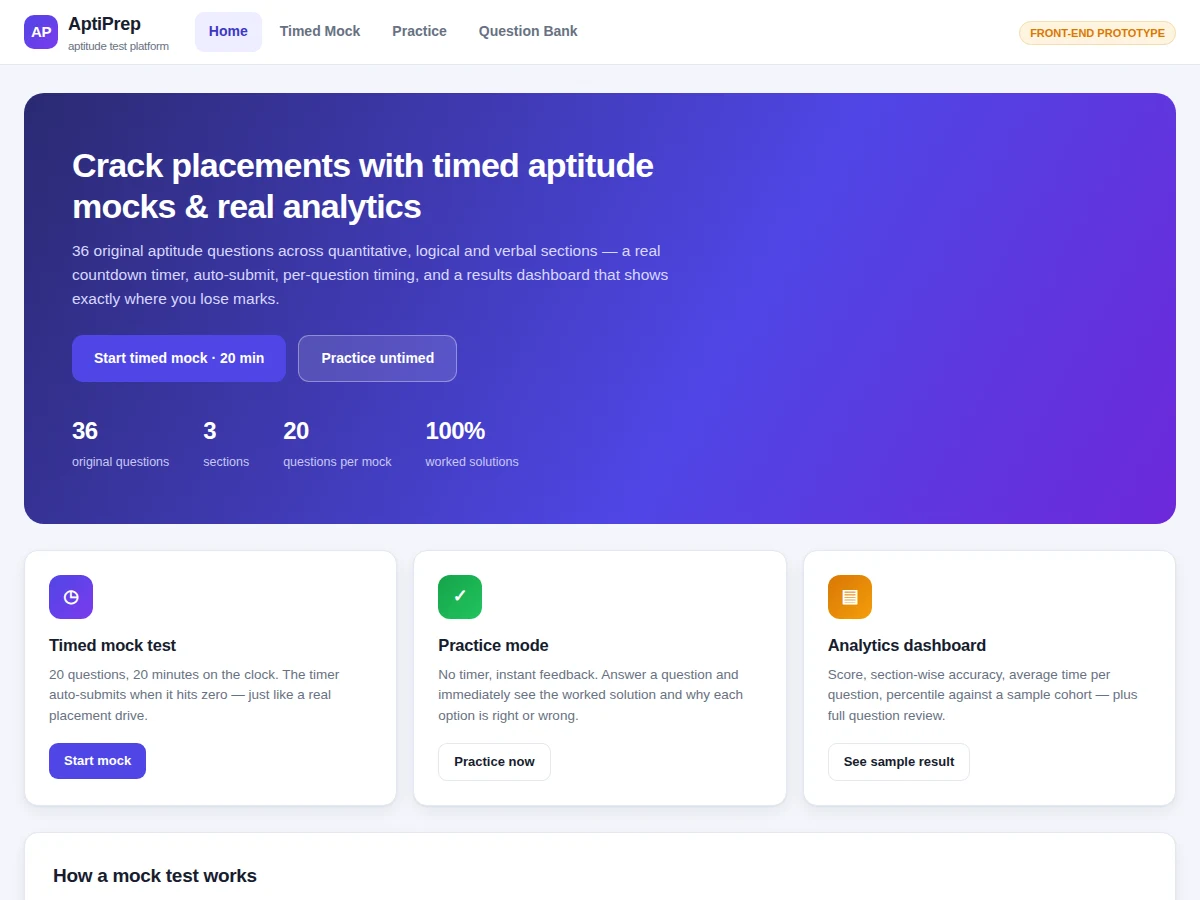
Placement aptitude rounds eliminate more candidates than any other stage, yet most students prepare from static PDFs with no sense of time pressure and no measurement of where their marks leak. Existing quiz tools rarely combine a realistic timed environment with analytics: a student cannot tell whether a low score comes from weak concepts, slow solving, or poor time allocation across quantitative, logical and verbal sections. This project builds a web platform that reproduces the pressure of a real test — a 20-minute countdown with automatic submission, a question palette with flag-for-review, and per-question timing — then converts every attempt into actionable analytics: score, section-wise accuracy, average time per question, a percentile against a sample cohort, and a full question-by-question review where each answer is paired with its worked solution. The bank ships with 36 original questions, each with four options and a step-by-step solution.
How it works
- The mock loads a fixed 20-question paper — 7 quantitative, 7 logical reasoning, 6 verbal — drawn from the 36-question bank, and starts the 20:00 countdown.
- A one-second interval drives the timer; every Previous/Next or palette jump stamps the dwell time onto the question being left.
- The palette re-renders from a single state object, so the answered, flagged and current indicators always match the underlying answers.
- At 0:00 the test auto-submits (early manual submit is also available); a grading function compares each selection against the bank's answer keys.
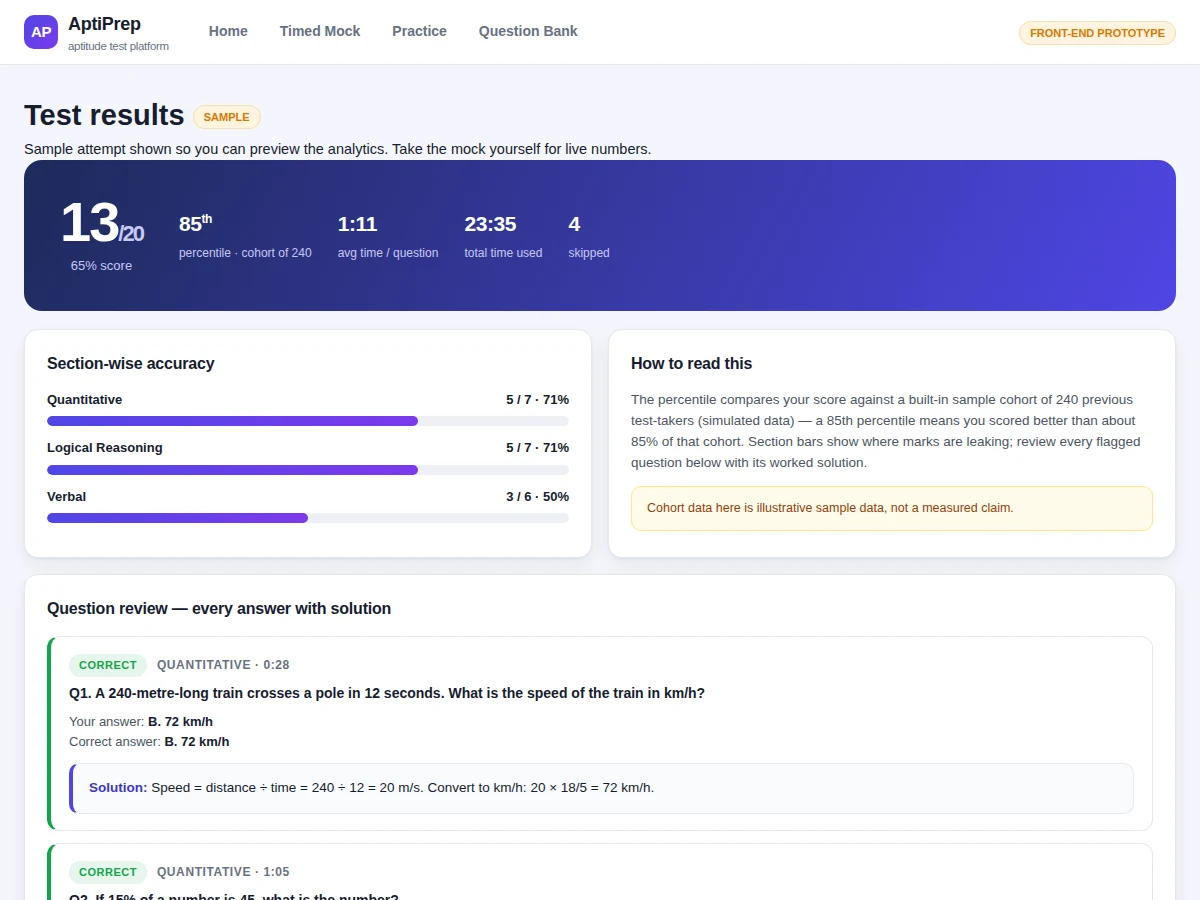
- The dashboard aggregates score, per-section correct/total tallies, average and total time, and the skipped count.
- The percentile is computed by ranking the score against the built-in 240-entry sample cohort (simulated data, labelled as such in the UI).
- The review section lists every question with your answer, the correct answer, time spent and the worked solution for study.
Tech stack:
- HTML5, CSS3
- Vanilla JavaScript (ES6)
- Single-file SPA with hash routing
- Node.js · Express (ordered full-stack build)
- PostgreSQL (ordered build)
- JWT authentication (ordered build)
- REST API between front end and services (ordered build)
| Parameter | Value |
|---|---|
| Questions in bank | 36 (12 per section) |
| Questions per mock | 20 (design target) |
| Mock duration | 20 minutes (design target) |
| Sections | 3 — Quantitative, Logical Reasoning, Verbal |
| Analytics metrics | 6 (score, section accuracy, avg time, total time, percentile, skipped) |
| Percentile cohort | 240 sample entries (illustrative sample data, not measured) |
| Front-end size | Approximately 60 KB single HTML file |
| Browser support | Modern Chrome, Edge, Firefox, Safari (expected) |
Project features
- [Timed mock engine] 20 questions against a 20-minute countdown with automatic submission at zero. The timer turns red in the final two minutes, reproducing real test pressure.
- [Question palette] A 20-cell palette shows answered, flagged and current states at a glance, with click-to-jump navigation between questions.
- [Per-question timing] Dwell time is stamped on every navigation event, so the results page reports exactly how long each question took.
- [Analytics dashboard] Score out of 20, section-wise accuracy bars, average and total time, skipped count, and a percentile ranked against the built-in sample cohort.
- [Worked-solution review] Every question is reviewed with your answer, the correct answer, time spent and a step-by-step worked solution.
- [Practice mode] Untimed single-question practice with instant correct/incorrect feedback and the solution revealed immediately.
- [Question bank browser] All 36 questions browsable and filterable by section, difficulty and keyword, with expandable solutions.
- [36 original questions] 12 quantitative, 12 logical reasoning and 12 verbal questions written originally for this project — nothing copied from question-bank sites.
What is included
- Working front-end prototype (single HTML file): timed mock, practice mode, question bank browser, analytics dashboard
- 36 original aptitude questions with worked step-by-step solutions
- Project report PDF (background, methodology, architecture, question bank design, results)
- PPT presentation for final review
- Viva Q&A preparation document (timer engine, grading logic, percentile computation, full-stack extension)
- Setup and customization guide
- Full-stack extension blueprint: backend API, auth design and database schema for the ordered build
Limitations & prerequisites
- The prototype is front-end only: no user accounts and no persistent attempt history — both ship with the ordered full-stack build.
- The question bank is fixed at 36 original questions in the prototype; bulk import and an admin panel are part of the ordered build.
- The percentile compares against a built-in 240-entry sample cohort (simulated data), not live test-taker data — stated openly in the UI.
- The 20-question / 20-minute paper format is a design target; the ordered build parameterizes paper size and duration.
- No proctoring features (tab-switch detection, webcam checks) in the prototype — listed as future scope.
- The countdown depends on the browser tab staying active; background tab throttling on some browsers can slow the timer — documented in the setup guide.
Frequently Asked Questions
How does the timed mock mode work?
The mock loads a 20-question paper — 7 quantitative, 7 logical reasoning and 6 verbal — and starts a 20-minute countdown. You navigate with Previous/Next or the question palette, flag tricky questions for review, and the app tracks time spent per question. The test auto-submits at zero, or you can submit early. Grading is instant, followed by the full analytics dashboard.
Are the aptitude questions original?
Yes. All 36 questions — 12 quantitative, 12 logical reasoning and 12 verbal — were written originally for this project, each with four options, exactly one correct answer, a difficulty tag and a worked step-by-step solution. Nothing is copied from question-bank sites. The bank is stored as structured data separate from the UI, so new questions can be added without touching the code.
What does the analytics dashboard show?
After submission you get your score out of 20, accuracy bars for each of the three sections, average time per question, total time used and the number of skipped questions. A percentile ranks your score against a built-in sample cohort of 240 previous test-takers. Below that, every question is reviewed with your answer, the correct answer, time spent and the worked solution.
Is the percentile based on real test-taker data?
No — and the platform says so openly. The percentile is computed against a built-in sample cohort of 240 scores generated from a seeded distribution, purely so the ranking feature can be demonstrated and tested. The ordered full-stack build replaces this with real attempt history once users start taking tests on the database backend.
What is the difference between the demo and the built-to-order version?
The demo is the complete working front end: timed mock, practice mode, question bank and analytics, running from a single HTML file with an in-browser question bank. The built-to-order version adds everything a production deployment needs — user accounts and login, a database-backed question bank with an admin panel, persistent attempt history, and real cohort analytics computed from actual users.
Is this project suitable for a final-year project?
Yes — for Computer Science, IT and Web Development programmes. It demonstrates real front-end engineering (a timer engine, state-driven UI, hash routing), data modelling for the question bank, an analytics pipeline from raw attempts to percentiles, and a credible full-stack extension plan with authentication and a database — all documented for the viva. Suitable for B.E./B.Tech final-year projects in Computer Science, IT and Web Development.
Components & software requirements
- HTML5, CSS3
- Vanilla JavaScript (ES6)
- Single-file SPA with hash routing
- Node.js · Express (ordered full-stack build)
- PostgreSQL (ordered build)
- JWT authentication (ordered build)
- REST API between front end and services (ordered build)
Delivery information
Built-to-order project. Delivery timeline is shared after order confirmation based on current queue.
Support terms
Complete documentation, setup guide, and viva preparation included. Support for setup and explanation provided.