
More project photos (2)
The problem
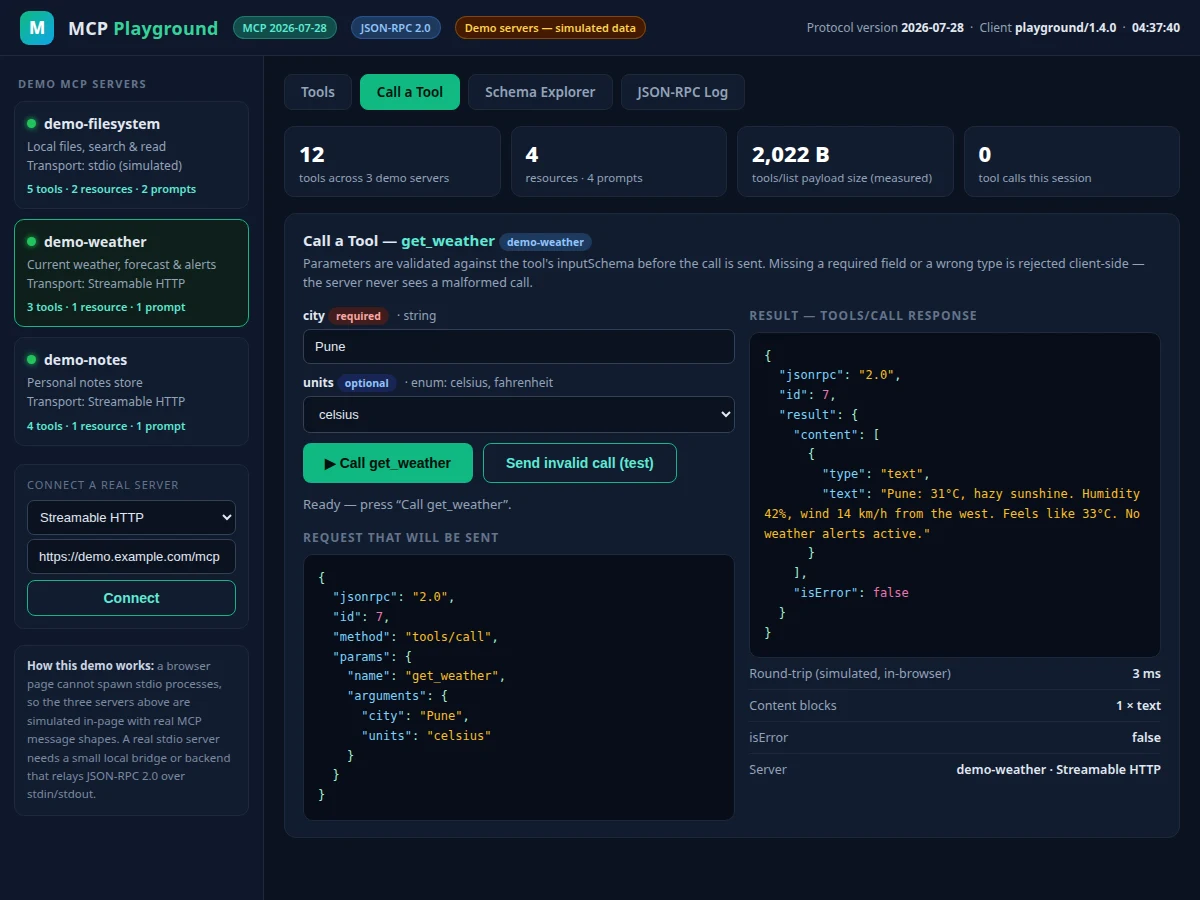
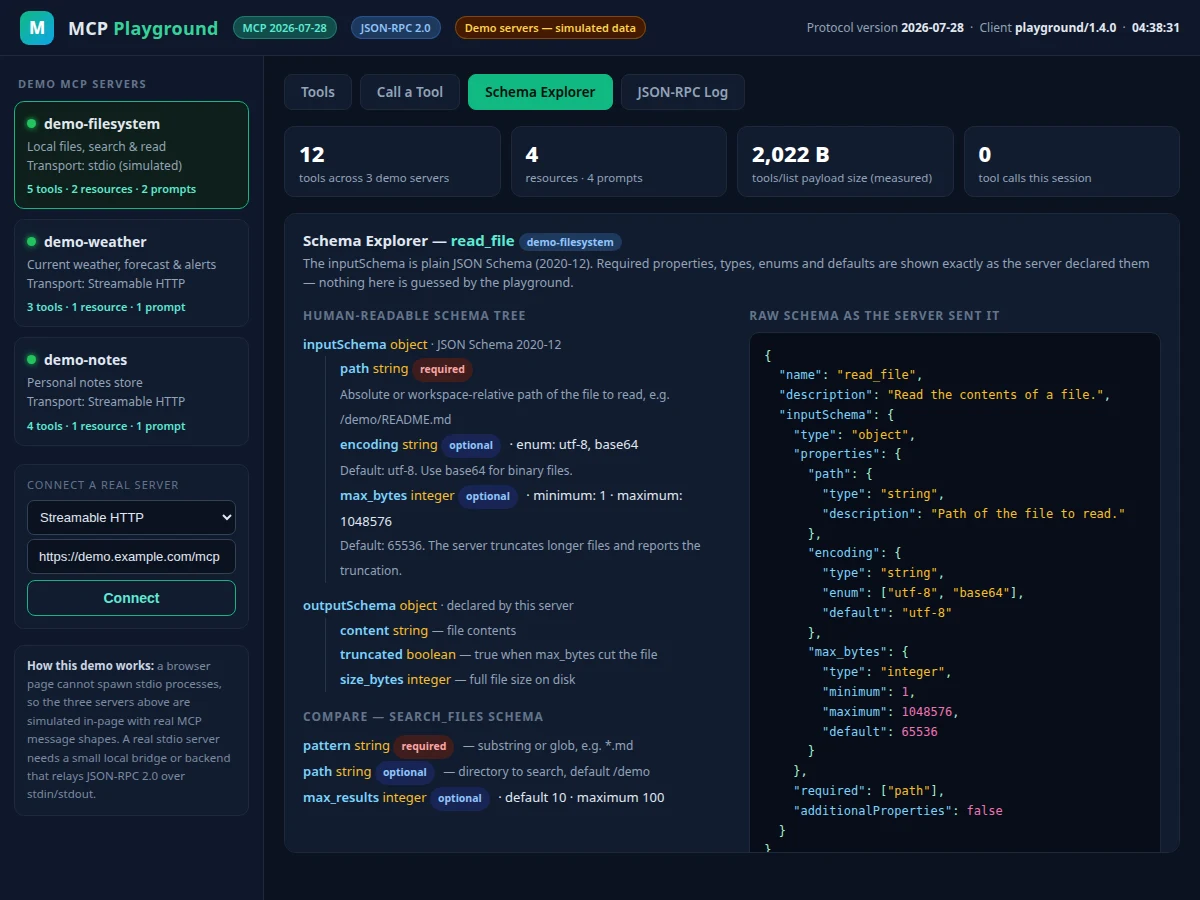
The MCP Server Testing Playground is a web app that lets a developer connect to a Model Context Protocol server and see exactly what that server offers before any AI model ever talks to it. It lists every tool the server publishes with its description and input schema, lets the developer fill in the tool's parameters in a form, validates those parameters against the schema, sends the call as a JSON-RPC 2.0 message, and shows the raw request and the raw response side by side. A schema explorer renders each tool's JSON Schema as a readable tree, and a message log records every exchange in order, so a broken server, a wrong parameter type, or a missing required field is visible quickly instead of hiding inside a model's silent failure. The playground is a testing client: it discovers and calls tools, reads resources, and fetches prompt templates — it never runs production tools itself.
MCP is the open standard Anthropic released on 25 November 2024 for connecting AI applications to tools and data, and donated to the Agentic AI Foundation under the Linux Foundation on 9 December 2025; the donation announcement reported 10,000+ public MCP servers. Because every MCP client — Claude, ChatGPT, Cursor, VS Code and others — speaks the same protocol, a server that works in this playground works in any of them, and a server that fails here fails everywhere. That is why server authors need a way to test before they ship. Builder note from the demo build: the playground's three demo servers expose 12 tools in total, and the tools/list response for all 12 measured 2,022 bytes — small enough that discovery is cheap, which is exactly why the protocol can afford to send the full schema of every tool on every connection.
Picks a demo server or a Streamable HTTP endpoint to test.
Follow the working sequence
How it works
The MCP Server Testing Playground works as a client that speaks the Model Context Protocol to a server. The user picks a transport — stdio for a local server process or Streamable HTTP for a remote endpoint — and the playground opens the connection. It then asks the server what it offers: tools/list returns each tool with its name, description and inputSchema; resources/list returns readable data by URI; prompts/list returns reusable prompt templates. The user picks a tool, and the playground builds a form from that tool's inputSchema, validates the entered values against the schema, and sends a tools/call message as JSON-RPC 2.0. The server runs the tool and returns a result with content blocks and an isError flag, and the playground renders both the result and the raw JSON of the request and the response. Every message is appended to the log, so the full session — discovery, calls, results and errors — is visible in one place.
- The user selects a transport: stdio for a local MCP server process, or Streamable HTTP for a remote endpoint URL.
- The playground connects and sends tools/list, resources/list and prompts/list; each request carries the protocol version 2026-07-28 in its metadata, and the server answers with its tools, resources and prompts.
- Tools are rendered as cards showing name, description, parameter count and required fields; resources and prompts are listed alongside with their URIs and descriptions.
- The user selects a tool, and the playground generates a parameter form from the tool's inputSchema — text fields for strings, dropdowns for enums, number fields with minimum and maximum limits.
- On submit, the entered values are validated against the schema in the browser; a missing required field or a wrong type is rejected client-side and no request is sent.
- A valid call is sent as a JSON-RPC 2.0 tools/call message with a unique id, and the response is matched to the request by that id.
- The result is rendered — content blocks as readable text and the isError flag — next to the raw request and response JSON, and both messages are appended to the log with timestamps.
- Saved test cases store the tool name and arguments, so the same call can be re-run after a server change to check for regressions.
Tech stack:
- HTML5, CSS and vanilla JavaScript (single-file web app)
- JSON-RPC 2.0 message format
- Model Context Protocol, specification revision 2026-07-28
- JSON Schema 2020-12
- Node.js 20 with the TypeScript MCP SDK (demo servers)
- Python 3 with the MCP Python SDK (server examples)
- Streamable HTTP and stdio transports
- Git
| Parameter | Value |
|---|---|
| Protocol | Model Context Protocol, specification revision 2026-07-28 |
| Message format | JSON-RPC 2.0 — every message carries jsonrpc "2.0" and a unique id |
| Transports | stdio for local servers; Streamable HTTP for remote servers; HTTP+SSE deprecated since revision 2025-03-26 |
| Primitives | Tools (model-called), resources (read-only, by URI), prompts (user-picked templates) |
| Demo servers | 3 servers: filesystem, weather and notes |
| Demo tools | 12 tools in total (5 filesystem + 3 weather + 4 notes) |
| Demo resources and prompts | 4 resources and 4 prompts across the 3 demo servers |
| Measured tools/list payload | 2,022 bytes for all 12 tools (measured in the demo build) |
| Simulated call round-trip | Approximately 3 ms in the in-browser demo (measured); design target under 500 ms for a local server call |
| Schema dialect | JSON Schema 2020-12, with additionalProperties false on demo tools |
| Public MCP servers | 10,000+ public servers reported in the 9 December 2025 donation announcement |
| Protocol history | Released 25 November 2024; donated to the Agentic AI Foundation on 9 December 2025 |
| Browser support | Any modern browser; the demo runs fully offline after download |
| Real stdio servers | A small local bridge is required (browser pages cannot spawn processes) |
Project features
The playground's three strongest capabilities are tool calling with schema validation, the schema explorer, and the raw JSON-RPC log. Tool calling turns every published tool into a fill-in form generated from its own inputSchema, so parameters are checked before anything is sent. The schema explorer shows required fields, types, enums, defaults and limits exactly as the server declared them, which is where most integration bugs are found. The JSON-RPC log records each request with its id and method and each response with the matching id, so the whole conversation can be replayed and explained. Around those three sit server discovery across transports, resource and prompt browsing, saved test cases, and clear error reporting that separates client-side validation failures from server errors. Saved test cases and clear error reporting complete the set, so a server can be re-checked after every change and a failure can be traced to the exact message that caused it.
- [Tool calling with schema validation] Every discovered tool becomes a form generated from its own inputSchema; required fields, types, enums and numeric limits are checked in the browser before the call is sent, and a missing required field is rejected with the schema rule that failed.
- [Schema explorer] Each tool's JSON Schema (2020-12) is rendered as a readable tree — property names, types, required and optional markers, enums, defaults and minimum/maximum values — next to the raw schema exactly as the server sent it.
- [Raw JSON-RPC 2.0 log] Every message is logged in order with its id, method and full JSON body, so the request–response pairing, the protocol version in each request's metadata, and any error object can be inspected and quoted in the report.
- [Multi-server discovery] Connect to the filesystem, weather and notes demo servers, or point the playground at any Streamable HTTP endpoint; tools/list, resources/list and prompts/list are shown for each server with tool, resource and prompt counts.
- [Resources and prompts browser] Resources are listed by URI with their sizes, and prompt templates are listed by name with their descriptions, showing the two primitives that are not model-called tools.
- [Saved test cases] A tool call — tool name plus its arguments — can be saved, renamed and re-run, so a regression check after a server change takes one click instead of retyping parameters.
- [Clear error reporting] Validation failures, server errors and transport failures are shown as three distinct outcomes with the exact message, so a student can tell a bad argument apart from a broken server.
- [Demo servers included] Three working demo servers ship with the project: a filesystem server with 5 tools, a weather server with 3 tools and a notes server with 4 tools, each with real JSON Schemas.
What is included
- Complete MCP Playground web app source code (single-file HTML, CSS and JavaScript)
- Three working demo MCP servers: filesystem (5 tools), weather (3 tools) and notes (4 tools)
- Local stdio bridge code that spawns a real server process and relays JSON-RPC 2.0 over stdin and stdout
- Saved test-case feature with example test cases for every demo tool
- Setup guide: running the demo servers, connecting a real server, and using the bridge
- Project report PDF (background, protocol explanation, architecture, methodology, results)
- PPT presentation for final review
- Viva Q&A preparation document (protocol versions, transports, JSON-RPC, JSON Schema, tools vs resources vs prompts)
- Project abstract PDF
Limitations & prerequisites
- The browser demo simulates the three demo servers in-page: a browser tab cannot spawn a stdio server process, so real local servers need the included bridge running outside the browser.
- The demo servers return simulated data (for example, the weather server's fixed Pune reading) — they demonstrate the protocol, not live weather or a real filesystem.
- The playground tests servers; it does not execute tools itself, host servers, or add authentication — connecting to a server that needs OAuth requires credentials the student supplies.
- The 2026-07-28 specification is stateless, so there is no long-lived session to inspect; older servers that still use the initialize handshake and session ids behave differently and are covered in the report, not in the live demo.
- Tool results are shown as returned; the playground does not judge whether a tool's answer is correct, only whether the call followed the protocol.
- Public MCP servers change frequently, so the 10,000+ figure is a snapshot from the 9 December 2025 announcement, not a live count.
Timeline & support
- Standard build timeline: approximately 4–6 weeks from confirmed requirements (expected).
- Support: setup guidance plus 30 days of email and WhatsApp support after delivery (expected standard scope).
- Customization after delivery — extra demo servers, a hosted Streamable HTTP endpoint, or additional test-case packs — is quoted separately.
Frequently Asked Questions
Is this project suitable for a final-year project?
Yes — for Computer Science, IT and Web Development students, because it demonstrates a real, current protocol with JSON-RPC 2.0 messaging, JSON Schema validation, two transports and client–server architecture, all inside a working web app with three demo servers the student can explain and demonstrate live. The report documents measured figures from the actual build, so the viva discussion rests on evidence rather than claims.
What is MCP and why does it need a testing playground?
MCP, the Model Context Protocol, is the open standard that lets AI applications discover and call tools on external servers through one interface instead of a custom integration for every app, and a playground is needed because a server bug otherwise hides inside the model's behaviour. Testing the server directly shows whether the tool, its schema and its responses are correct before any model is involved.
Does the playground connect to real MCP servers?
Yes — over Streamable HTTP the playground connects directly to any hosted MCP endpoint by URL, and local stdio servers connect through the included bridge, because a browser page cannot spawn a server process itself. The three demo servers are built in, so the playground works immediately with no setup at all. The setup guide walks through connecting a real server step by step.
What is the difference between tools, resources and prompts?
Tools are functions the model decides to call, each with a name, description and JSON Schema for its inputs, while resources are read-only data the application reads by URI, such as a file, and prompts are reusable templates the user picks. The playground shows all three, because a server is more than its tools.
Can I test my own MCP server with it?
Yes — point the playground at your server's Streamable HTTP endpoint, or run your stdio server through the included bridge, and the tool list, schemas, call results and the full JSON-RPC log will show exactly whether your server follows the specification. Saved test cases let you re-check the server after every change.
What will I receive with the project?
You receive the complete playground web app, three demo MCP servers, the stdio bridge, saved example test cases, a setup guide, the project report, a PPT, a viva Q&A document and the abstract PDF, with the report documenting the measured 2,022-byte tools/list payload and the demo call timings from the actual build. So the viva discussion rests on figures from the real build, not on claims.
Components & software requirements
- HTML5, CSS and vanilla JavaScript (single-file web app)
- JSON-RPC 2.0 message format
- Model Context Protocol, specification revision 2026-07-28
- JSON Schema 2020-12
- Node.js 20 with the TypeScript MCP SDK (demo servers)
- Python 3 with the MCP Python SDK (server examples)
- Streamable HTTP and stdio transports
- Git
Delivery information
Built-to-order project. Delivery timeline is shared after order confirmation based on current queue.
Support terms
Complete documentation, setup guide, and viva preparation included. Support for setup and explanation provided.
Download free synopsis (PDF)
Enter your name and WhatsApp number — the synopsis PDF downloads immediately. We may send occasional project updates on WhatsApp; no spam.