
More project photos (3)

The problem
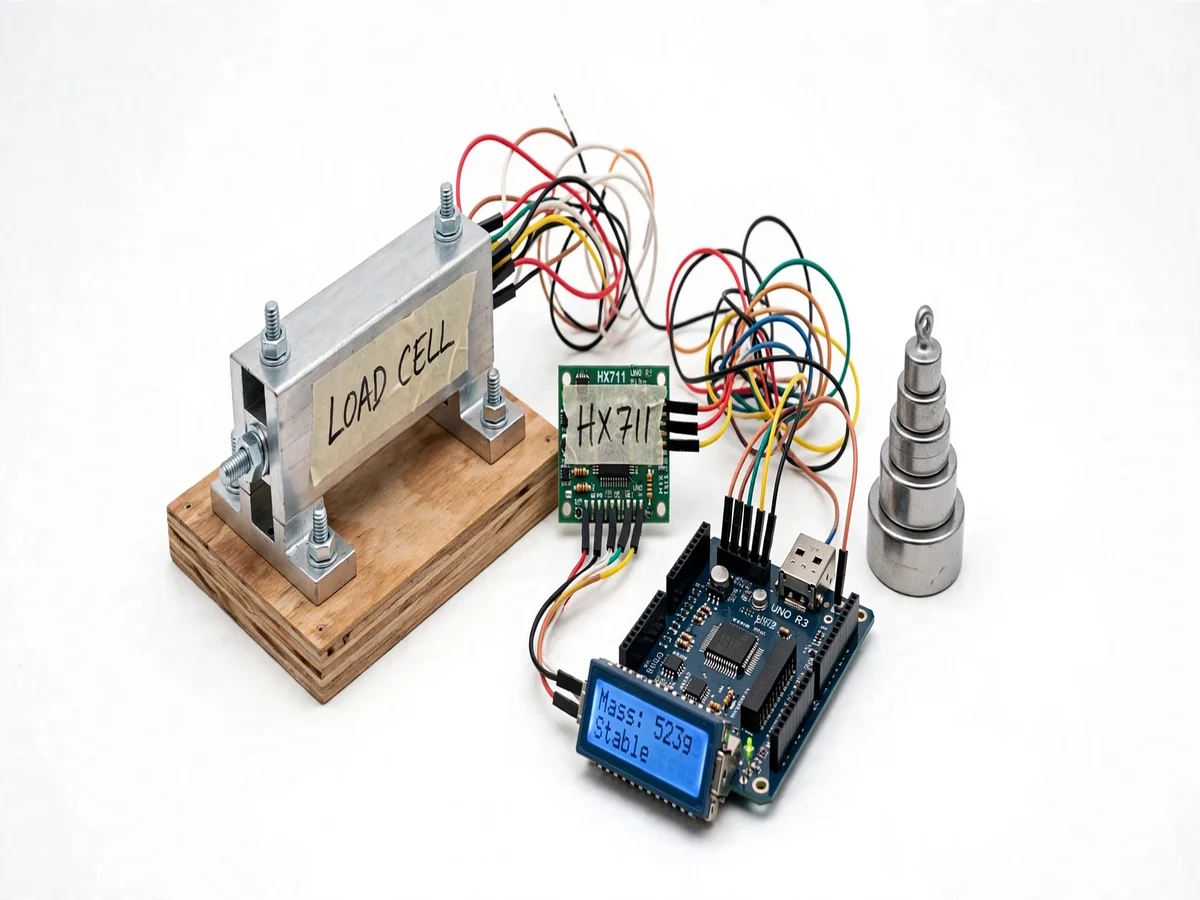
A weighing scale looks simple until you build one: the load cell's millivolt signal must be amplified thousands of times without drowning in noise, the reading must be zeroed with the pan loaded, the scale factor must be calibrated against known masses, and the display must not jitter on the last digit. This project implements all of it honestly — a bar-type strain-gauge load cell bolted to a wooden mounting base, an HX711 precision 24-bit ADC module, an Arduino Uno, and a 16x2 LCD that shows mass with a stability indicator. The student performs a genuine multi-point calibration with the supplied standard weights, checks linearity across the range, and learns why every real scale has a tare button and a "stable" annunciator. The physics of the strain gauge, the Wheatstone bridge, and the ADC signal chain are all in the report with the student's own measured numbers.
Mass strains the internal foil gauges, unbalancing the Wheatstone bridge into a millivolt signal.
Follow the working sequence
How it works
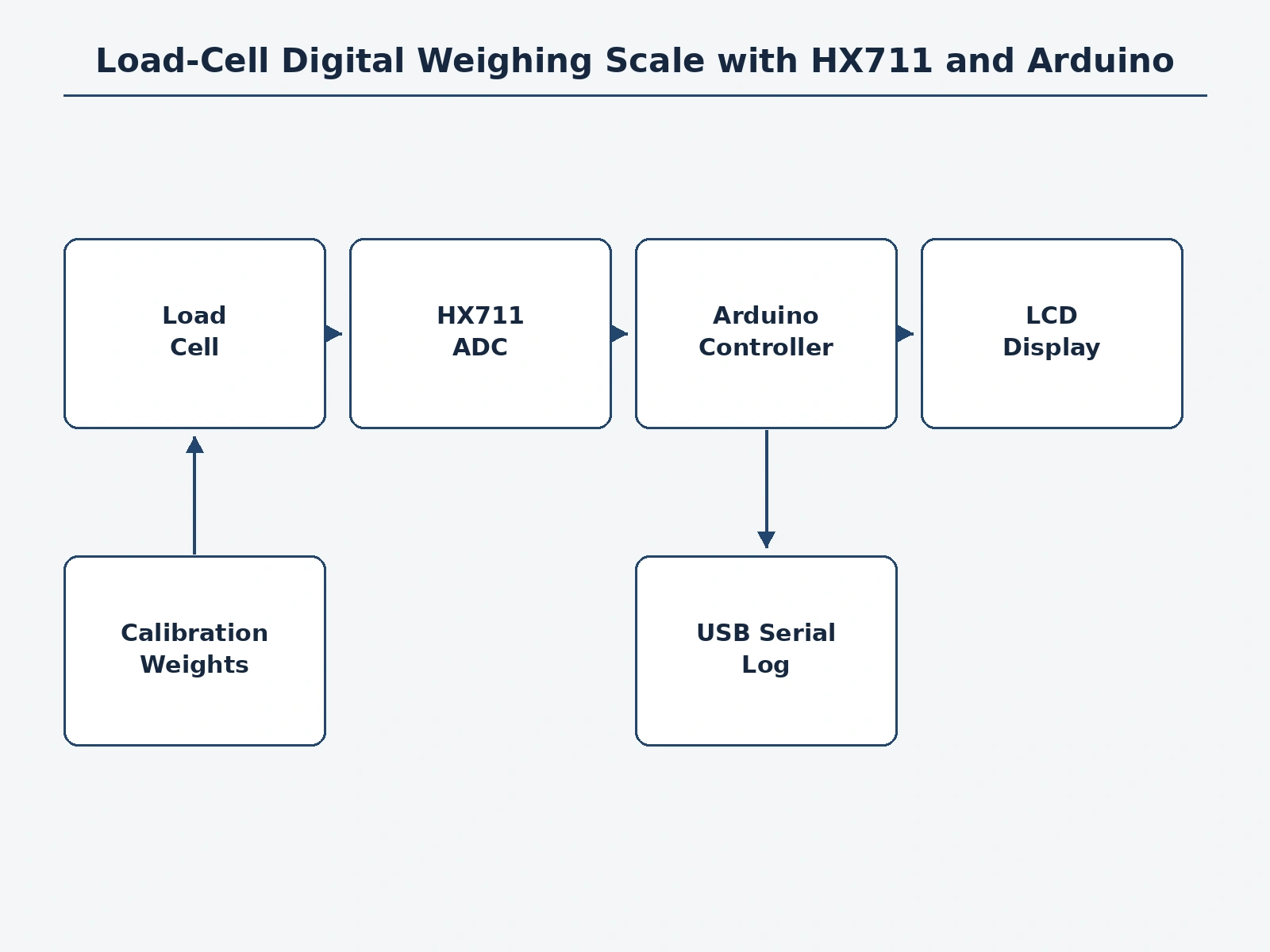
- A mass on the load cell strains its internal foil gauges, unbalancing the Wheatstone bridge and producing a millivolt-level differential signal.
- The HX711 amplifies that tiny signal with its integrated programmable-gain amplifier and converts it with a 24-bit sigma-delta ADC.
- The Arduino reads the raw counts over the HX711's two-wire interface and applies the tare offset and calibration scale factor.
- Firmware averages a short window of readings and checks their spread; when the spread falls below the stability threshold, the LCD shows "Stable".
- With no container, the tare button zeroes the reading; calibration mode steps through the standard weights to compute the scale factor.
- Every reading can also be logged over USB serial, so the student plots measured-versus-applied mass for the report's linearity check.
- Readings beyond the safe range trigger an overload warning, protecting the load cell from permanent damage.
Tech stack:
- Bar-type strain-gauge load cell
- HX711 24-bit weigh-scale ADC module
- Arduino Uno (ATmega328P)
- 16x2 character LCD
- Standard calibration weights set
- C/C++ firmware (Arduino IDE)
- USB serial logging
| Parameter | Value |
|---|---|
| Sensing element | Strain-gauge bar load cell, Wheatstone bridge |
| ADC | HX711, 24-bit sigma-delta with integrated PGA (datasheet) |
| Display resolution | 1 g (design target after buyer calibration) |
| Calibration | Multi-point, buyer-run with supplied standard weights |
| Display | 16x2 LCD: mass in grams + stability annunciator |
| Tare | One-press firmware tare |
| Output | USB serial stream for logging |
| Cell protection | Mechanical stops + firmware overload warning (design) |
Project features
- [Strain-gauge load cell] A bar-type load cell on a fabricated mounting base — the same sensing element used in commercial scales.
- [HX711 24-bit ADC] A precision weigh-scale ADC with integrated low-noise amplifier, interfaced to the Arduino over a two-wire digital link.
- [Multi-point calibration] A buyer-run calibration procedure with the supplied standard weights, computing the scale factor from real measurements.
- [Tare function] One-press zeroing with any container on the pan, implemented in firmware exactly as commercial scales do it.
- [Stability detection] The firmware watches reading variance and shows a "Stable" indicator only when the mass has settled, so readings are taken honestly.
- [LCD mass display] A 16x2 LCD showing live mass in grams with the stability annunciator, readable across the bench.
- [Serial data output] Readings stream over USB serial for logging calibration curves and linearity checks in a spreadsheet.
- [Overload guidance] Mechanical stops and firmware warnings protect the cell, with the safe-loading procedure documented.
What is included
- Load cell on fabricated mounting base with wiring
- HX711 module, Arduino Uno and 16x2 LCD
- Standard calibration weight set
- Firmware with tare, calibration mode and stability detection (full source)
- Multi-point calibration and linearity-check procedure (buyer-run)
- Project report PDF (strain-gauge theory, bridge, HX711 chain, measured results)
- PPT presentation for final review
- Viva Q&A preparation document (Wheatstone bridge, ADC resolution, calibration, creep)
Limitations & prerequisites
- Display resolution of 1 g is a design target achieved only after careful buyer calibration; it is not a pre-measured claim.
- The load cell exhibits creep and temperature drift like all strain gauges — the report covers these honestly with a drift-observation procedure.
- Off-center loading introduces corner error; the procedure specifies centered placement.
- The wooden base is a demonstration mount, not an industrial enclosure; it is sensitive to bench vibration.
- Accuracy figures in the report are the student's own measured linearity results, never pre-claimed.
Frequently Asked Questions
How does the load cell actually sense weight?
Four foil strain gauges are bonded inside the metal bar in a Wheatstone bridge. Weight bends the bar microscopically, stretching two gauges and compressing two, which unbalances the bridge and produces a tiny voltage proportional to the applied force.
Why is the HX711 needed — can't the Arduino read the cell directly?
The bridge output is a few millivolts, far below what the Arduino's 10-bit ADC can resolve usefully, and it is differential. The HX711 provides a low-noise programmable-gain amplifier plus a 24-bit ADC designed exactly for weigh scales.
What does calibration involve?
The student places known standard weights on the pan in calibration mode; the firmware records the raw ADC counts at each point and computes the scale factor. The report then checks linearity with intermediate weights — every number is measured by the student.
What is the "Stable" indicator for?
Real scales never show a jumping last digit. The firmware watches the variance of recent readings and lights the stable annunciator only when the mass has settled, so the noted reading is trustworthy.
How accurate is it?
That is determined by the student's own calibration and linearity procedure and reported honestly in their report. The design target is 1 g resolution; creep, drift and corner-loading are covered as the known error sources.
Is this project suitable for a final-year project?
Yes — for Electronics and Instrumentation programs. It is a genuine measurement instrument: strain-gauge physics, precision ADC interfacing, calibration methodology and error analysis. Suitable for B.E./B.Tech final-year projects in Electronics and Instrumentation Engineering.
Components & software requirements
- Bar-type strain-gauge load cell
- HX711 24-bit weigh-scale ADC module
- Arduino Uno (ATmega328P)
- 16x2 character LCD
- Standard calibration weights set
- C/C++ firmware (Arduino IDE)
- USB serial logging
Delivery information
Built-to-order project. Delivery timeline is shared after order confirmation based on current queue.
Support terms
Complete documentation, setup guide, and viva preparation included. Support for setup and explanation provided.
Download free synopsis (PDF)
Enter your name and WhatsApp number — the synopsis PDF downloads immediately. We may send occasional project updates on WhatsApp; no spam.