
More project photos (3)
The problem
Hostel lockers still run on shared keys and fixed combinations. A lost key means a lock change, a shared combination spreads from roommate to roommate, and when something goes missing there is no record of who opened which locker or when. Wardens are left with guesswork, and residents have no way to show their belongings were untouched. The IoT-Based Smart Locker System for Hostels with OTP Access replaces the shared key with a personal, time-limited code. A resident requests access from the companion app, receives a six-digit one-time password, and enters it on the locker keypad or taps a registered RFID card; the ESP32 controller checks the credential, releases the solenoid lock, and writes the event to a per-locker audit log. The warden keeps a master override for emergencies, so access is personal, traceable, and revocable without changing any hardware.
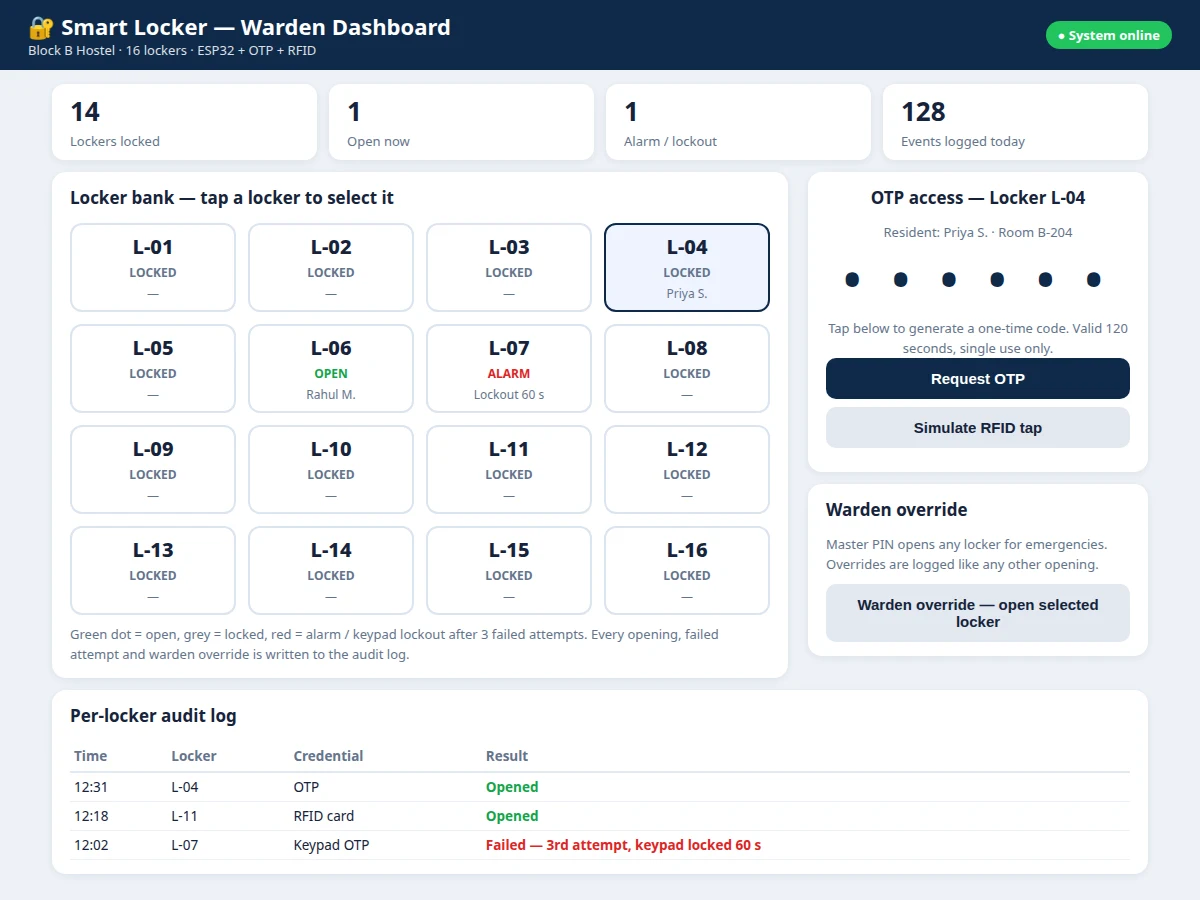
The resident selects a locker and requests a one-time code.
Follow the working sequence
How it works
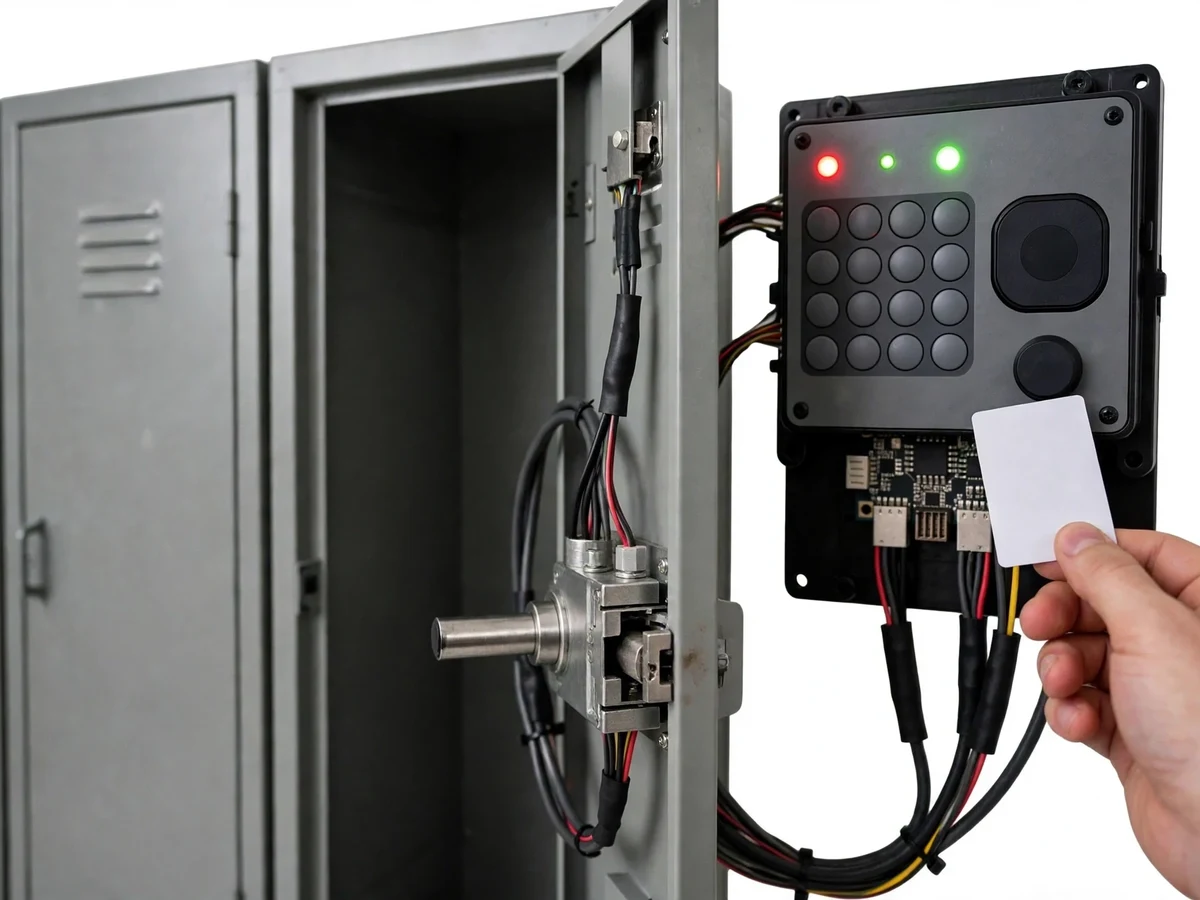
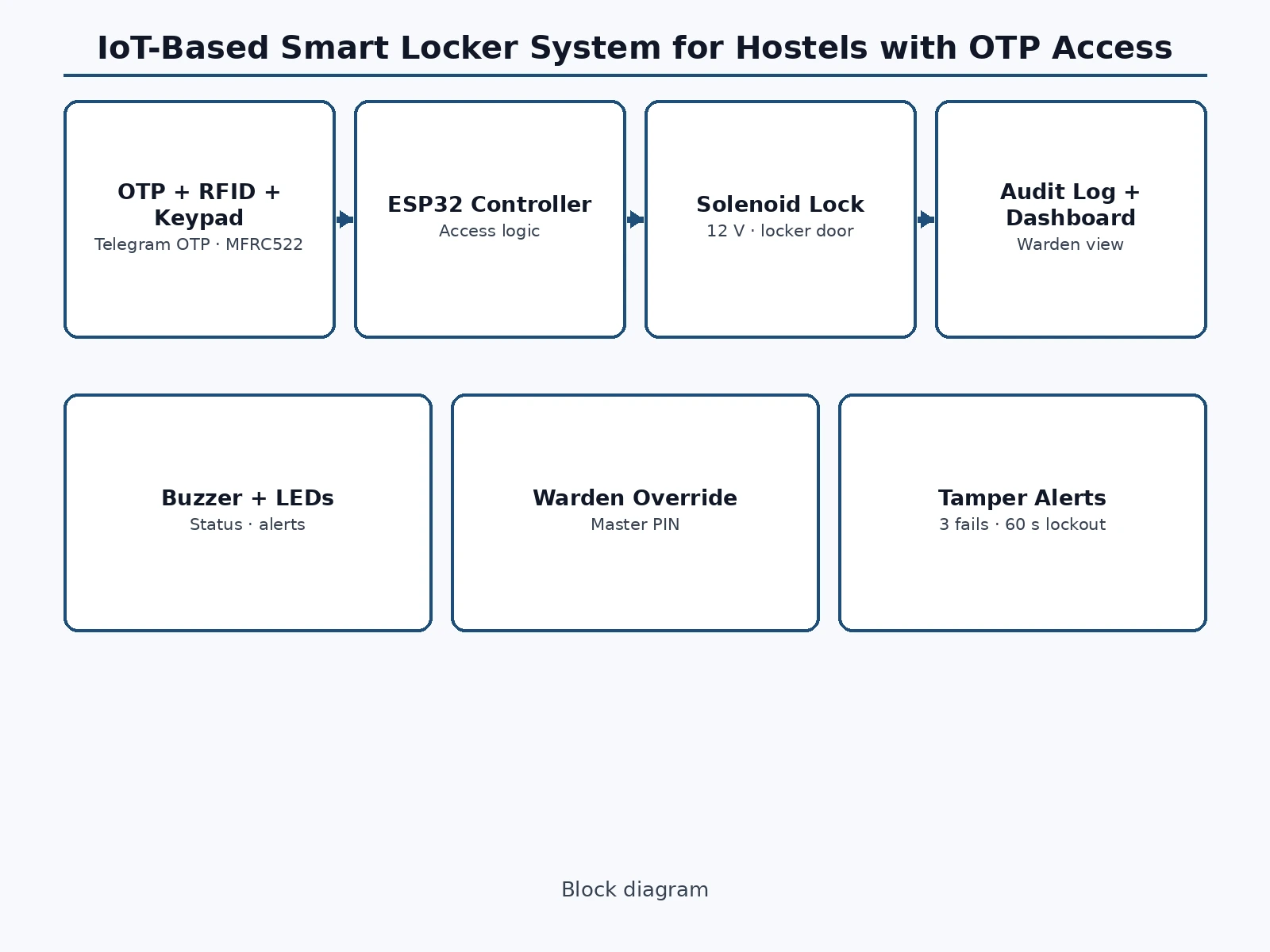
The resident opens the companion app, selects their locker, and taps Request OTP. The system generates a six-digit code valid for 120 seconds (design target), sends it through the Telegram bot, and stores only its hash on the controller. The resident enters the code on the 4x4 keypad, or taps a registered RFID card instead; the ESP32 verifies the credential against its stored list, energises the 12 V solenoid lock, lights the green status LED, and logs the locker number, credential type and timestamp. A wrong code sounds the buzzer and flashes the red LED, and after three failed attempts the keypad locks for 60 seconds (design target). The warden dashboard shows live locker status and the full audit log, and the warden's master PIN opens any locker for emergencies, with that override recorded like any other opening.
- The resident selects their locker in the companion app and taps Request OTP.
- The ESP32 generates a six-digit OTP, stores only its hash, and sends the code to the resident through the Telegram bot.
- The resident enters the OTP on the 4x4 keypad, or taps their registered RFID card as the backup credential.
- The ESP32 verifies the credential: OTP hash and expiry, or RFID UID against the registered list for that locker.
- On a match, the controller energises the 12 V solenoid lock, lights the green status LED, and records the opening in the per-locker audit log.
- On a mismatch, the buzzer sounds and the red LED flashes; after 3 failed attempts (design target) the keypad locks for 60 seconds (design target).
- The warden dashboard updates live with locker status and the new log entry; the warden's master PIN can open any locker, and that override is logged too.
- When the door closes, the bolt re-engages and the locker returns to the locked state shown on the dashboard.
Builder note from the demo build: in the bench build, the solenoid's back-EMF spike reset the ESP32 until a flyback diode was fitted across the lock terminals — fit the diode before the first power-up, or the controller will reboot on every unlock. Inside the MFRC522 reader, a 13.56 MHz radio field powers the passive card and reads its UID without contact, which is why a tap, not a swipe, is all the backup credential needs.
Tech stack:
- ESP32-WROOM-32 controller
- Arduino IDE (ESP32 firmware)
- MFRC522 RFID reader (13.56 MHz)
- 12 V solenoid lock with flyback diode
- 4x4 matrix keypad
- Telegram Bot API (OTP delivery, implemented)
- HTML · CSS · JavaScript (companion app and warden dashboard demo)
- SQLite-style audit log (per-locker event records)
| Parameter | Value |
|---|---|
| Controller | ESP32-WROOM-32 (dual-core, Wi-Fi, datasheet value) |
| Lock actuator | 12 V DC solenoid lock (datasheet value) |
| RFID reader | MFRC522 at 13.56 MHz (datasheet value) |
| Keypad | 4x4 matrix keypad, 16 keys (component count) |
| OTP format | 6 digits, single use (design target) |
| OTP validity | 120 seconds (design target) |
| Failed-attempt lockout | 3 attempts, then 60 seconds keypad lock (design target) |
| Status indication | Green LED (open) and red LED (denied/alarm) plus buzzer |
| OTP delivery | Telegram Bot API message (implemented); SMS gateway is an optional customization |
| Audit log | 1 record per event: locker number, credential type, timestamp |
| Power | 12 V DC adapter with 5 V regulation for the controller (design target) |
| Demo | Single-file HTML companion-app and dashboard demo, runs offline in the browser after download |
Project features
At its core, the locker offers four capabilities that matter most to a hostel. Time-limited OTP access gives every resident a personal code that expires in 120 seconds (design target) and cannot be reused, so no key ever needs copying. RFID tap-to-open provides a fast backup credential for residents without their phone at hand. A per-locker audit log records every opening, failed attempt and override with its timestamp, giving the warden a traceable history instead of guesswork. Finally, the warden dashboard and master override combine live locker status with emergency access, so staff can supervise the whole bank of lockers and still open any unit when a resident is locked out, a card is lost, or a safety issue arises. Together these four capabilities replace shared keys with personal, revocable, logged access.
- [Time-limited OTP access] (Implemented) The resident requests a six-digit OTP from the companion app; the code is delivered through the Telegram bot, is valid for 120 seconds (design target), works once only, and is stored on the controller as a hash, never as plain text.
- [RFID backup credential] (Implemented) A registered MFRC522 RFID card or tag opens the same locker without a phone, so a resident with a dead battery or no network is not locked out of their own belongings.
- [Warden override] (Implemented) A master PIN known only to the warden opens any locker in the bank, for emergencies, inspections and lockouts; every override is written to the audit log like any other opening.
- [Per-locker audit log] (Implemented) Every successful opening, failed attempt and override is recorded with locker number, credential type and timestamp, and shown on the warden dashboard for review.
- [Live warden dashboard] (Implemented) The dashboard shows each locker's status (locked, open, alarm), recent events and failed attempts, so the warden can supervise the whole locker bank from one screen.
- [Tamper and failed-attempt alerts] (Implemented) A wrong code sounds the buzzer and flashes the red LED; after 3 failed attempts (design target) the keypad locks for 60 seconds (design target) and the event is logged.
- [Fingerprint unlock] (Optional customization — not in the base build) A fingerprint module can be added as a third credential on request; the base build ships with OTP and RFID only, and no fingerprint claim is made for it.
What is included
- Working locker prototype (ESP32, solenoid lock, RFID reader, keypad, buzzer, status LEDs)
- ESP32 firmware source code (OTP verification, RFID check, lockout logic, audit logging)
- Companion app flow and warden dashboard (single-file HTML demo plus delivered build)
- Circuit and wiring documentation with component list
- Setup instructions for registering residents, RFID cards and the warden master PIN
- Project report PDF (background, design, working, limitations, future scope)
- PPT presentation for final review
- Viva Q&A preparation document (OTP security, RFID working, ESP32 interfacing, lockout logic)
Timeline
- Week 1: requirements, locker bank design, component selection and circuit diagram.
- Week 2: ESP32 firmware — keypad, RFID, solenoid control and lockout logic.
- Week 3: OTP generation and Telegram delivery, companion app flow and warden dashboard.
- Week 4: audit logging, bench testing of all credential paths, report, PPT and viva Q&A.
Support
- Setup guidance for wiring the prototype, registering residents and RFID cards, and configuring the Telegram bot and warden master PIN, plus a walkthrough of the OTP, RFID and override flows and fixes for defects found in the shipped build during the handover review.
Requirements
- A hostel locker unit or locker bank frame to fit the solenoid lock into
- 12 V DC power adapter for the lock and regulated 5 V supply for the controller
- Wi-Fi network for Telegram OTP delivery (RFID and warden master PIN work without internet)
- A Telegram account for the resident receiving OTPs
- A modern web browser for the companion app and warden dashboard demo
Limitations & prerequisites
- OTP delivery needs internet: if Wi-Fi or Telegram is down, residents fall back to RFID or the warden override — OTP alone cannot open a locker offline.
- The prototype is a student-built locker unit, not a certified security product; it is not a substitute for a bank-grade safe or a commercial access-control system.
- RFID cards can be lost or lent, so a lost card must be de-registered by the warden promptly; the audit log shows use, but cannot prove who held the card.
- The solenoid lock needs continuous 12 V power while released; a power cut leaves the locker in its locked state, which is safe but means no access until power returns.
- OTP validity of 120 seconds and the 3-attempt lockout are design targets for the delivered build, not measured security guarantees.
- Fingerprint unlock and SMS OTP delivery are optional customizations, not included in the base build.
Frequently Asked Questions
Is this project suitable for a final-year project?
Yes, this project fits IoT, Electronics and Computer Science programmes because it combines an ESP32 hardware build with a real access-control problem, a companion app and a dashboard in one working system. It demonstrates embedded interfacing, credential verification, network messaging and event logging, which gives a student concrete work to explain in a review. The report walks through each part in turn: how the solenoid, keypad and RFID reader are wired, how OTP hashing and expiry are handled, how the audit log is built, and where the design's limits lie, so review questions can be answered from the built system rather than from generic descriptions.
How does the OTP unlock actually work?
The resident requests a code in the companion app, the ESP32 generates a six-digit OTP valid for 120 seconds (design target), and the code arrives through the Telegram bot. The resident types it on the locker keypad, the controller checks the stored hash and the expiry, and only then releases the solenoid lock. The code works once and is never stored as plain text, so a screenshot of an old code cannot reopen the locker later.
What happens if the resident has no phone or no internet?
The RFID card opens the same locker without a phone or internet, because the card UID is checked against the list stored on the ESP32 itself. If both OTP and RFID fail, the warden's master PIN opens the locker and the override is logged. Only the OTP step needs connectivity; the keypad, RFID check and lock itself all run locally on the controller.
Can the warden see who opened a locker?
Yes, the audit log records every opening, failed attempt and override with the locker number, the credential type and the timestamp, and the warden dashboard shows the full history per locker. The log identifies which credential was used, not the person holding it, so a lent RFID card still appears under that card's owner and the warden must de-register lost cards promptly.
Can this project be customized?
Yes, realistic customizations include fingerprint unlock as a third credential, SMS OTP delivery through a paid gateway instead of Telegram, more lockers in one bank with a shared dashboard, and a mobile app build of the companion flow. The base build ships with OTP plus RFID and the warden dashboard, so each customization is quoted and built on top of a working locker rather than promised inside it.
What power supply does the locker need?
The locker needs a 12 V DC adapter for the solenoid lock and a regulated 5 V supply for the ESP32, both from the same bench supply in the delivered prototype. During a power cut the solenoid stays locked, which keeps belongings safe but blocks access until power returns, so a hostel deploying the unit should plan its supply accordingly. The dashboard demo itself runs offline in a browser after download and needs no power beyond the viewing device.
Components & software requirements
- ESP32-WROOM-32 controller
- Arduino IDE (ESP32 firmware)
- MFRC522 RFID reader (13.56 MHz)
- 12 V solenoid lock with flyback diode
- 4x4 matrix keypad
- Telegram Bot API (OTP delivery, implemented)
- HTML · CSS · JavaScript (companion app and warden dashboard demo)
- SQLite-style audit log (per-locker event records)
Delivery information
Built-to-order project. Delivery timeline is shared after order confirmation based on current queue.
Support terms
Complete documentation, setup guide, and viva preparation included. Support for setup and explanation provided.
Download free synopsis (PDF)
Enter your name and WhatsApp number — the synopsis PDF downloads immediately. We may send occasional project updates on WhatsApp; no spam.