
More project photos (2)

The problem
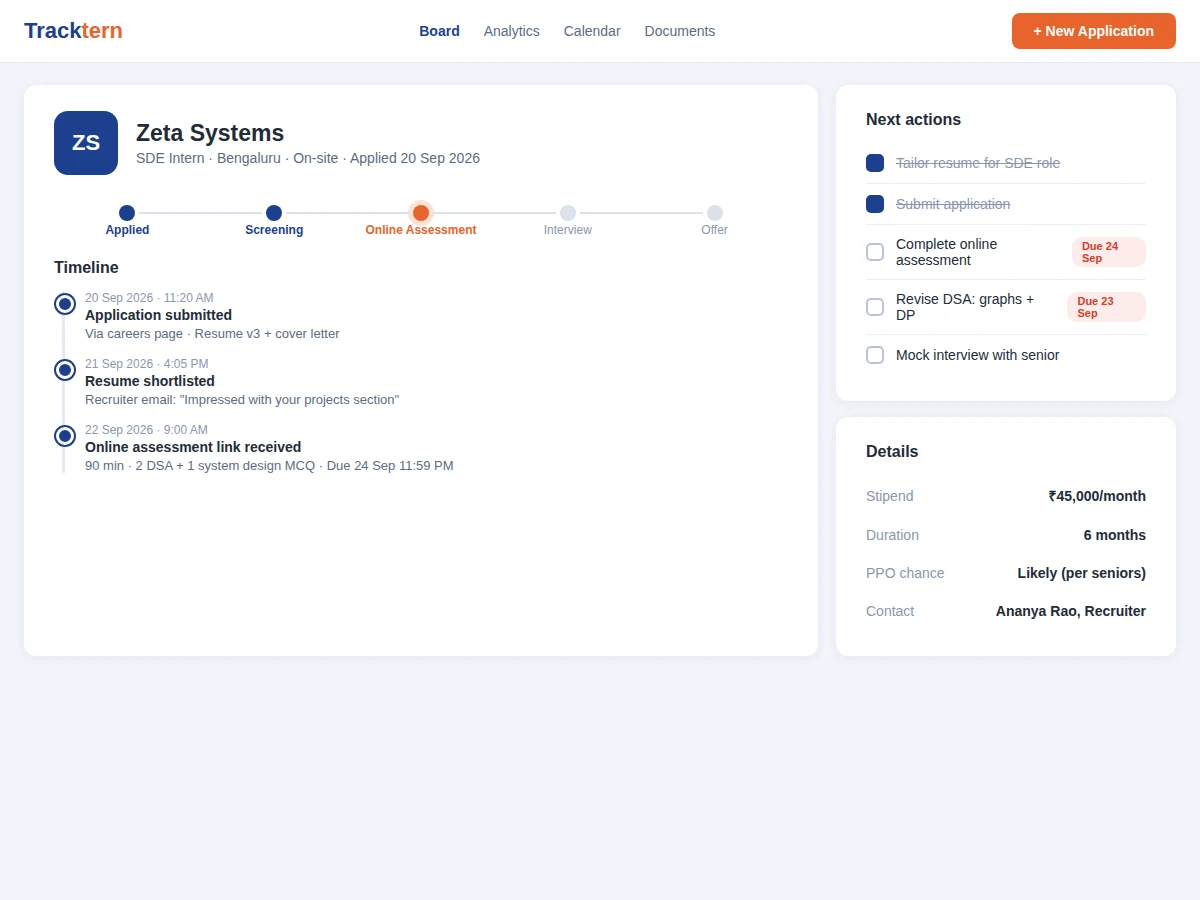
A typical placement season means dozens of applications scattered across spreadsheets, email threads and job portals — and students miss online-assessment deadlines or walk into interviews without their notes. Spreadsheets cannot remind you that an assessment closes tonight, and they cannot show that referral applications convert twice as well as cold ones. This project builds a dedicated internship application tracker: every application is a card with stage, deadlines, contacts, stipend and documents; the board surfaces what needs action today; and analytics reveal which strategies actually work so effort goes where it converts. Timeline entries, checklists and reminders keep every opportunity moving forward.
How it works
- The student logs an application with company, role, location, source, stipend and deadline — it lands in the Applied column.
- Timeline events (resume shortlisted, assessment link received, interview scheduled) are appended as they happen.
- Cards are dragged across stages; each move is timestamped in the application's history.
- Upcoming deadlines appear in the action list with urgency highlighting; reminders go out by email.
- Prep checklists per application track interview readiness with due dates.
- The analytics page aggregates the season: funnel from applied to offer, response rate, average time-to-first-response and source performance.
Tech stack:
- Python (Django/Flask) or Node.js backend
- SQLite/PostgreSQL database
- HTML5, CSS3, JavaScript frontend
- Kanban drag-and-drop UI
- Charting library for analytics
- Email service for reminders
- CSV export
- Responsive web UI
| Parameter | Value |
|---|---|
| Application type | Single-user web application (personal CRM) |
| Pipeline stages | Applied, Screening, Interview, Offer, Rejected (configurable) |
| Capacity | Hundreds of applications per season (design target) |
| Reminders | Email reminders for deadlines (configurable lead time) |
| Analytics | Funnel, response rate, source performance (descriptive statistics) |
| Export | Full-season CSV export |
| Deployment | Shared hosting or small VPS |
| Deliverables | Source code, DB schema, setup guide, report, PPT, viva Q&A |
Project features
- [Kanban pipeline] Drag applications across Applied, Screening, Interview, Offer and Rejected stages with counts per stage.
- [Per-application detail pages] Stage tracker, timeline of events, stipend, contacts, documents and notes — every fact has one home.
- [Deadline reminders] Assessments, HR calls and interviews surface as urgent; overdue items are highlighted automatically.
- [Interview-prep checklists] Per-application task lists (revise DSA, mock interview, research the company) with due dates.
- [Season analytics] Response rate, offer rate, funnel conversion and applications-by-source charts computed from the student's real data.
- [Document management] Attach resumes, cover letters and offer letters to the application they belong to.
- [Season export] One-click CSV export of the full season for personal records or the placement cell.
What is included
- Complete internship tracker web application source code
- Database schema and migration scripts
- Kanban board with drag-and-drop stage management
- Analytics dashboards (funnel, sources, timing)
- Reminder scheduling implementation
- Setup and deployment guide
- User walkthrough script for the buyer to validate flows
- Project report PDF (background, data model, workflow design, methodology)
- PPT presentation for final review
- Viva Q&A preparation document (CRUD design, aggregation queries, UX decisions)
Limitations & prerequisites
- Analytics are descriptive statistics of the user's own data — the system predicts nothing about hiring outcomes.
- Reminders depend on the student entering correct deadlines; the system cannot read recruiter emails.
- Single-user design: there is no team/placement-cell multi-user mode in the base build.
- Drag-and-drop needs a modern browser; keyboard-accessible stage controls are included as fallback.
- Email delivery depends on the configured mail service and spam filtering.
- No integration with job portals — applications are logged manually (browser-extension capture is future scope).
Frequently Asked Questions
How is this different from a spreadsheet?
Deadlines trigger reminders, stage changes build an automatic timeline, prep checklists attach to the right application, and analytics compute funnel conversion — none of which a spreadsheet does without manual work.
Does it predict whether I will get an offer?
No. All analytics are descriptive — response rates, funnel conversion, source performance — computed from your real pipeline. It shows what is working, not what will happen.
Can the placement cell see my data?
Only what you export. The application is single-user; a CSV export lets you share your season summary voluntarily.
What happens when I get two interviews on the same day?
Both appear in the action list with urgency highlighting, and each application's detail page keeps its own prep checklist so nothing gets mixed up.
Is my data private?
Yes — accounts are per-student and the database holds only your applications. Deployment guidance covers HTTPS and backups.
Is this project suitable for a final-year project?
Yes — for Computer Science, IT and Web Development programs. It demonstrates data modeling, workflow UX, aggregation queries and turning a real student pain point into a polished tool. Suitable for B.E./B.Tech final-year projects in Computer Science, IT and Web Development.
Components & software requirements
- Python (Django/Flask) or Node.js backend
- SQLite/PostgreSQL database
- HTML5, CSS3, JavaScript frontend
- Kanban drag-and-drop UI
- Charting library for analytics
- Email service for reminders
- CSV export
- Responsive web UI
Delivery information
Built-to-order project. Delivery timeline is shared after order confirmation based on current queue.
Support terms
Complete documentation, setup guide, and viva preparation included. Support for setup and explanation provided.