
More project photos (2)

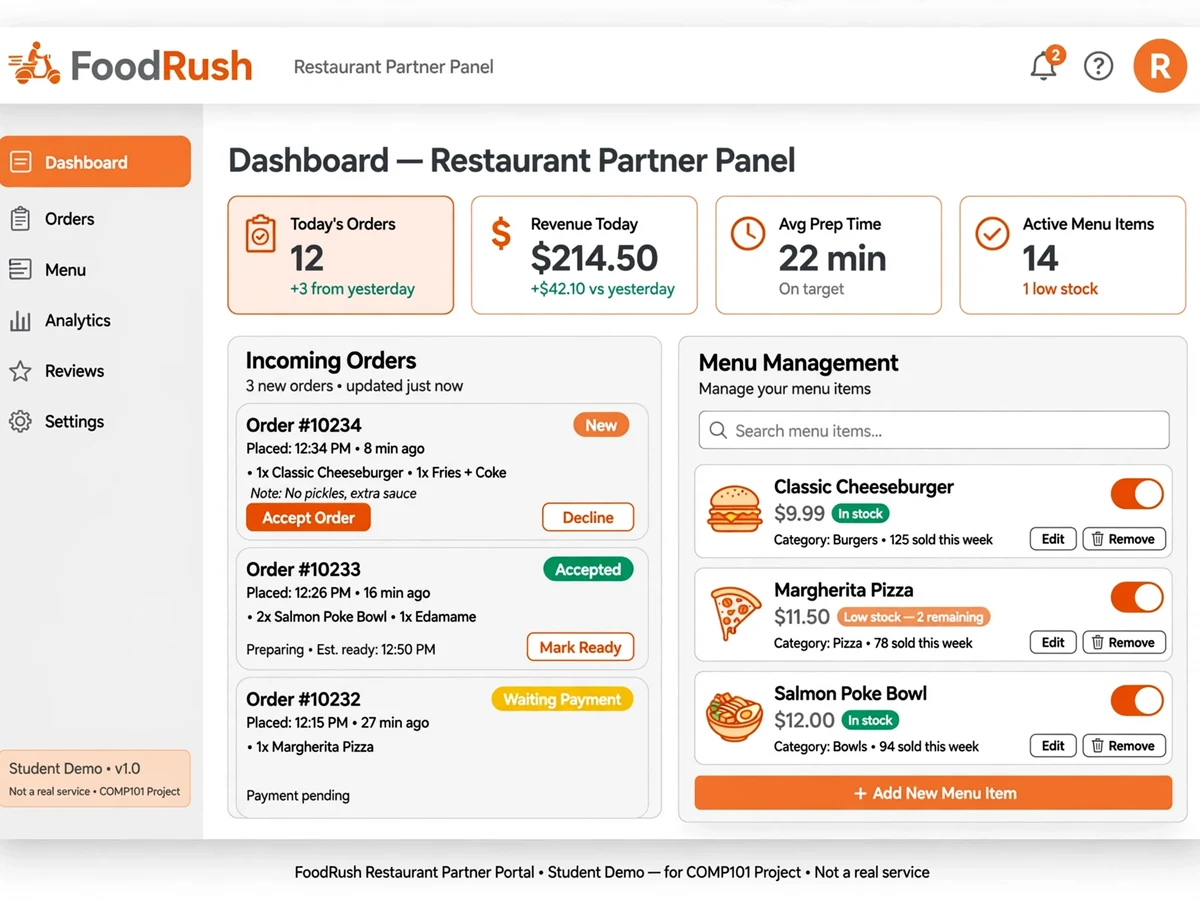
The problem
A food delivery app looks like a menu on a screen, but underneath it is a coordination problem between three parties. The customer expects to know exactly where their order stands; the restaurant needs a reliable queue of incoming orders with preparation times; the platform must record every state change and settle commissions accurately. If statuses go stale or an order is lost between "preparing" and "delivered," the marketplace loses trust. Most student builds stop at a menu and a cart — a single-user CRUD app in a food-delivery costume. This project builds the part that matters: a live order lifecycle from placed to delivered, with every transition pushed to the customer's screen in real time, role-separated portals for customers, restaurant partners and admins, and a commission model that shows how the platform earns.
How it works
- A customer searches or browses restaurants, opens a menu and adds items (with customizations) to the cart.
- At checkout the customer confirms the address; the order is created in "Placed" state and pushed to the restaurant partner's panel in real time.
- The restaurant accepts the order and sets a preparation time; the customer sees the status change instantly via WebSocket events.
- As the kitchen works, statuses advance — Preparing → Ready for pickup → On the way → Delivered — each broadcast live to the tracking screen with timestamps.
- Payment (test-mode gateway or cash-on-delivery) is recorded against the order; the admin dashboard tracks the commission split between platform and restaurant.
- After delivery, the customer rates the restaurant; reviews feed back into the restaurant's listing score.
Project features
Restaurant discovery: listings with cuisines, ratings, delivery time, distance and search/filters
Menu browsing with categories, veg/non-veg markers, item customization (addons, sizes) and photos
Cart with multi-item totals, GST breakup, delivery fee and promo-code support
Order placement with address selection and live order-status tracking (WebSocket push)
Restaurant partner panel: menu CRUD, item availability toggle, incoming-order queue, accept/reject, preparation-time estimates, earnings summary
Admin dashboard: restaurant onboarding/approval, user management, commission settings, order monitoring, payout reports, banner/promotion control
Role-based logins: customer, restaurant partner, delivery-agent (basic) and admin
Ratings and reviews for restaurants and delivery experience
Notifications: order confirmations and status changes (in-app + email/SMS hooks)
Responsive design with a mobile-first ordering flow
What is included
Full source code (React frontend + Node/Express backend), commented
Database seed scripts with demo restaurants, menus, users and orders across all roles
Project report PDF (synopsis, ER diagram, DFD, system design, order state machine, testing, conclusion)
PPT presentation
Viva Q&A document (WebSockets, three-sided marketplace design, schema questions)
Deployment guide (localhost, Render/VPS, environment variables, map API key setup)
FAQs
- What makes this more than a menu-and-cart app? The live order lifecycle: an order moves through placed, confirmed, preparing, ready, picked up, on the way and delivered, with every transition pushed to the customer over WebSockets — plus role-separated portals and a commission model. That is the actual system design of a food-delivery marketplace.
- How does the live order tracking work? The backend emits Socket.io events on every status change; the customer's tracking screen and the restaurant panel subscribe to the order's room and update instantly, with an audit history of every transition.
- What demo credentials are included? Seeded logins for a customer, a restaurant partner, a delivery agent and an admin, with demo restaurants and full menus — the entire lifecycle can be run live.
- Can it be customized for a city or cuisine? Yes — restaurants, menus, delivery zones and commission rates are all data-driven, and the report documents the schema.
- How is it deployed for a demo? The guide covers localhost, Render and VPS deployment with PM2, MongoDB Atlas setup and environment variables; a phone hotspot is enough for demo-day networking.
- What would a production version need? KYC-verified restaurant onboarding, a live payment gateway, and real-time GPS courier tracking (the current delivery-agent flow is status-based) — all documented as extensions.
Limitations & prerequisites
Delivery-agent tracking is a basic status flow; real-time GPS courier tracking on a map is an optional extension.
Payments use a test-mode gateway or cash-on-delivery — going live needs your own gateway account.
Maps integration needs your own (free-tier) API key; the guide walks through key creation.
Seeded demo data covers a handful of restaurants; bulk catalog import is documented but manual.
Components & software requirements
Frontend: React SPA with role-based routing (customer app, partner panel, admin dashboard)
Backend: Node.js with Express REST API (PHP/Laravel alternative)
Database: MongoDB with Mongoose (or MySQL) — restaurants, menus, orders, users, reviews
Real-time: Socket.io WebSockets for live order-status pushes and partner order alerts
Maps: address selection and restaurant distance display (own free-tier API key)
Auth: JWT authentication with bcrypt; four roles with protected routes
Payments: test-mode payment gateway + cash-on-delivery option
Deployment: Render/VPS with PM2; MongoDB Atlas; environment-based config
| Parameter | Value |
|---|---|
| Architecture | MERN: React SPA + Express API + MongoDB; Socket.io real-time layer |
| Key tables/collections | users, restaurants, menu_categories, menu_items, carts, orders, order_status_history, reviews, coupons, commissions, payouts |
| Auth & roles | JWT + bcrypt; customer, restaurant-partner, delivery-agent, admin; protected routes per role |
| Order lifecycle | Placed → Confirmed → Preparing → Ready → PickedUp → OnTheWay → Delivered; Cancelled/Rejected branches with audit history |
| Real-time | Socket.io rooms per order; partner panel gets instant new-order alerts; customer tracking updates without refresh |
| Commission model | Configurable platform commission % per restaurant; payout report aggregates per cycle |
| Test coverage | Order state-machine transitions, role authorization guards, cart total/GST math, socket event delivery |
| Deployment | Render/Railway/VPS with PM2; MongoDB Atlas; env vars for JWT secret, gateway keys, map API key |