
More project photos (2)
The problem
Modern teams ship code continuously, but releasing features is still risky: a big-bang deploy exposes every user to new code at once, and rolling back means redeploying. Feature flags decouple deployment from release — code ships dormant behind a flag, and the flag is then switched on per environment, per user segment or for a percentage of traffic, with a kill switch ready if anything goes wrong. Without flag infrastructure, teams face three pains: risky all-or-nothing releases, long-lived feature branches that rot while waiting for a release train, and no audit trail answering "who enabled what, when?" during an incident. Commercial platforms solve this but are black boxes a student cannot dissect. This project rebuilds the essential machinery as transparent, self-hosted MERN code: a React dashboard for flag management, an Express API with a deterministic evaluation engine, MongoDB storage, and a Node.js SDK with a simple isEnabled(flag, context) contract. The build covers the full lifecycle — a flag goes from created to targeted to gradually rolled out to killed, all visible in the audit timeline.
How it works
- A developer creates a flag (e.g. new-checkout-flow) in the React dashboard; it starts off in every environment.
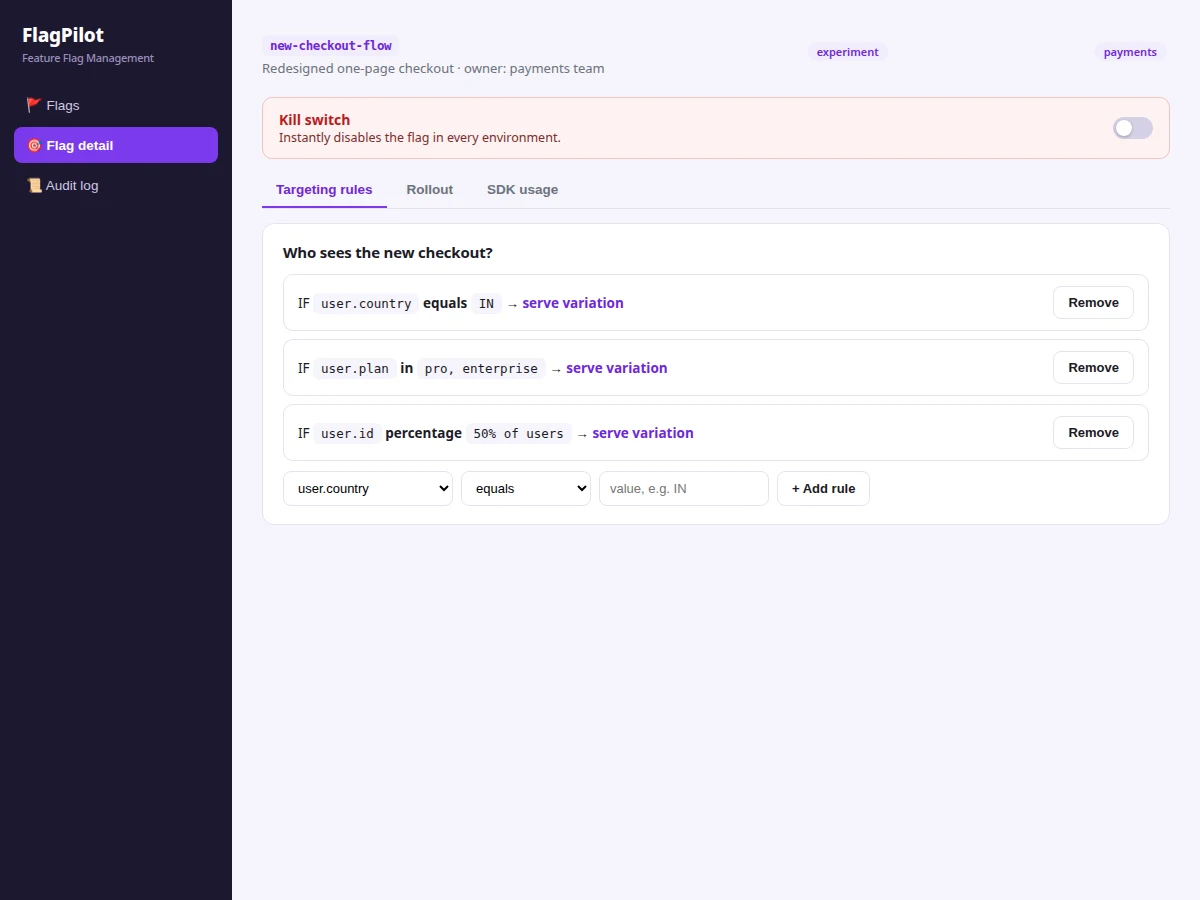
- Targeting rules are added — for example, country equals IN, plan in pro/enterprise — evaluated in order at request time.
- A percentage rollout is set per environment (say 50% in production); the engine hashes each user ID into a sticky bucket and compares against the percentage.
- The application under test calls the SDK's isEnabled with the user context; the evaluation endpoint applies rules, then bucketing, and returns the variation to serve.
- Rollouts move with a slider as confidence grows; if anything breaks, the kill switch disables the flag everywhere at once.
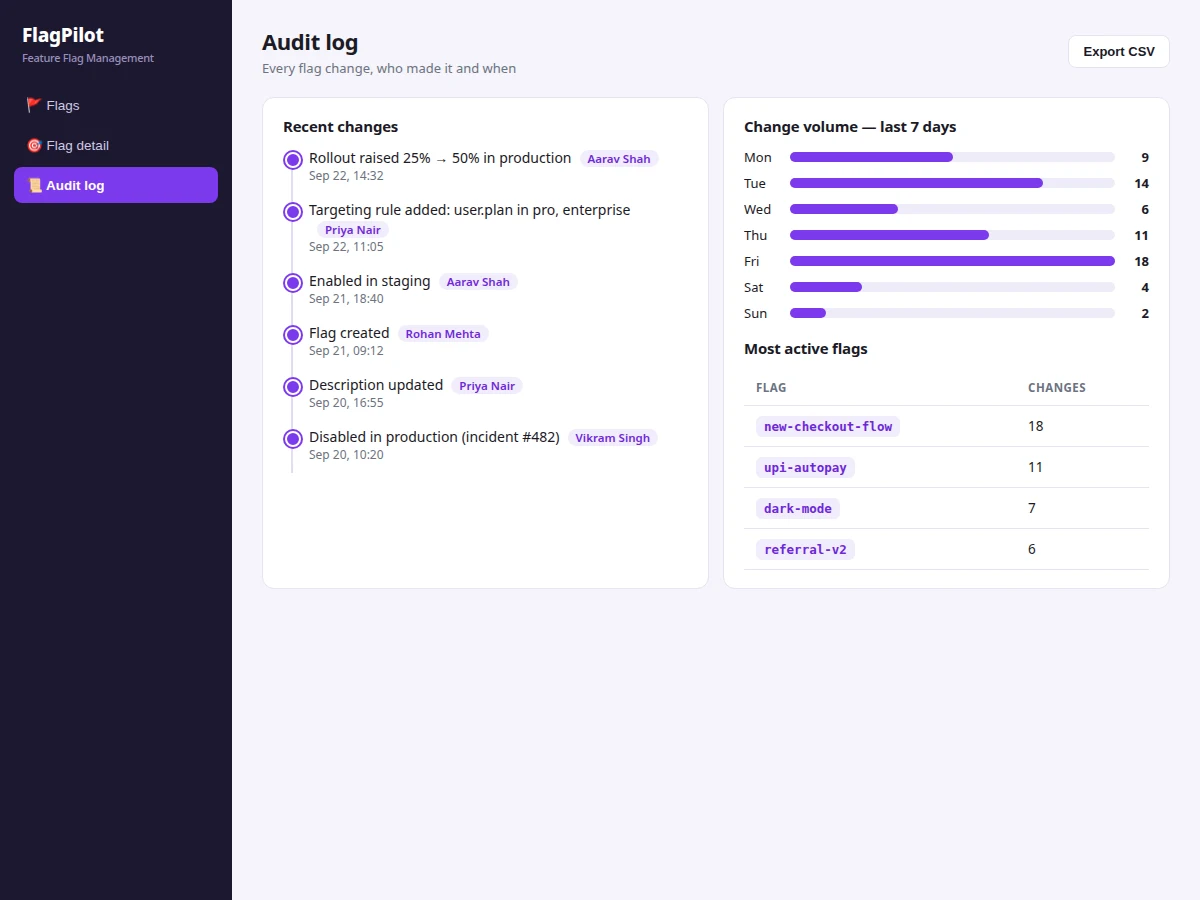
- Every mutation writes an audit event — toggle, rule edit, rollout change, kill — rendered in the timeline with actor and timestamp.
Tech stack:
- MongoDB 6+ with Mongoose (flags, targeting rules, audit events)
- Express 4.x (REST API: flag CRUD, toggles, rules, rollouts, audit, evaluation endpoint)
- React 18 with Vite (dashboard: flag table, flag detail, audit timeline)
- Node.js 18+ (API + SDK)
- JWT authentication with admin/developer roles, bcrypt password hashing
| Parameter | Value |
|---|---|
| Stack | MongoDB, Express, React, Node.js (MERN) |
| Data models | Flags (key, environments, rollout %), targeting rules (attribute/operator/value), audit events |
| Evaluation | Ordered rule matching → user-ID hash sticky bucketing → variation |
| Environments | Development, staging, production — independent toggle state per flag |
| Auth | JWT with admin/developer roles; production changes require admin |
| SDK | Node.js isEnabled(flag, context) with local caching; usage docs included |
| Audit | Every mutation logged with actor + timestamp; change-volume analytics |
| Demo data | Seeded shopkart-web project with 24 flags across environments |
Project features
- [Per-environment toggles] Each flag carries independent on/off state for development, staging and production; toggles apply instantly from the dashboard.
- [Targeting rules] Ordered IF-rules on user attributes — country, plan, user ID, signup date — decide who sees a variation before percentage logic runs.
- [Percentage rollouts] Gradual rollouts from 0–100% with sticky bucketing: users are hashed by ID into buckets, so the same user always sees the same variant.
- [Kill switch] One control disables a flag in every environment immediately — the incident-response story of the platform.
- [Audit log] Every flag change — toggles, rule edits, rollout moves, kills — is recorded with actor and timestamp in a timeline, plus change-volume analytics.
- [Node.js SDK] Applications evaluate flags with isEnabled(flag, context); the SDK calls the evaluation endpoint with local caching, and usage docs with code samples are included.
- [JWT authentication with roles] Admin and developer roles: developers toggle in dev/staging while production changes require admin rights.
- [Seeded demo project] A realistic seeded project (shopkart-web, 24 flags) populates every view — flag table, flag detail, audit log — on first run.
What is included
- Complete MERN source code (React dashboard, Express API, Mongoose models)
- Node.js SDK with usage documentation and code samples
- Seed script (demo project with 24 realistic flags)
- Project report PDF (data model, evaluation algorithm, auth design, SDK contract)
- PPT presentation for final review (live 0%→50% rollout demo with kill-switch finale)
- Viva Q&A preparation document (sticky bucketing, cache invalidation, JWT, flags vs branches)
- Setup guide (environment, MongoDB, seeding, running API + dashboard + SDK example)
Limitations & prerequisites
- This is a functional platform prototype, not a hardened SaaS: rate limiting, multi-region replication and enterprise SSO are documented future scope, not included.
- The SDK ships for Node.js; browser, Python or mobile SDKs are not part of the base build (the evaluation endpoint is HTTP, so ports are straightforward customizations).
- Percentage bucketing is deterministic per user ID but anonymous visitors without stable IDs will not bucket stably — documented in the report.
- No built-in A/B statistics: the platform serves variations but does not compute conversion significance; that is listed as future scope.
- Hosting, domain and MongoDB Atlas costs (if used) are separate from the project itself.
Frequently Asked Questions
Is the database included?
Yes. MongoDB schemas ship as Mongoose models, and a seed script loads a realistic demo project (shopkart-web with 24 flags) so every view is populated on first run.
Does the project contain an admin panel?
The React dashboard is the admin surface: flag table with inline environment toggles, per-flag detail (targeting, rollout, SDK snippet) and the audit log — with role-based access separating developers from admins.
Can more roles or modules be added?
Yes. The JWT role design extends to per-project roles, and realistic extensions include A/B statistics, webhooks and scheduled rollouts.
Can it be hosted online?
Yes. The Express API and React build deploy to any VPS or Node hosting; MongoDB can be local or Atlas. Hosting costs are separate from the project.
Is payment gateway integration included?
No — this is release infrastructure, not a storefront; there is no payment flow in the base build.
What will I receive with the project?
Complete MERN source code, Node.js SDK with docs, seed data, project report, PPT, viva Q&A document and setup guide. Suitable for B.E./B.Tech final-year projects in Computer Science, Information Technology and related branches.
Components & software requirements
- MongoDB 6+ with Mongoose (flags, targeting rules, audit events)
- Express 4.x (REST API: flag CRUD, toggles, rules, rollouts, audit, evaluation endpoint)
- React 18 with Vite (dashboard: flag table, flag detail, audit timeline)
- Node.js 18+ (API + SDK)
- JWT authentication with admin/developer roles, bcrypt password hashing
Delivery information
Built-to-order project. Delivery timeline is shared after order confirmation based on current queue.
Support terms
Complete documentation, setup guide, and viva preparation included. Support for setup and explanation provided.