
More project photos (2)
The problem
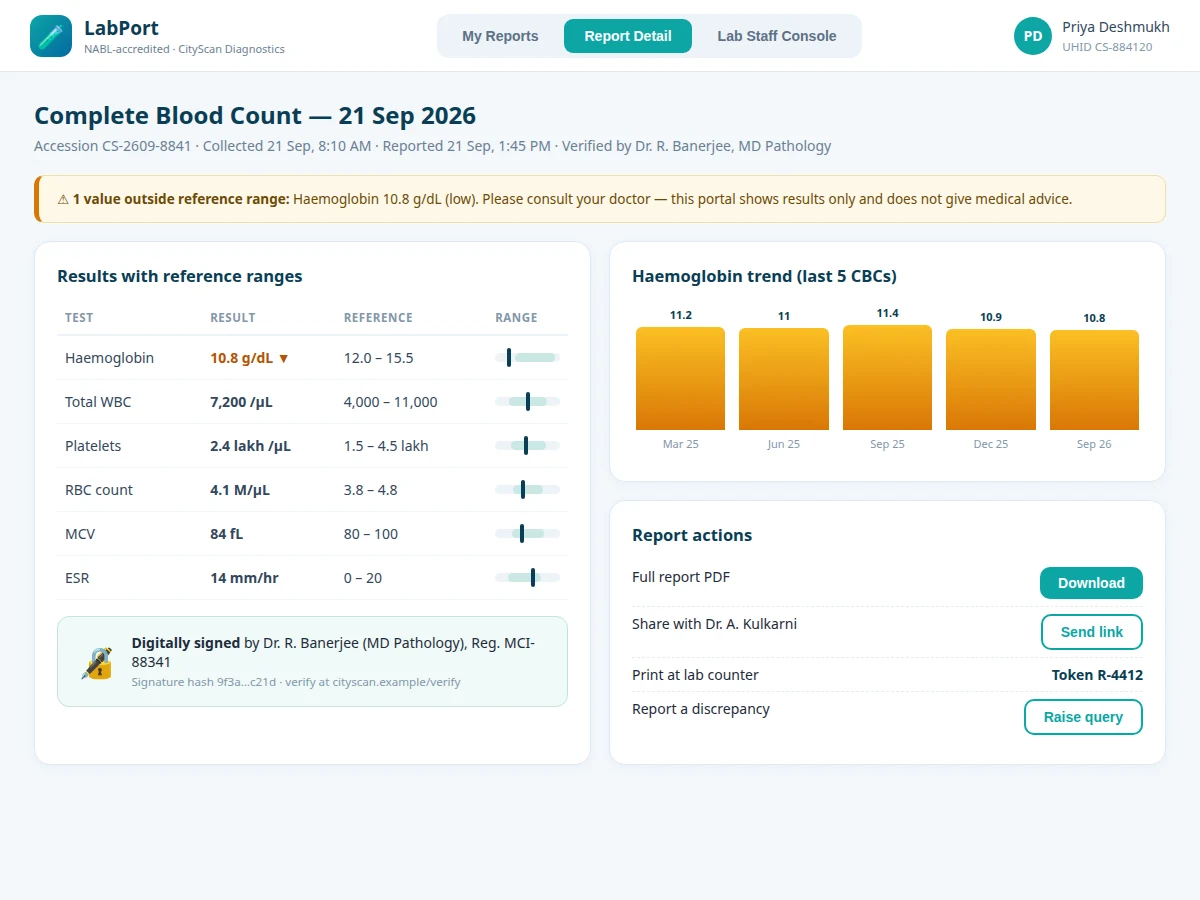
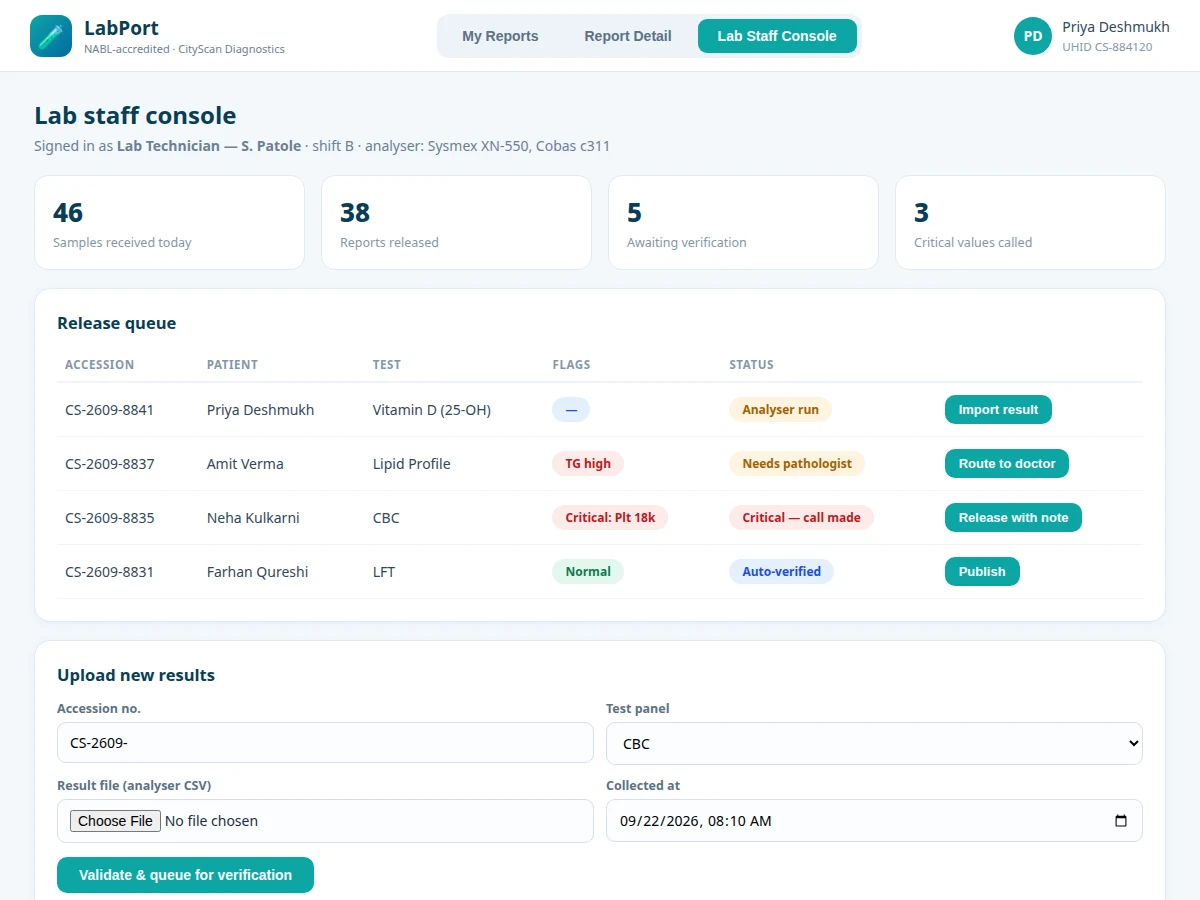
Patients still collect lab reports as paper printouts or wait for a WhatsApp photo from the lab. Paper gets lost, photos are unreadable, and there is no way to see how a value changed since the last test. This project builds a proper report portal. Patients log in with their hospital ID and see every report as a downloadable, digitally signed PDF; inside the portal each test result is shown against its reference range with a visual marker, and key values are charted across visits. On the staff side, technicians import analyser output, the system flags out-of-range and critical values, a pathologist verifies, and only then is the report published to the patient. Sharing with a doctor happens through expiring secure links, not forwarded PDFs. The project is scoped honestly: it is a document-delivery and workflow system, not a diagnostic tool — it shows results and never interprets them.
How it works
- The patient registers with the UHID given at sample collection and logs in.
- The technician imports the analyser's CSV against the accession number; the system stores each parameter value.
- Values are auto-compared to reference ranges; out-of-range flags and critical-value alerts are raised.
- Critical values follow a documented call-first protocol; everything else routes to the pathologist's verification queue.
- On verification, the report is digitally signed, rendered to PDF, and published to the patient's library with an SMS/email notification.
- The patient downloads the PDF or shares an expiring secure link with their doctor; trend charts update automatically.
Tech stack:
- PHP 8 (backend)
- MySQL (patients, accessions, results, verifications, shares)
- HTML5, CSS3, JavaScript + SVG charts
- PDF generation library (report rendering)
- OTP-based share links
| Parameter | Value |
|---|---|
| Architecture | PHP + MySQL, session auth |
| Report rendering | Server-side PDF per published report (design target: under 5 s) |
| Share links | Expire after 7 days; OTP-gated |
| Data retention | Design target: 2 years of report history per patient |
| Database tables | Approximately 8 (patients, accessions, panels, results, verifications, shares, queries, users) |
| Privacy | Role-separated access; patients see only their own UHID records |
Project features
- [Patient report library] Every report listed by date with test name, referring doctor, flag summary and one-click signed-PDF download.
- [Reference-range result view] Each parameter shown with its reference interval and a visual marker of where the patient's value falls; out-of-range values are highlighted.
- [Trend charts] Key values (haemoglobin, HbA1c, cholesterol) plotted across all past visits so patients and doctors see direction at a glance.
- [Staff release console] Technicians import analyser CSVs, the queue shows flags, critical values trigger a call-and-document step, and pathologists verify before publish.
- [Secure doctor sharing] Time-limited links (7 days) protected by the doctor's mobile OTP — no more forwarding PDFs over chat.
- [Digital signatures] Published reports carry the verifying pathologist's signature block with a verification hash.
- [Discrepancy queries] Patients can raise a query on a report, which routes back to the lab queue instead of a phone call.
What is included
- Complete portal source (patient views, staff console, PDF rendering)
- MySQL schema with anonymized sample patients and reports
- Reference-range configuration for common panels (CBC, lipid, thyroid, LFT)
- Project report PDF (requirements, workflow design, ER diagram, privacy notes, testing)
- PPT presentation for final review
- Viva Q&A preparation document (auth, PDF generation, reference-range logic, audit trails)
Limitations & prerequisites
- The portal displays results; it does not interpret them and gives no medical advice — a disclaimer to that effect is part of the UI and the report.
- Digital signatures in the base build are system-generated signature blocks with hashes, not government-certified DSC tokens (noted as an integration option).
- Analyser integration is via CSV import in the base build; direct HL7/LIS interfacing is future scope.
- Reference ranges ship for common panels; the lab admin adds or edits ranges for the rest.
- This is an educational prototype of a lab workflow — it is not certified for clinical use, and the report states that plainly.
Frequently Asked Questions
How are reports kept private?
Patients authenticate against their UHID and see only their own records; staff roles separate technicians (upload) from pathologists (verify/publish); doctor-share links expire in 7 days and need an OTP.
What happens with a critical value?
The queue flags it prominently and the documented protocol requires the lab to phone the doctor/patient before release; the call is logged with a timestamp in the system.
Can patients see old reports?
Yes — the library keeps two years of history by design, and trend charts use the full history for tracked parameters.
Which tests are supported?
Any panel the lab configures. CBC, lipid profile, thyroid, LFT/KFT and HbA1c ship preconfigured with reference ranges.
Does it replace the lab's existing software?
No — it is the patient-facing delivery layer plus a release workflow. It imports analyser CSVs and can sit alongside existing LIS software.
Is this project suitable for a final-year project?
Yes — for Computer Science, IT and Web Development programs. It demonstrates document workflows, role-based access, PDF generation and privacy-conscious design. Suitable for B.E./B.Tech final-year projects in Computer Science, IT and Web Development.
Components & software requirements
- PHP 8 (backend)
- MySQL (patients, accessions, results, verifications, shares)
- HTML5, CSS3, JavaScript + SVG charts
- PDF generation library (report rendering)
- OTP-based share links
Delivery information
Built-to-order project. Delivery timeline is shared after order confirmation based on current queue.
Support terms
Complete documentation, setup guide, and viva preparation included. Support for setup and explanation provided.