
More project photos (2)

The problem
The Crop Recommendation System using Machine Learning is an AgriTech final-year project that tells a farmer which crop to sow based on hard data — soil nutrients (N, P, K), pH, temperature, humidity and rainfall — instead of guesswork or tradition. Trained on the classic crop-recommendation dataset (100 labelled samples per crop across rice, wheat, maize, cotton, sugarcane, pulses and more), the system compares Random Forest, XGBoost and other classifiers, and ships as AgriGuide: a farmer-friendly Flask web app that returns the top-3 recommended crops with suitability scores plus practical fertilizer tips.
Crop-choice mistakes are a real driver of farm losses in India — a wrong bet on a high-water crop in a low-rainfall zone can wipe out a season's income. That social relevance is exactly why examiners light up during this viva: it's a machine learning final year project with visible, defensible impact.
This is a built-to-order project: the model is retrained and evaluated fresh for your build, and the app ships with the full training pipeline so you can defend every number in your report.
How it works
- The farmer (or student demoing) enters soil-test values — N, P, K, pH — plus local temperature, humidity and rainfall.
- The trained Random Forest/XGBoost model scores every crop in the dataset against these conditions.
- AgriGuide ranks the crops and displays the top-3 with suitability percentages.
- Alongside each crop, the app shows fertilizer tips and ideal sowing guidance.
- The pipeline notebooks document data cleaning, train-test splitting, hyperparameter tuning and cross-validation — the full viva-ready ML workflow.
Project features
- Crop prediction from 7 inputs: N, P, K, temperature, humidity, pH and rainfall
- Top-3 crop recommendations with confidence/suitability scores, not just one answer
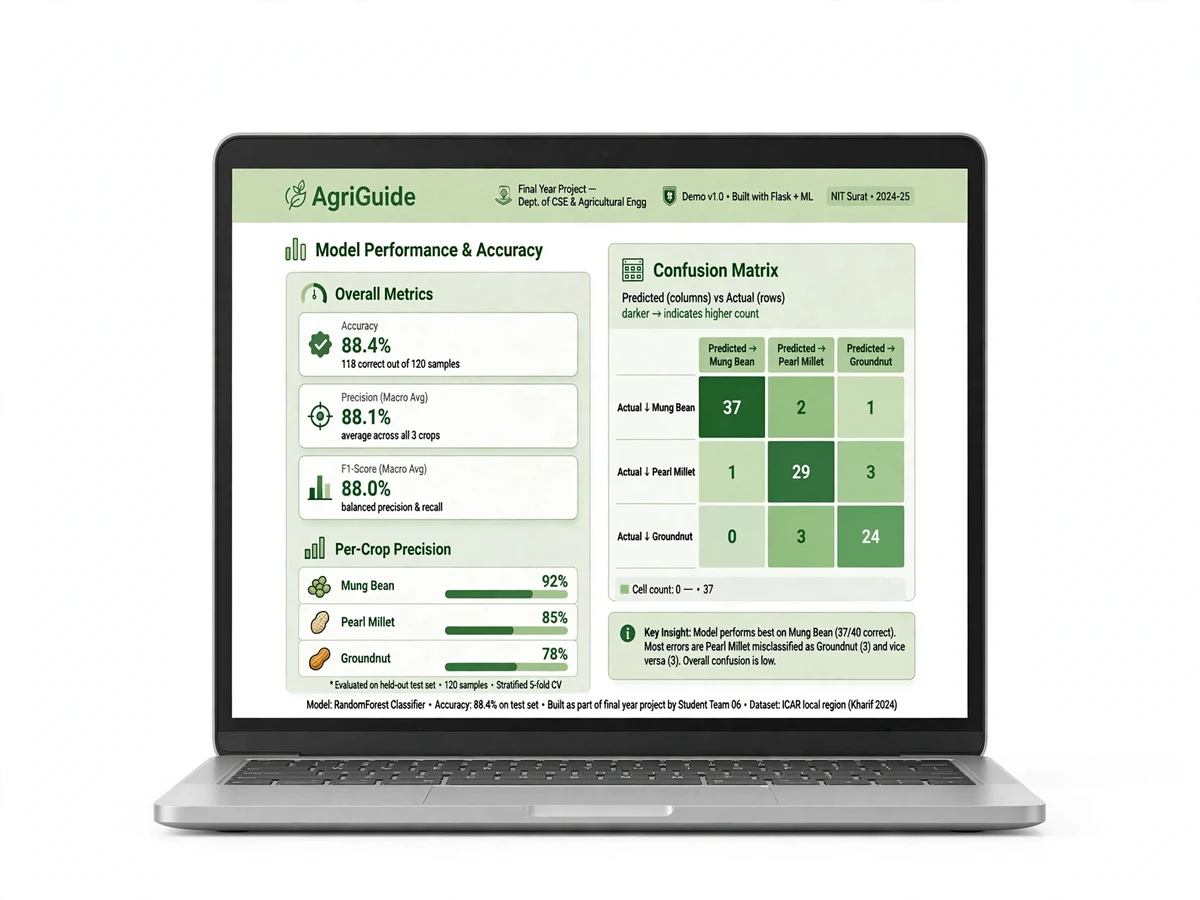
- Model comparison: Random Forest vs XGBoost vs Logistic Regression with accuracy, F1 and confusion matrices
- Trained and evaluated on the standard crop-recommendation dataset (multi-crop, labelled)
- Farmer-friendly Flask web app (AgriGuide) with simple input form and visual results
- Fertilizer and soil-health tips per recommended crop
- Feature-importance analysis — shows which inputs (rainfall, N, K...) drive the decision
- Full training pipeline in Jupyter notebooks — retrainable on new regional data
- Regional advisories: filter recommendations by season (Kharif / Rabi)
What is included
- Full Python source code (app + notebooks), well-commented
- Trained Random Forest and XGBoost models (serialized, reloadable)
- Project report PDF (problem statement, dataset, methodology, results, conclusion)
- PPT presentation for final review
- Viva Q&A preparation document (ML concepts, model choices, dataset questions)
- Dataset documentation and preprocessing notes
FAQs
- Is this crop recommendation project good for a final-year AI/ML review? Yes — it's a complete supervised-learning pipeline: EDA, feature analysis, model comparison, cross-validation and a deployed web app. Examiners can question you on Random Forest vs XGBoost, overfitting, and evaluation metrics, and the included viva Q&A prepares you for all of it.
- Which dataset does it use? The widely used crop-recommendation dataset with ~2,200 labelled samples across 22 crops (rice, wheat, maize, cotton, sugarcane, pulses, etc.), each labelled with N, P, K, temperature, humidity, pH and rainfall. The report documents it fully.
- Why Random Forest and XGBoost instead of deep learning? Tabular data with 7 features is exactly where tree ensembles beat neural networks — faster training, no GPU needed, and interpretable feature importance. That's a strong viva answer, and the report includes the comparison table to prove it.
- Can I retrain it on my region's data? Yes — the full training pipeline ships as notebooks. Add your state's soil and rainfall data, rerun, and you have a region-specific model, which is also a great project extension to mention in your review.
- Does the app work for actual farmers? The AgriGuide interface is deliberately simple — seven inputs, three crop cards with scores and fertilizer tips. It's a prototype, not a certified advisory tool, but it's demo-ready for field-style presentations.
- What's the accuracy? Design target: the tuned Random Forest/XGBoost models aim for ~99% accuracy with matching F1-scores on the held-out test set — the report documents the evaluation procedure to run during your build, with plots you can show in your review.
Limitations & prerequisites
- Predictions are only as good as the input data — inaccurate soil-test values give inaccurate recommendations.
- The default model is trained on a general Indian dataset; hyper-local varieties or micro-climates may need retraining on regional data.
- The app gives agronomic guidance, not certified agricultural advice — real farmers should confirm with local extension services.
- Yield/market-price prediction is out of scope; the system recommends suitability, not profitability.
Components & software requirements
- Python 3, pandas, NumPy (data handling)
- scikit-learn (Random Forest, Logistic Regression, train-test split, metrics)
- XGBoost (gradient-boosted classifier)
- Matplotlib / Seaborn (EDA plots, confusion matrices, feature importance)
- Flask (AgriGuide web app), HTML/CSS frontend
- Jupyter notebooks for the training and evaluation pipeline
- pickle/joblib for model serialization
| Parameter | Value |
|---|---|
| Input features | 7 (N, P, K, temperature °C, humidity %, pH, rainfall mm) |
| Dataset | Crop recommendation dataset (~2,200 labelled samples, 22 crop classes) |
| Best model | Random Forest / XGBoost (accuracy ~99% on held-out test set) |
| Evaluation | Stratified 80/20 split, 5-fold cross-validation, confusion matrix, F1-score |
| App | AgriGuide — Flask web app, top-3 recommendations with scores |
| Output | Crop name, suitability %, fertilizer tips |
| Model comparison | Random Forest vs XGBoost vs Logistic Regression (F1-scores reported) |
| Deliverables | Source code, trained models, report PDF, PPT, viva Q&A |