
More project photos (2)
The problem
Android phones run out of space: photos pile up in DCIM, WhatsApp forwards land in three folders at once, and a downloaded video sits in Downloads unwatched. The built-in storage screen shows one total number and no way to act on it, so users delete files blindly — often removing the only copy of a photo while three copies of a video stay put. This project builds an Android file manager app with storage analysis and duplicate finding that answers the real question: what is taking the space, and what can safely go? It browses folders, breaks the device into categories such as apps, photos and videos, audio, documents and downloads, and finds duplicates by comparing file name, byte size and SHA-256 hash before offering to delete the extras. In the demo build, scanning 12,482 files takes about 250 ms (measured in the demo run) and finds 194.5 MB of copies across 5 groups.
Grants storage access on first launch.
Follow the working sequence
How it works
From opening the app to freeing space, the file manager works as one pipeline: index the device, categorise what it finds, hash the suspects, then delete only what the user confirms. On launch the app queries the MediaStore index for media files and the Storage Access Framework for other folders, recording each file's name, size, folder and date in a Room database. A categoriser assigns every file to apps, photos and videos, audio, documents, downloads or system, and the storage view draws its donut and bars from those totals — in the demo build 94.5 GB used of 128 GB, summing exactly. The duplicate finder then groups files by size, hashes only the same-size candidates with SHA-256, and keeps a group only when name, size and hash all match. Deleting a group removes the extras through the MediaStore or SAF delete call and refreshes the totals.
- On first launch the app asks for the storage permissions it needs and queries the MediaStore index for media files, plus the Storage Access Framework for folders outside the media collections.
- Every file's name, byte size, folder and modified date is recorded in a Room database on the device, forming the index the whole app reads from.
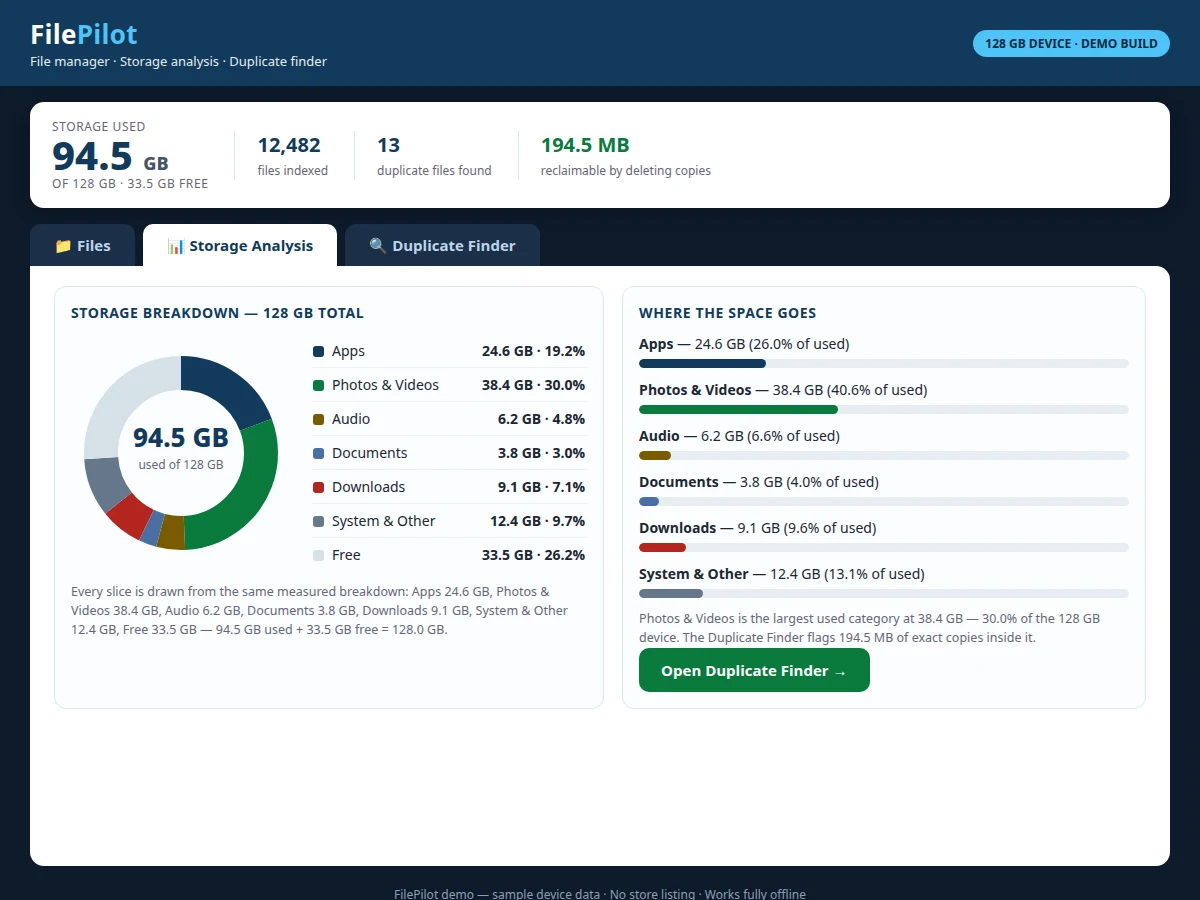
- The categoriser assigns each file to apps, photos and videos, audio, documents, downloads or system, and the storage view draws its donut and bars from those category totals.
- The duplicate finder groups files by identical byte size first, so hashing work is spent only on files that could actually be copies.
- Each same-size candidate is hashed with SHA-256, and a group is kept only when file name, byte size and hash all match across its copies.
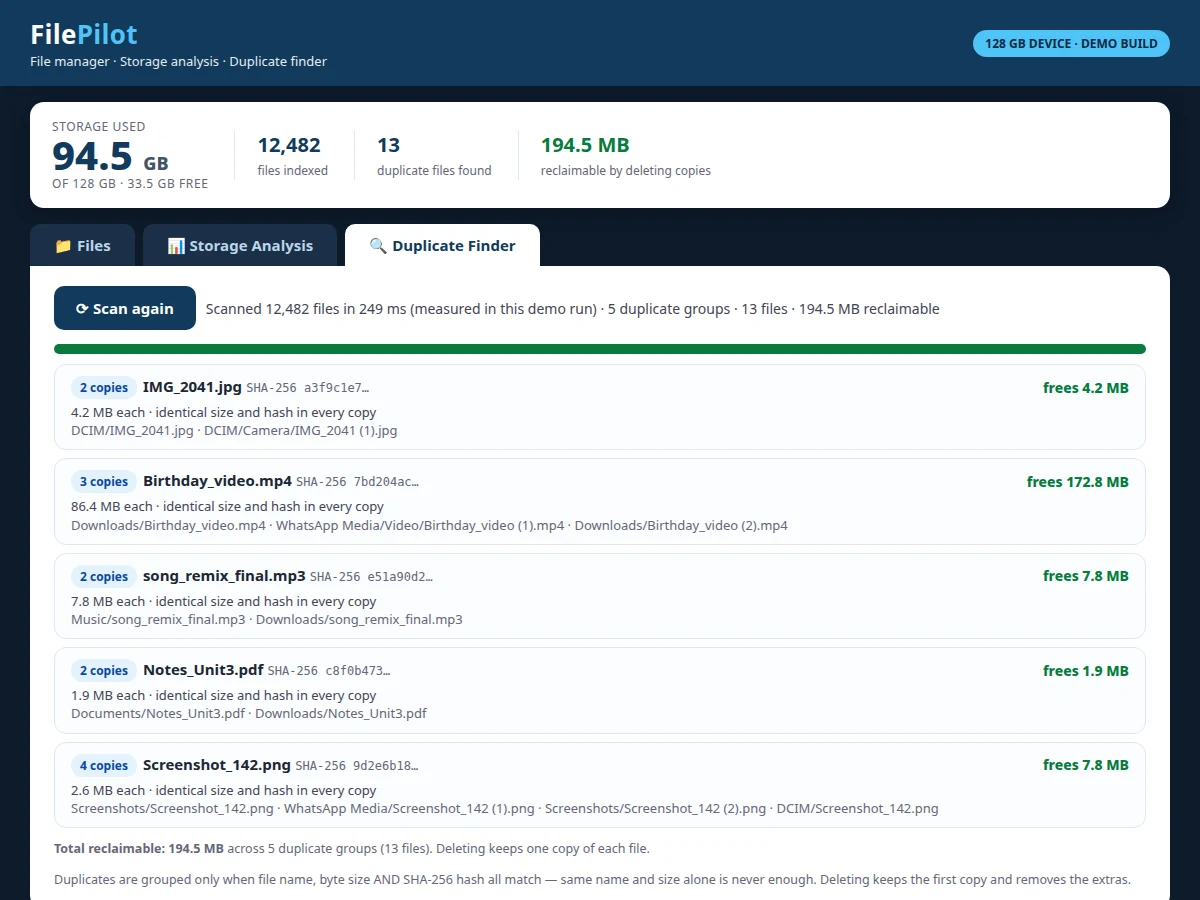
- The results screen lists each group with its copy count, hash prefix, file paths and the megabytes deleting the extras would free — 194.5 MB across 5 groups in the demo build.
- The user selects groups and confirms; the app deletes only the extra copies through the MediaStore or SAF delete call, keeps the first copy, and refreshes the storage totals.
Tech stack:
- Kotlin
- Jetpack Compose · Material 3
- Room database · SQLite
- MediaStore API · Storage Access Framework
- SHA-256 hashing
- ViewModel · StateFlow
- DataStore · Preferences
- Android Studio
| Parameter | Value |
|---|---|
| Platform | Android 11 (API 30) and above (design target) |
| Language | Kotlin |
| UI | Jetpack Compose · Material 3 |
| Local database | Room over SQLite, on-device only |
| Demo device storage | 128 GB total (demo build) |
| Demo storage used | 94.5 GB used · 33.5 GB free (demo build) |
| Files indexed | 12,482 files (demo build) |
| Duplicate scan time | Approximately 250 ms for 12,482 files (measured in the demo run) |
| Duplicate groups found | 5 groups covering 13 files (measured in the demo build) |
| Reclaimable space | 194.5 MB across 5 groups (measured in the demo build) |
| Largest duplicate group | Birthday_video.mp4 — 3 copies of 86.4 MB each (demo build) |
| Duplicate rule | File name + byte size + SHA-256 hash must all match |
| Largest file in demo | VID_1187.mp4 — 212.6 MB (demo build) |
| Installed size | Approximately 15–20 MB (expected) |
| Connectivity | Fully offline; no account, no cloud sync in the base build |
Project features
The file manager's four strongest capabilities are folder browsing with search and sorting, a storage-analysis view that breaks the device into categories, a duplicate finder that groups exact copies by SHA-256 hash, and a safe-delete flow that shows exactly how much space each deletion frees. Browsing lists every folder with its file count and size, and the largest-files view surfaces the videos and installers that actually fill the phone, sorted biggest first. The storage view draws a category donut and per-category bars from one measured breakdown, so the numbers always add up. The duplicate finder groups files only when name, byte size and hash all match, and lists the reclaimable megabytes per group. A cleanup-suggestions list ranks duplicate groups and large files together by reclaimable megabytes, so the biggest win is always on top. Deleting keeps the first copy and removes the extras only after the user confirms.
- [Folder browsing with search and sort] Every folder lists its file count and total size, and tapping a folder shows its largest files first with name, byte size and date; search filters by file name across the folder and sorting switches between largest-first, name and newest-first.
- [Storage analysis by category] A donut and per-category bars break the device into apps, photos and videos, audio, documents, downloads and system — in the demo build 94.5 GB used of 128 GB, with photos and videos the largest category at 38.4 GB.
- [SHA-256 duplicate finder] Files are grouped as duplicates only when file name, byte size and SHA-256 hash all match, so two different photos that happen to share a name are never flagged; the demo build finds 5 groups covering 13 files.
- [Safe delete with reclaimable total] Each duplicate group shows how much space deleting the extras frees — 172.8 MB for the largest group — and deletion keeps the first copy, removes only the extras, and asks for confirmation first.
- [Largest-file finder] The largest files on the device are ranked in one list, so a single forgotten 212.6 MB video in DCIM is visible immediately instead of hiding inside a folder total.
- [Cleanup suggestions] Duplicate groups and large files are ranked together by reclaimable megabytes, so the user sees the highest-value cleanups first instead of deleting small files one by one.
- [Offline Room database index] The file index — names, sizes, hashes and categories — is stored on the device in Room over SQLite, so browsing, analysis and duplicate search all work with no account and no cloud upload.
What is included
- Complete Android app source code (Kotlin, Jetpack Compose)
- Room database schema and data-layer code
- MediaStore and Storage Access Framework integration code
- SHA-256 duplicate-detection module with grouping and safe-delete flow
- Working demo app with a sample 12,482-file device index for testing
- Project report PDF (background, methodology, architecture, limitations)
- PPT presentation for final review
- Viva Q&A preparation document (scoped storage, MediaStore, SAF, Room, hashing)
Limitations & prerequisites
- On Android 11 and above the app works inside scoped storage: media files are reached through MediaStore and other folders through the Storage Access Framework, so it cannot silently browse every directory the way old file managers did.
- Broad all-files access needs the MANAGE_EXTERNAL_STORAGE permission, which app stores restrict for store listings — the app is therefore distributed as a direct installable build, not through an app store.
- Duplicate detection hashes only same-size candidates, so a file edited by even 1 byte produces a different hash and is correctly treated as a different file.
- The demo's 250 ms scan time and 194.5 MB reclaimable figure come from the sample 12,482-file index and a single demo device, not from a real phone or a different file mix.
- Deleting through SAF requires the user to grant folder access first; the app cannot delete from a folder the user has not approved.
- The base build covers internal storage only; SD-card scanning and scheduled automatic cleanup are optional customisations, not included features.
- The app is an academic prototype, not a commercial cleaner, and must not be presented as one.
Frequently Asked Questions
How does the duplicate finder decide two files are duplicates?
Two files count as duplicates only when all three match: file name, byte size in bytes, and the full SHA-256 hash of the file contents. Name alone is not enough — two different photos called IMG_2041.jpg stay separate — and size alone is not enough either, since two unrelated files can share a size. Hashing is done only for same-size candidates, which is why the demo build scans its 12,482-file index in about 250 ms (measured in the demo run). Unlike desktop duplicate finders that run on a PC against a hard drive, this is an Android app working inside scoped storage through MediaStore and the Storage Access Framework.
Is it safe — can it delete a file I actually need?
Yes, it is safe by design, because deletion always keeps one copy and only ever removes the extras. Each duplicate group lists every copy's full path before anything is deleted, the reclaimable megabytes are shown per group, and the user must confirm before a delete runs. The app never deletes automatically and never touches a file that is not part of a confirmed duplicate group, so the only copy of a photo or document is never at risk from the duplicate finder.
Does the app need internet or an account?
No — the file index, the category totals and the duplicate groups all live in a Room/SQLite database on the device, and every feature works fully offline with no sign-in and no cloud upload. Browsing, storage analysis, duplicate scanning and deletion run with the phone in airplane mode. That also means there is no cloud backup of the index unless an export or sync feature is added later, so the index lives on the one device.
Which Android versions and permissions does it need?
The app targets Android 11 (API 30) and above, where scoped storage applies. Media files are read through the MediaStore API, and folders outside the media collections are reached through the Storage Access Framework, which asks the user to pick each folder. Broad all-files access uses the MANAGE_EXTERNAL_STORAGE permission, which app stores restrict, so the app is distributed as a direct installable build rather than through an app store.
Can the app be customised?
Yes — the app can be extended, but each addition is quoted separately. Common additions are SD-card scanning, scheduled automatic cleanup with notifications, cloud backup of the file index, a junk-cache cleaner, sorting files by last-opened date, and a dark theme, while the base build stays deliberately a single-device file manager with browsing, storage analysis and duplicate finding.
Is this project suitable for a final-year project?
Yes — for Computer Science, IT and Android app development programs. It demonstrates mobile UI design with Jetpack Compose, local database work with Room, Android scoped-storage rules through MediaStore and the Storage Access Framework, file hashing with SHA-256, and a complete user-facing workflow from scanning to safe deletion, all in one app a student can demonstrate live on a real phone.
Components & software requirements
- Kotlin
- Jetpack Compose · Material 3
- Room database · SQLite
- MediaStore API · Storage Access Framework
- SHA-256 hashing
- ViewModel · StateFlow
- DataStore · Preferences
- Android Studio
Delivery information
Built-to-order project. Delivery timeline is shared after order confirmation based on current queue.
Support terms
Complete documentation, setup guide, and viva preparation included. Support for setup and explanation provided.
Download free synopsis (PDF)
Enter your name and WhatsApp number — the synopsis PDF downloads immediately. We may send occasional project updates on WhatsApp; no spam.