
More project photos (2)
The problem
Android Ebook Reader with Night Mode and Bookmarks is an Android reading app that solves a plain problem: phone reading is uncomfortable after dark, and ordinary document viewers forget where the reader stopped. Many students read ebooks on their phones, yet a generic viewer offers no book library, no low-light theme, no way to mark a passage and return to it, and no memory of progress. Bright screens strain eyes during long night sessions, and reopening a book to the first page breaks concentration. This project builds a dedicated reader that treats books as a library rather than loose files: EPUB books are imported, parsed into chapters, displayed with adjustable type, and reopened exactly where reading stopped. Night mode, bookmarks and progress tracking are built in from the start, so the app works as a daily reader and as a final-year project because every feature maps to an Android concept — file parsing, local persistence, theming and state management.
Imports an EPUB file through the Android file picker.
Follow the working sequence
How it works
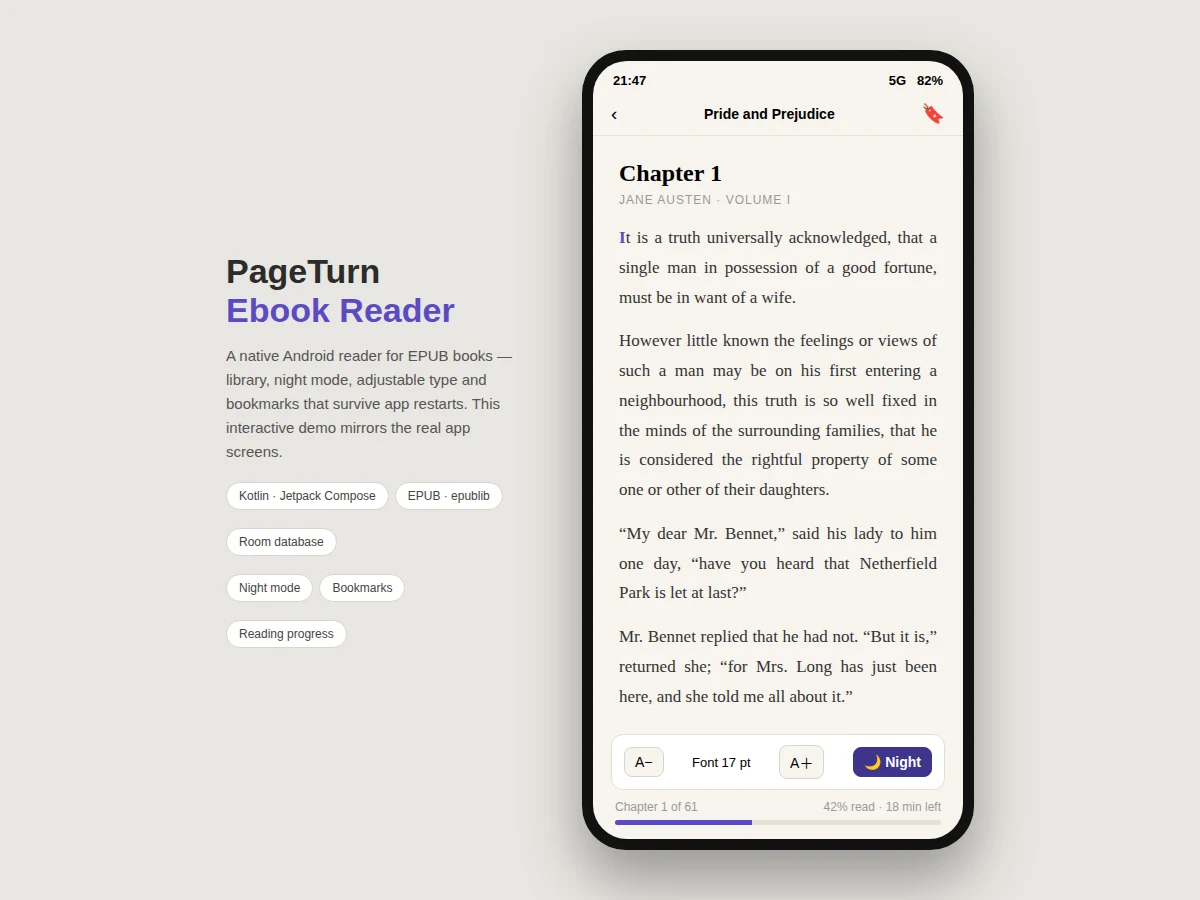
The app works end to end as a small pipeline: import, parse, display, remember. The user picks an EPUB file through the Android file picker, and epublib opens the EPUB archive, reads its metadata (title, author, cover) and splits the contents into chapters in reading order. The reading screen renders one chapter at a time with the reader's chosen font size and theme, and every page turn updates the stored reading position in the Room database. Bookmarks are saved as chapter-plus-offset records tied to the book, and the library screen reads the same database to show progress bars and resume points. Because parsing, rendering and storage all happen on the device, the app needs no server, no account and no internet after import — the full loop from tapping a book to resuming mid-chapter runs locally on the phone.
- The user imports an EPUB file through the Android Storage Access Framework file picker.
- epublib opens the EPUB archive and reads the book metadata — title, author, cover image and table of contents.
- The parser splits the book into chapters in reading order and the app stores the book record in the Room database.
- The library screen lists imported books with covers, authors and per-book progress bars.
- Tapping a book opens the reading view at the saved last-read position, rendering the current chapter with the reader's font size and theme.
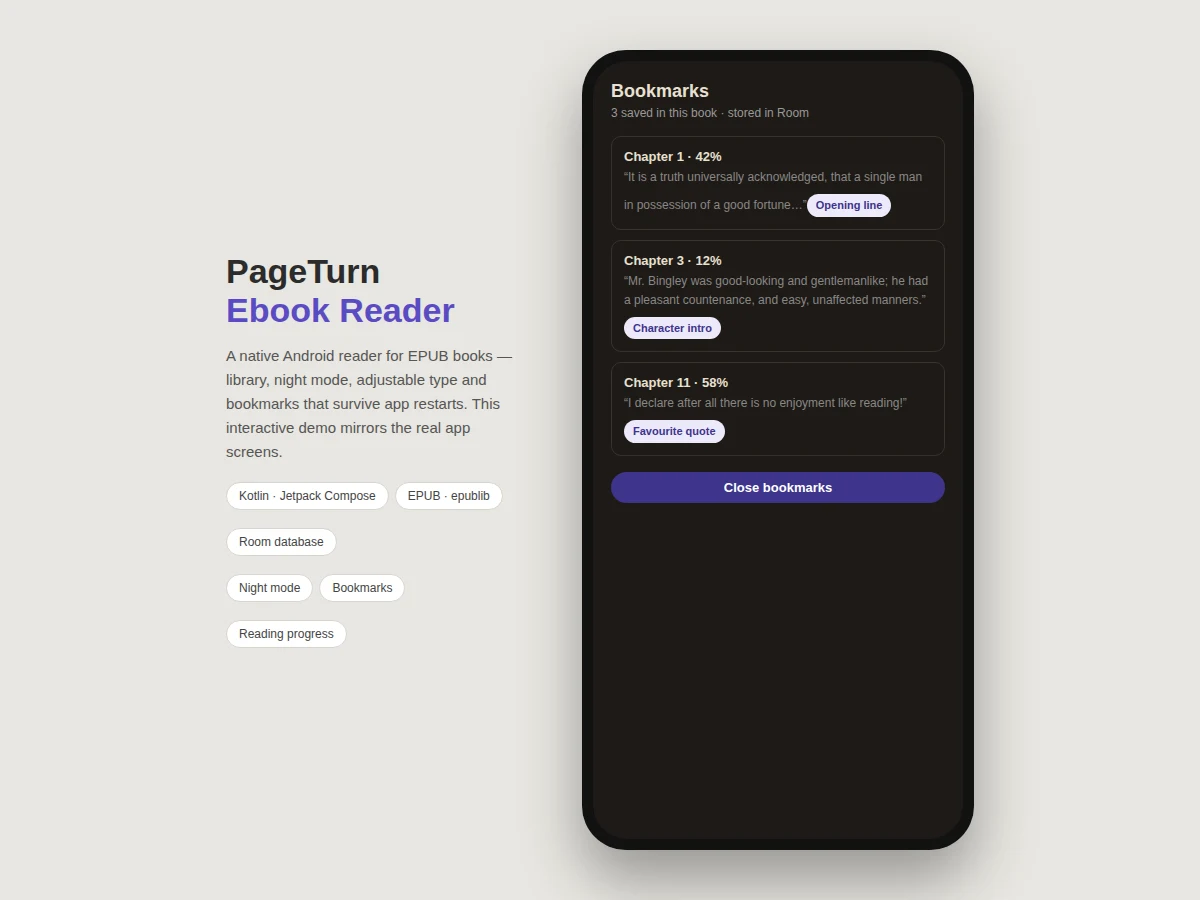
- Page turns update the stored position and percentage read; bookmarks save a chapter and offset with a short note.
- Night mode re-themes the reading screen in one tap, and all data stays on the device for fully offline reading.
Tech stack:
- Kotlin
- Jetpack Compose
- Android Studio
- epublib-core 4.0 · EPUB parsing
- Room database 3.0.3 · SQLite
- Android Storage Access Framework
- Material Design 3
- Gradle
| Parameter | Value |
|---|---|
| Platform | Android (API level 26 and above — design target) |
| Language | Kotlin |
| UI toolkit | Jetpack Compose (declarative UI) |
| EPUB parsing | epublib-core 4.0 (Java EPUB library) |
| Local database | Room 3.0.3 over SQLite (official version) |
| Font size range | 14–22 pt in 1 pt steps (9 sizes, measured in demo build) |
| Sample book chapters | 61 chapters in Pride and Prejudice (public-domain sample) |
| Bookmarks per book | No fixed limit (design target) |
| Reading data | Stored locally on device; no account or server |
| Internet | Not required after import (offline-first design) |
Project features
The reader is built around four capabilities that work together: an EPUB library, a comfortable reading view, night mode, and persistent bookmarks with progress. The library shows imported books with cover, author and a progress bar for each title, so the reader can see at a glance what is finished and what is in progress. The reading view renders real chapter text with adjustable font size, and night mode switches the whole screen to a dark, low-glare theme in one tap. Bookmarks save an exact position with a short note, and the app remembers the last-read page of every book, so reopening a book resumes mid-sentence. All reading data lives in a local Room database, which means bookmarks and progress survive app restarts and work without any internet connection. Together these features cover the complete lifecycle of reading a book on a phone — import, read, mark, resume — and each one is implemented in the base project.
- [EPUB library with covers and progress] Imported books appear as a cover grid with title, author and a progress bar per book, so the reader can pick up any book and see exactly how far through it they are.
- [Chapter-based reading view] Each EPUB is parsed into chapters and rendered as clean, paginated serif text with chapter headings, so long books stay navigable instead of scrolling as one endless document.
- [Night mode] One tap switches the whole reading screen to a dark, low-glare theme with warm text, reducing eye strain during late-night reading sessions.
- [Adjustable font size] Type scales from 14 pt to 22 pt in 1 pt steps (9 sizes, measured in the demo build), so readers with different eyesight and screen sizes can set a comfortable size.
- [Bookmarks with notes] Any position can be saved with a short label such as a favourite quote or a revision point, and the bookmark list jumps straight back to that exact spot.
- [Reading-progress tracking and resume] The app records the last-read position of every book and the percentage read, so reopening a book resumes mid-sentence instead of at the start.
- [Offline-first local storage] Books, bookmarks and progress are stored in a Room database on the device, so everything works without internet once books are imported.
What is included
- Complete Android app source code (Kotlin + Jetpack Compose)
- EPUB import and parsing with epublib, chapter navigation and metadata display
- Room database layer for books, bookmarks and reading progress
- Night mode, adjustable font size and bookmark screens as in the demo
- Working demo screens with real public-domain book text
- Project report PDF (background, architecture, methodology, results)
- PPT presentation for final review
- Viva Q&A preparation document (EPUB parsing, Room, Compose state, theming)
Limitations & prerequisites
- EPUB format only in the base build — PDF and other formats are not supported without an added parser.
- Books with heavy fixed-layout formatting, embedded fonts or DRM protection may not render as intended; DRM-protected files cannot be opened at all.
- Covers are shown from the EPUB metadata where present; books without embedded covers use a generated title cover.
- Font size range is 14–22 pt (9 sizes) — sizes outside this range need a settings change.
- Reading progress is stored per device; there is no cloud sync, so progress does not carry across phones.
- The app is a student reading prototype, not a commercial store — it has no book purchasing or download catalogue.
Frequently Asked Questions
Is this project suitable for a final-year project?
Yes. It fits Computer Science, IT and Android-focused final-year work because it combines file parsing, local database design, declarative UI and theming in one complete, demonstrable app. The viva discussion can cover EPUB structure, Room entities and DAOs, Compose state management and offline-first design, all of which are standard Android concepts an examiner expects a student to explain.
Which EPUB features does the reader support?
The reader supports standard reflowable EPUB files: metadata, cover image, table of contents and chapter text parsed with epublib-core 4.0. Books open chapter by chapter with adjustable type and night mode. Fixed-layout EPUBs, embedded fonts and DRM-protected files are outside the base build, and the report states these limits honestly.
Does the app need the internet to read?
No. Once an EPUB file is imported, everything works offline: parsing, rendering, bookmarks, progress tracking and night mode all run on the device. The only step that needs a file is the import itself, which reads from local storage or a file the user already has. No account, server or download catalogue is involved.
How do bookmarks and progress survive app restarts?
Bookmarks and reading positions are stored as rows in a Room database (SQLite) on the device, not in memory. Room provides compile-time-checked queries through DAOs, so a saved bookmark is written to disk immediately and reloaded when the app opens again. Closing the app, restarting the phone or opening another book does not lose any saved position.
Can the reader be customised?
Yes. Realistic additions include in-book text search, a dictionary lookup on selected words, a sepia theme alongside night mode, reading statistics such as minutes read per day, and PDF support through an added parser. The report lists these as customisation options with the effort each one needs, so a team can pick what fits their timeline.
Components & software requirements
- Kotlin
- Jetpack Compose
- Android Studio
- epublib-core 4.0 · EPUB parsing
- Room database 3.0.3 · SQLite
- Android Storage Access Framework
- Material Design 3
- Gradle
Delivery information
Built-to-order project. Delivery timeline is shared after order confirmation based on current queue.
Support terms
Complete documentation, setup guide, and viva preparation included. Support for setup and explanation provided.
Download free synopsis (PDF)
Enter your name and WhatsApp number — the synopsis PDF downloads immediately. We may send occasional project updates on WhatsApp; no spam.