
More project photos (2)
The problem
AI Image Background Remover using GPT-Image-2.6 is a web application that turns a product photo with a busy or plain backdrop into a clean cut-out with a transparent background. A seller uploads a photo of a mug, shoe, watch or any small product, and the app returns the same product with the background removed, ready to list. The removal runs in two stages: a fast client-side pass clears the backdrop from the photo's own pixels in milliseconds, and an AI refinement step sends the result to OpenAI's GPT-Image-2.6 image-editing model, which cleans ragged edges, repairs fine detail and preserves the product's original colours. The model is used through the Images API edits endpoint, with the fast Flare variant for quick refinement and the detailed Sunburst variant for careful work. Tolerance control, background choices and one-click PNG download complete the app, so a student can demonstrate the whole pipeline in a single working demo.
Online sellers photograph products on whatever surface is at hand — a desk, a bedsheet, a shop counter — and then spend minutes per photo cutting the product out by hand in an editor. That manual step is slow, inconsistent across a catalogue, and out of reach for a small seller with hundreds of listings. Existing free removers either watermark the result, cap the number of free images, or send every photo to a server the seller does not control. This project shows a different arrangement: the first pass runs entirely in the browser so nothing is uploaded before the user chooses, and only the refinement step calls a hosted image model, with the exact request visible on screen. For a student it is a compact way to demonstrate image processing, API integration and a real seller workflow in one build.
A product photo is picked from the samples or uploaded in the browser.
Follow the working sequence
How it works
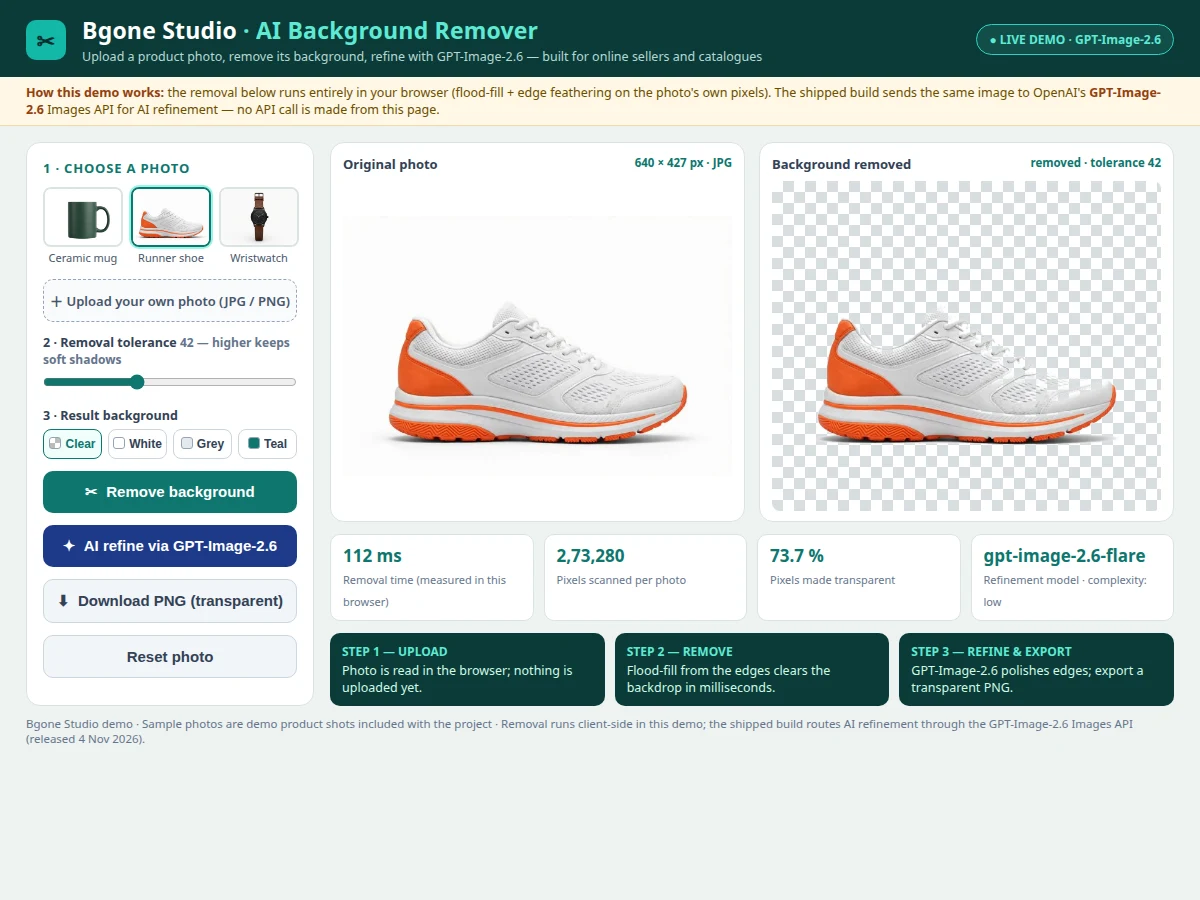
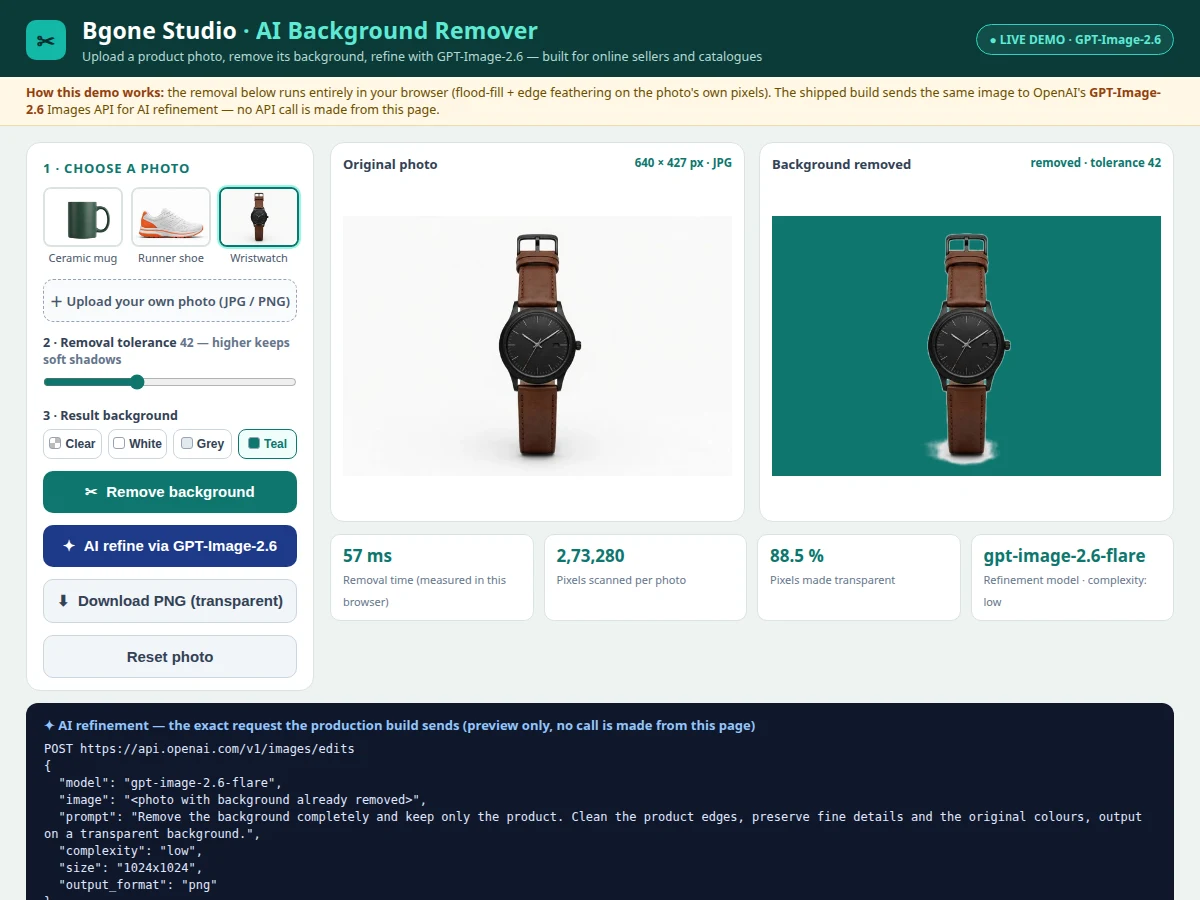
The app moves a photo through four stages: upload, client-side removal, AI refinement and export. Upload accepts a JPG or PNG from the device, or one of three built-in demo product photos — a ceramic mug, a running shoe and a wristwatch — and draws it on a canvas at 640 by 427 pixels. Removal samples the backdrop colour from the photo's four corners and walks every pixel, measuring its colour distance from that backdrop; pixels close to the backdrop turn transparent, pixels far from it stay solid, and a one-pixel feather smooths the boundary so edges look natural. The result is shown side by side with the original, with the measured removal time and the share of pixels cleared. Refinement is optional: the cut-out is sent to the GPT-Image-2.6 Images API edits endpoint with a prompt that asks the model to clean the edges and keep only the product. Finally the finished image downloads as a transparent PNG.
- The user uploads a JPG or PNG photo, or picks one of the three built-in demo product photos (ceramic mug, running shoe, wristwatch).
- The photo is drawn on a 640 × 427 px canvas and the backdrop colour is sampled from the four corner patches of the image.
- Every pixel is compared with the sampled backdrop colour; pixels within the tolerance turn transparent, pixels beyond it stay solid, and a one-pixel feather smooths the edge.
- The original and the cut-out are shown side by side, with the measured removal time and the share of pixels cleared.
- The user adjusts the tolerance slider or switches the preview background (transparent, white, grey or teal) until the cut-out looks right.
- On request, the cut-out is sent to the GPT-Image-2.6 Images API edits endpoint (model gpt-image-2.6-flare, complexity low) with a prompt to clean the edges and keep only the product.
- The refined image is returned as a PNG and the user downloads the finished cut-out with a transparent background.
| Approach | How the background is removed | Cost per photo | Suits |
|---|---|---|---|
| This project (client-side + GPT-Image-2.6) | Pixel rules in the browser, then AI edge refinement via the Images API | Token rates apply only to the refinement step | Sellers and students who want a visible, inspectable pipeline |
| Manual photo editor | A person traces the outline by hand | Free, but minutes of work per photo | One-off photos where perfect edges matter |
| Free online removers | Upload to a third-party server, black-box result | Free tier with limits or watermarks | Quick one-off removals with no privacy concern |
| Desktop batch tools | Scripted rules or a local segmentation model | One-time software cost | Large catalogues processed offline |
Tech stack:
- HTML5 · CSS · JavaScript
- Canvas 2D API
- OpenAI Images API
- GPT-Image-2.6 Flare
- GPT-Image-2.6 Sunburst
- Node.js · Express backend proxy
- Python 3 tooling
- Git
Dataset & model details
- Dataset: No training dataset is used. The demo ships with 3 sample product photos (ceramic mug, running shoe, wristwatch) used only to demonstrate removal; they are demo samples, not training data. The shipped build calls a hosted model and trains nothing.
- Task: Image editing — input is a product photo plus a text prompt, output is the same photo with the background removed and the product preserved.
- Model: GPT-Image-2.6, OpenAI's image model released 4 November 2026, used through the Images API edits endpoint. Two API variants: gpt-image-2.6-flare for fast iteration and gpt-image-2.6-sunburst for detailed work and consistency across edits. Both support complexity control (low, medium, high; default high, no separate fee), markup-guided edits, SVG output and animated GIF output.
- Metrics: No accuracy figure is claimed. Quality is judged by visual inspection of the cut-out edges, and the demo reports measured removal time, pixels scanned and the share of pixels cleared for every photo.
| Parameter | Value |
|---|---|
| Input photo | JPG or PNG, up to 10 MB (design target) |
| Working canvas | 640 × 427 px (demo build) |
| Pixels scanned | 273,280 per demo photo (640 × 427 px) |
| Client-side removal time | Approximately 40–112 ms per photo at 640 × 427 px (measured in the demo browser; varies with machine) |
| Share of pixels cleared | 73.7–88.5% across the three demo samples (measured in the demo) |
| Refinement model | gpt-image-2.6-flare, complexity low (design target) |
| Refinement output | 1024 × 1024 px PNG (design target) |
| API endpoint | POST /v1/images/edits |
| Token rates | $5 per million text-input tokens · $8 per million image-input tokens · $30 per million image-output tokens (OpenAI published list price, November 2026) |
| Export | PNG with transparency |
| Runs offline | Client-side removal only; AI refinement needs internet and an API key |
Project features
Bgone Studio, the web app at the centre of this project, is built around four capabilities that a visitor can try in under a minute. First, instant client-side removal clears a light backdrop from a photo the moment it is uploaded, with a tolerance slider that trades edge tightness against soft shadows. Second, one-click AI refinement sends the cut-out to GPT-Image-2.6, which rebuilds frayed edges and restores fine detail that pixel rules alone cannot judge. Third, background choices — transparent checkerboard, white, grey or a brand colour — let the same cut-out be previewed exactly as it would appear in a store listing. Fourth, transparent PNG export downloads the finished image for immediate use in a catalogue or advertisement. Around those four sit upload support for the user's own photos, three built-in demo product shots, live statistics for every removal, and a visible copy of the exact API request the production build sends, so the whole system stays inspectable.
- [Instant client-side background removal] The backdrop is cleared in the browser by sampling the photo's corner colour and removing connected near-background pixels with a one-pixel feather, so the first result appears in milliseconds with nothing uploaded.
- [AI refinement via GPT-Image-2.6] One click sends the cut-out to the Images API edits endpoint with model gpt-image-2.6-flare and complexity set to low, asking the model to clean the edges and keep only the product.
- [Tolerance slider] A slider from 15 to 90 controls how aggressively near-background pixels are removed, so soft shadows can be kept or cleared depending on the photo.
- [Background choices and live preview] The cut-out can be previewed on a transparent checkerboard, white, grey or a brand teal background, matching how it will look in a real listing.
- [Upload your own photo] Any JPG or PNG from the device can be dropped into the app and processed the same way as the built-in samples.
- [Transparent PNG download] The finished cut-out downloads as a PNG with a real alpha channel, ready to paste into a catalogue, listing or advertisement.
- [Visible API request and live statistics] The demo shows the exact JSON request the production build sends and reports the measured removal time, pixels scanned and share of pixels cleared for every photo.
What is included
- Complete web app source code (frontend + Node.js backend proxy that holds the API key server-side)
- Working single-file demo with three sample product photos
- GPT-Image-2.6 API integration with the exact edits-endpoint request documented
- Project report PDF (background, image-processing method, API design, methodology, results)
- PPT presentation for final review
- Viva Q&A preparation document (colour distance, alpha feathering, API endpoints, token pricing, limitations)
Limitations & prerequisites
- The client-side pass only handles light, near-uniform backdrops; busy or textured backgrounds need the AI refinement step.
- Fine detail such as hair, fur or translucent glass can lose edge quality; the demo's feathering is 1 px.
- AI refinement needs internet and a paid OpenAI API key; token rates apply per image and are billed by OpenAI.
- Demo photos are processed at 640 × 427 px; larger uploads are downscaled in the demo build.
- No accuracy figure is claimed; cut-out quality is judged by visual inspection of the edges.
- The demo page makes no live API call; the refinement panel shows the request the production build sends.
Frequently Asked Questions
Which model is used and how does it remove the background?
GPT-Image-2.6, OpenAI's image model released 4 November 2026, in its fast Flare variant. The removal itself runs in two stages: a client-side pass clears the light backdrop using colour distance from the photo's corners, and the cut-out is then sent to the Images API edits endpoint, where the model cleans the edges and keeps only the product. In the demo you can watch both stages happen: the browser pass first, then the refinement panel showing the exact API request.
Is this project suitable for a final-year project?
Yes — for Computer Science, IT and AI & Machine Learning programmes, where it demonstrates image processing, API integration and a complete product workflow in one build. The report explains the colour-distance method, the API design and the token pricing, and the working demo lets a student show the full pipeline live during the review. The demo is the strongest part of a review: the student can upload a fresh photo live and walk the examiner through each stage.
Does the demo call the OpenAI API?
No. The demo page makes no network call and ships no API key; the background removal you see runs entirely in the browser on your own machine, so it works offline and no photo ever leaves the device before you choose to refine it. The AI refinement panel only displays the exact request the production build sends — POST /v1/images/edits with model gpt-image-2.6-flare — and the shipped build sends it from a server-side proxy that holds the key. That separation is deliberate: a key inside a web page would be visible to anyone who opened the source, so the shipped build keeps it on the server.
What photos work well, and which ones fail?
Product photos on a light, plain backdrop work reliably — the demo mug, shoe and watch clear cleanly at the default tolerance. Busy, textured or dark backgrounds fail the client-side pass because the backdrop colour cannot be sampled reliably, and fine detail such as hair, fur or glass loses edge quality. Those cases rely on the GPT-Image-2.6 refinement step. The tolerance slider is the quick fix for borderline photos: lowering it keeps more of a soft shadow, raising it clears a pale backdrop more firmly.
Can this project be customised?
Yes. Realistic extensions include batch processing for a whole catalogue folder, extra background colours or branded templates, a Sunburst option for careful refinement work, and a comparison view that shows the client-side cut-out next to the AI-refined one side by side. The backend proxy can also add per-user usage limits and an upload history. Each of these is a small, well-bounded change, so a team can pick one as their own contribution and defend it in the review.
What will I receive with the project?
The complete web app source code with the frontend and the server-side API proxy, the working demo with its three sample product photos, the GPT-Image-2.6 integration guide, the project report, a PPT for the final review and a viva Q&A document. The OpenAI API key itself is not included — the buyer creates one on their own OpenAI account. The report and Q&A document are written around the actual build, so the student can explain the method and the API design without memorising generic theory.
Components & software requirements
- HTML5 · CSS · JavaScript
- Canvas 2D API
- OpenAI Images API
- GPT-Image-2.6 Flare
- GPT-Image-2.6 Sunburst
- Node.js · Express backend proxy
- Python 3 tooling
- Git
Dataset & model details
- Dataset: No training dataset is used. The demo ships with 3 sample product photos (ceramic mug, running shoe, wristwatch) used only to demonstrate removal; they are demo samples, not training data. The shipped build calls a hosted model and trains nothing.
- Task: Image editing — input is a product photo plus a text prompt, output is the same photo with the background removed and the product preserved.
- Model: GPT-Image-2.6, OpenAI's image model released 4 November 2026, used through the Images API edits endpoint. Two API variants: gpt-image-2.6-flare for fast iteration and gpt-image-2.6-sunburst for detailed work and consistency across edits. Both support complexity control (low, medium, high; default high, no separate fee), markup-guided edits, SVG output and animated GIF output.
- Metrics: No accuracy figure is claimed. Quality is judged by visual inspection of the cut-out edges, and the demo reports measured removal time, pixels scanned and the share of pixels cleared for every photo.
Delivery information
Built-to-order project. Delivery timeline is shared after order confirmation based on current queue.
Support terms
Complete documentation, setup guide, and viva preparation included. Support for setup and explanation provided.
Download free synopsis (PDF)
Enter your name and WhatsApp number — the synopsis PDF downloads immediately. We may send occasional project updates on WhatsApp; no spam.