
More project photos (2)
The problem
Wildfires grow from a wisp of smoke to an uncontrollable front in minutes, and early detection is the difference between a contained incident and a disaster. Forest camera networks stream thousands of frames a day, but nobody can watch them all — an automated first pass that flags suspicious smoke plumes for a human reviewer is exactly what these networks need. Building that first pass is genuinely hard: smoke is amorphous and changes shape constantly, and clouds, fog, dust and glare are classic false alarms that look deceptively similar from a distance. This project frames the task as binary frame classification: a transfer-learned ResNet or EfficientNet scores each sampled frame for smoke, and an alert candidate is raised only when confident detections persist over a time window — single-frame noise never triggers an alert. Grad-CAM overlays show which image regions drove each alert so the reviewer judges reasoning, not just a number, and the evaluation includes an explicit false-alarm analysis over hard negatives.
How it works
Dataset & model:
Dataset name: Public wildfire smoke imagery from forest camera networks such as HPWREN (High Performance Wireless Research and Education Network, UC San Diego).
Source: Publicly released camera imagery from the HPWREN network, used in fire-detection research.
Task: Binary image classification (smoke vs no-smoke) per sampled frame, with a time-window alert rule.
Classes: Smoke / no-smoke — the binary labeling scheme defined by the build over the public imagery (there is no single official labeled smoke-detection benchmark used here).
Model: Transfer-learned CNN — pre-trained ResNet or EfficientNet backbone fine-tuned on the smoke imagery.
Input: Forest camera frames (JPEG/PNG), sampled and normalized.
Prediction: Per-frame smoke probability.
Output: Alert candidates on sustained detections, with Grad-CAM overlays explaining each alert.
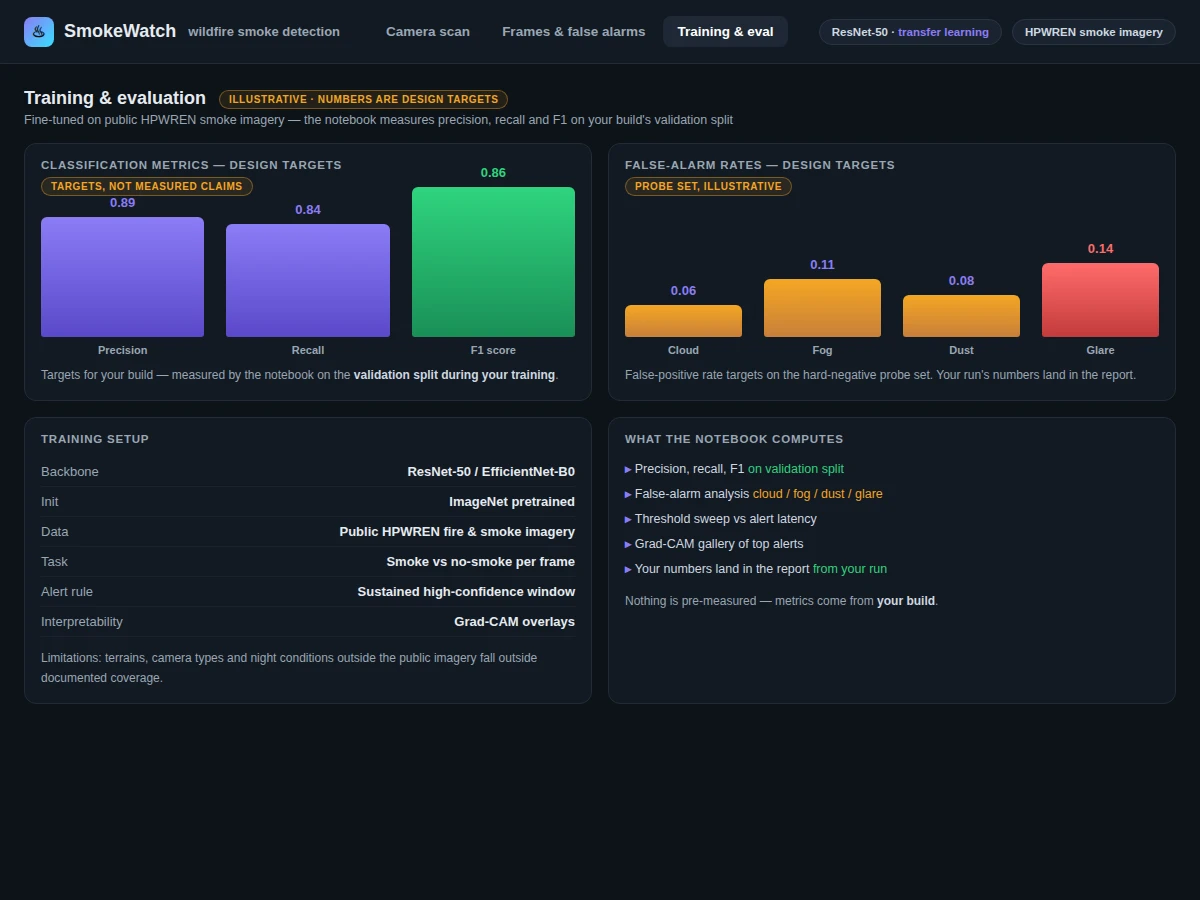
Evaluation metrics: Precision, recall, F1 on the validation split, plus a dedicated false-alarm analysis over clouds, fog and dust — computed by the notebook during the buyer's build. No metrics claimed.
Working:
- Frames are sampled from forest camera feeds and normalized with OpenCV.
- Training phase: a pre-trained ResNet or EfficientNet backbone is fine-tuned on public smoke imagery for binary smoke / no-smoke classification.
- Inference phase: the fine-tuned classifier scores each sampled frame and outputs a smoke probability.
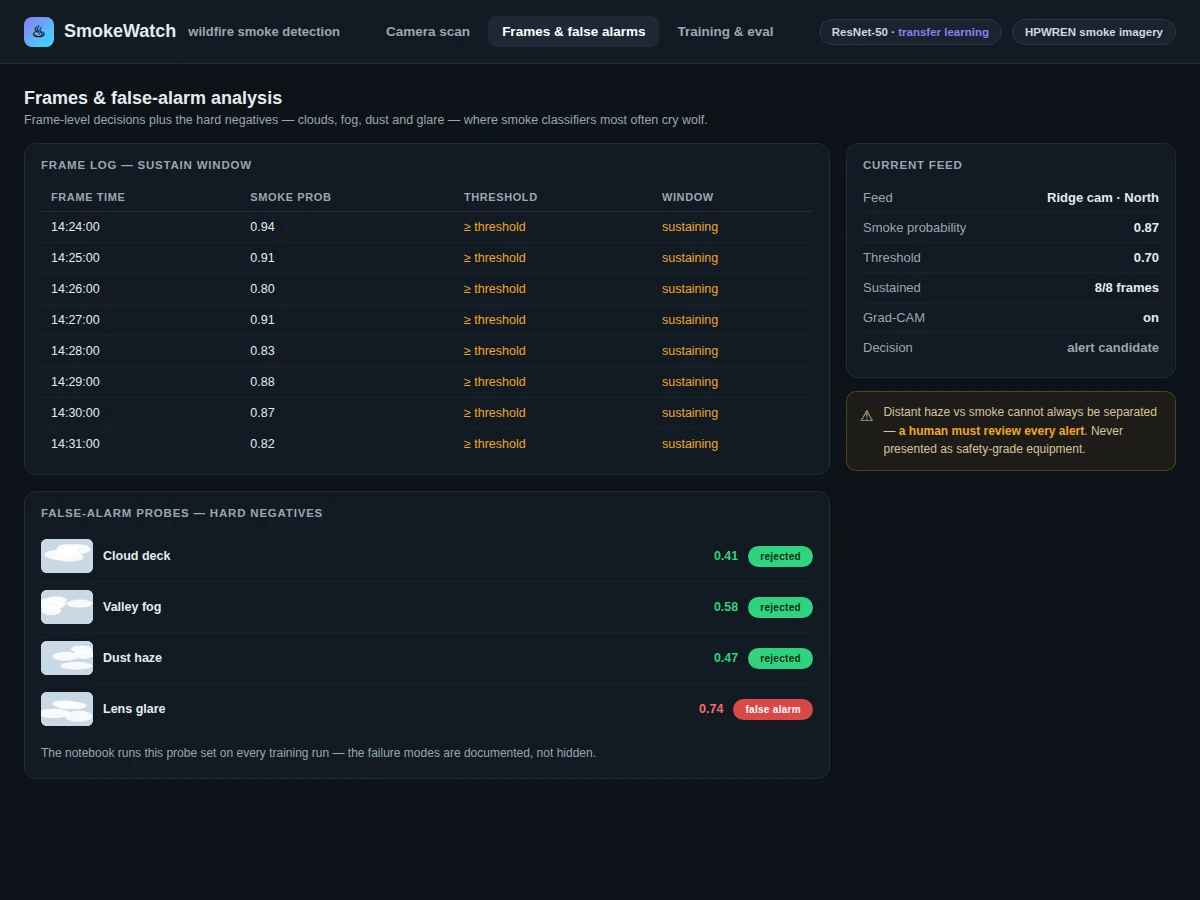
- Frames staying above the threshold across a time window become an alert candidate, suppressing single-frame noise.
- Grad-CAM overlays visualize the attended regions so a human reviewer can judge whether the model saw a real plume or was fooled by a cloud.
- Evaluation phase: the notebook computes precision, recall and F1 on the validation split and runs the false-alarm analysis over hard negatives.
Specifications:
Model | Transfer-learned CNN (ResNet or EfficientNet backbone, ImageNet pre-trained, fine-tuned)
Data | Public HPWREN fire and smoke camera imagery
Task | Binary frame classification (smoke / no-smoke) with time-window alerting
Input | Forest camera frames (JPEG/PNG), sampled and normalized
Output | Alert candidates on sustained detections + Grad-CAM overlays
Alert rule | Configurable probability threshold + persistence across a time window
Evaluation | Precision, recall, F1 + false-alarm analysis — computed by the notebook during the buyer's build
Demo app | Flask app with camera-frame upload interface
Scope | Daytime forest camera frames from the evaluated imagery sources
Project features
[Transfer-Learned Smoke Classifier] (implemented) — ResNet or EfficientNet backbone, pre-trained on ImageNet and fine-tuned on public wildfire smoke imagery for binary classification.
[Per-Frame Smoke Probability] (implemented) — Each sampled frame gets a smoke probability score with a configurable alert threshold.
[Time-Window Alert Rule] (implemented) — Alert candidates trigger only on sustained high-confidence detections across a time window, not single frames.
[Grad-CAM Alert Explanations] (implemented) — Overlays show which image regions drove each alert for human review.
[False-Alarm Analysis] (implemented) — The notebook explicitly evaluates clouds, fog and dust as hard negatives alongside precision, recall and F1.
[Evaluation Notebook] (implemented) — Computes precision, recall and F1 on the validation split with the false-alarm study during the build.
[Camera-Feed Demo App] (implemented) — Flask demo app for uploading and scoring camera frames.
[Night Infrared Inputs] (future-scope) — Night-capable infrared inputs and video-sequence modeling are future work, not included features.
What is included
Complete source code (training, inference, alert logic, Grad-CAM, demo app)
Jupyter training and evaluation notebook (precision, recall, F1, false-alarm analysis)
Project report PDF (background, smoke imagery, methodology, evaluation, error analysis)
PPT presentation for final review
Viva Q&A preparation document (CNNs, transfer learning, Grad-CAM, false alarms, evaluation)
Setup guide (environment, dataset download, training, running on your own camera frames)
Limitations & prerequisites
Clouds, fog, dust and glare are the classic false-alarm sources: the notebook includes a false-alarm analysis, but the system cannot reliably separate distant haze from smoke in all conditions — a human must review every alert.
Public HPWREN imagery is the only evaluated source; other terrains, camera types and night conditions fall outside the documented coverage.
Scope covers daytime forest camera frames from the evaluated imagery sources only.
This is an early-warning research prototype, not a certified fire-alarm system — it must never replace official fire-detection infrastructure or be presented as safety-grade equipment.
The smoke / no-smoke labeling scheme is the build's own; there is no single official labeled benchmark used here, so cross-source generalization is not claimed.
Frequently Asked Questions
Which dataset and model are used?
Public wildfire smoke imagery from forest camera networks such as HPWREN (the public UC San Diego camera network), labeled by the build's own smoke / no-smoke scheme. The model is a ResNet or EfficientNet CNN, pre-trained on ImageNet and fine-tuned on the smoke imagery (transfer learning).
Is the detection performance guaranteed?
No measured performance is claimed. The included notebook computes precision, recall and F1 on the validation split and runs a dedicated false-alarm analysis over clouds, fog and dust during the buyer's own build.
How are false alarms controlled?
Two ways: a time-window alert rule (only sustained high-confidence frames become alert candidates) and a false-alarm analysis in the notebook that documents cloud/fog/dust failure modes. Every alert still requires human review.
Can this be used as real fire-alarm equipment?
No. This is an early-warning research prototype, not a certified fire-alarm system. It must never replace official fire-detection infrastructure or be presented as safety-grade equipment.
Is this project suitable for a final-year project?
Yes, for B.E./B.Tech in Computer Science, AI/ML, Data Science and related programs. It demonstrates transfer learning, class-imbalance handling, model interpretability (Grad-CAM) and honest false-alarm analysis.
What will I receive, and can it be customized?
Source code (training, inference, alert logic, Grad-CAM, demo app), the evaluation notebook, report, PPT, viva Q&A and a setup guide. Customizable: video-sequence modeling, multi-camera alert fusion, night-capable infrared inputs, scoped at quotation.
Components & software requirements
Python 3.10, PyTorch (CNN training and inference)
torchvision (pre-trained ResNet and EfficientNet backbones)
OpenCV (frame capture, preprocessing, alert overlays)
NumPy, scikit-learn (metrics, false-alarm analysis)
Jupyter Notebook (evaluation with precision, recall, F1)
Flask (demo app with camera-feed upload interface)
Public HPWREN fire and smoke imagery (download guidance in the setup guide)
GPU recommended for fine-tuning (cloud-GPU guidance in the setup guide)
Delivery information
Built-to-order: the source code, evaluation notebook, report, PPT and viva kit are prepared fresh for the buyer. Typical delivery spans dataset setup, the fine-tuning run, evaluation and documentation; the exact schedule is confirmed at quotation.
Support terms
Setup guidance (environment, dataset download, training commands, running on your own camera frames); viva preparation covering CNNs, transfer learning, Grad-CAM, false alarms and evaluation; customization discussion (video-sequence modeling, multi-camera fusion, infrared inputs) scoped at quotation.