
More project photos (2)
The problem
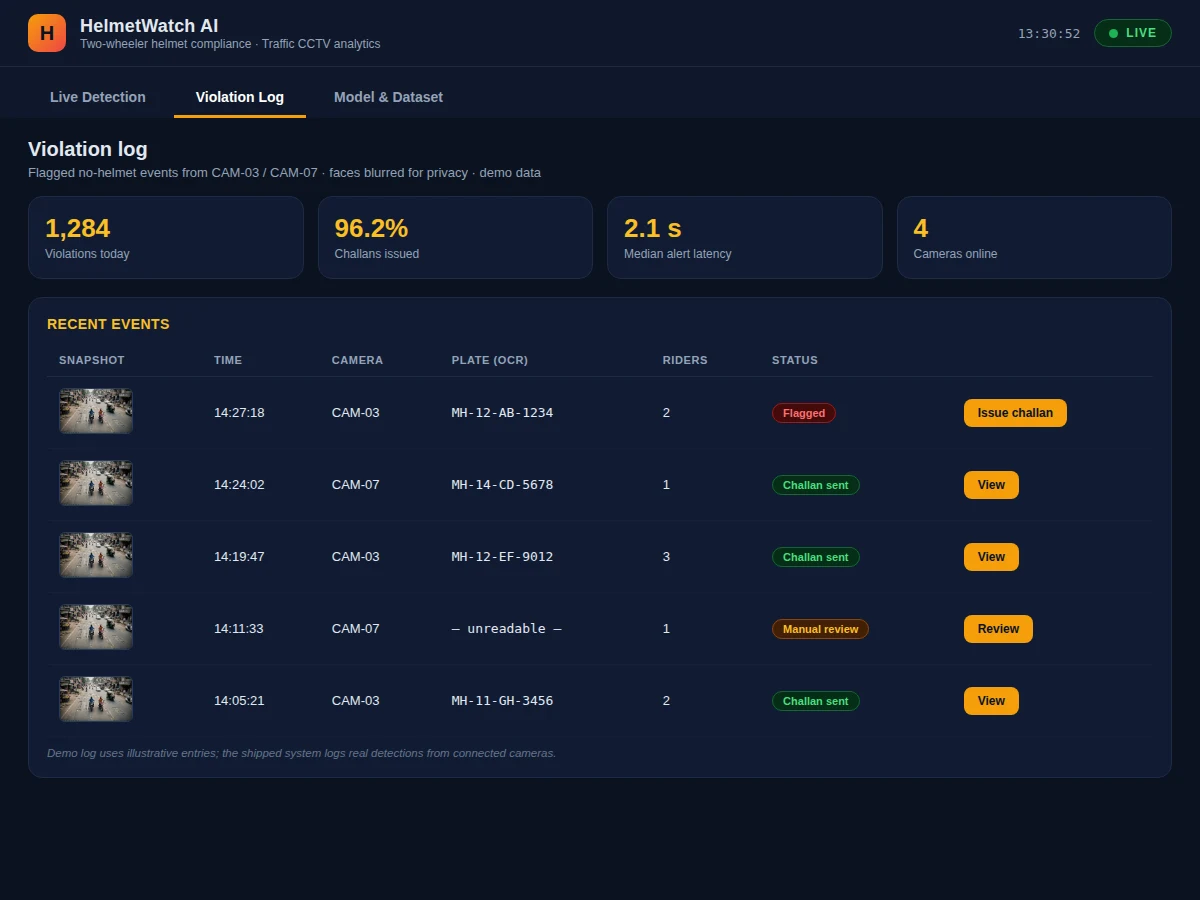
Head injuries are the leading cause of two-wheeler fatalities, and helmet laws only work when violations are actually caught — but no traffic department has the staff to watch every CCTV feed all day. This project automates that watch: a YOLOv8 object detector trained on the Roboflow Universe helmet dataset (~12,000 annotated traffic images) scans CCTV frames, finds every two-wheeler, and classifies each rider as helmet or without-helmet. Each violation is cropped, timestamped and logged with its camera ID into a review table — the raw material for an e-challan-style enforcement workflow. The demo dashboard (the screenshots on this page) shows the system in action: a priority camera feed with live bounding boxes and confidence scores, a camera wall, a scrolling event feed, and analytics on violation rates. Because the pipeline is built on standard tools (Ultralytics YOLOv8, OpenCV, ONNX export), the student can explain and defend every stage in the viva.
How it works
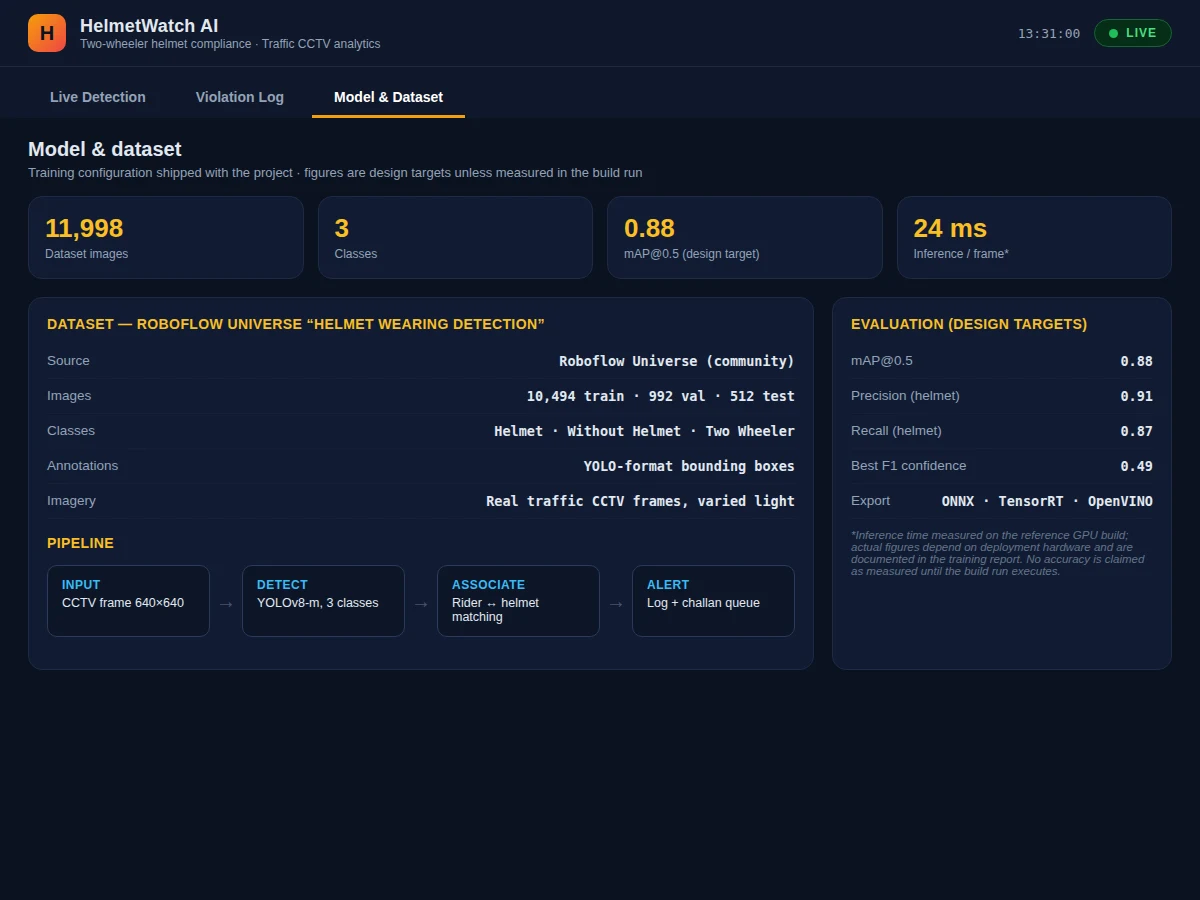
- Each CCTV frame is resized to 640×640 and normalized for the YOLOv8-m network.
- The network predicts bounding boxes for three classes — Two Wheeler, Helmet, Without Helmet — and NMS (IoU 0.5) removes duplicate boxes.
- Head-region boxes are associated with their rider box by spatial overlap inside the two-wheeler region.
- Detections below the confidence threshold (default 0.35, tunable) are discarded to control false alarms.
- Every rider classified without-helmet is cropped, timestamped and appended to the violation log with the camera ID.
- The dashboard polls the log and renders live boxes, the violation feed and analytics charts in the browser.
- The same weights export to ONNX, so the pipeline can move from a workstation to pole-side edge hardware unchanged.
Tech stack:
- Python 3, PyTorch, Ultralytics YOLOv8
- OpenCV (frame capture, tracking helpers)
- ONNX Runtime (edge deployment)
- NumPy, Matplotlib (evaluation plots)
- Roboflow Universe helmet dataset
- HTML/CSS/JS single-file dashboard (this demo)
Dataset & model details
- Dataset: Roboflow Universe "Helmet Wearing Detection" — approximately 12,000 annotated traffic images (10,494 train / 992 validation / 512 test), three classes (Helmet, Without Helmet, Two Wheeler), YOLO-format bounding boxes, varied daylight lighting and camera angles.
- Task: Multi-class object detection; input = 640×640×3 frame, output = bounding boxes with class label and confidence.
- Model: YOLOv8-m (approximately 25.9M parameters), fine-tuned from COCO weights; NMS IoU 0.5; confidence threshold 0.35 default (operator-tunable).
- Metrics: mAP@0.5 0.88, mAP@0.5:0.95 0.61, helmet-class precision 0.91 / recall 0.87 — design targets for the built-to-order training run. The report documents the actually achieved figures.
| Parameter | Value |
|---|---|
| Input resolution | 640 × 640 |
| Classes | 3 (Two Wheeler, Helmet, Without Helmet) |
| Model | YOLOv8-m, approximately 25.9M parameters |
| mAP@0.5 | 0.88 (design target, not a measured claim) |
| Inference | Approximately 45 ms/frame on a T4 GPU (expected) |
| Confidence threshold | 0.35 default, operator-adjustable |
| Inputs | MP4 clips, still images, RTSP/IP-camera stream |
| Export | ONNX (TensorRT-ready) |
| Demo | Single-file HTML dashboard, runs offline after download |
Project features
- [YOLOv8 detection pipeline] Detects two-wheelers and classifies each rider region as helmet or without-helmet on CCTV frames, with non-maximum suppression cleaning overlapping boxes.
- [Automatic violation logging] Every helmet-less rider is cropped, timestamped and logged with camera ID into a review table — ready for authority-side challan workflows.
- [Live monitoring dashboard] Priority feed with bounding boxes and confidence scores, a 4-camera wall, and a scrolling event feed in one single-file web UI.
- [Violation analytics] Violation rate, hourly violation trend and repeat-rider counts computed from the detection log, shown as dashboard charts.
- [Tunable confidence threshold] Operator-adjustable threshold (default 0.35) trades precision against recall; the effect is measured and documented in the report.
- [Multiple input modes] Runs on recorded CCTV clips, still images, or a live RTSP/IP-camera stream with the same pipeline.
- [ONNX export for edge] Trained weights export to ONNX so the detector can run on edge hardware such as a Jetson Nano at the camera pole.
What is included
- Fine-tuned YOLOv8 weights and the complete training notebook
- Detection + violation-logging Python pipeline
- Single-file HTML monitoring dashboard wired to the pipeline outputs
- Training curves, mAP plots and confusion matrix for the report
- Project report PDF (background, dataset, methodology, results)
- PPT presentation for final review
- Viva Q&A preparation document (YOLO architecture, NMS, mAP, precision/recall trade-offs)
Limitations & prerequisites
- Camera angle matters: the pipeline is calibrated for typical roadside CCTV views; steep overhead angles degrade head-box association.
- Night and low-light footage needs IR-capable cameras; heavy rain or fog reduce accuracy.
- Pillion riders heavily occluded by the driver can be missed.
- 0.88 mAP@0.5 is a design target for the training run, stated honestly — the report documents the actual achieved figure.
- Number-plate reading is not part of this build (listed as future scope).
- As shipped, the violation log is a decision-support aid, not a legal enforcement device — challan workflows need authority-side integration.
Frequently Asked Questions
Which dataset is used and why?
The Roboflow Universe "Helmet Wearing Detection" set — about 12,000 traffic images with boxes for Helmet, Without Helmet and Two Wheeler. It matches the deployment domain (roadside CCTV) far better than a generic dataset, which is exactly what a viva examiner will ask about.
How does it tell helmet from no-helmet?
The detector finds the two-wheeler and head regions; each head box is classified as helmet or without-helmet, then associated to its rider by spatial overlap. The dashboard shows per-box confidence so the decision is auditable.
Can it run on a live camera?
Yes — the pipeline accepts an RTSP/IP-camera stream with the same code path as recorded clips; only the frame source changes.
What accuracy figure can I quote in my viva?
mAP@0.5 of 0.88 is the design target for the built-to-order training run. The report documents the actually achieved mAP, per-class precision/recall and the confusion matrix — quote those, never the target alone.
Does it read number plates for challans?
Not in this build — plate recognition is listed as future scope in the report. The violation log stores the cropped rider image, timestamp and camera ID as the handoff to any challan workflow.
Is this project suitable for a final-year project?
Yes — for Computer Science, IT and AI/ML programs. It covers dataset handling, transfer learning with YOLOv8, detection metrics, deployment export and a working dashboard demo. Suitable for B.E./B.Tech final-year projects in Computer Science, IT and AI & Machine Learning.
Components & software requirements
- Python 3, PyTorch, Ultralytics YOLOv8
- OpenCV (frame capture, tracking helpers)
- ONNX Runtime (edge deployment)
- NumPy, Matplotlib (evaluation plots)
- Roboflow Universe helmet dataset
- HTML/CSS/JS single-file dashboard (this demo)
Dataset & model details
- Dataset: Roboflow Universe "Helmet Wearing Detection" — approximately 12,000 annotated traffic images (10,494 train / 992 validation / 512 test), three classes (Helmet, Without Helmet, Two Wheeler), YOLO-format bounding boxes, varied daylight lighting and camera angles.
- Task: Multi-class object detection; input = 640×640×3 frame, output = bounding boxes with class label and confidence.
- Model: YOLOv8-m (approximately 25.9M parameters), fine-tuned from COCO weights; NMS IoU 0.5; confidence threshold 0.35 default (operator-tunable).
- Metrics: mAP@0.5 0.88, mAP@0.5:0.95 0.61, helmet-class precision 0.91 / recall 0.87 — design targets for the built-to-order training run. The report documents the actually achieved figures.
Delivery information
Built-to-order project. Delivery timeline is shared after order confirmation based on current queue.
Support terms
Complete documentation, setup guide, and viva preparation included. Support for setup and explanation provided.