
More project photos (2)
The problem
Knowing whether a text supports or opposes a topic is different from knowing whether it is positive — a tweet can angrily attack a politician's critics and still be in favor of the politician. Stance detection is the task that captures this: given a target topic and a text, decide FAVOR, AGAINST or NONE. It underpins debate analysis, policy monitoring and misinformation triage, and it is harder than sentiment analysis because the stance often lives in references, sarcasm and implication rather than in emotion words. This project builds it with transfer learning: bert-base-uncased fine-tuned on the SemEval-2016 benchmark with target-conditioned inputs, so the classifier learns the relationship between the topic and the text rather than memorizing topic keywords. The demo's evidence highlighting shows which words carried the stance signal, and per-target evaluation in the notebook reveals honestly where the model is strong and where it leans on shallow cues.
How it works
- SemEval-2016 tweets are formatted as target [SEP] tweet pairs and WordPiece-tokenized (max 128 tokens); FAVOR / AGAINST / NONE labels are kept from the official annotation.
- bert-base-uncased encodes the pair; the CLS embedding feeds a dropout + linear 3-way classification head.
- The model is fine-tuned for about 4 epochs with AdamW; every epoch logs per-target F1 and macro-averaged F1 on the validation split.
- At inference, the demo app formats the chosen target with the pasted tweet, runs the fine-tuned model and renders the stance verdict with a confidence bar.
- Attention-based token evidence scores color each word by how strongly it pushed the decision toward the predicted stance.
- Batch mode reads a CSV of target/tweet pairs and writes per-pair stances and confidences to a report file.
Tech stack:
- Python 3.10, PyTorch, Hugging Face transformers (bert-base-uncased)
- scikit-learn (metrics, confusion matrix), NumPy, pandas
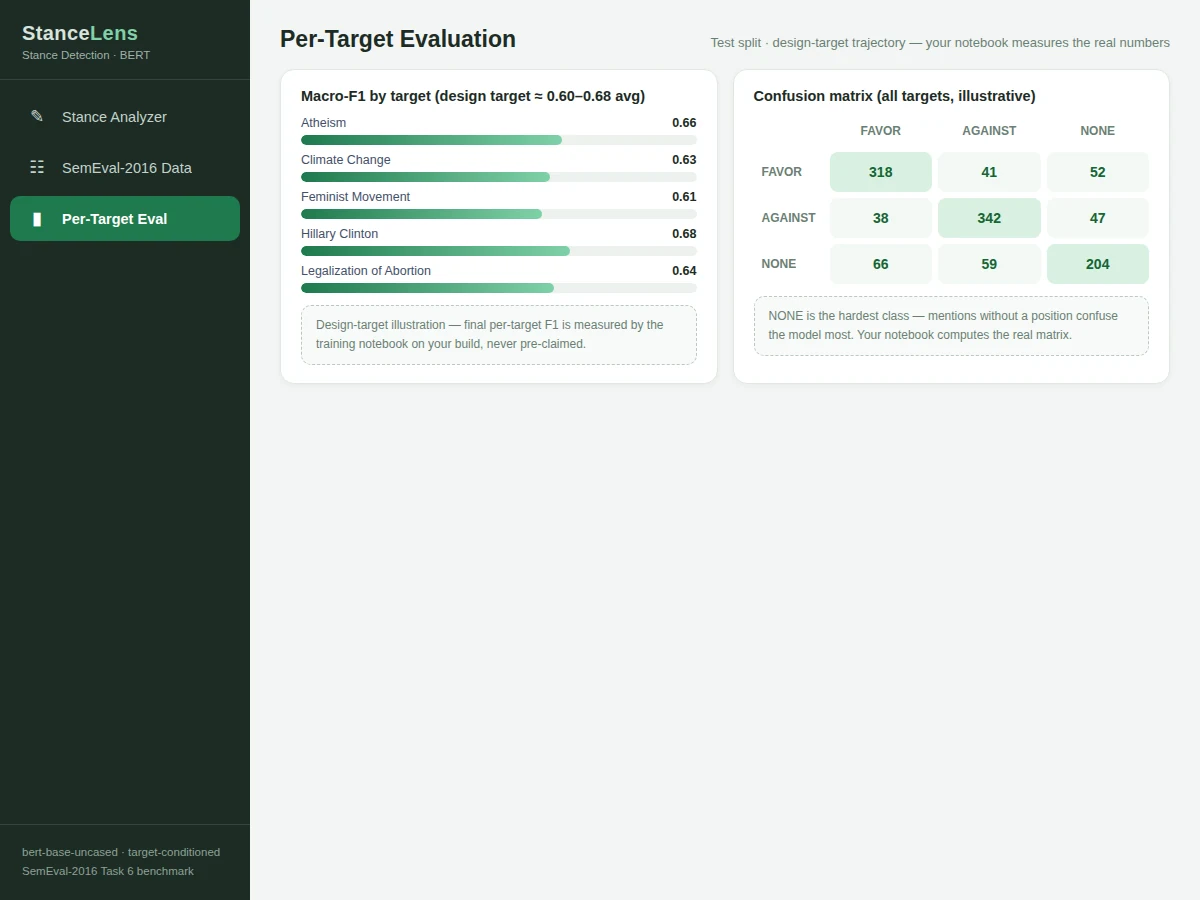
- Matplotlib (per-target F1 bars, training curves)
- Single-file HTML/CSS/JS demo app (analyzer, dataset explorer, evaluation views)
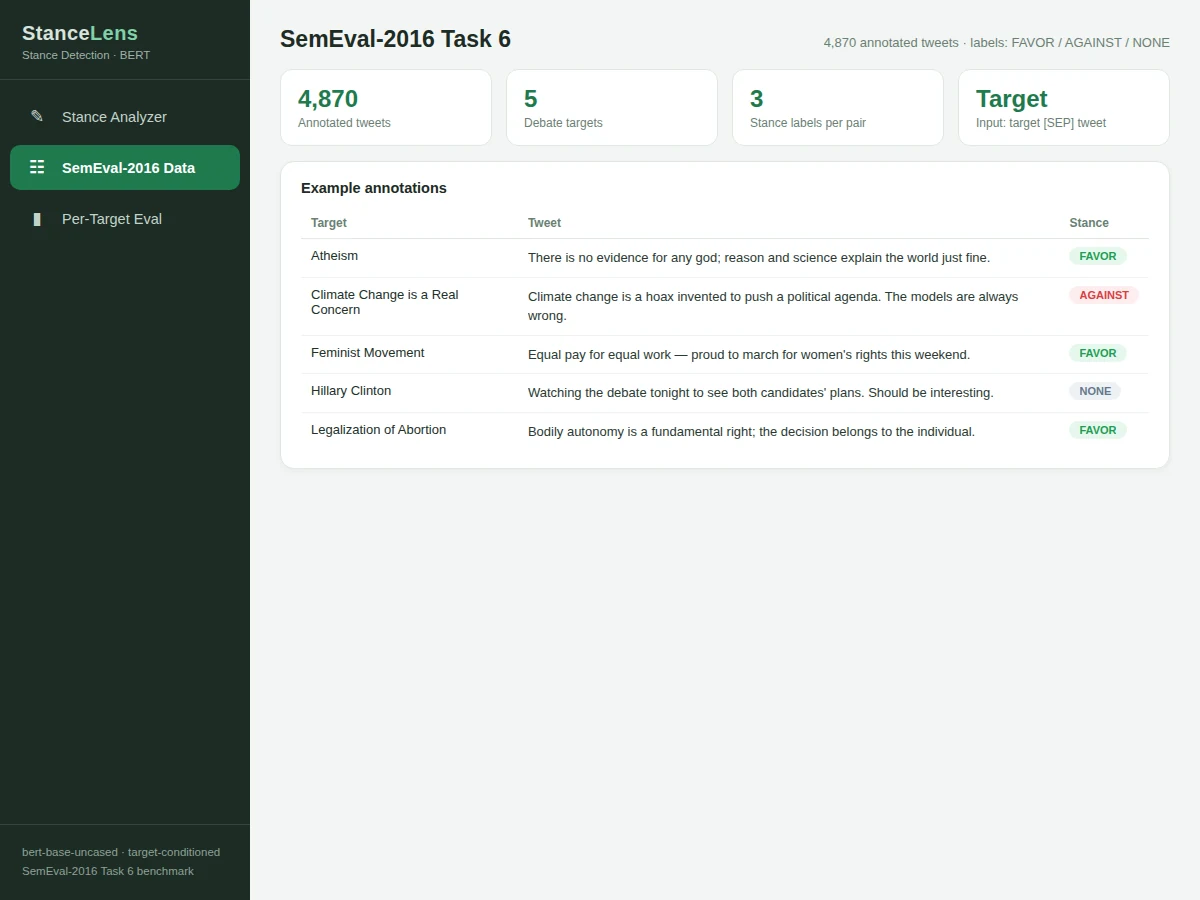
- SemEval-2016 Task 6 stance benchmark (4,870 tweets, 5 targets)
- Trained weights exported from the included fine-tuning run
| Parameter | Value |
|---|---|
| Model | bert-base-uncased + dropout/linear head (110M parameters), target-conditioned input |
| Dataset | SemEval-2016 Task 6: 4,870 tweets across 5 debate targets |
| Targets | Atheism; Climate Change is a Real Concern; Feminist Movement; Hillary Clinton; Legalization of Abortion |
| Labels | FAVOR / AGAINST / NONE per (target, tweet) pair |
| Input | Target + English tweet, max 128 WordPiece tokens |
| Output | Stance verdict, confidence score, token-evidence highlights |
| Training | ~4 epochs, AdamW, linear warmup; design target macro-F1 ≈ 0.60–0.68 |
| Evaluation | Per-target and macro-averaged F1 — computed by the notebook on your build |
| Inference | CPU-friendly; a single pair scores in well under a second |
Project features
- [Stance analyzer] Pick one of the five debate targets, paste a tweet, and get a FAVOR / AGAINST / NONE verdict with a confidence bar; token-evidence highlighting colors the words that carried the stance signal.
- [Target-conditioned BERT] Input formatted as "target [SEP] tweet" with a dropout + linear head; one model handles all five targets and the demo re-scores the same text against different targets live.
- [BERT fine-tuning pipeline] bert-base-uncased fine-tuned with AdamW and a linear warmup schedule; all hyperparameters exposed in the notebook.
- [Dataset explorer view] Browse the SemEval-2016 label distribution per target, train/test splits and real example tweets from each stance class inside the demo app.
- [Per-target evaluation view] Per-target F1 bars and the confusion matrix reproduced by the notebook, so strengths and weaknesses by topic are visible.
- [Batch scoring mode] Score a CSV of (target, tweet) pairs into a stance report for larger-scale analysis.
- [Full evaluation logging] Per-target and macro-averaged F1 computed on the official SemEval-2016 test split — never pre-claimed.
What is included
- Complete source code (preprocessing, target-conditioned formatting, fine-tuning, evidence extraction, inference, demo app)
- Jupyter training and evaluation notebook (buyer-run procedure: fine-tune, evaluate, inspect per-target errors)
- Project report PDF (background, SemEval-2016 analysis, methodology, evaluation, error analysis)
- PPT presentation for final review
- Viva Q&A preparation document (transformers, stance vs sentiment, fine-tuning, evaluation metrics)
- Setup guide (environment, dataset download, training, running the demo)
Limitations & prerequisites
- The model classifies stances on the five SemEval-2016 targets — the training domain. Novel topics with unseen vocabulary are outside its distribution and it handles them poorly.
- A verdict is a statistical prediction, not a reading of belief: low-confidence outputs must be read as model uncertainty and passed to human review.
- Implicit stances expressed only through sarcasm or memes can be misclassified; the per-target confusion matrices in the report document the error patterns openly.
- Fine-tuning BERT needs a GPU (or long CPU patience) — the notebook documents expected runtimes and a smaller-sample quick-run mode.
- NONE is the hardest class — tweets that merely mention a target without taking a position are frequently confused with weak FAVOR/AGAINST.
Frequently Asked Questions
Which dataset is used?
SemEval-2016 Task 6: 4,870 real tweets annotated as FAVOR, AGAINST or NONE toward five debate targets — atheism, climate change, feminism, Hillary Clinton and legalization of abortion.
How is this different from sentiment analysis?
Sentiment asks if text sounds positive; stance asks whether it supports a target. An angry attack on a politician's critics is negative in tone but FAVOR in stance — this project models the target-text relationship explicitly via "target [SEP] tweet" inputs.
Is the accuracy guaranteed?
No. The design target is macro-averaged F1 ≈ 0.60–0.68 across the five targets, but final performance is measured by the training notebook during your build — the report documents your own numbers, not a pre-claimed figure.
Can it detect stance on new topics?
Not reliably — the classifier is trained on the five SemEval targets and generalizes poorly to unseen topics with unfamiliar vocabulary. That is documented as an explicit limitation.
What are the main limitations?
Five fixed targets only; implicit/sarcastic stances are hard; NONE is the most confused class; confidence is model uncertainty, not ground truth; fine-tuning needs a GPU for reasonable runtimes.
Is this project suitable for a final-year project?
Yes — for Computer Science, AI/ML and Data Science programs. It demonstrates transformers, pair-sequence modeling, stance-vs-sentiment reasoning, per-target evaluation and honest error analysis, all strong viva material. Suitable for B.E./B.Tech final-year projects in Computer Science, AI/ML and Data Science.
Components & software requirements
- Python 3.10, PyTorch, Hugging Face transformers (bert-base-uncased)
- scikit-learn (metrics, confusion matrix), NumPy, pandas
- Matplotlib (per-target F1 bars, training curves)
- Single-file HTML/CSS/JS demo app (analyzer, dataset explorer, evaluation views)
- SemEval-2016 Task 6 stance benchmark (4,870 tweets, 5 targets)
- Trained weights exported from the included fine-tuning run
Delivery information
Built-to-order project. Delivery timeline is shared after order confirmation based on current queue.
Support terms
Complete documentation, setup guide, and viva preparation included. Support for setup and explanation provided.