
More project photos (2)
The problem
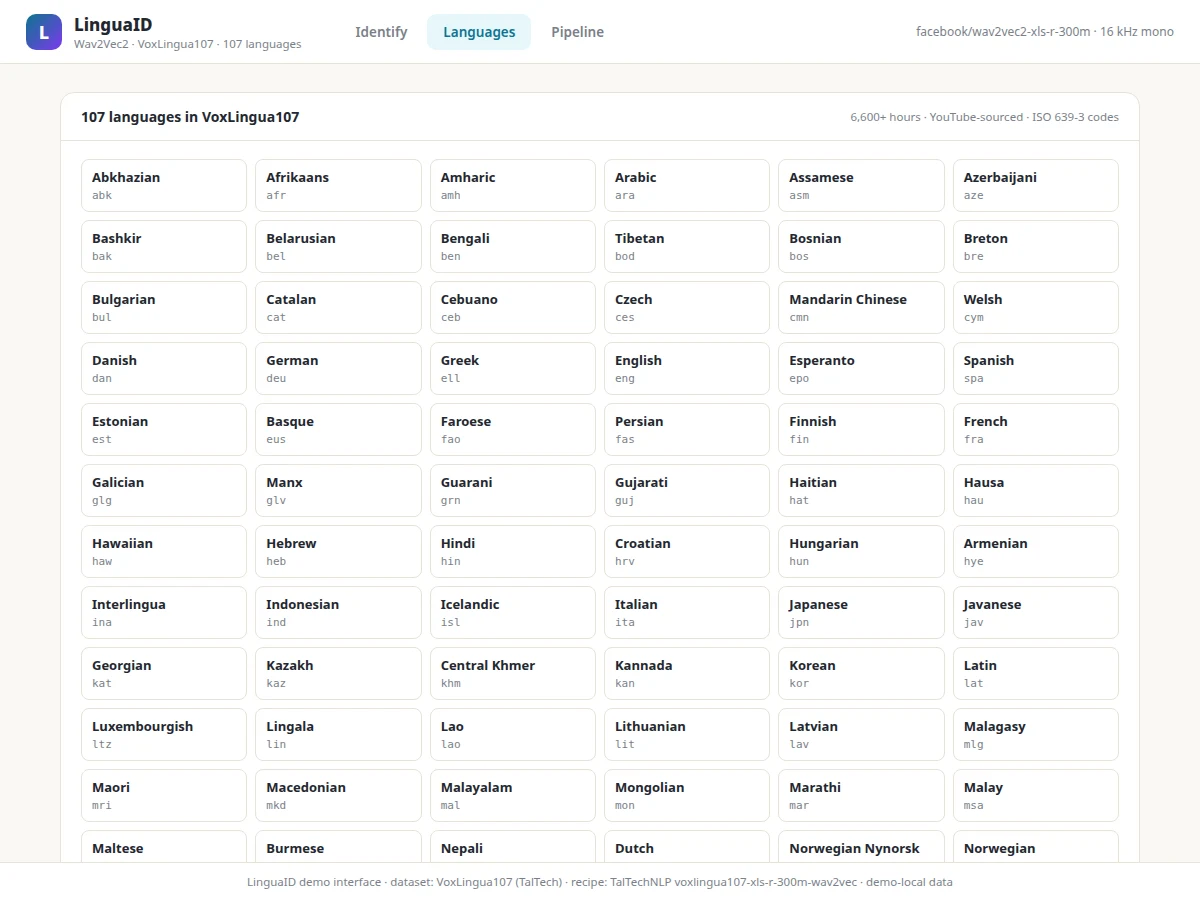
Humans identify a language within seconds of hearing it; machines need to learn the same trick from raw waveforms. Spoken language identification (LID) is the front door of multilingual speech systems — call centers route by language, voice assistants pick the right recognizer, and archives tag recordings automatically. Classical LID used handcrafted features (MFCCs) with GMM or i-vector classifiers, but self-supervised speech models changed the game: Wav2Vec2 learns rich representations from raw audio without labels, and fine-tuning it on a labeled LID dataset produces strong classifiers with modest labeled data. This project builds that pipeline end to end. The dataset is VoxLingua107 — over 6,600 hours of YouTube-sourced speech across 107 languages, the standard public benchmark for the task. The model starts from the pretrained facebook/wav2vec2-xls-r-300m backbone (the same backbone used in the public TalTechNLP voxlingua107-xls-r-300m-wav2vec recipe), adds temporal pooling and a 107-way classifier head, and fine-tunes on the dataset's language labels. A demo app takes an uploaded clip and returns ranked language predictions. The honest ML story is preserved throughout: short clips and closely related languages (Hindi/Urdu, Spanish/Portuguese) are genuinely harder, and the report shows the confusion patterns instead of hiding them.
How it works
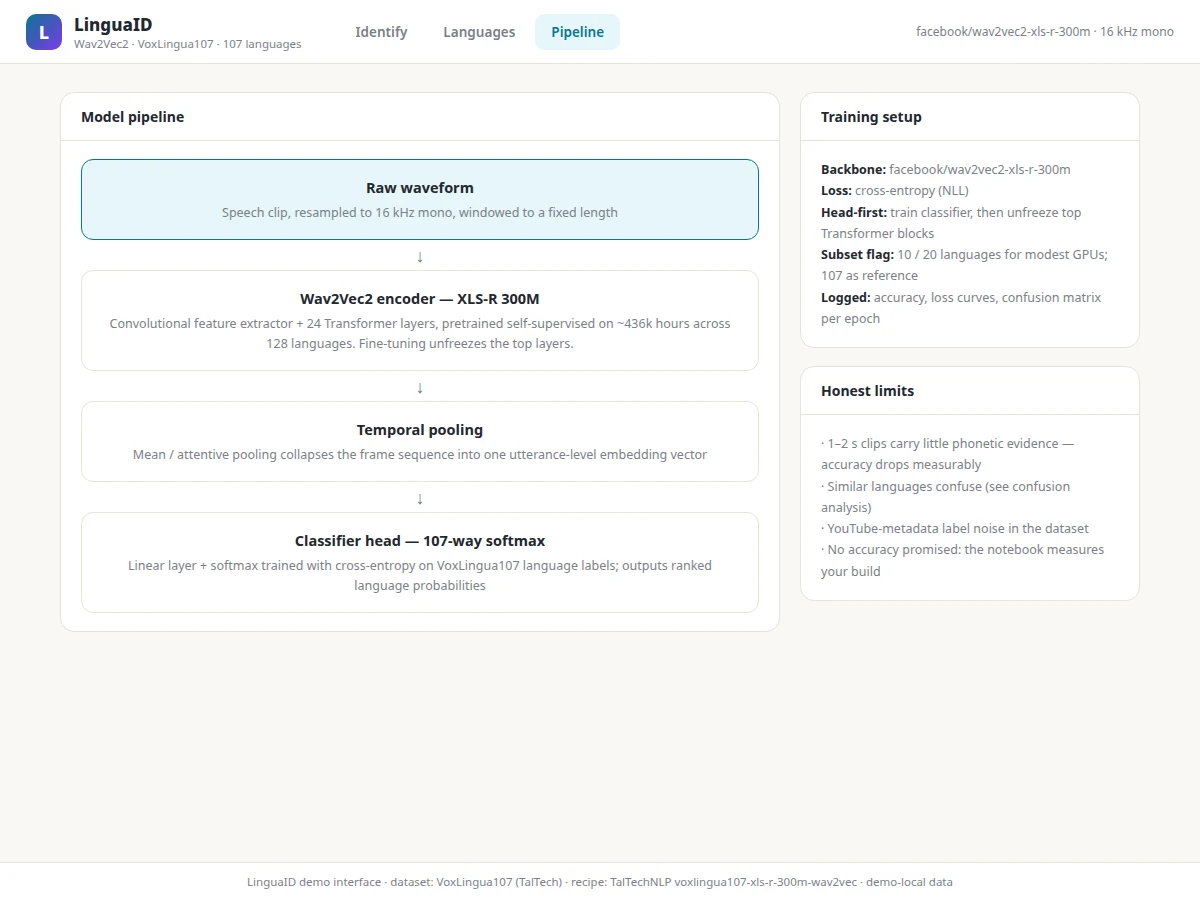
- Speech audio is loaded and normalized to 16 kHz mono — the sampling the XLS-R backbone was pretrained on — with clips trimmed or padded to a fixed window.
- The Wav2Vec2 encoder (convolutional feature extractor plus Transformer layers) converts the raw waveform into a sequence of contextual speech embeddings.
- Temporal pooling collapses the embedding sequence into a single utterance-level vector, which the classifier head maps to 107 language logits and a softmax.
- Fine-tuning updates the head (and optionally the top Transformer layers) with cross-entropy loss on VoxLingua107's language labels, logging accuracy each epoch.
- At inference, the demo app runs the same preprocessing and forward pass on an uploaded clip and returns the top-5 softmax languages with confidence scores.
- The evaluation notebook computes accuracy and the confusion matrix on the held-out split; those measured numbers — not targets — go into the report.
Tech stack:
- PyTorch with Hugging Face Transformers (Wav2Vec2 / XLS-R 300M)
- VoxLingua107 dataset (6,600+ hours, 107 languages, YouTube-sourced)
- SpeechBrain-style LID recipe (pooling + classifier head, NLL/cross-entropy loss)
- torchaudio / librosa (resampling, mel-spectrograms)
- scikit-learn (confusion matrix, per-class metrics)
- Matplotlib (training curves, confusion heatmap)
- Flask demo app with audio upload and prediction UI
| Parameter | Value |
|---|---|
| Model | Wav2Vec2 (facebook/wav2vec2-xls-r-300m backbone) + pooling + 107-way softmax head |
| Dataset | VoxLingua107 — 6,600+ hours of speech, 107 languages, 16 kHz |
| Task | Utterance-level spoken language identification (classification) |
| Input | Speech clips, resampled to 16 kHz mono (WAV/MP3 upload or browser recording) |
| Output | Top-5 ranked languages with confidence scores |
| Evaluation | Accuracy, confusion matrix, per-class metrics — computed by the notebook on your held-out split during your build |
| Training config | Subset flag for 10/20-language runs on modest GPUs; full 107-language reference documented |
| Inference | Forward pass on CPU feasible for demo-length clips; GPU recommended for training |
Project features
- [Wav2Vec2 XLS-R fine-tuning] Transfer learning from the pretrained 300M-parameter XLS-R backbone with a pooling + 107-way softmax head, trained with the standard SpeechBrain-style recipe.
- [VoxLingua107 dataset pipeline] Data loading, 16 kHz mono normalization and train/validation splitting on the real 107-language dataset (or a documented subset for smaller GPUs).
- [Top-5 ranked predictions] The demo returns the five most likely languages with confidence bars, because the second guess is often informative when languages are similar.
- [Audio upload and recording] Users upload WAV/MP3 clips or record in the browser; the app resamples to 16 kHz mono exactly as training expects.
- [Waveform and spectrogram view] The demo renders the clip's waveform and a mel-spectrogram, so the report can show what the model "hears".
- [Training metrics dashboard] The notebook logs per-epoch accuracy, loss curves and a confusion matrix on the held-out split — the numbers in the report come from this run.
- [Language confusion analysis] A dedicated notebook section surfaces the most confused language pairs, giving the viva genuine error-analysis material.
- [Subset-training configuration] A config flag trains on a 10- or 20-language subset for machines without a strong GPU, with the full 107-language run documented as the reference.
What is included
- Complete source code (dataset pipeline, fine-tuning script, inference module, demo app)
- Jupyter training and evaluation notebook (buyer-run: configure subset, train, evaluate)
- Pretrained-backbone download and setup guide (Hugging Face model hub)
- Project report PDF (background, dataset analysis, model design, evaluation, error analysis)
- PPT presentation for final review
- Viva Q&A preparation document (Wav2Vec2 pretraining, XLS-R, pooling, confusion analysis)
- Demo guidance (sample clips per language family, scripted walkthrough)
Limitations & prerequisites
- Short utterances are genuinely harder: a 1–2 second clip carries far less phonetic evidence than a 10-second one, and accuracy drops accordingly — the report measures this rather than hiding it.
- Closely related languages confuse the model (Hindi/Urdu, Spanish/Portuguese, Malay/Indonesian); the confusion matrix documents these pairs openly.
- VoxLingua107 labels come from YouTube metadata, so some label noise exists; the report notes this as a dataset limitation.
- No accuracy figure is promised: performance depends on the language subset, clip lengths, GPU budget and training configuration, and the notebook measures your build's actual numbers.
- The full 107-language fine-tune needs a real GPU and significant time; the subset configuration exists precisely for modest hardware, with the tradeoff documented.
Frequently Asked Questions
Which dataset is used?
VoxLingua107 — a public research dataset of over 6,600 hours of speech across 107 languages, sourced from YouTube and published by TalTech. The page's language claims match the dataset's actual language list.
Which model is used?
Wav2Vec2, specifically the pretrained facebook/wav2vec2-xls-r-300m (XLS-R) backbone with a temporal-pooling layer and a 107-way softmax classifier head, fine-tuned on the dataset's language labels — following the public TalTechNLP voxlingua107-xls-r-300m-wav2vec recipe.
Is the accuracy guaranteed?
No. The notebook computes accuracy, confusion matrix and per-class metrics on your held-out split during your build, and the report presents those measured numbers. Design targets are stated as targets, never as results.
Can it identify a language from 2 seconds of speech?
It will try, but short clips are measurably less reliable — the report includes an utterance-length analysis so you can demonstrate this honestly in the viva.
Can I train on fewer languages?
Yes. A configuration flag selects a 10- or 20-language subset for faster training on modest GPUs; the full 107-language run is documented as the reference configuration.
What hardware do I need?
A GPU is strongly recommended for fine-tuning (the subset config lowers the bar); inference on demo-length clips runs on CPU. The setup guide covers both paths. Suitable for B.E./B.Tech final-year projects in Computer Science, AI/ML and Data Science.
Components & software requirements
- PyTorch with Hugging Face Transformers (Wav2Vec2 / XLS-R 300M)
- VoxLingua107 dataset (6,600+ hours, 107 languages, YouTube-sourced)
- SpeechBrain-style LID recipe (pooling + classifier head, NLL/cross-entropy loss)
- torchaudio / librosa (resampling, mel-spectrograms)
- scikit-learn (confusion matrix, per-class metrics)
- Matplotlib (training curves, confusion heatmap)
- Flask demo app with audio upload and prediction UI
Delivery information
Built-to-order project. Delivery timeline is shared after order confirmation based on current queue.
Support terms
Complete documentation, setup guide, and viva preparation included. Support for setup and explanation provided.