
More project photos (2)
The problem
A single popular job posting can attract hundreds of resumes, and manual screening does not scale: recruiters skim each resume for seconds, strong candidates get missed, and two screeners can rank the same pile differently. Keyword-only applicant tracking systems help, but they are brittle — a candidate who writes "RESTful services" instead of "REST API" can be filtered out despite being qualified. This project builds a more principled screener: resumes and the job description are normalized through an NLP preprocessing pipeline (tokenization, stopword removal, stemming), required skills are extracted with a domain lexicon, and each resume is scored by combining TF-IDF cosine similarity with skill-overlap against the JD. The result is a ranked shortlist with per-candidate explanations — matched skills, missing skills, and similarity scores — so the screening decision stays with the human, but the grunt work is automated and auditable.
How it works
- The recruiter pastes a job description; the lexicon extractor identifies the required skill set.
- Each resume is preprocessed: lowercasing, tokenization, stopword removal and stemming.
- TF-IDF vectors are built over the JD plus all resumes, so term weights reflect the actual applicant pool.
- Cosine similarity between each resume vector and the JD vector gives the text-similarity component.
- Skill overlap (matched required skills ÷ total required skills) gives the skill component; the two combine into the final score.
- Candidates are ranked, labeled with verdicts, and each row expands into the inspector view with highlighted evidence.
Tech stack:
- Python 3.10, scikit-learn (TfidfVectorizer, cosine_similarity)
- Regex + domain skill lexicon (44 terms: languages, frameworks, cloud, DevOps)
- NLTK-style preprocessing (tokenize, stopwords, Porter stemming)
- Flask demo app (JD input, ranking dashboard, resume inspector)
- pandas (shortlist tables and batch exports)
- Matplotlib (TF-IDF weight charts, similarity heatmaps)
- Jupyter notebook (buyer-run pipeline walkthrough and evaluation)
| Parameter | Value |
|---|---|
| Model | TF-IDF vectorizer + cosine similarity; lexicon-based skill extractor (training-free, no labeled data needed) |
| Scoring | 65% skill overlap + 35% TF-IDF cosine similarity; verdict thresholds configurable |
| Preprocessing | Lowercase, tokenize, stopword removal, Porter stemming |
| Skill lexicon | 44 terms across languages, frameworks, databases, cloud, DevOps |
| Input | Job description text + resumes as .txt/.pdf (text layer) |
| Output | Ranked shortlist with scores, matched/missing skills, verdicts |
| Evaluation | Precision-at-k on buyer-labeled resume sets via the included notebook |
| Demo | Flask app: analyzer, resume inspector, matching-engine views |
Project features
- [Job description skill extraction] Required skills are pulled from any pasted JD with a 44-term domain lexicon covering languages, frameworks, databases, cloud and DevOps tooling, so the "required set" adapts to each posting.
- [TF-IDF resume ranking] Resumes are vectorized with TF-IDF and ranked by cosine similarity to the JD, weighted 35% alongside 65% skill-overlap for a transparent composite score.
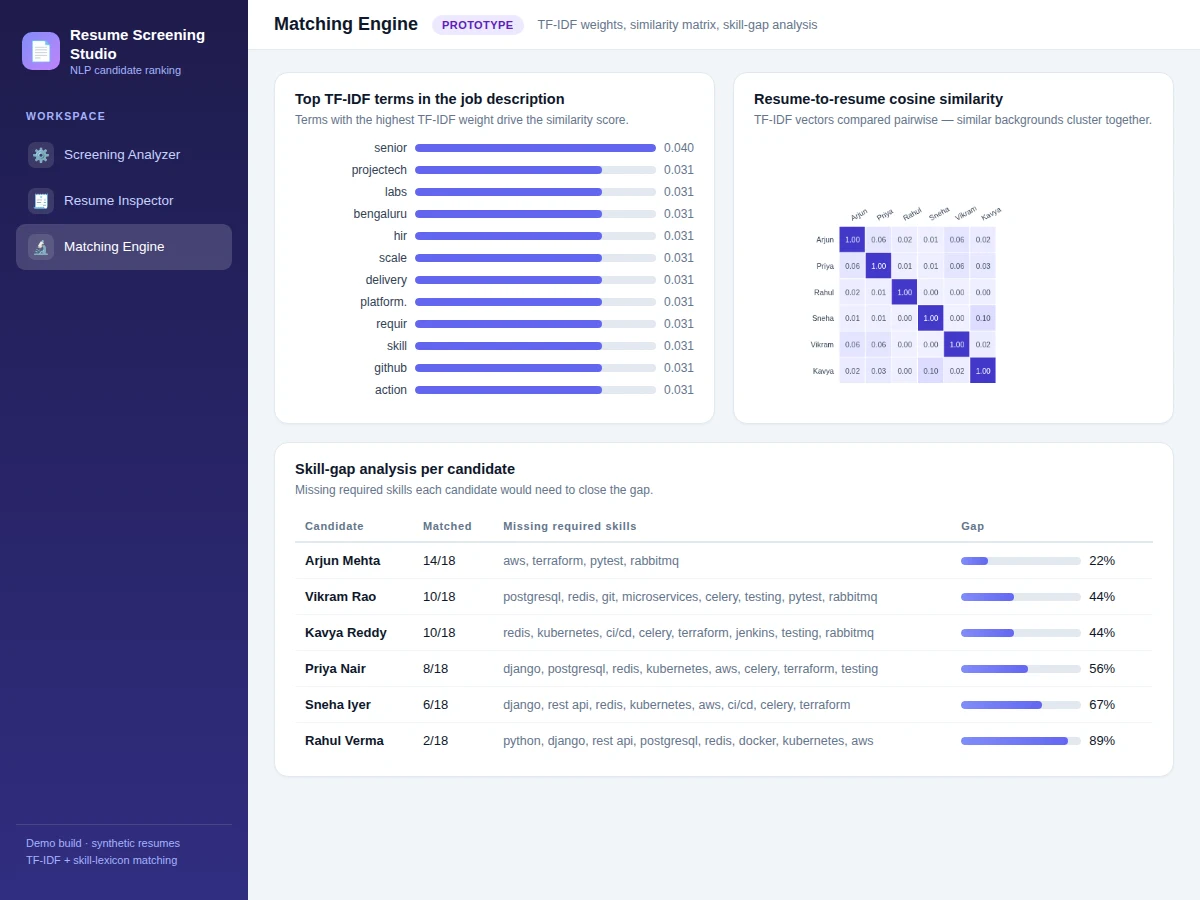
- [Skill-gap analysis] Every candidate gets a matched-vs-missing skill breakdown, showing exactly which required skills would close the gap.
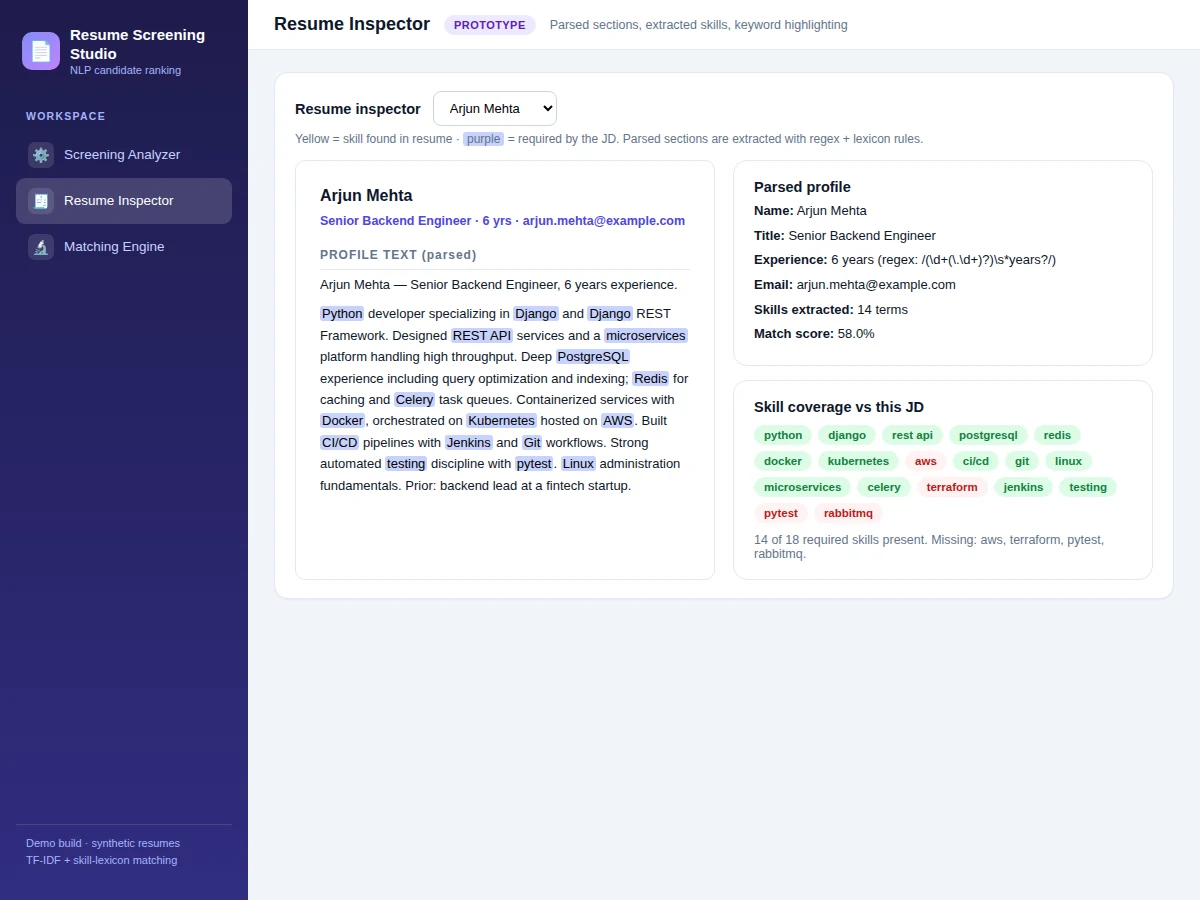
- [Resume inspector] Click any ranked candidate to see the parsed resume with matched keywords highlighted and the extracted profile (title, experience, contact, skills).
- [Similarity heatmap] A resume-to-resume cosine similarity matrix reveals which candidates have similar backgrounds — useful for diversifying a shortlist.
- [Verdict thresholds] Configurable cutoffs label candidates Shortlist, Review or Reject, with the thresholds documented and adjustable in code.
- [Batch screening] Score a whole folder of resumes in one run and export the ranked shortlist as a report table.
- [Evaluation notebook] A Jupyter notebook walks through preprocessing, TF-IDF weighting and ranking on your own resume set, with precision-at-k computed on your labels.
What is included
- Complete source code (preprocessing, TF-IDF pipeline, skill extractor, scoring, Flask demo)
- Jupyter notebook (pipeline walkthrough + precision-at-k evaluation procedure on your resume set)
- Project report PDF (background, NLP design, scoring formula, evaluation, bias discussion)
- PPT presentation for final review
- Viva Q&A preparation document (TF-IDF, cosine similarity, stemming, precision-at-k, limitations)
- Setup guide (environment, preparing your resume set, running batch screening)
Limitations & prerequisites
- The system ranks resumes against the JD you provide — it cannot judge qualities absent from text (culture fit, communication, real ability), and the report states this boundary explicitly.
- Skill extraction depends on lexicon coverage: synonyms or brand-new tools outside the 44-term list are missed unless you extend the lexicon, which the guide shows how to do.
- TF-IDF is lexical, not semantic — "RESTful services" and "REST API" score as different terms; the report discusses this as the motivation for embedding-based future scope.
- PDF resumes without a text layer (scanned images) need OCR first, which is outside the base pipeline.
- Any screening aid can amplify historical bias if trained or tuned on past hiring decisions — the report includes a bias-and-fairness discussion, and the tool is positioned as a screener's assistant, never an autonomous hiring decision-maker.
Frequently Asked Questions
Which dataset is used?
No fixed public dataset — the pipeline is training-free, so it works on any resume set you provide. The notebook shows how to assemble and label your own evaluation set (e.g. 30–50 resumes across 2–3 roles) and compute precision-at-k on it.
Which NLP techniques are used?
Classical and explainable: tokenization, stopword removal, Porter stemming, TF-IDF weighting with scikit-learn, cosine similarity, and lexicon-based skill extraction with regex matching. No black-box model — every score decomposes into inspectable parts.
Is the accuracy guaranteed?
No ranking accuracy is claimed, because there is no universal ground truth for "best candidate". The notebook computes precision-at-k on your own labeled set, and the report presents your build's numbers with the labeling procedure documented.
Can it handle PDF resumes?
Yes for text-based PDFs (text layer extracted directly). Scanned/image PDFs need an OCR step first — Tesseract integration is listed as an optional customization, not in the base build.
Can it be customized for other domains?
Yes — the skill lexicon is a plain list, so swapping in medical, finance or mechanical terms re-targets the extractor. The scoring weights and verdict thresholds are configuration constants.
Is this project suitable for a final-year project?
Yes — it suits Computer Science, AI/ML and Data Science programs, demonstrating NLP preprocessing, information retrieval (TF-IDF), explainable scoring and an honest treatment of bias in automated screening. Suitable for B.E./B.Tech final-year projects in Computer Science, AI/ML and Data Science.
Components & software requirements
- Python 3.10, scikit-learn (TfidfVectorizer, cosine_similarity)
- Regex + domain skill lexicon (44 terms: languages, frameworks, cloud, DevOps)
- NLTK-style preprocessing (tokenize, stopwords, Porter stemming)
- Flask demo app (JD input, ranking dashboard, resume inspector)
- pandas (shortlist tables and batch exports)
- Matplotlib (TF-IDF weight charts, similarity heatmaps)
- Jupyter notebook (buyer-run pipeline walkthrough and evaluation)
Delivery information
Built-to-order project. Delivery timeline is shared after order confirmation based on current queue.
Support terms
Complete documentation, setup guide, and viva preparation included. Support for setup and explanation provided.