
More project photos (2)
The problem
Cutting a subject out of a photo by hand is slow, skilled work: even a careful editor can spend many minutes masking hair and fine edges on a single portrait, and the free online alternatives are either paid services or black boxes that reveal nothing about their method. That makes background removal an ideal applied deep-learning problem: results are visually checkable in seconds, the standard public benchmark (DUTS) is openly available, and model failures are instructive rather than hidden. This project builds a reproducible pipeline around U2-Net, the salient-object-detection architecture whose nested U-structure produces crisp masks on thin detail like hair and foliage. The trained model is exported to ONNX so the demo runs on an ordinary CPU with no GPU required, and an evaluation notebook computes standard metrics (MAE and max F-measure) on the DUTS-TE split during the build. The report presents those numbers alongside honest failure cases on cluttered scenes, demonstrating both practical model deployment and transparent evaluation.
Frequently asked questions
- What makes U2-Net different from other segmentation models? Its nested U-structure stacks U-blocks inside U-blocks, capturing fine local boundaries and broad global context at once, with deep supervision applied at multiple side outputs. That is why its masks hold up on hair and thin edges where simpler models smear.
- Why is the model exported to ONNX? ONNX Runtime gives optimized CPU inference without requiring a full PyTorch install at demo time, so the Flask app runs fast on an ordinary laptop — near-real-time on typical photos is the design target.
- Which datasets are used? DUTS-TR (10,553 training images with saliency masks) trains the network, and DUTS-TE (5,019 test images) is used by the evaluation notebook — the standard benchmark pair for salient object detection.
- How is segmentation quality measured? The included evaluation notebook computes mean absolute error (MAE) and max F-measure between the predicted masks and ground truth on DUTS-TE, using the weights produced during the build. No scores are claimed in advance.
- Is this project suitable for a final-year project? Yes — for B.E./B.Tech Computer Science and AI/ML students. It demonstrates a real editing problem, a landmark segmentation architecture, the DUTS benchmark, ONNX deployment for CPU inference, and metric-based evaluation with documented failure cases.
How it works
Dataset & model:
Dataset name: DUTS-TR (training) and DUTS-TE (evaluation), introduced by Wang et al. (CVPR 2017). Source: the public salient-object-detection benchmark, via the official release. Task: binary salient-object segmentation. Classes: two — salient foreground vs. background (per-pixel masks, no multi-class labels). DUTS-TR holds 10,553 training images with masks; DUTS-TE holds 5,019 test images.
Model: U2-Net (Qin et al., arXiv:2005.09007, Pattern Recognition 2020) — a nested U-structure with deep supervision at multiple side outputs.
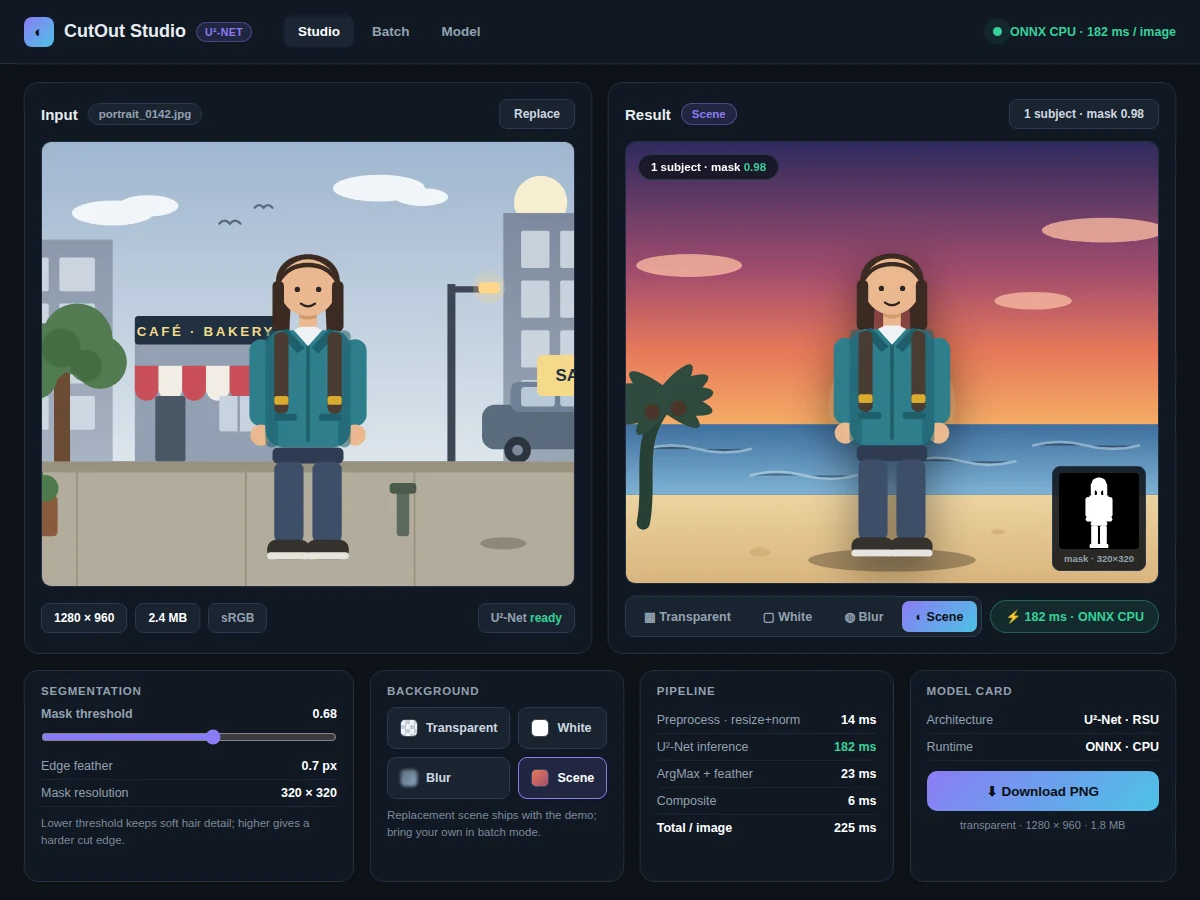
Input: an RGB photograph, resized and normalized. Prediction: a per-pixel saliency probability map. Output: a binarized, smoothed mask used as the alpha channel of a transparent PNG, optionally composited onto a replacement or blurred background.
Evaluation metrics: mean absolute error (MAE) and max F-measure on DUTS-TE, computed by the included evaluation notebook during the build. Final numbers come from the buyer's training run; near-real-time inference on typical photos via ONNX is the design target.
Working:
- Dataset: DUTS-TR images (10,553) with binary saliency masks are loaded as the training set; DUTS-TE (5,019) is kept strictly separate for evaluation.
- Preprocessing: images are resized to a fixed working resolution and normalized with ImageNet-style statistics; masks are resized to match the network's side-output scales.
- Training phase: the nested U-structure of U2-Net is trained with deep supervision — a loss term on each side output plus the final fused output — so every level of the network learns the mask.
- Export: the trained PyTorch model is converted to ONNX, producing a portable CPU-friendly checkpoint for the demo app.
- Evaluation phase (offline): the evaluation notebook runs the build's own weights over DUTS-TE and computes MAE and max F-measure, which the report documents as the build's measured results.
- Inference phase (demo): each uploaded photo is resized, normalized and passed through the ONNX model to produce a saliency probability map; the map is binarized at a configurable threshold, smoothed, and used as the alpha channel; the Flask app composites the subject onto transparency or a replacement background and serves the PNG download.
Specifications:
Model | U2-Net (Qin et al., arXiv:2005.09007, Pattern Recognition 2020)
Dataset | DUTS-TR (10,553 images) for training; DUTS-TE (5,019 images) for evaluation
Metric | MAE and max F-measure on DUTS-TE, computed by the evaluation notebook during the build
Inference | ONNX Runtime on CPU; near-real-time on typical photos is the design target
Input | Photographs (JPEG, PNG); auto-resized internally
Output | Transparent PNG, or subject composited onto a replacement/blurred background
Demo app | Flask web app with upload, threshold slider and PNG download
Weights | PyTorch checkpoint plus ONNX export, shipped with the build
Project features
U2-Net Salient-Object Segmentation [implemented] — The trained U2-Net produces pixel-level saliency masks with crisp edges on hair and fine detail, trained with deep supervision on DUTS-TR.
ONNX Export for CPU Inference [implemented] — The model ships as an ONNX checkpoint so the demo app runs fast on an ordinary CPU, with no GPU needed at demo time.
Flask Demo: Upload to Transparent PNG [implemented] — Upload a photo through the web app and download the subject cut out as a transparent PNG in seconds.
Background Replacement and Blur [implemented] — Drop the subject onto a replacement background or blur the original background; effects are applied from the same mask.
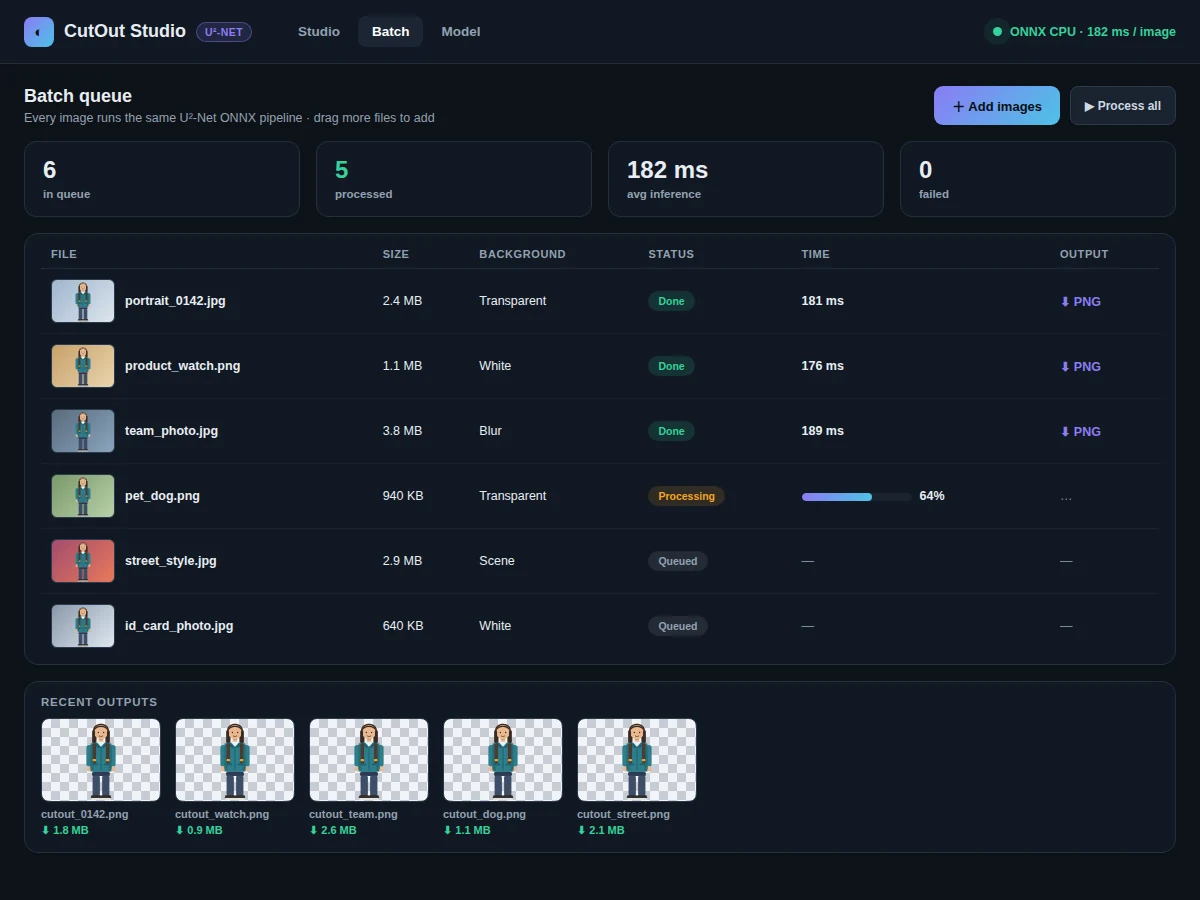
Batch Processing Mode [implemented] — Process a whole folder of photos in one run, with each result saved as its own PNG.
MAE and F-Measure Evaluation Notebook [implemented] — A notebook reproduces the standard DUTS-TE evaluation (MAE, max F-measure) from the build's own weights.
Adjustable Binarization Threshold [configurable] — The mask threshold is exposed as a slider with live preview, so edge softness can be tuned per photo.
Video Frame Matting [future-scope] — Applying the model frame-by-frame to video is documented as a possible extension but is not part of this build.
What is included
Complete source code: U2-Net training, ONNX export, evaluation notebook, Flask demo app
Trained U2-Net weights: PyTorch checkpoint and ONNX export
Dataset download scripts for DUTS-TR and DUTS-TE
Project report PDF: background, U2-Net architecture, methodology, evaluation, failure analysis
PPT presentation for final review
Viva Q&A preparation document: salient object detection, nested U-structure, ONNX, evaluation metrics
Setup guide: environment, dependencies, CPU inference notes
Limitations & prerequisites
Heavily cluttered scenes or camouflaged subjects confuse the saliency map — the report documents these as failure cases with example images.
Very low-resolution inputs produce blocky, rough edges, since the mask is upsampled to the original photo size.
Reflections, shadows and translucent objects such as glass are segmented imperfectly; the model was not trained on such cases.
Near-real-time inference is a design target for typical photos on a modern CPU; very large images on weak CPUs take noticeably longer.
This is an educational prototype, not a production photo-editing service.
Frequently Asked Questions
What makes U2-Net different from other segmentation models?
Its nested U-structure stacks U-blocks inside U-blocks, capturing fine local boundaries and broad global context at once, with deep supervision applied at multiple side outputs. That is why its masks hold up on hair and thin edges where simpler models smear.
Why is the model exported to ONNX?
ONNX Runtime gives optimized CPU inference without requiring a full PyTorch install at demo time, so the Flask app runs fast on an ordinary laptop — near-real-time on typical photos is the design target.
Which datasets are used?
DUTS-TR (10,553 training images with saliency masks) trains the network, and DUTS-TE (5,019 test images) is used by the evaluation notebook — the standard benchmark pair for salient object detection.
How is segmentation quality measured?
The included evaluation notebook computes mean absolute error (MAE) and max F-measure between the predicted masks and ground truth on DUTS-TE, using the weights produced during the build. No scores are claimed in advance.
Is this project suitable for a final-year project?
Yes — for B.E./B.Tech Computer Science and AI/ML students. It demonstrates a real editing problem, a landmark segmentation architecture, the DUTS benchmark, ONNX deployment for CPU inference, and metric-based evaluation with documented failure cases.
Components & software requirements
Python 3.10
PyTorch (U2-Net training)
ONNX Runtime (CPU inference in the demo app)
OpenCV and Pillow (image loading, masking, compositing, PNG export)
NumPy (probability maps, thresholding)
Matplotlib (saliency visualizations, metric plots)
Flask (demo web application)
A CPU laptop for the demo; a GPU is recommended for the training phase (cloud-GPU guidance included in the setup guide)
Delivery information
Built-to-order. The training run on DUTS-TR, the ONNX export, the evaluation-notebook run on DUTS-TE, and the full documentation kit (report, PPT, viva Q&A, setup guide) are prepared fresh for the buyer. The GPU training phase is the pacing item; the exact build schedule is confirmed at quotation.
Support terms
- Setup guidance: environment, dependencies, dataset download, CPU-inference notes
- Viva preparation: salient-object detection concepts, U2-Net's nested architecture, ONNX deployment, interpreting MAE and F-measure
- Customization discussion: different threshold defaults, new background options, retraining notes on custom image sets (feasibility confirmed before quoting)