
More project photos (2)
The problem
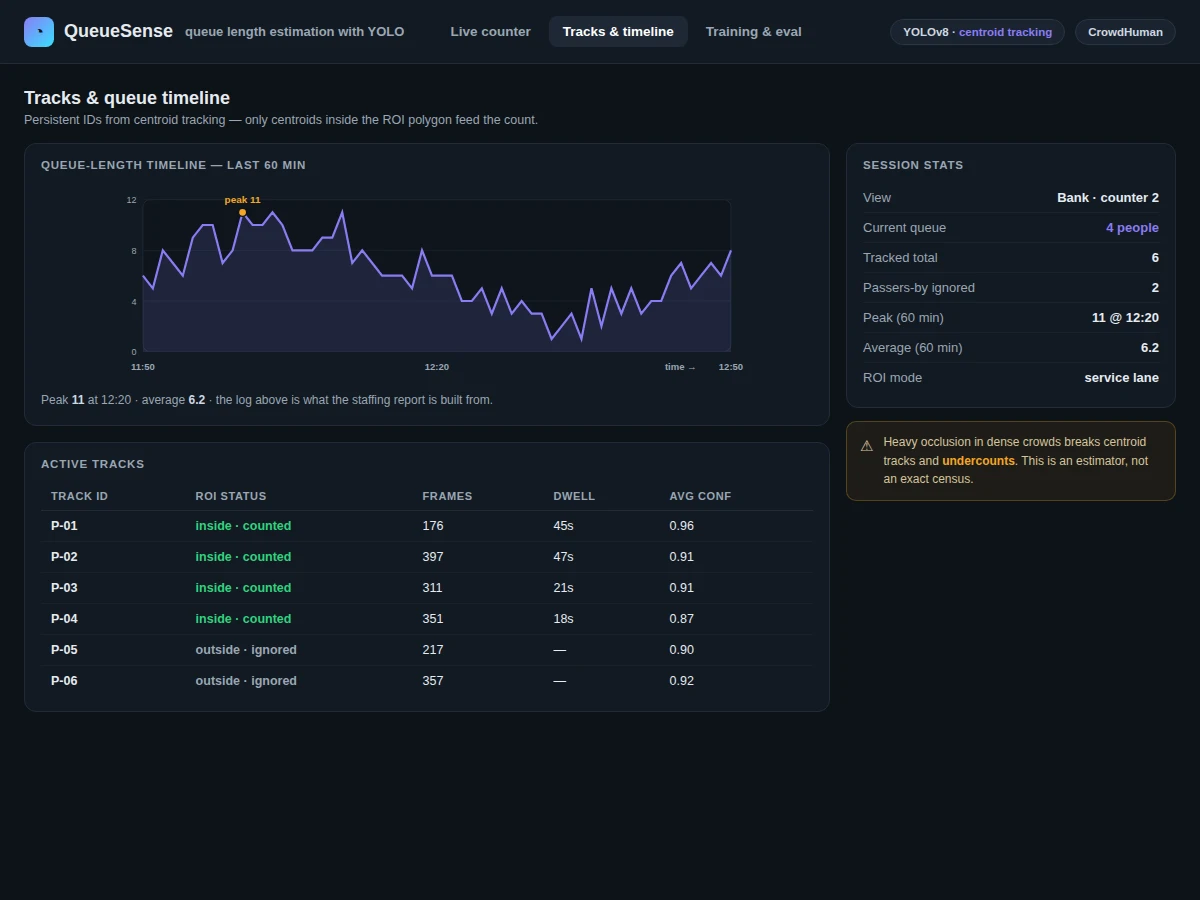
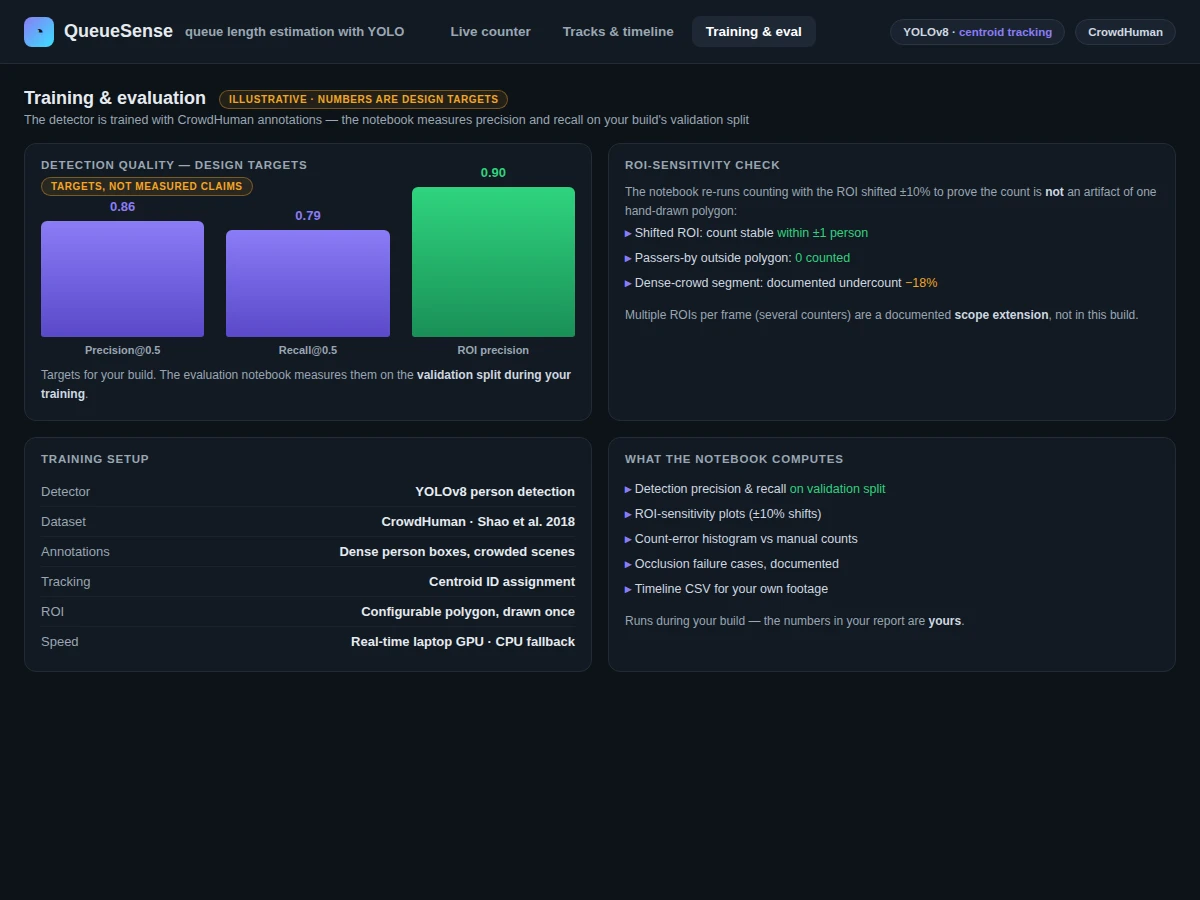
Queues at banks, canteens and ticket counters are usually measured by someone standing and counting — tedious, inconsistent and impossible to keep up all day. Without continuous data, staffing cannot be matched to real demand: counters sit idle or get overwhelmed. A camera-based estimator changes that by watching the counter continuously, reporting how many people are waiting right now and logging the count over time. The catch is that naive person counting also counts everyone walking past. This project solves the real problem with three layers: YOLOv8 for person detection, centroid tracking to keep identities stable across frames, and a configurable region of interest so that only people actually inside the queue zone contribute to the count. The detector is trained with CrowdHuman (Shao et al., 2018), the public benchmark of thousands of images with dense person annotations built specifically for crowded scenes, and the evaluation notebook measures precision and recall plus an ROI-sensitivity check so the region dependence is documented, not hidden.
How it works
Dataset & model:
Dataset name: CrowdHuman (Shao et al., "CrowdHuman: A Benchmark for Detecting Human in a Crowd", arXiv:1805.00123, 2018).
Source: Official academic release of the CrowdHuman benchmark.
Task: Person detection in video frames, composed with tracking and ROI counting.
Classes: Person (human) — dense person annotations built for crowded scenes, per the official dataset.
Model: YOLOv8 (Ultralytics) person detector trained with CrowdHuman annotations; centroid tracking with persistent IDs across frames.
Input: Video files or live camera streams of service counters.
Prediction: Person bounding boxes with confidence scores per frame, tracked across frames.
Output: Live queue-length count overlaid on video, plus a timestamped queue-length timeline log.
Evaluation metrics: Detection precision and recall on the validation split, plus an ROI-sensitivity check — computed by the Jupyter notebook during the buyer's build. No metrics claimed.
Working:
- Video frames are captured from a file or camera stream with OpenCV.
- Training phase: YOLOv8 is trained with CrowdHuman dense person annotations.
- Inference phase: YOLOv8 detects persons in each frame, returning bounding boxes with confidence scores.
- Box centroids are matched across consecutive frames to assign persistent tracking IDs.
- Tracked centroids falling inside the configured queue ROI polygon are counted as queued; people outside the polygon never enter the number.
- Evaluation phase: the notebook measures detection precision and recall on the validation split and runs an ROI-sensitivity check. The count, tracking IDs and timestamps are logged into a queue-length timeline, and the demo app overlays the live count with boxes and IDs on the video.
Specifications:
Model | YOLOv8 person detector (Ultralytics) + centroid tracking with persistent IDs
Dataset | CrowdHuman — dense person annotations (Shao et al. 2018)
Task | Person detection, tracking and ROI-restricted queue counting
Input | Video files or live camera streams of service counters
Counting rule | Only tracked centroids inside the configured ROI polygon are counted
Output | Live count overlay with boxes and IDs + timestamped queue-length timeline
Evaluation | Precision, recall on validation split + ROI-sensitivity check — computed during the buyer's build
Demo app | Processes uploaded videos or live streams
Scope | Single-counter feeds with one configured ROI
Project features
[YOLOv8 Person Detector] (implemented) — YOLOv8 trained with CrowdHuman dense annotations for person detection on video frames.
[Centroid Tracker] (implemented) — Box centroids are matched across consecutive frames to keep persistent tracking IDs stable.
[Configurable Queue ROI] (implemented) — A queue ROI polygon restricts counting to the queue zone; an ROI editor adapts it to any camera view.
[Live Count Overlay] (implemented) — The demo app overlays the live queue-length count with per-person bounding boxes and IDs on the video.
[Queue-Length Timeline Log] (implemented) — Counts are logged with timestamps for staffing and service-time analysis.
[Evaluation Notebook] (implemented) — Computes precision and recall on the validation split plus an ROI-sensitivity check.
[Video and Live-Stream Demo] (implemented) — The demo app processes uploaded video files or a live camera stream.
[Wait-Time Estimation] (future-scope) — Estimating wait times from tracked dwell times is not included; it is future work, not a current feature.
What is included
Complete source code (detection, tracking, ROI counting, logging, demo app)
Jupyter training and evaluation notebook (precision, recall, ROI-sensitivity plots)
Project report PDF (background, CrowdHuman, methodology, evaluation, error analysis)
PPT presentation for final review
Viva Q&A preparation document (YOLO, CrowdHuman, tracking, ROI counting, evaluation)
Setup guide (environment, dataset download, camera configuration, running on your own footage)
Limitations & prerequisites
CrowdHuman is the evaluated dataset: viewpoints, lighting and crowd densities far from it classify worse, and the report documents this coverage gap openly.
Heavy occlusion in dense crowds breaks centroid tracks and undercounts; the system is an estimator, not an exact census, and the report shows where it underperforms.
Scope covers single-counter video feeds with one configured ROI; the ROI must be defined per camera view.
This is an educational prototype for queue analytics, not a certified occupancy or safety system — counts are advisory and must not drive capacity or safety decisions.
Low-resolution or poorly positioned cameras degrade both detection and tracking stability.
Frequently Asked Questions
Which dataset and model are used?
CrowdHuman (Shao et al., 2018) — thousands of images with dense person annotations built for crowded scenes. The model is YOLOv8 (Ultralytics) for person detection, combined with centroid tracking (persistent IDs) and ROI-restricted counting.
Is the counting accuracy guaranteed?
No measured count accuracy is claimed. The notebook computes detection precision and recall on the validation split and includes an ROI-sensitivity check documenting how the count depends on region placement, all during the buyer's build.
How does it avoid counting passers-by?
Only tracked centroids falling inside the configured queue ROI polygon are counted. People outside the polygon never enter the number, and the ROI editor lets the buyer define the queue zone for any camera view.
Can it estimate wait times?
Not in the base build — it logs queue-length timelines with timestamps, from which wait patterns can be analyzed. Wait-time estimation from tracked dwell times is listed as future scope.
Is this project suitable for a final-year project?
Yes, for B.E./B.Tech in Computer Science, AI/ML, Data Science and related programs. It demonstrates detection-plus-tracking pipelines, region-based counting and video analytics — strong viva material.
What will I receive, and can it be customized?
Source code (detection, tracking, ROI counting, logging, demo app), the evaluation notebook, report, PPT, viva Q&A and a setup guide. Customizable: multiple ROIs per frame, wait-time estimation, multi-camera queue analytics, scoped at quotation.
Components & software requirements
Python 3.10, PyTorch (YOLOv8 training and inference)
Ultralytics YOLOv8 framework
CrowdHuman dataset (dense person annotations; download guidance in setup)
OpenCV (video capture, ROI masking, count overlays)
NumPy, pandas (queue-length logs, wait-time charts)
Jupyter Notebook (evaluation with precision and recall)
Flask or equivalent demo interface (video/stream upload and playback)
GPU recommended for training and smooth video inference (CPU works for short clips)
Delivery information
Built-to-order: the source code, evaluation notebook, report, PPT and viva kit are prepared fresh for the buyer. Typical delivery spans dataset setup, the YOLOv8 training run, evaluation and documentation; the exact schedule is confirmed at quotation.
Support terms
Setup guidance (environment, CrowdHuman download, camera configuration, running on your own footage); viva preparation covering YOLO, CrowdHuman, tracking, ROI counting and evaluation; customization discussion (multiple ROIs, wait-time estimation, multi-camera analytics) scoped at quotation.