
More project photos (2)
The problem
Plant diseases destroy a share of every season's harvest, and farmers usually notice infections only after they have spread beyond easy control. Expert visual diagnosis does not scale — an extension officer cannot visit every field, and misdiagnosis wastes both pesticide and yield. Transfer learning changes the economics of this problem: a network pre-trained on ImageNet already understands edges, textures and shapes, so fine-tuning it on leaf images reaches strong accuracy with tens of thousands of labeled photos instead of millions. This project builds that system as a complete student build: MobileNetV2 fine-tuned on the public PlantVillage dataset for 38 crop-disease classes, wrapped in a demo that classifies a leaf photo, explains its decision with a region heatmap, and shows a treatment note. Because the training is a logged two-phase experiment, the report and viva can discuss exactly what transfer learning bought — frozen-backbone accuracy versus full fine-tune.
How it works
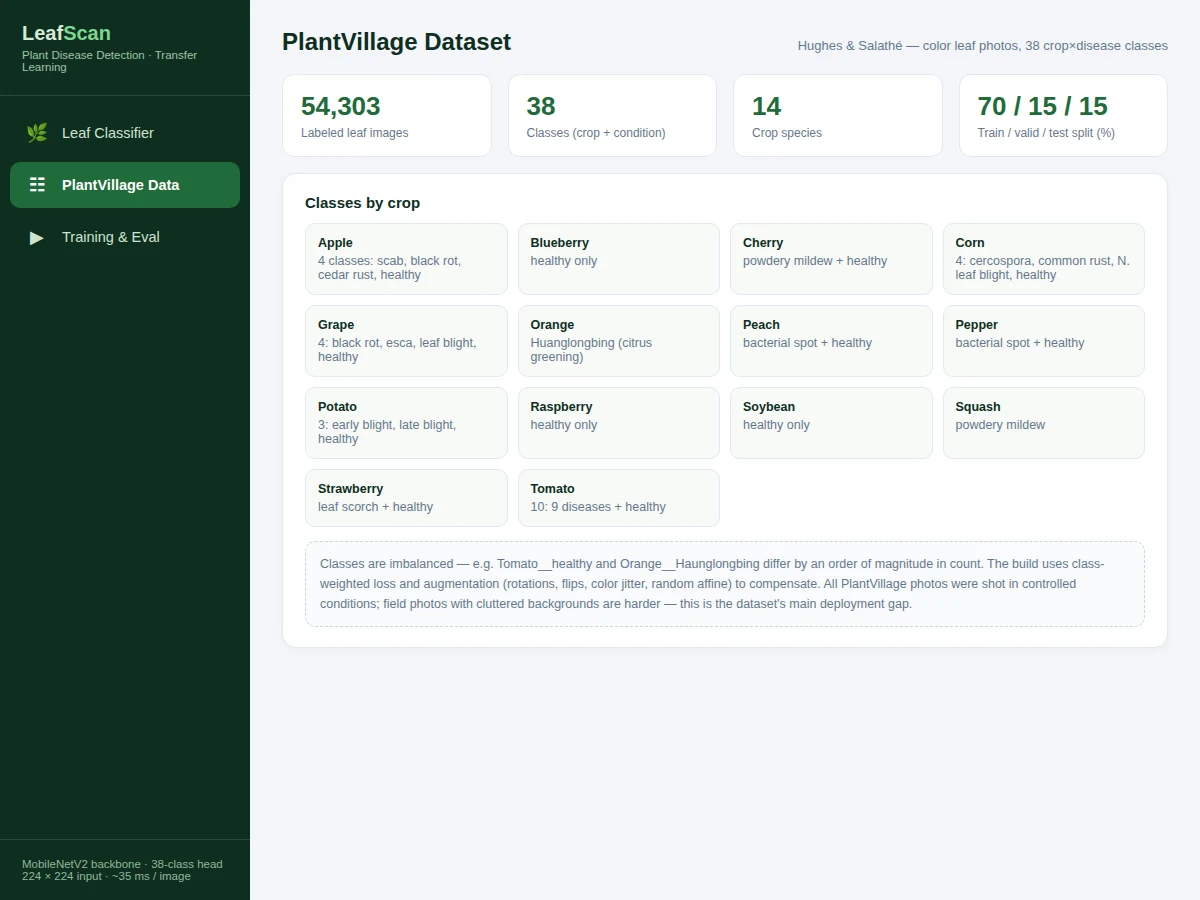
- PlantVillage images are resized to 224×224 and split 70/15/15 into train/validation/test; training images receive augmentation (rotations, flips, color jitter, random affine).
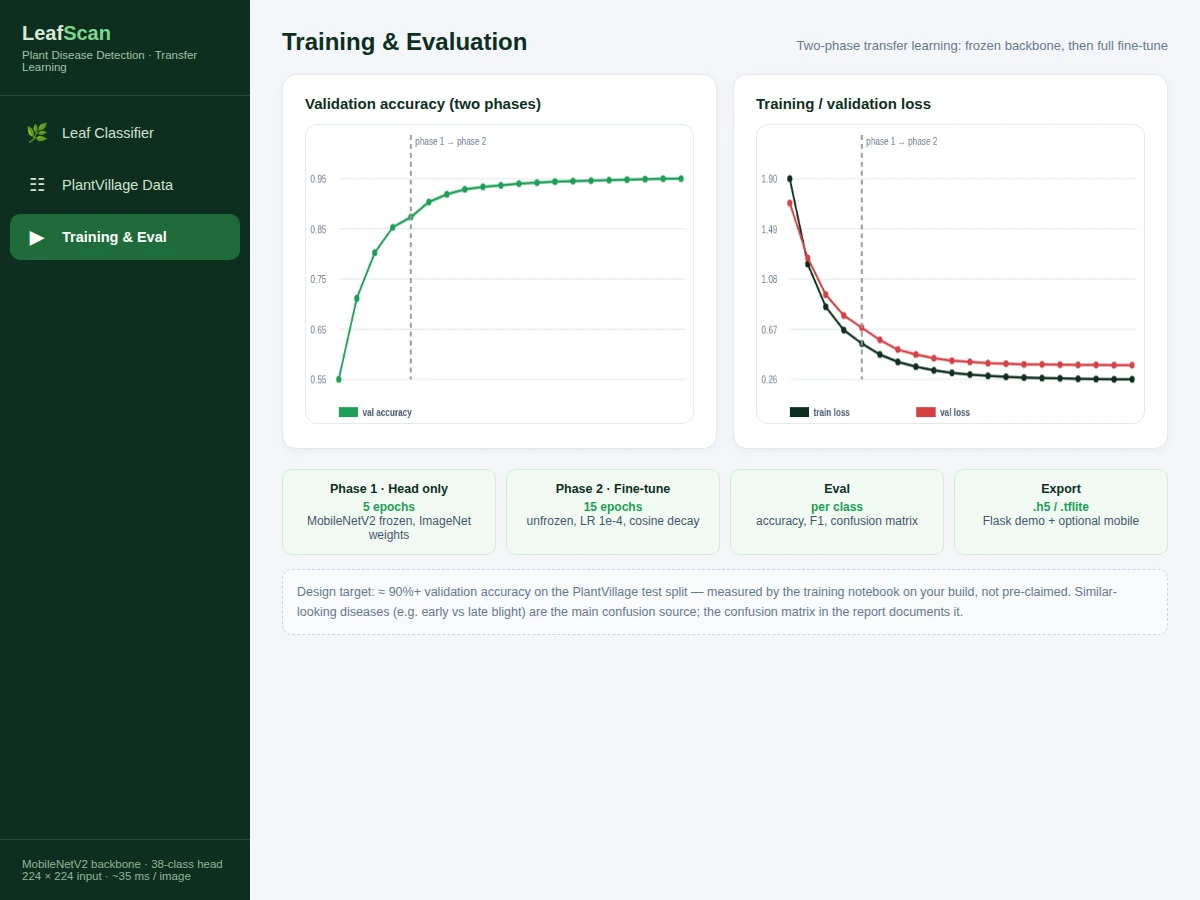
- Phase 1: the MobileNetV2 backbone (ImageNet weights) stays frozen while only the new 38-way classification head trains for about 5 epochs.
- Phase 2: the backbone is unfrozen and the whole network fine-tunes for about 15 epochs at a low learning rate with cosine decay and class-weighted loss.
- Every epoch logs accuracy, loss and per-class F1; the best checkpoint on validation accuracy is kept and exported.
- At inference, the demo app classifies the leaf photo and renders the top-3 classes with confidence bars.
- A Grad-CAM-style heatmap overlays the influential leaf regions, and the treatment-note panel shows guidance for the top prediction.
Tech stack:
- Python 3.10, TensorFlow/Keras (MobileNetV2)
- NumPy, scikit-learn (metrics, confusion matrix)
- Matplotlib, Seaborn (training curves, per-class analysis)
- Flask-compatible inference module + single-file HTML/CSS/JS demo app
- PlantVillage dataset (Hughes & Salathé)
- Trained weights shipped as .h5 from the included training run
| Parameter | Value |
|---|---|
| Model | MobileNetV2 (ImageNet pre-trained) + 38-way classification head |
| Dataset | PlantVillage: 54,303 images, 38 classes, 14 crops; 70/15/15 split |
| Input | Single leaf photo, resized to 224×224 RGB |
| Output | Top-3 crop-disease classes, confidence bars, region heatmap, treatment note |
| Training | 2 phases (~5 + ~15 epochs); design target ≈ 90%+ validation accuracy |
| Evaluation | Accuracy, per-class F1, confusion matrix — computed by the notebook on your build |
| Inference | ~35 ms per image on GPU; CPU-friendly for demo use |
Project features
- [38-class leaf classifier] Predicts the crop and disease (or healthy) from a single 224×224 leaf photo using a fine-tuned MobileNetV2.
- [Top-3 predictions with confidence] Ranked class probabilities with animated confidence bars, so near-ties between similar diseases stay visible.
- [Region-influence overlay] A Grad-CAM-style heatmap showing which leaf areas drove the prediction — key viva material on model explainability.
- [Treatment note panel] A concise, crop-specific treatment note for the predicted condition, clearly labeled as general guidance.
- [Two-phase transfer-learning notebook] Phase 1 trains only the classification head with the backbone frozen; phase 2 fine-tunes end-to-end — both fully logged.
- [Imbalance handling] Class-weighted loss plus augmentation (rotations, flips, color jitter, random affine) to compensate for PlantVillage's skewed class counts.
- [Full evaluation logging] Accuracy, per-class F1 and the confusion matrix on a held-out test split — computed during the build, never pre-claimed.
What is included
- Complete source code (data pipeline, two-phase training, evaluation, inference, demo app)
- Jupyter training and evaluation notebook (buyer-run procedure: prepare data, train, evaluate)
- Project report PDF (background, dataset analysis, transfer-learning methodology, evaluation, error analysis)
- PPT presentation for final review
- Viva Q&A preparation document (transfer learning, MobileNetV2, Grad-CAM, augmentation, class imbalance)
- Setup guide (environment, dataset download, training, running the demo)
Limitations & prerequisites
- PlantVillage photos were shot in controlled conditions; cluttered field backgrounds, multiple leaves and poor lighting reduce accuracy — the report states this deployment gap explicitly.
- Similar-looking diseases are the main confusion source (early vs late blight); the confusion matrix documents it rather than hiding it.
- The system classifies only the 38 PlantVillage classes — crops and diseases outside the dataset cannot be recognized.
- Treatment notes are general guidance, not agronomist advice; the report frames the system as an educational prototype, not a diagnostic authority.
- Class imbalance is real (some classes outnumber others ~10×); the build mitigates it with class weights but rare classes still score lower.
Frequently Asked Questions
Which dataset is used?
PlantVillage (Hughes & Salathé): 54,303 labeled leaf images across 38 crop×disease classes and 14 crops (tomato, potato, apple, corn, grape and others), split 70/15/15 for train/validation/test.
Which model is used?
MobileNetV2 pre-trained on ImageNet, fine-tuned in two phases — frozen-backbone head training, then full fine-tune. The notebook compares both phases so the report can show what transfer learning contributed.
Is the accuracy guaranteed?
No. The design target is ≈ 90%+ validation accuracy, but final performance is measured by the training notebook during your build — the report documents your own numbers and the per-class breakdown.
Can it work on photos taken in the field?
With reduced accuracy. PlantVillage images have clean backgrounds; field photos with soil, hands and clutter are harder. The report discusses this gap and suggests background-segmentation as future work.
What are the main limitations?
Controlled-condition photos only; 38 known classes; early-vs-late-blight style confusions; treatment notes are general guidance, not professional diagnosis.
Is this project suitable for a final-year project?
Yes — for Computer Science, AI/ML, Data Science and Agriculture Engineering programs. It demonstrates transfer learning, fine-grained classification, explainability (Grad-CAM) and honest evaluation, all strong viva material. Suitable for B.E./B.Tech final-year projects in Computer Science, AI/ML, Agriculture Engineering and Data Science.
Components & software requirements
- Python 3.10, TensorFlow/Keras (MobileNetV2)
- NumPy, scikit-learn (metrics, confusion matrix)
- Matplotlib, Seaborn (training curves, per-class analysis)
- Flask-compatible inference module + single-file HTML/CSS/JS demo app
- PlantVillage dataset (Hughes & Salathé)
- Trained weights shipped as .h5 from the included training run
Delivery information
Built-to-order project. Delivery timeline is shared after order confirmation based on current queue.
Support terms
Complete documentation, setup guide, and viva preparation included. Support for setup and explanation provided.