
More project photos (2)
The problem
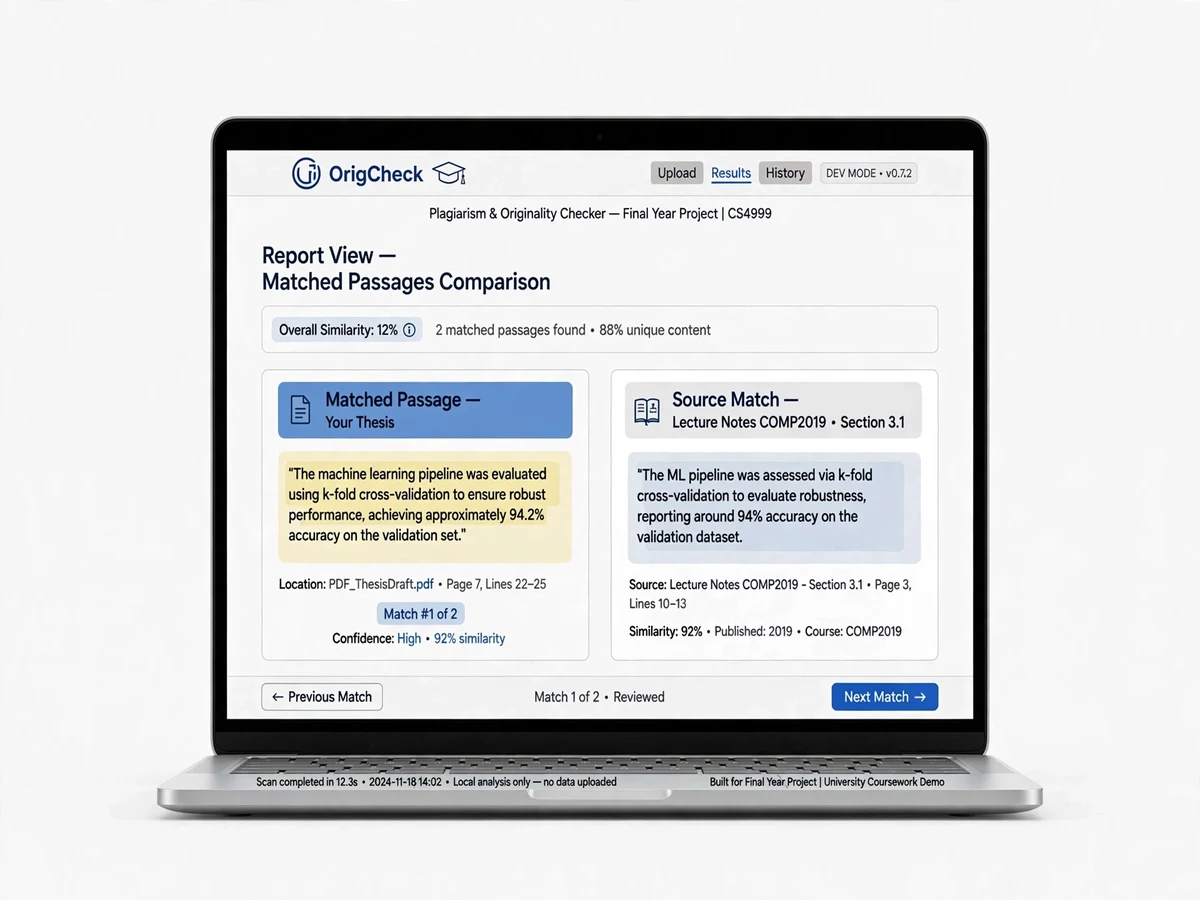
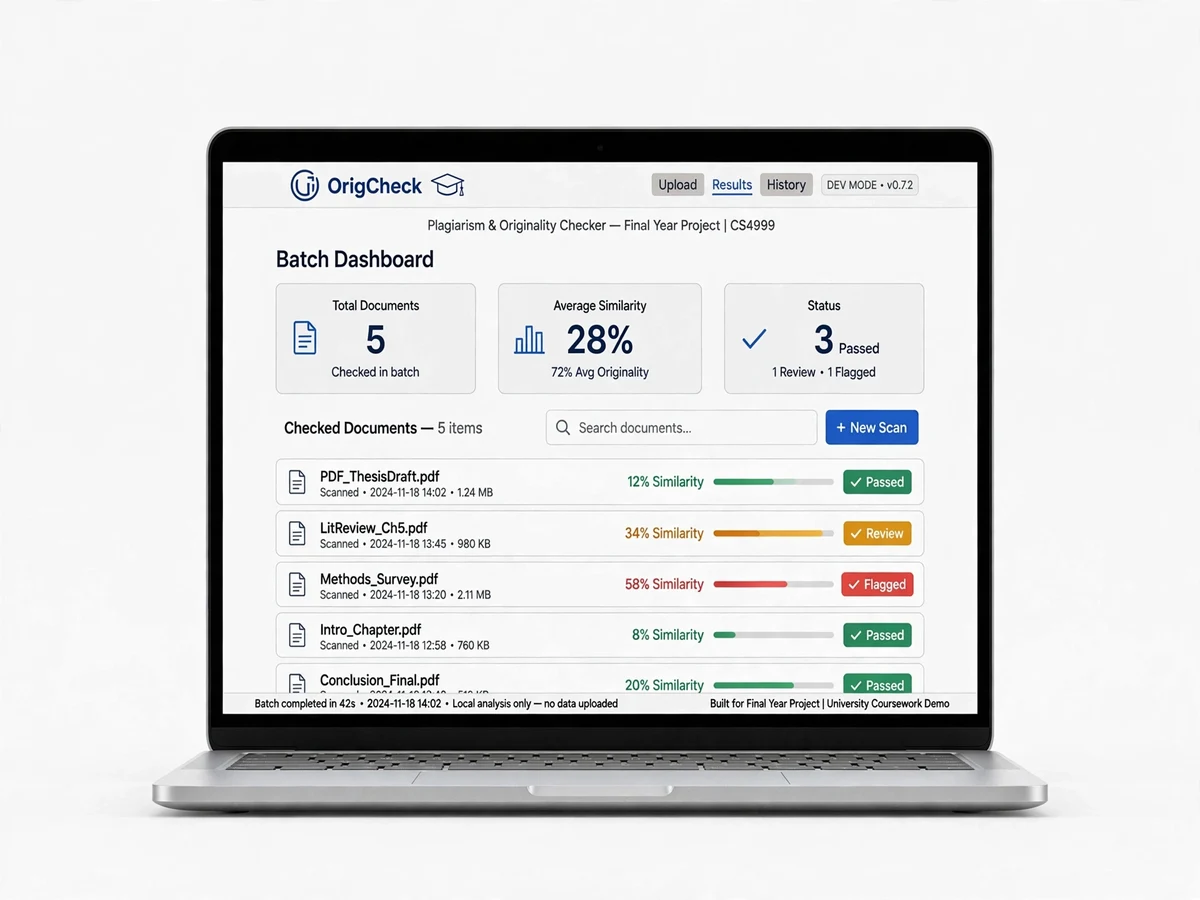
The Plagiarism Detection System using NLP is a final-year project that checks submitted documents for copied content the way professional tools do: it compares every document against a corpus using TF-IDF vectorization with cosine similarity, plus winnowing-based fingerprinting that catches paraphrased and reordered text. OrigCheck — the Flask web app — highlights matched passages side by side, shows similarity percentages per source document, and generates a downloadable originality report that a college project coordinator could actually use.
Academic integrity is a live problem: with AI-generated text everywhere, departments need their own similarity-checking capability, and commercial tools are expensive per-seat licenses. Building one from first principles — tokenization, n-grams, TF-IDF, fingerprinting — is exactly the NLP depth that viva examiners reward, and the demo (upload two assignments, watch the matches light up) sells itself.
This is a built-to-order project: the corpus handling, thresholds and report format are configured for your build, and the full algorithm pipeline ships with documentation you can defend line by line.
How it works
- Reference documents (previous submissions, source material) are uploaded into the corpus.
- A suspect document is uploaded; NLTK preprocesses it — tokenization, lowercasing, stopword removal, stemming.
- The engine builds TF-IDF vectors for the suspect and every corpus document and computes pairwise cosine similarity.
- In parallel, the winnowing algorithm generates document fingerprints from k-gram hashes to catch paraphrased matches that pure TF-IDF might miss.
- OrigCheck displays the originality score, highlights matched passages against each source, and exports the full report as PDF.
Project features
- Multi-document plagiarism checking — compare one submission against an entire corpus
- TF-IDF vectorization with cosine similarity scoring (document-level and passage-level)
- Winnowing fingerprinting — catches paraphrased, reordered and lightly edited copying
- Side-by-side matched-passage highlighting with color-coded similarity bands
- Per-source similarity percentages and an overall originality score
- Downloadable originality report (PDF) with matched excerpts and source references
- Configurable similarity threshold and n-gram / shingle sizes
- Corpus management — upload reference documents, assignments or web-scraped text
- Preprocessing pipeline: tokenization, stopword removal, stemming (NLTK)
What is included
- Full Python source code (engine + Flask app), well-commented
- Custom winnowing fingerprinting module with documentation
- Project report PDF (problem statement, algorithms, implementation, results, conclusion)
- PPT presentation for final review
- Viva Q&A preparation document (TF-IDF math, cosine similarity, winnowing, NLP preprocessing)
- Sample corpus and test documents for demo-day use
FAQs
- Is this plagiarism detector good for a final-year CSE/IT project? Yes — it's genuine NLP and algorithms work: text preprocessing, vector-space models, cosine similarity math and the winnowing fingerprinting algorithm. Examiners can drill into any layer, and the viva Q&A prepares you for the math as well as the code.
- How is this different from just comparing strings? Naive string matching misses paraphrasing entirely. TF-IDF cosine similarity measures semantic overlap in vector space, and winnowing fingerprints catch reordered or lightly edited passages — the report explains both with worked examples you can present.
- Can it check against the internet? Out of the box it checks against your uploaded corpus (previous submissions, reference material). A web-scraping extension is a documented future-scope item — and a great answer when examiners ask "what's next?"
- What does the originality report contain? The overall originality percentage, per-source similarity breakdown, the matched passages highlighted side by side, and document metadata — exported as a clean PDF a coordinator could attach to a review file.
- How accurate is it? On the included sample corpus with known copied passages, the engine flags planted plagiarism at the configured threshold with passage-level highlighting. The report documents the test methodology so you can run the evaluation during your build.
- Can colleges actually use this? That's the pitch: departments pay per-seat for commercial checkers. OrigCheck runs locally, costs nothing per document, and keeps student submissions private — a strong real-world justification for your project review.
Limitations & prerequisites
- Compares against the uploaded corpus only — it cannot search the live internet without an added web-scraping module.
- Heavily paraphrased or translated text may score below the flag threshold; no detector is perfect.
- Very short documents produce noisy similarity scores — best on assignments of a page or more.
- PDF report generation for very large corpora can be slow; batch processing is recommended.
Components & software requirements
- Python 3, NLTK (tokenization, stopwords, Porter stemming)
- scikit-learn (TfidfVectorizer, cosine_similarity)
- Custom winnowing fingerprinting implementation (k-grams, rolling hash, window minimum)
- Flask (OrigCheck web app), HTML/CSS/JS frontend
- reportlab / WeasyPrint (PDF originality reports)
- SQLite (corpus and submission storage)
| Parameter | Value |
|---|---|
| Similarity engine | TF-IDF + cosine similarity (scikit-learn) |
| Fingerprinting | Winnowing algorithm (configurable k-gram and window sizes) |
| Preprocessing | NLTK: tokenize, lowercase, stopword removal, stemming |
| Comparison scope | One-to-many (submission vs full corpus) |
| Output | Originality %, per-source similarity %, highlighted matches, PDF report |
| Threshold | Configurable (default flags passages above set similarity) |
| App | OrigCheck — Flask web app with corpus management |
| Deliverables | Source code, report PDF, PPT, viva Q&A |