
More project photos (2)
The problem
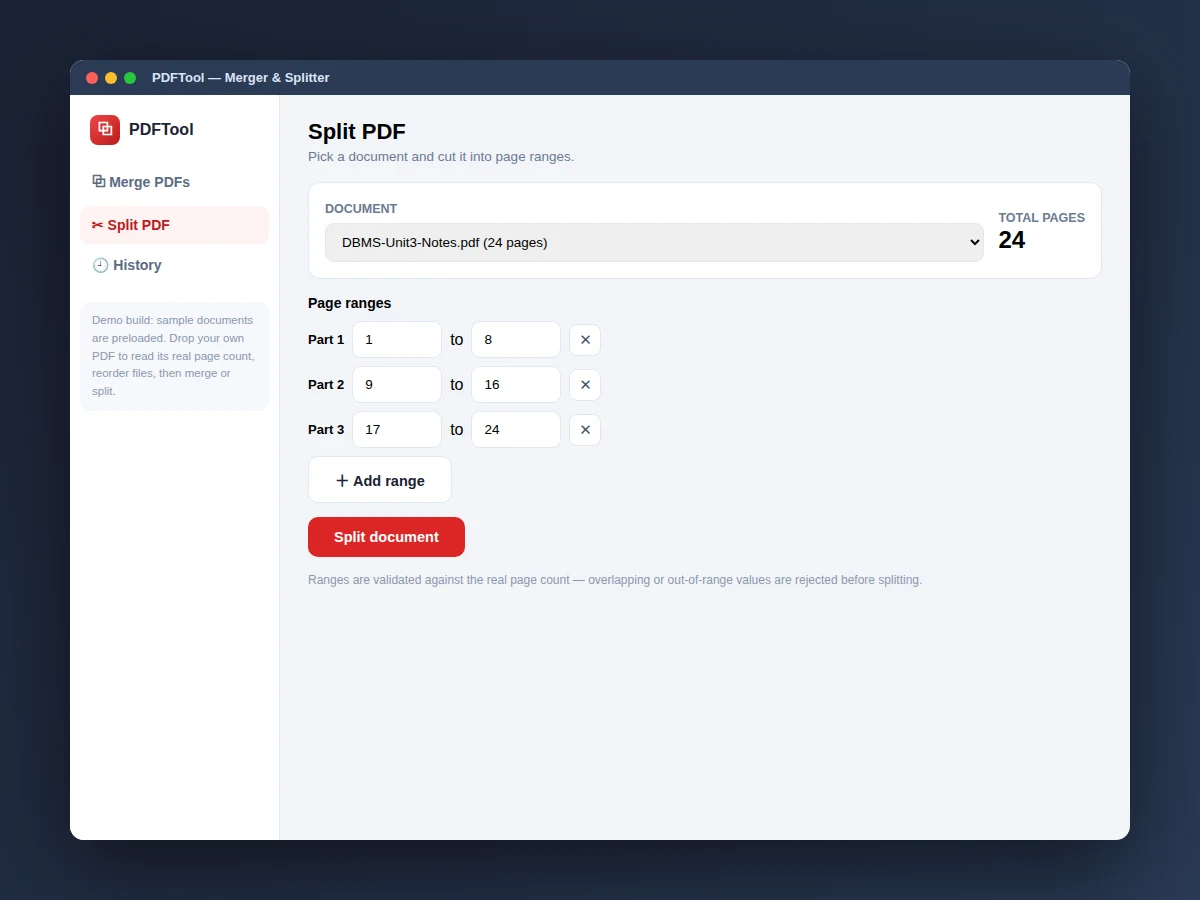
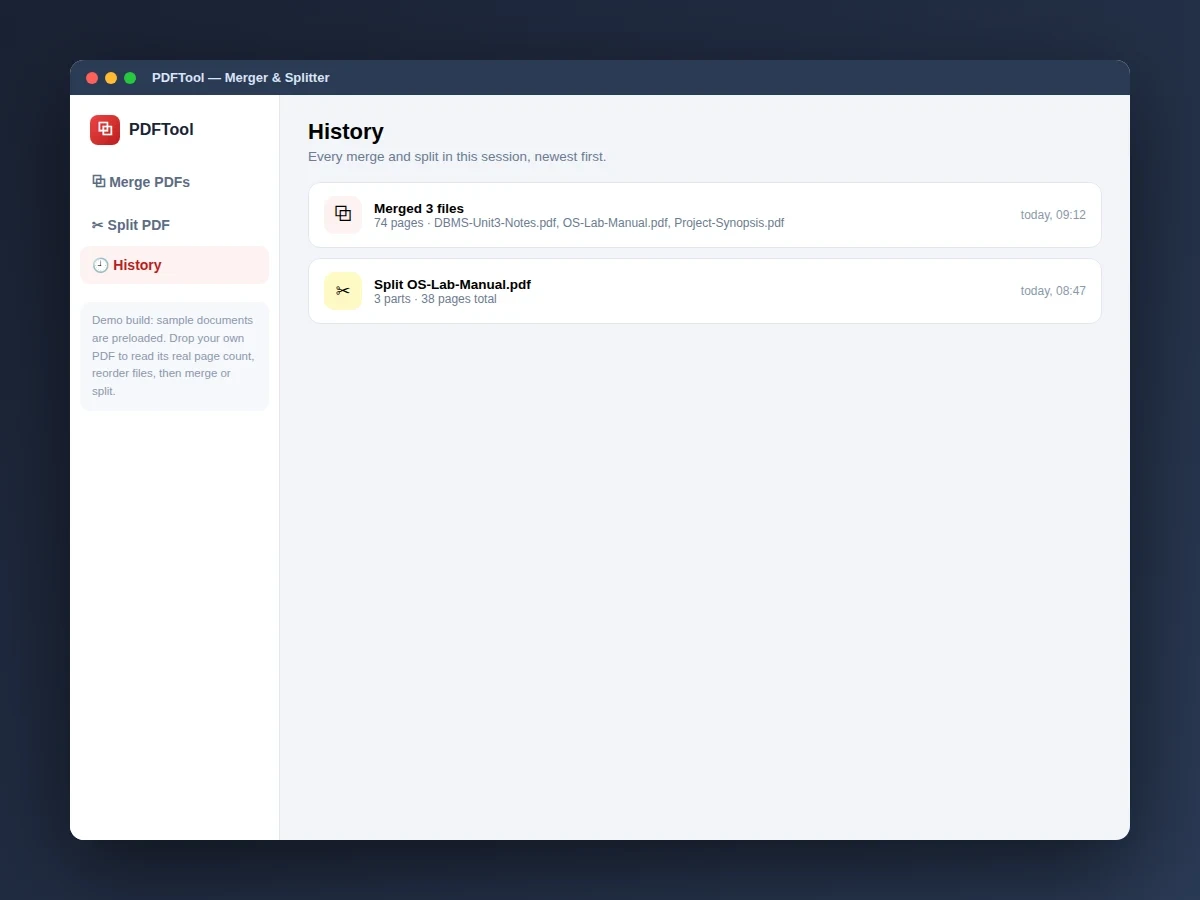
Students constantly wrestle with PDFs: assignment pages scattered across files, a lab manual that needs only chapters 3–5, a project report assembled from three teammates' documents. Online merge tools upload your files to someone else's server and cap the free tier; desktop suites are overkill. This project is a focused desktop-style app for the two operations students actually need. The Merge view accepts dropped PDFs, parses each file's real page count from the PDF structure, lets the student reorder files and toggle which ones are included, then combines the selection into one document. The Split view takes one PDF and a list of page ranges — 1–12, 13–24 — validates them against the real page count, and produces one file per range. Everything runs locally in the app: downloads are genuine PDF files written by the app's own PDF writer, and a history view records every operation in the session. No uploads, no accounts, no watermarks.
How it works
- The student drops PDF files onto the merge view; each file's page count is parsed from its internal structure.
- Files are toggled in or out and reordered with up/down controls to set the merge sequence.
- Clicking "merge selected" combines the chosen files in order and downloads the result as a valid PDF.
- In the split view, the student selects one PDF and enters page ranges such as 1–12, 13–24.
- Ranges are validated against the file's real page count; invalid ranges are rejected with an explanation.
- Each valid range downloads as its own PDF file, and the operation is logged in the history view.
Tech stack:
- Python with a desktop GUI toolkit (delivered app)
- PDF structure parsing for page counts
- Minimal client-side PDF writer for downloads
- Interactive web prototype of the app flow (HTML/CSS/JS) for demonstration
| Parameter | Value |
|---|---|
| Platform | Desktop app in Python (design target) |
| Demo screens | 3 (merge, split, history) |
| Demo merge | 3 sample PDFs, 74 pages combined |
| Page-count parsing | Read from each PDF's /Count entry (real files) |
| Split ranges | Validated against the actual page count |
| Download format | Genuine PDF files written by the app's PDF writer |
| Sample files | 3 preloaded demo PDFs |
| History | Session log with file names, pages and timestamps |
| Demo views | Interactive web prototype of the desktop app flow |
| Data handling | Fully local — no uploads, no accounts (design target) |
Project features
- [Merge with reorder] Drop multiple PDFs, toggle inclusion per file, reorder with up/down controls, and merge the selection — the demo combines 3 files totalling 74 pages.
- [Real page-count parsing] Each dropped PDF's page count is read from the file's own structure (/Count), not guessed or typed.
- [Split by page ranges] Enter ranges like 1–12 or 13–38; the app validates them against the actual page count before splitting.
- [Genuine PDF downloads] Merged and split results download as real, openable PDF files written by the app's own minimal PDF writer.
- [Session history] Every merge and split is logged with file names, page counts and timestamps.
- [Sample documents preloaded] The demo ships with sample PDFs so every feature is tryable immediately.
What is included
- Complete desktop app source code (Python) implementing merge, split and history
- Interactive web prototype of the app flow (the demo shown in the screenshots)
- The app's PDF parsing and PDF-writing modules with comments
- Project report PDF (background, methodology, architecture, screens, testing notes)
- PPT presentation for final review
- Viva Q&A preparation document (PDF internals, page-count parsing, file generation)
Limitations & prerequisites
- The demo's merge concatenates sample documents; the delivered app merges real uploaded PDFs page by page.
- The minimal PDF writer produces clean text-based PDFs; complex source layouts (forms, annotations) are out of scope.
- Encrypted or password-protected PDFs are not supported in the current build.
- The demo prototype runs in the browser; the delivered app is a Python desktop application.
- Very large PDFs (hundreds of megabytes) are outside the tested range.
Frequently Asked Questions
What does the app actually do?
It merges multiple PDFs into one with reorderable file order, and splits a PDF into parts by page ranges — with real page-count parsing and genuine PDF downloads.
How are page counts determined?
Each dropped PDF's page count is parsed from the file's own internal structure, so split ranges can be validated against reality.
Are the downloads real PDFs?
Yes — merged and split results download as genuine, openable PDF files written by the app's own PDF writer.
Is the demo a real desktop app?
The screenshots show an interactive web prototype of the desktop app flow. The delivered project is the full Python desktop application; the prototype demonstrates every screen and interaction.
What does the report include?
A background on PDF handling, the parsing and writing architecture, screen walkthroughs, and testing notes.
Is this project suitable for a final-year project?
Yes — for Computer Science and IT programs. It demonstrates file-format parsing, desktop UI design, and binary file generation. Suitable for B.E./B.Tech final-year projects in Computer Science and IT.
Components & software requirements
- Python with a desktop GUI toolkit (delivered app)
- PDF structure parsing for page counts
- Minimal client-side PDF writer for downloads
- Interactive web prototype of the app flow (HTML/CSS/JS) for demonstration
Delivery information
Built-to-order project. Delivery timeline is shared after order confirmation based on current queue.
Support terms
Complete documentation, setup guide, and viva preparation included. Support for setup and explanation provided.