
More project photos (2)
The problem
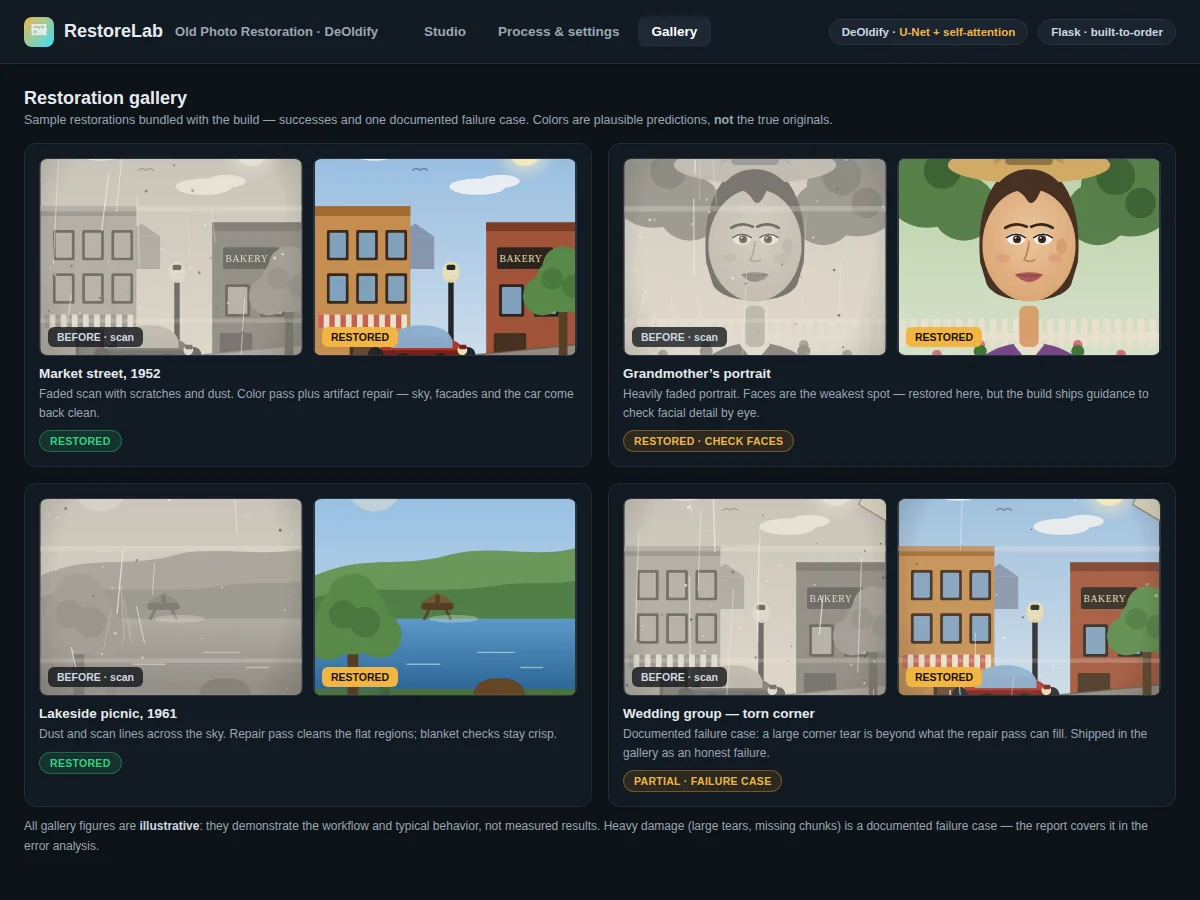
Most families own photographs that exist only as fading black-and-white prints — grandparents' portraits, decades-old wedding shots, flatbed scans marred by scratches and dust. Restoring them by hand is slow expert work that does not scale to personal collections, and the task resists automation by rules: plausible color cannot be derived from grayscale pixels by any formula, and damage varies from scan to scan. This build gives those photos a second life with DeOldify, Jason Antic's open-source deep-learning pipeline. A U-Net with self-attention colorizes grayscale images, trained with the NoGAN approach — first as a plain colorizer, then refined with a GAN-style critic so colors look natural rather than washed out — and an artifact-repair pass cleans scratches and scan defects in the same run. A Flask demo wraps the pipeline: upload a scan, compare the result with a draggable before-after slider. Because restoration has no single correct color, the build is deliberately qualitative: a sample restoration gallery plus documented failure cases (heavy damage, faded faces) ships instead of numeric scores — honest, demoable computer-vision work with genuine viva material.
Frequently asked questions
- How does DeOldify colorize a black-and-white photo? A U-Net with self-attention predicts a color for every pixel. It was trained first as a plain colorizer and then refined with a GAN-style critic (the NoGAN approach), which teaches it to produce natural-looking rather than washed-out colors, with attention keeping colors consistent across large regions like skies and clothing.
- Does it recover the original colors of the photo? No — and the report states this plainly. It predicts plausible colors learned from its training imagery. A red dress in the original might come back blue; the result looks natural but is not a factual recovery.
- What kinds of damage can it repair? Scratches, dust specks, scan lines and light fading respond well. Large tears or missing chunks are much harder and are documented as failure cases in the gallery.
- Why are there no accuracy numbers? Photo restoration has no ground truth — there is no correct color for a faded 1960s portrait. Quality is judged visually, so the build ships a gallery of results and documented failure cases instead of scores.
- Is this project suitable for a final-year project? Yes — for B.E./B.Tech Computer Science, AI/ML and Data Science students. It covers colorization, U-Net architectures, self-attention, GAN-style refinement, and honest qualitative evaluation, with a transformation demo that is instantly visible to examiners.
How it works
Dataset & model:
Dataset name: ImageNet-subset imagery for the colorizer (Deng et al., CVPR 2009 family). Source: public ImageNet data. Task: grayscale-to-color image translation plus artifact repair (image-to-image, no class labels — colorization has no classes). The build integrates DeOldify's published pre-trained weights; no buyer-run retraining on a labeled dataset is performed.
Model: DeOldify pipeline by Jason Antic — U-Net with self-attention for colorization, trained with the NoGAN approach (plain colorizer pre-training followed by GAN-style critic refinement on fastai), plus a dedicated artifact-repair model.
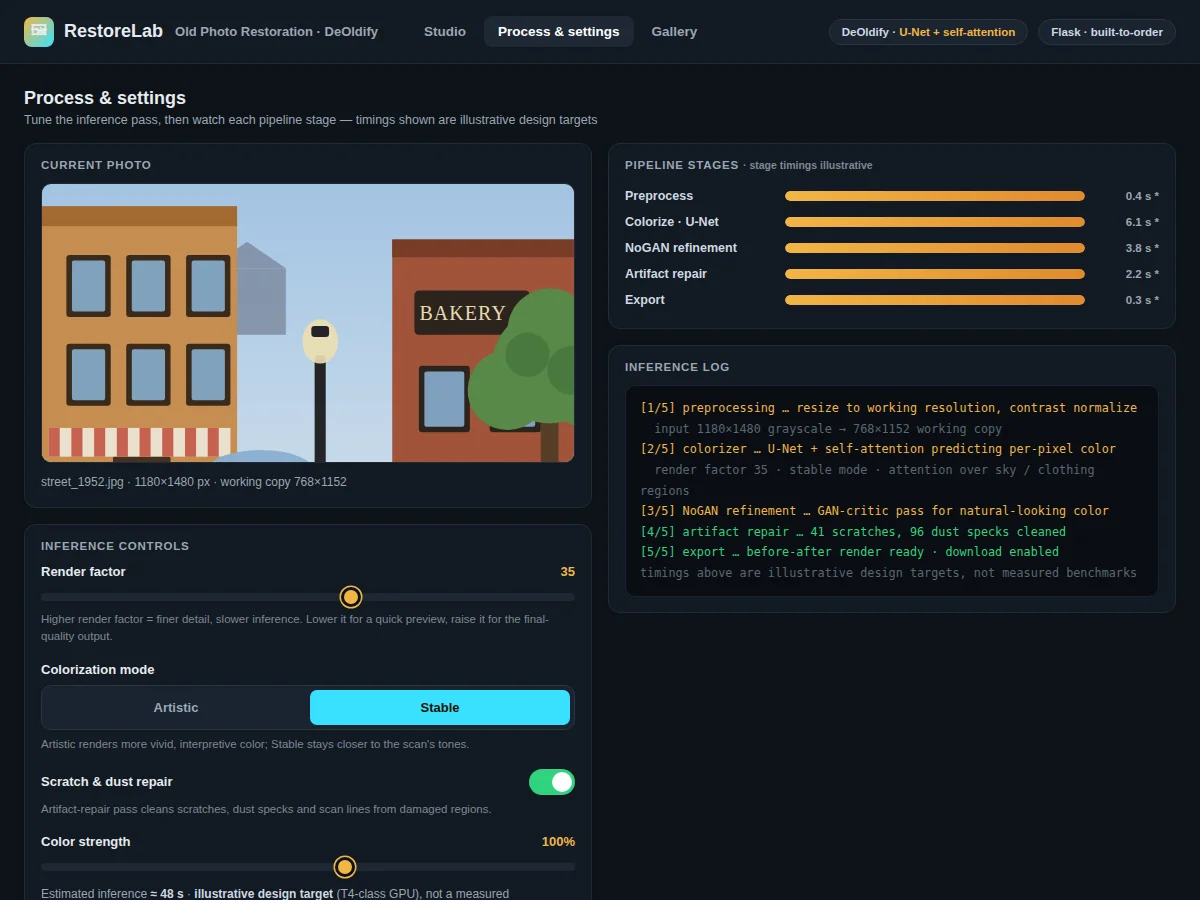
Input: a scanned grayscale photograph, resized internally. Prediction: per-pixel color values plus repaired regions. Output: a restored color image, downloadable, shown behind the before-after slider.
Evaluation metrics: none numeric, by design. Evaluation is qualitative: the sample restoration gallery and documented failure cases (heavy damage, faded faces) are the build's evidence, since there is no ground-truth color to score against.
Working:
- Dataset: the colorizer's training imagery is an ImageNet subset (no class labels needed — colorization is an image-to-image task); the artifact-repair model trains on artificially damaged imagery.
- Preprocessing: each uploaded scan is resized to a working resolution and contrast-normalized with OpenCV.
- Training phase (pre-built): DeOldify's U-Net colorizer was trained with the NoGAN approach — first as a plain colorizer, then refined with a GAN-style critic on fastai — so the build integrates the published pre-trained weights rather than retraining from scratch.
- Inference phase: the colorizer predicts a color for every pixel, with self-attention keeping colors consistent across large regions; the artifact-repair pass then cleans scratches, dust specks and scan lines from damaged regions.
- Output: the app renders the original and restored images behind a draggable before-after slider; the render factor can be lowered for a fast preview or raised for final-quality output, and the restored photo is downloadable.
- Evaluation phase (offline, qualitative): the sample restoration gallery documents successes and failure cases (heavy damage, faded faces) as the build's evaluation — no numeric scores are claimed, because none would be meaningful.
Specifications:
Model | DeOldify colorizer by Jason Antic — U-Net with self-attention
Training approach | NoGAN: plain colorizer pre-training, then GAN-style critic refinement on fastai
Colorization training data | ImageNet-subset imagery (no class labels; image-to-image task)
Restoration | Scratch, dust and scan-artifact repair on damaged regions of the uploaded photo
Input | Scanned grayscale photographs, resized internally for inference
Render factor | Adjustable setting trading output quality against inference time
Evaluation | Qualitative: sample gallery plus documented failure cases; no numeric scores claimed
Demo app | Flask web app with upload, before-after slider and download
Weights | Pre-trained colorizer and artifact-repair weights via included download scripts
Project features
Grayscale-to-Color Conversion [implemented] — DeOldify's U-Net colorizer predicts per-pixel colors for scanned vintage photos, with self-attention keeping colors consistent across regions.
Scratch and Artifact Repair [implemented] — The artifact-repair pass cleans scratches, dust specks and scan lines on the same photo in the same run.
Flask Demo with One-Click Upload [implemented] — Upload a scan and run the full pipeline from the browser with a single action.
Draggable Before-After Slider [implemented] — Compare the original and restored images side by side behind an interactive comparison control.
Adjustable Render Factor [configurable] — Trade output quality against inference time: lower the factor for fast previews, raise it for final-quality results.
Batch Mode for Scan Folders [implemented] — Process a whole folder of scans in one run, useful for building the restoration gallery.
Sample Restoration Gallery [implemented] — A bundled gallery of restored photos demonstrates successes and anchors the qualitative evaluation.
Documented Failure Cases [implemented] — Heavy damage and faded-face cases are recorded with analysis, giving the report honest error material.
What is included
Complete source code: preprocessing, inference pipeline, Flask demo app
Pre-trained DeOldify colorizer and artifact-repair weights with download scripts
Sample restoration gallery with documented failure cases
Project report PDF: photo-restoration background, DeOldify/NoGAN method, qualitative evaluation, error analysis
PPT presentation for final review
Viva Q&A preparation document: colorization, U-Net, self-attention, NoGAN, GAN critics
Setup guide: environment, dependencies, weights download, GPU/CPU guidance
Limitations & prerequisites
Restoration quality is judged visually — there is no meaningful numeric score for restoration goodness, and the build does not claim one.
Faces are the weakest spot: the model can smooth or slightly alter facial detail, so restored faces need careful visual checking; the gallery documents this bias.
Colorization predicts plausible colors — it does not recover the original true colors of the scene.
Heavy damage (large tears, missing chunks) restores poorly; light fading and scratches respond far better.
GPU is strongly recommended; CPU inference is slow, which limits live-demo pacing on weak machines.
This is an educational prototype, not a professional restoration service.
Frequently Asked Questions
How does DeOldify colorize a black-and-white photo?
A U-Net with self-attention predicts a color for every pixel. It was trained first as a plain colorizer and then refined with a GAN-style critic (the NoGAN approach), which teaches it to produce natural-looking rather than washed-out colors, with attention keeping colors consistent across large regions like skies and clothing.
Does it recover the original colors of the photo?
No — and the report states this plainly. It predicts plausible colors learned from its training imagery. A red dress in the original might come back blue; the result looks natural but is not a factual recovery.
What kinds of damage can it repair?
Scratches, dust specks, scan lines and light fading respond well. Large tears or missing chunks are much harder and are documented as failure cases in the gallery.
Why are there no accuracy numbers?
Photo restoration has no ground truth — there is no correct color for a faded 1960s portrait. Quality is judged visually, so the build ships a gallery of results and documented failure cases instead of scores.
Is this project suitable for a final-year project?
Yes — for B.E./B.Tech Computer Science, AI/ML and Data Science students. It covers colorization, U-Net architectures, self-attention, GAN-style refinement, and honest qualitative evaluation, with a transformation demo that is instantly visible to examiners.
Components & software requirements
Python 3.10
PyTorch and the fastai-based DeOldify model code
OpenCV, NumPy, PIL (scanning prep, resizing, post-processing)
Flask (demo web application)
Matplotlib (gallery figures for the report)
Pre-trained DeOldify colorizer and artifact-repair weights (download scripts included)
A GPU is strongly recommended — the setup guide covers free cloud-GPU options; CPU inference works but is slow
Delivery information
Built-to-order. The pipeline integration (colorizer + artifact repair), the Flask demo app, the sample restoration gallery with failure-case documentation, and the full documentation kit (report, PPT, viva Q&A, setup guide) are prepared fresh for the buyer. No long training run is needed since published pre-trained weights are integrated; the pacing item is gallery curation and documentation. The exact schedule is confirmed at quotation.
Support terms
- Setup guidance: environment, dependencies, weights download, GPU/CPU inference guidance
- Viva preparation: colorization concepts, U-Net with self-attention, the NoGAN approach, why evaluation is qualitative here
- Customization discussion: different render defaults, gallery additions, portrait-focused experiments (feasibility confirmed before quoting)