
More project photos (2)
The problem
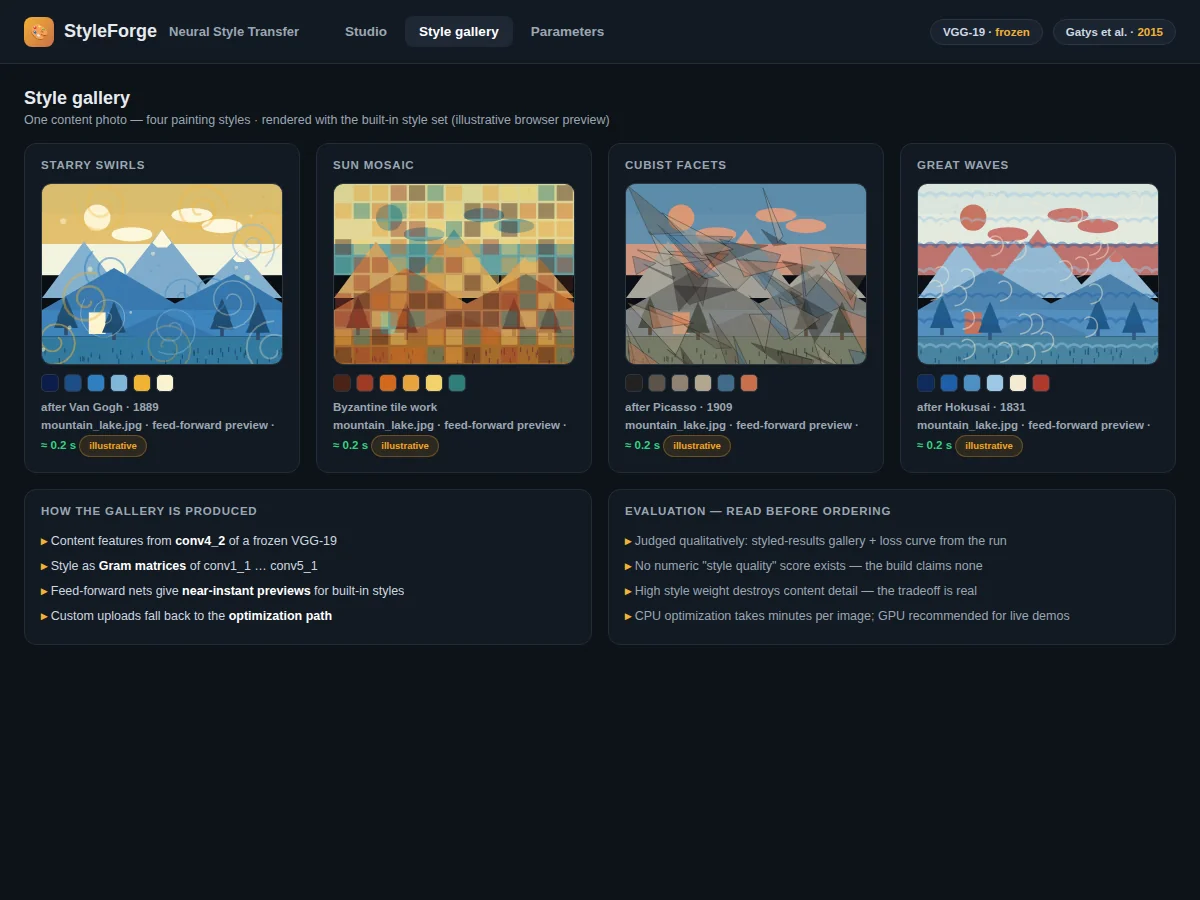
Neural style transfer is usually shown as a one-off script: run it, wait, admire the output — with no interface, no controls and no way to explore the content-versus-style tradeoff. That leaves the most educational part of Gatys et al.'s landmark result on the table: the visible mechanics of separating what an image depicts from how it is painted. This build turns "A Neural Algorithm of Artistic Style" (CVPR 2016) into a complete PyTorch application. A frozen pre-trained VGG-19 supplies the representations — deep-layer activations for content, Gram matrices of feature maps for style — and gradient descent optimizes a target image until it carries the photo's layout in the painting's brushwork. The Flask demo lets a student upload a content photo, choose or upload a style painting, set the style strength with a slider, and watch the loss curve fall during optimization. A fast feed-forward mode after Johnson et al. gives near-instant previews for built-in styles. With no single right answer for art, evaluation is qualitative — a styled-results gallery plus the run's loss curve.
Frequently asked questions
- What is neural style transfer, exactly? A technique from Gatys et al. (2015) that separates what an image depicts (content) from how it is painted (style) using a convolutional network, then recombines them — so a photo keeps its layout but gains the brushwork and palette of a painting.
- What is a Gram matrix, and why does it capture style? A Gram matrix records how pairs of feature channels correlate across an image, capturing textures, strokes and color patterns while discarding spatial layout — exactly the style part to borrow from a painting.
- Optimization-based vs feed-forward — what is the difference? Optimization runs gradient descent on each new image (slow, flexible, works with any style). Feed-forward trains one network per style once, then stylizes in a single pass (fast, but one network per style).
- How long does one styled image take? The feed-forward preview is near-instant; full optimization typically takes several minutes on CPU and far less on GPU. The live loss curve keeps the wait interesting during demos.
- Is this project suitable for a final-year project? Yes — for B.E./B.Tech Computer Science, AI/ML and Web students. It covers CNN feature hierarchies, Gram matrices, loss design, optimization vs feed-forward inference, and the content-style tradeoff, with a live demo examiners can play with.
How it works
Dataset & model:
Dataset: none for training — the method uses a frozen pre-trained VGG-19 (Simonyan & Zisserman, arXiv:1409.1556; weights via torchvision). Content photos and style paintings are user-supplied at demo time. Task: neural style transfer (image-to-image generation). Classes: none — not a classification task.
Model: Gatys et al., "A Neural Algorithm of Artistic Style" (arXiv:1508.06576, CVPR 2016) — optimization of a target image against content and style losses — plus an optional feed-forward transfer network after Johnson et al. (arXiv:1603.08155, ECCV 2016) for instant previews of built-in styles.
Input: a content photo and a style painting. Prediction: an image minimizing the weighted content/style loss. Output: the stylized image, downloadable, shown side by side with its sources.
Evaluation metrics: none numeric, by design — style transfer is an artistic process with no ground truth. Evaluation is qualitative: the styled-results gallery plus the optimization loss curve from the run.
Working:
- Data: a content photo and a style painting are loaded through torchvision transforms and resized; no training dataset is used — the VGG-19 is pre-trained and frozen.
- Feature extraction: the frozen VGG-19 extracts content features from a deep convolutional layer and style features — Gram matrices of feature maps — from several layers.
- Initialization: a target image is initialized from the content photo and marked as the only optimizable tensor.
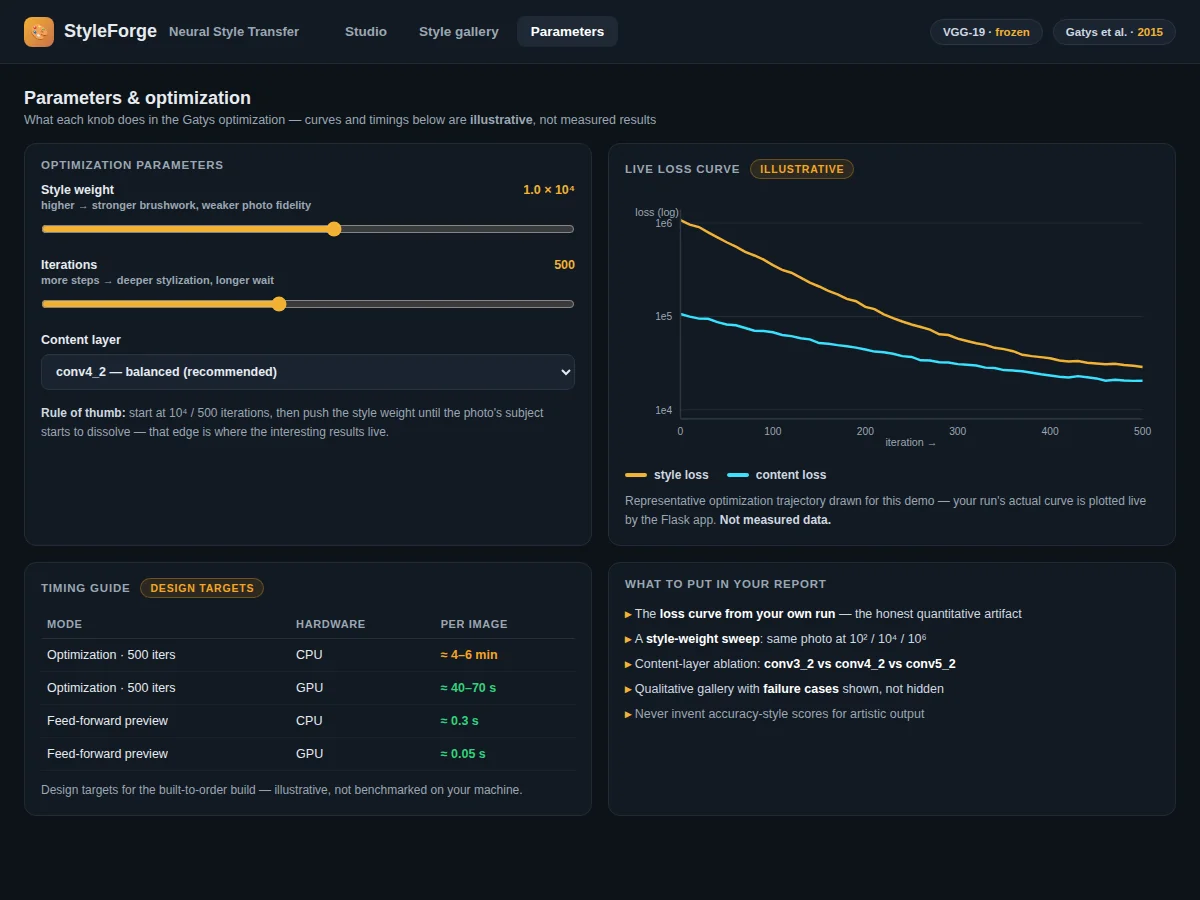
- Optimization phase: gradient descent minimizes a weighted sum of content loss and style loss; the style-strength slider sets the weighting, and the Flask app plots the falling loss curve live.
- Preview path: for built-in styles, the optional feed-forward network (Johnson et al.) produces a preview in a single forward pass instead of hundreds of optimization steps.
- Inference phase (demo): the finished image is shown next to the original photo and the style painting and is downloadable; evaluation is the styled-results gallery plus the run's loss curve.
Specifications:
Method | Gatys et al., A Neural Algorithm of Artistic Style (arXiv:1508.06576, CVPR 2016)
Network | VGG-19, pre-trained, weights frozen during optimization
Content representation | Activations of a deep convolutional layer
Style representation | Gram matrices of feature maps from multiple layers
Control | Style-strength slider weighting style loss against content loss
Preview mode | Feed-forward network after Johnson et al., for built-in styles only
Optimization time | Several minutes per image on CPU is typical; GPU is much faster
Evaluation | Qualitative: styled-results gallery plus the run's loss curve; no numeric scores
Demo app | Flask with content upload, style gallery, strength slider and download
Project features
Content Upload and Style Gallery [implemented] — Upload a content photo and pick a style painting from the built-in gallery, or upload any painting or texture as a custom style source.
Style-Strength Slider [implemented] — Dial the tradeoff between fidelity to the photo and strength of the style; the slider directly weights the style loss against the content loss.
Optimization-Based Transfer with VGG-19 [implemented] — Gatys-style transfer using a frozen pre-trained VGG-19, with content loss from deep-layer activations and style loss from Gram matrices.
Fast Feed-Forward Preview Mode [implemented] — After Johnson et al., a dedicated network gives near-instant previews for the built-in styles.
Live Loss Curve [implemented] — Content and style loss are plotted live during optimization, making the descent visible as it happens.
Side-by-Side Comparison View [implemented] — Content photo, style painting and result are shown together, with the result downloadable.
New Styles via Retraining [configurable] — Additional built-in styles can be added by training the feed-forward network on them; custom uploads use the optimization path instead.
Video Style Transfer [future-scope] — Extending stylization to video frames is documented as a possible extension, not included in this build.
What is included
Complete source code: VGG-19 transfer, feed-forward preview network, Flask demo app
Pre-trained VGG-19 weights via torchvision, plus feed-forward style weights
Built-in gallery of style paintings and sample styled results
Project report PDF: style-transfer background, content/style loss derivation, qualitative evaluation
PPT presentation for final review
Viva Q&A preparation document: Gram matrices, VGG features, optimization vs feed-forward, content/style tradeoff
Setup guide: environment, dependencies, GPU/CPU guidance
Limitations & prerequisites
Style transfer is judged visually — there is no numeric score for artistic quality, and the build does not claim one.
Optimization-based transfer takes several minutes per image on CPU; a GPU is recommended for live demos.
Pushing style strength too high destroys the photo's content detail — the tradeoff is real and the slider exposes it.
The feed-forward preview mode only covers the built-in styles; custom styles use the slower optimization path.
Very low-resolution content photos produce blurry, soft results.
This is an educational prototype, not a commercial photo-editing tool.
Frequently Asked Questions
What is neural style transfer, exactly?
A technique from Gatys et al. (2015) that separates what an image depicts (content) from how it is painted (style) using a convolutional network, then recombines them — so a photo keeps its layout but gains the brushwork and palette of a painting.
What is a Gram matrix, and why does it capture style?
A Gram matrix records how pairs of feature channels correlate across an image, capturing textures, strokes and color patterns while discarding spatial layout — exactly the style part to borrow from a painting.
Optimization-based vs feed-forward — what is the difference?
Optimization runs gradient descent on each new image (slow, flexible, works with any style). Feed-forward trains one network per style once, then stylizes in a single pass (fast, but one network per style).
How long does one styled image take?
The feed-forward preview is near-instant; full optimization typically takes several minutes on CPU and far less on GPU. The live loss curve keeps the wait interesting during demos.
Is this project suitable for a final-year project?
Yes — for B.E./B.Tech Computer Science, AI/ML and Web students. It covers CNN feature hierarchies, Gram matrices, loss design, optimization vs feed-forward inference, and the content-style tradeoff, with a live demo examiners can play with.
Components & software requirements
Python 3.10
PyTorch and torchvision (pre-trained VGG-19, autograd optimization)
PIL and NumPy (image loading, transforms, saving)
Matplotlib (live loss-curve display)
Flask (demo web application)
Pre-trained VGG-19 weights via torchvision, plus feed-forward style weights
Built-in gallery of style paintings and sample styled results
A GPU is recommended for live optimization demos (CPU works, at several minutes per image)
Delivery information
Built-to-order. The PyTorch implementation (optimization path + feed-forward preview), the Flask demo app, the styled-results gallery, and the full documentation kit (report, PPT, viva Q&A, setup guide) are prepared fresh for the buyer. No long training run is required since VGG-19 weights are pre-trained; the pacing item is the demo build and documentation. The exact schedule is confirmed at quotation.
Support terms
- Setup guidance: environment, dependencies, pre-trained weights, GPU/CPU guidance
- Viva preparation: Gram matrices, VGG feature hierarchies, content/style loss design, optimization vs feed-forward tradeoffs
- Customization discussion: extra built-in styles, UI changes, alternative content/style loss weightings (feasibility confirmed before quoting)