
More project photos (2)
The problem
Every computer on a network exposes 65,535 TCP ports, and the ones left open define its attack surface: an exposed Telnet port, a database listening on the LAN, a forgotten admin panel. Network administrators map this surface with port scanners, and computer-networks courses teach the underlying TCP handshake — but students rarely watch it happen. This project builds a desktop scanner that is both a practical auditing tool and a teaching instrument. The scan engine opens TCP connections with configurable timeouts: a completed handshake means open, a RST reply means closed, no reply means filtered. A ping sweep first skips dead hosts so a /24 subnet finishes in minutes via a worker pool. Banner grabbing reads each open port's self-identification, and the findings engine translates raw results into graded, plain-language advice instead of scanner jargon.
How it works
- The user enters a target — single IP, range or CIDR — plus a port range, profile and timeout.
- A ping sweep identifies live hosts first so dead addresses are skipped.
- The worker pool opens TCP connections to each target port; handshake responses classify ports as open, closed or filtered.
- Banner grabbing connects to open ports and reads service self-identification strings.
- Results stream into the live table and log; completing hosts accumulate in the per-host detail view.
- The findings engine grades issues (high/medium/low) with plain-language remediation advice.
- The full report — hosts, ports, banners, findings — exports to HTML, CSV or JSON.
Tech stack:
- Python with socket and threading (worker pool)
- Desktop GUI or Electron frontend
- TCP connect + half-open SYN scan modes
- Banner-grabbing service probes
- Report export (HTML, CSV, JSON)
| Parameter | Value |
|---|---|
| Scan methods | TCP connect (unprivileged); half-open SYN needs admin/root |
| Port states | Open (handshake), closed (RST), filtered (timeout) |
| Target formats | Single IP, range, CIDR subnet |
| Profiles | Quick (top 1000), full (1–65535), stealth SYN, service detect, ping sweep |
| Throughput | Multithreaded worker pool; a /24 quick scan in minutes on typical lab hardware (design target) |
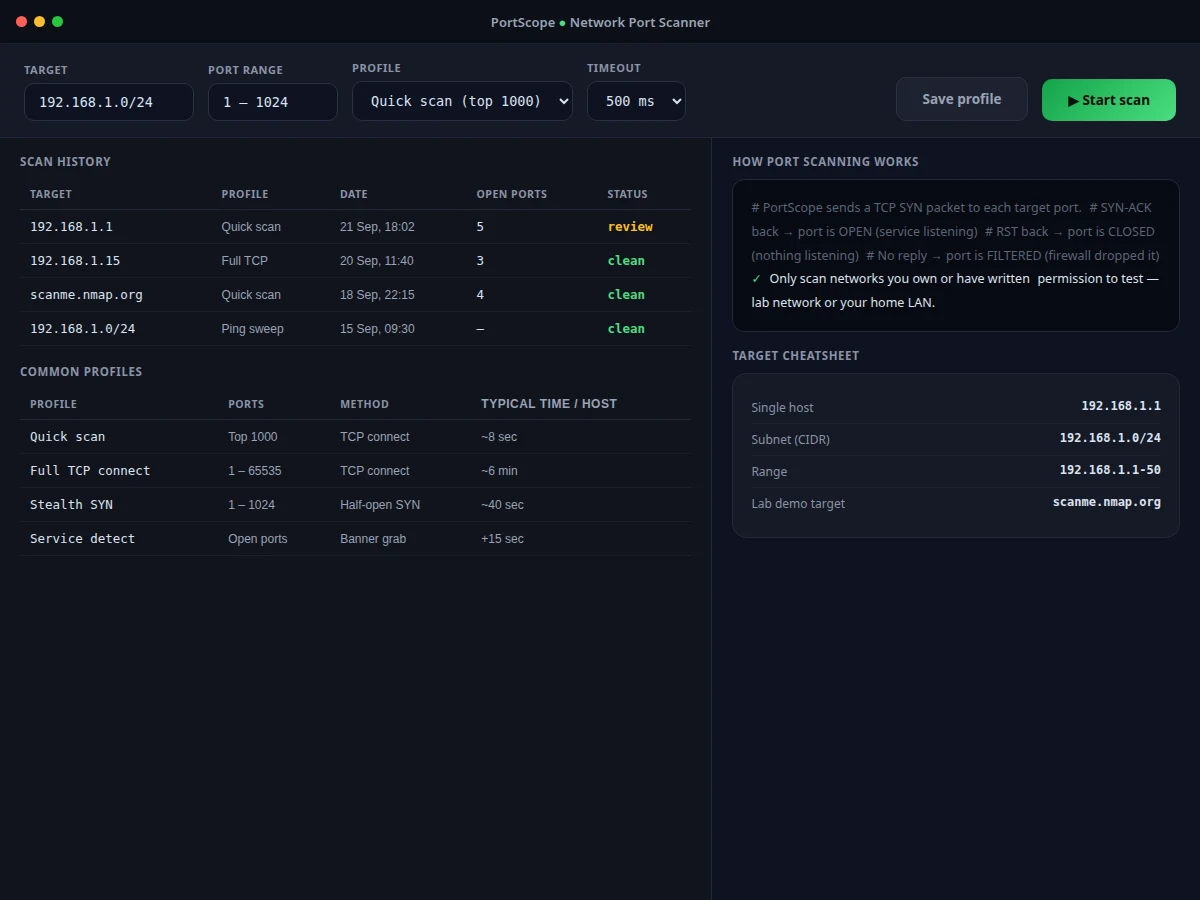
| Ethics scope | Owned or authorized networks only; notice shown in-app |
| Connectivity | Local network; no internet needed |
| Platform | Windows, macOS and Linux desktops (expected) |
Project features
- [Flexible targets] Scan a single host, an IP range or a full CIDR subnet (for example 192.168.1.0/24), with a lab-demo target cheatsheet built in.
- [TCP connect scanning] Each port gets a real connection attempt with configurable timeout; open, closed and filtered states are classified from handshake responses.
- [Scan profiles] Quick scan (top 1000), full TCP connect (1–65535), stealth SYN, service detection and ping sweep — each with typical per-host times.
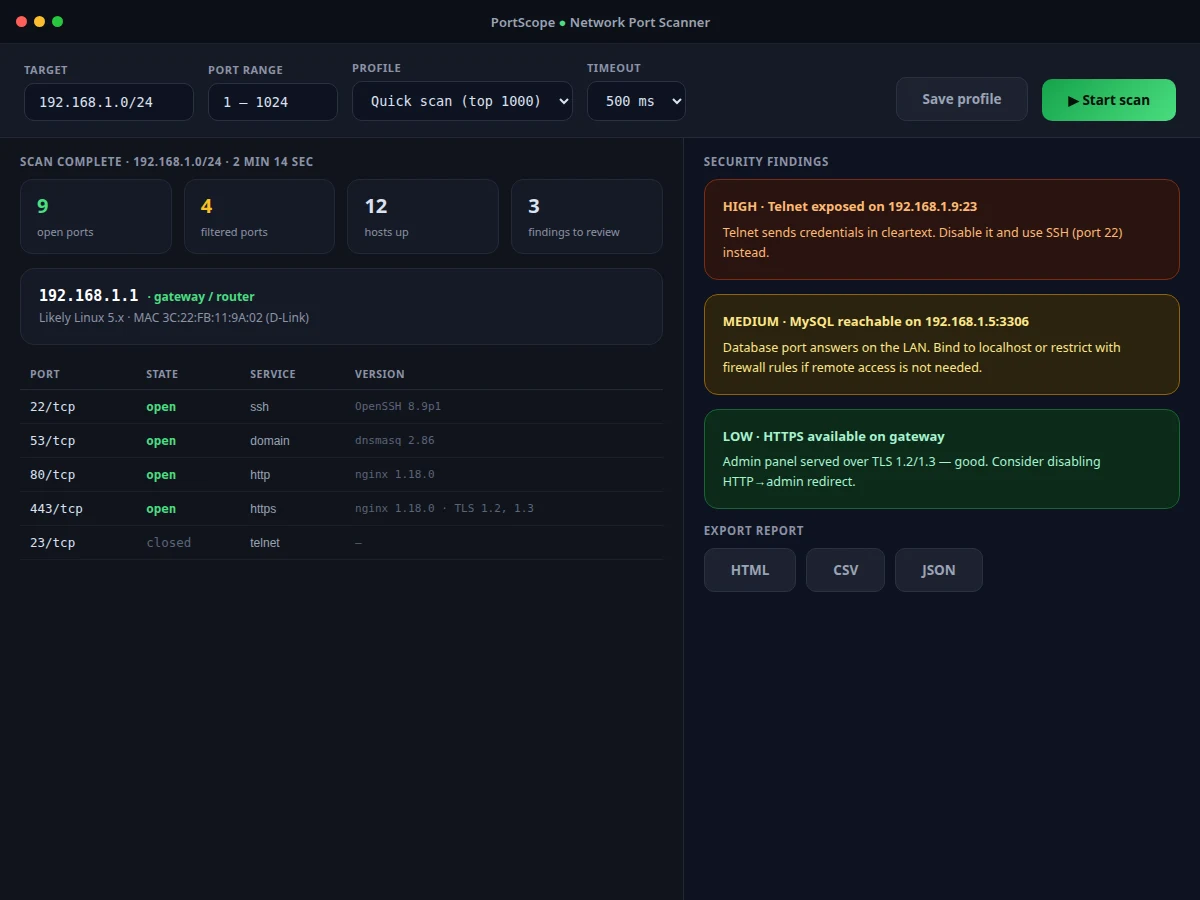
- [Banner grabbing] Open ports are queried for service banners, identifying SSH, HTTP, MySQL, SMB and their versions.
- [Live scan log] A streaming packet-level log shows the scan progressing host by host in real time with elapsed time and percentage.
- [Graded security findings] Cleartext protocols flagged high, LAN-reachable databases medium, each with a one-paragraph remediation note in plain language.
- [Report export] Per-host port tables and findings export to HTML, CSV and JSON for coursework submission.
- [Ethics guardrail] The app scopes itself to networks the user owns or has written permission to test, with the notice shown before scanning.
What is included
- Complete desktop app source code (scan engine, live UI, findings engine, export)
- Scanning-engine documentation (handshake logic, state classification, profiles)
- Lab scan walkthrough with annotated example output
- Setup guide (install, privilege notes, ethical-use guidance)
- Project report PDF (background, TCP scanning theory, methodology)
- PPT presentation for final review
- Viva Q&A preparation document (TCP/IP, sockets, threading, network ethics)
Limitations & prerequisites
- The tool is for authorized auditing only — scanning networks without permission may be illegal; the app shows this notice and the report states it plainly.
- Stealth SYN scanning needs raw-socket privileges (admin/root); without them, TCP-connect mode is used, which is noisier in target logs.
- Filtered vs closed classification depends on the timeout setting; aggressive timeouts on slow networks can misclassify — the setting is exposed and documented.
- Banner grabbing identifies common services; custom or obscured services may return unidentifiable banners.
- UDP scanning is limited compared to TCP; full UDP coverage is future scope.
- Scan speed claims are design targets for typical lab hardware; congested networks scan slower.
Frequently Asked Questions
How does it tell open from closed from filtered?
It opens a TCP connection to each port: a completed handshake means open, an RST reply means closed, and no reply within the timeout means filtered (likely firewalled). The report documents this classification logic packet by packet.
Is port scanning legal?
Scanning networks you own or have written permission to test — your home LAN, your college lab — is the intended use, and the app says so up front. Scanning others' networks without permission may be illegal; this project is an auditing and teaching tool, not an attack tool.
What's the difference between TCP connect and SYN scan?
TCP connect completes the full handshake (works unprivileged but is logged by the target); SYN scan sends only the first packet and reads the reply (stealthier, needs admin/root for raw sockets). Both are implemented as profiles.
What are banner grabs?
Many services announce themselves on connection — an SSH server sends its version string, a web server sends headers. The scanner reads these to identify the service and version behind each open port.
Can it find vulnerabilities?
It finds exposures (open ports, risky services) and grades them with remediation advice. Matching banner versions against vulnerability databases is listed as future scope.
Is this project suitable for a final-year project?
Yes — for Computer Science, Information Technology and related branches. It demonstrates TCP/IP networking, socket programming, multithreading and security-auditing methodology with an explicit ethics framing. Suitable for B.E./B.Tech final-year projects in Computer Science, Information Technology and related branches.
Components & software requirements
- Python with socket and threading (worker pool)
- Desktop GUI or Electron frontend
- TCP connect + half-open SYN scan modes
- Banner-grabbing service probes
- Report export (HTML, CSV, JSON)
Delivery information
Built-to-order project. Delivery timeline is shared after order confirmation based on current queue.
Support terms
Complete documentation, setup guide, and viva preparation included. Support for setup and explanation provided.