
More project photos (2)
The problem
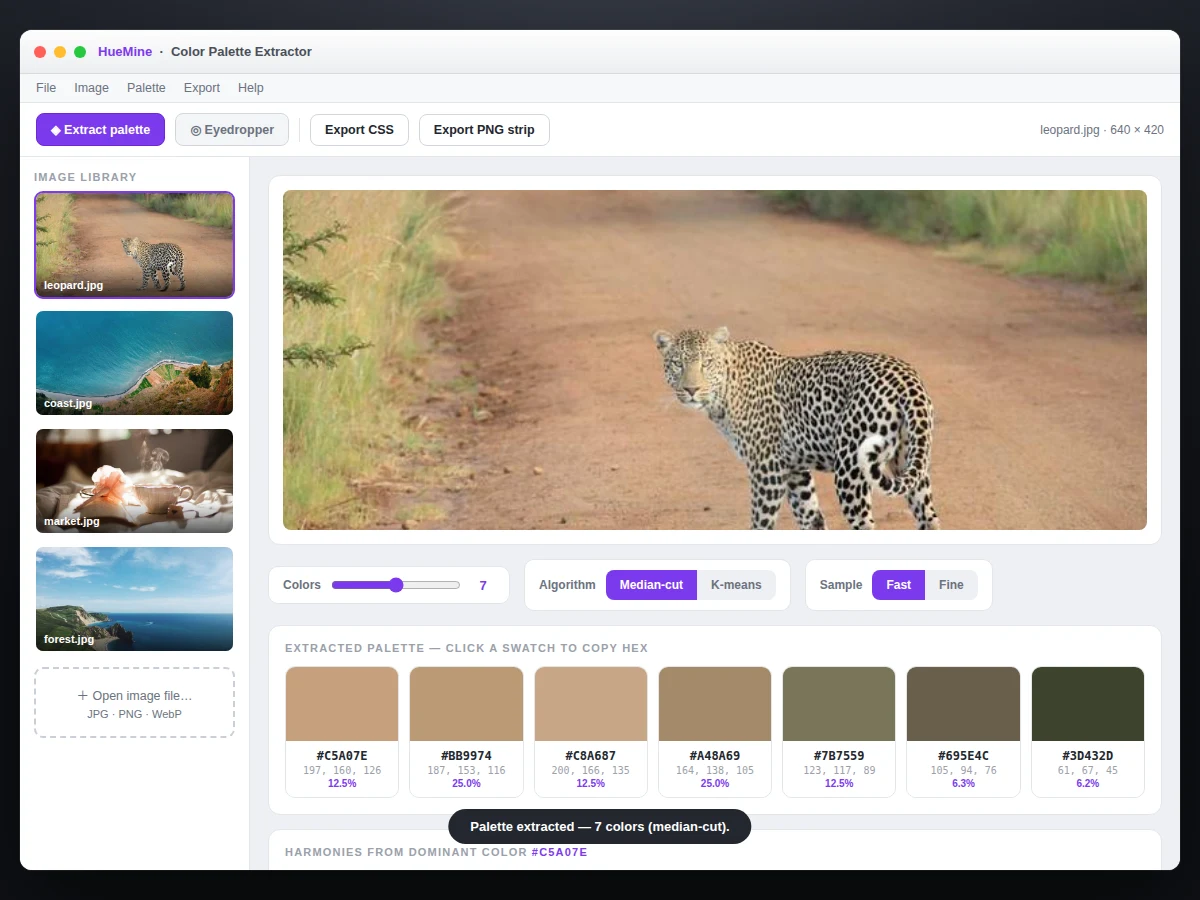
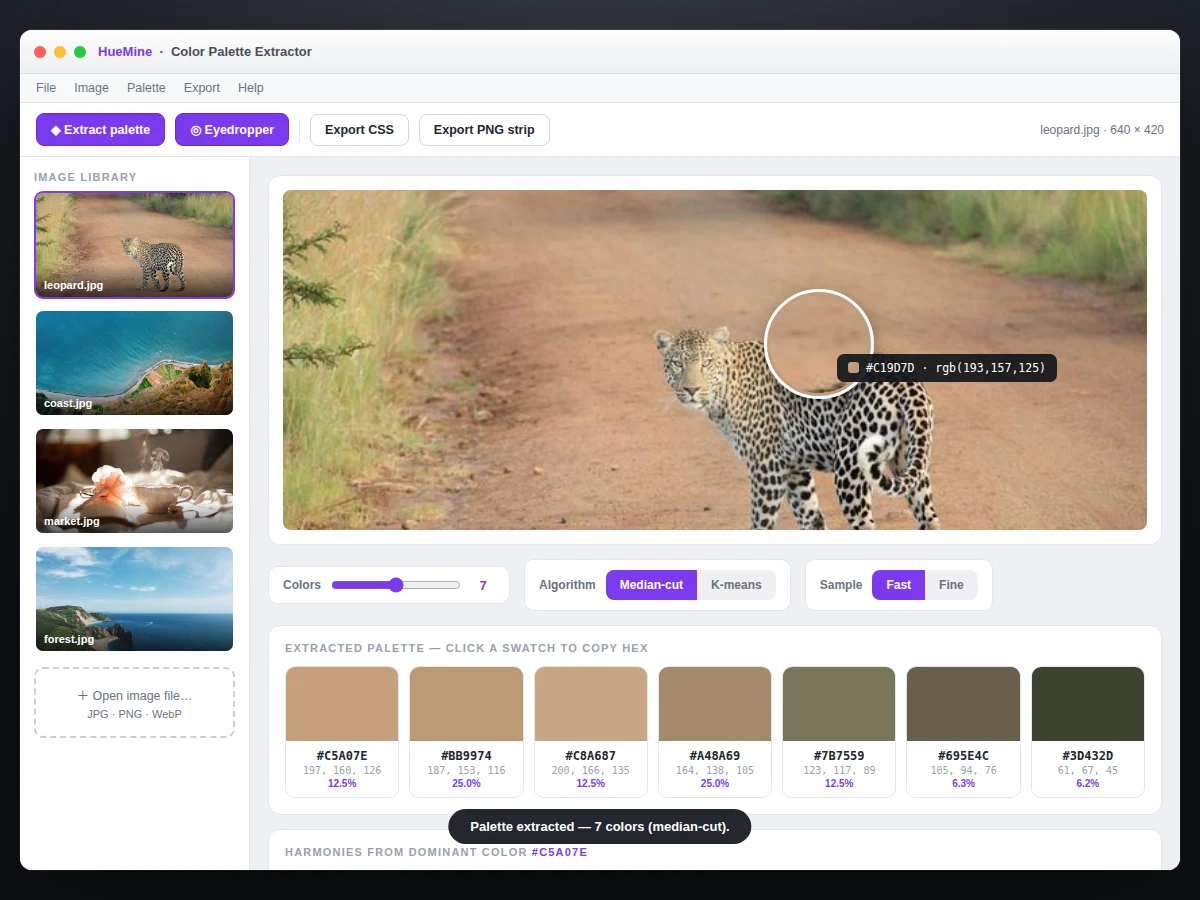
Designers constantly ask 'what are the colors in this photo?' and most tools answer with a black box. This project builds a color palette extractor that shows its work: upload any image (or use the built-in real photographs) and the app extracts dominant colors with two genuine algorithms — median-cut quantization and k-means clustering — running on the actual pixels in the browser. An eyedropper with a magnifier loupe samples any exact pixel, each swatch shows its share of the image, and harmony tools suggest complementary, analogous and triadic companions. Palettes export to ASE (Adobe Swatch Exchange), CSS variables and PNG strip formats. Because both algorithms are implemented from scratch and their intermediate steps are visualizable, the report can explain quantization and clustering honestly — no black boxes anywhere.
How it works
- The user uploads an image or picks one of the built-in real photographs; it is drawn to an offscreen canvas for pixel access.
- Optional downsampling (default 200 px on the long edge) keeps extraction fast while preserving color statistics.
- Median-cut recursively splits the RGB color space at median boundaries until the requested color count is reached; each box's average becomes a swatch.
- K-means (k = color count, k-means++ seeding) clusters the sampled pixels; centroids become the palette, with iteration count shown.
- Pixels are assigned to their nearest swatch to compute each color's share of the image.
- The eyedropper reads raw pixel data under the cursor with a loupe magnifier for precise sampling.
- Export serializes the palette to ASE binary, CSS variables, or a rendered PNG strip for download.
Tech stack:
- JavaScript (ES6+)
- Canvas pixel processing
- Median-cut quantization
- K-means clustering
- HSV color math
- ASE/CSS/PNG exporters
- Single-file web app
| Parameter | Value |
|---|---|
| Algorithms | Median-cut + k-means (from scratch) |
| Palette size | 3–10 colors, adjustable live |
| Eyedropper | Loupe magnifier, exact hex readout |
| Exports | ASE, CSS variables, PNG strip |
| Sampling | Downsampled pixel statistics (configurable) |
| Harmonies | Complementary, analogous, triadic |
| Runtime | Sub-second on typical photos (design target) |
| Privacy | All processing client-side; no uploads |
Project features
- [Two real extraction algorithms] Median-cut quantization and k-means clustering, both implemented from scratch and run on the image's real pixels.
- [Eyedropper with loupe] Click any pixel to sample it exactly; the magnifier loupe shows a zoomed grid with the center pixel's hex value.
- [Usage shares] Every swatch shows what percentage of the image it represents, computed from the actual pixel assignment.
- [Harmony suggestions] Complementary, analogous and triadic companions generated from the dominant hues in HSV space.
- [Palette export] One-click export to ASE, CSS custom properties, and PNG strip — formats designers actually use.
- [Algorithm comparison view] Run median-cut and k-means side by side on the same image and compare their palettes and runtimes.
- [Adjustable color count] Extract 3–10 dominant colors; the algorithms re-run live as the slider moves.
What is included
- Single-file palette extractor app (working demo)
- From-scratch median-cut and k-means source code
- 4 built-in real photographs for testing
- ASE, CSS and PNG palette exporters
- Project report PDF (quantization theory, clustering, color spaces)
- PPT presentation for final review
- Viva Q&A preparation document
Limitations & prerequisites
- Extraction quality depends on the image: near-monochrome photos yield near-monochrome palettes, which is correct behavior, not a bug.
- K-means is randomized (k-means++ seeding); repeated runs may differ slightly — the UI notes this.
- Very large images are downsampled before analysis; per-pixel-exact mode is available but slower.
- ASE export targets the common swatch format; exotic color modes (LAB swatches) are not included.
- Harmony suggestions are computed in HSV and are stylistic aids, not color-theory guarantees.
- Runtime figures are design targets on the developer's laptop, not measured claims across devices.
Frequently Asked Questions
How do median-cut and k-means differ here?
Median-cut partitions the RGB color space by repeatedly splitting the most populous box at its median — fast and deterministic. K-means iteratively moves cluster centroids toward pixel groups — slower but often more perceptually pleasing. The app runs both so you can compare on the same image.
Does it upload my photos anywhere?
No. The image is drawn to a canvas and every pixel is processed locally in your browser. Nothing leaves your machine.
What export formats are supported?
ASE (opens in Photoshop/Illustrator), CSS custom properties for web projects, and a PNG strip image of the swatches.
Can I pick an exact color from the photo?
Yes — the eyedropper with a magnifier loupe samples the precise pixel under your cursor and shows its hex, RGB and HSV values.
Why do two runs sometimes give slightly different palettes?
K-means uses randomized k-means++ seeding, so centroids can settle differently. Median-cut is fully deterministic if you need repeatability.
Is this project suitable for a final-year project?
Yes — for Computer Science and IT programs. It covers image processing, quantization, clustering algorithms and color science with a polished, demonstrable tool. Suitable for B.E./B.Tech final-year projects in Computer Science and IT.
Components & software requirements
- JavaScript (ES6+)
- Canvas pixel processing
- Median-cut quantization
- K-means clustering
- HSV color math
- ASE/CSS/PNG exporters
- Single-file web app
Delivery information
Built-to-order project. Delivery timeline is shared after order confirmation based on current queue.
Support terms
Complete documentation, setup guide, and viva preparation included. Support for setup and explanation provided.