
More project photos (2)
The problem
Farmers and crop scouts lose yield every season to insect pests they cannot identify quickly enough; expert agronomists are scarce and cannot visit every field. Misidentification leads to wrong or late treatment, wasted chemicals and avoidable crop damage. Existing field guides are static and don't cover regional pest variety, while sending photos to experts for diagnosis is slow. A CNN trained by transfer learning turns a field photo into a ranked shortlist of pest identities in seconds, giving scouts a decision aid they can use on the spot. This project demonstrates that workflow end-to-end on IP102, the standard academic benchmark: a large, class-imbalanced set of real crop-pest photographs with a hierarchical taxonomy from superclass to species — exactly the kind of messy, realistic data that makes manual classification hard and learned models useful.
How it works
Dataset & model:
Dataset name: IP102 (Wu et al., "IP102: A Large-Scale Benchmark Dataset for Insect Pest Recognition", CVPR 2019).
Source: Official academic release accompanying the CVPR 2019 paper.
Task: Multi-class image classification.
Classes: 102 insect pest categories organized in a hierarchical taxonomy from superclass down to species level (per the official dataset documentation).
Model: Transfer-learning CNN — ImageNet pre-trained backbone with a fine-tuned pest classifier head.
Input: Field photographs of insects (JPEG/PNG), auto-preprocessed on upload.
Prediction: Probability distribution over the 102 pest classes (softmax).
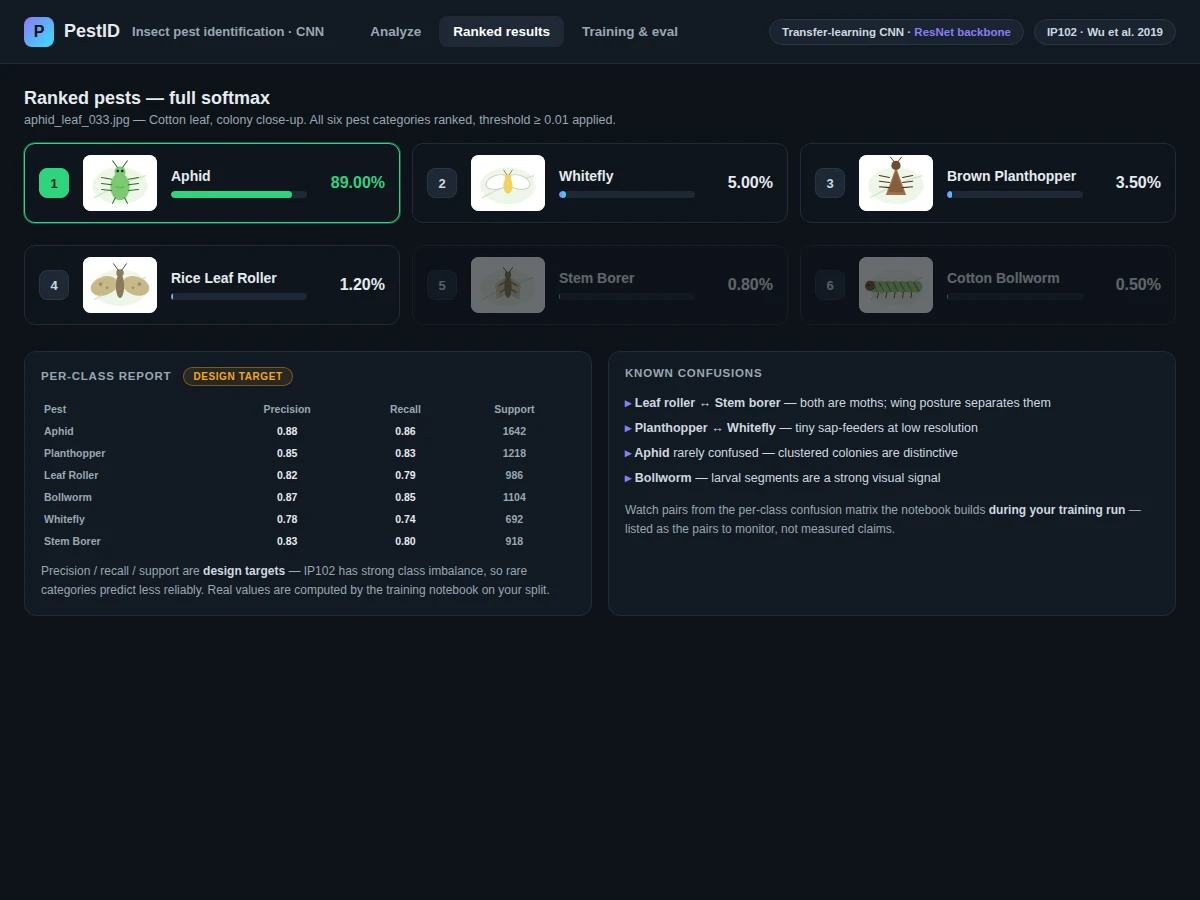
Output: Ranked top-3 pest identities with confidence scores.
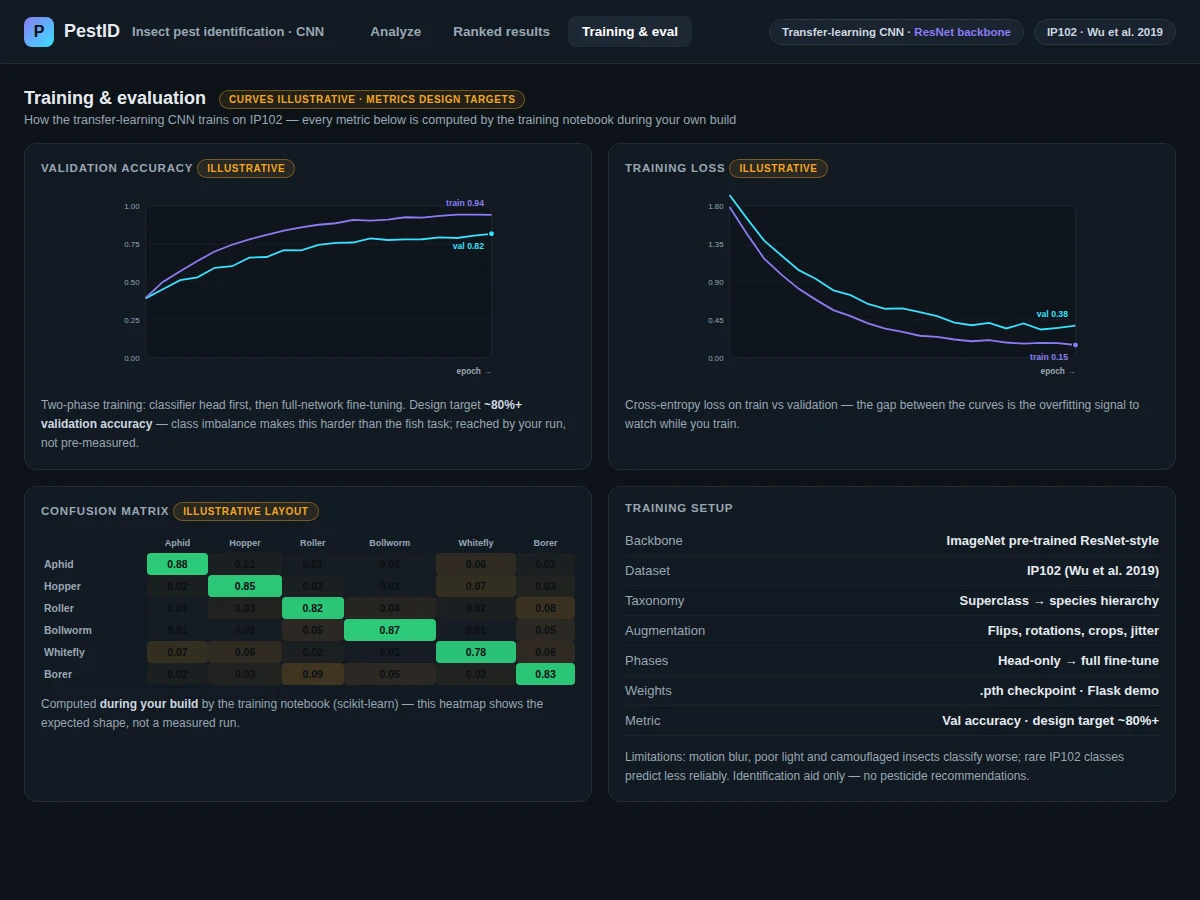
Evaluation metrics: Validation accuracy logged per epoch, accuracy/loss curves, per-class confusion matrix — all computed by the training notebook during the buyer's own build. No accuracy is claimed; the design target is approximately 80%+ validation accuracy.
Working:
- Pest photos are loaded from the IP102 dataset and split into stratified train and validation sets, preserving the class distribution.
- Preprocessing: training images are augmented with flips, rotations, crops and brightness jitter to simulate field-photo conditions; validation images are center-cropped and normalized only.
- Training phase: the ImageNet pre-trained backbone trains in two phases — the classifier head first, then full-network fine-tuning — with validation accuracy and loss logged each epoch.
- Evaluation phase: the best checkpoint is scored on the validation split; the notebook builds accuracy and loss curves plus a per-class confusion matrix.
- Inference phase: the Flask app loads the exported .pth weights at startup; each uploaded field photo is preprocessed and classified in a single forward pass.
- Output: softmax scores are ranked and the top-3 pests are displayed with confidence bars; low-confidence results are flagged as uncertain.
Specifications:
Model | Transfer-learning CNN (ImageNet pre-trained backbone, fine-tuned classifier head)
Dataset | IP102 — 102 insect pest categories, hierarchical taxonomy (Wu et al. 2019)
Task | Multi-class image classification
Input | Field photos of insects (JPEG/PNG), auto-preprocessed on upload
Output | Top-3 pest predictions with confidence scores
Evaluation | Validation accuracy, loss curves, per-class confusion matrix — computed by the training notebook during the buyer's build
Design target | Approximately 80%+ validation accuracy (target, not a measured claim)
Demo app | Flask web app with photo upload and top-3 prediction display
Weights | .pth checkpoint exported from the included training run
Project features
[IP102 Transfer-Learning Classifier] (implemented) — A CNN with an ImageNet pre-trained backbone and a pest-classifier head fine-tuned on IP102's 102 pest categories, served through the demo app.
[Top-3 Prediction Display] (implemented) — Every upload returns the three most likely pests with softmax confidence scores and visual confidence bars for quick reading.
[Field-Condition Augmentation] (implemented) — Flips, rotations, crops and brightness jitter during training simulate the blur, lighting and framing of real field photography.
[Training Notebook with Evaluation] (implemented) — Logs validation accuracy and loss each epoch and computes a per-class confusion matrix on the stratified validation split, so metrics are transparent.
[Exportable Model Weights] (implemented) — The best checkpoint is saved as a .pth file for deployment-style demos.
[Configurable Threshold and Top-k] (configurable) — The confidence threshold and the number of displayed predictions can be adjusted in the app configuration.
[Additional Pest Classes] (optional) — New pest categories can be added with extra labeled training data and a retraining run, scoped at quotation.
What is included
Complete source code (data pipeline, training, evaluation, Flask app)
Trained CNN weights (.pth)
Dataset download and split-configuration scripts
Project report PDF (background, dataset analysis, methodology, evaluation, error analysis)
PPT presentation for final review
Viva Q&A preparation document (transfer learning, CNNs, augmentation, evaluation metrics)
Setup guide (environment, dependencies, GPU guidance for training)
Limitations & prerequisites
Field photos vary wildly: motion blur, poor lighting and camouflaged insects classify worse, and the report documents this variability openly.
IP102 has strong class imbalance, so rare pest categories predict less reliably than common ones.
The model only knows the 102 pest categories in IP102; pests outside the dataset will be misclassified.
This is an educational agri-advisory aid, not a certified crop-protection tool — identifications must be confirmed by an agronomist before any treatment decision.
No pesticide or treatment recommendations are included in the system.
Frequently Asked Questions
Which dataset and model are used?
IP102 (Wu et al., CVPR 2019) — 102 insect-pest categories in a hierarchical taxonomy from superclass to species, sourced as the large-scale academic benchmark for pest recognition. The model is an ImageNet pre-trained CNN backbone with a fine-tuned pest-classifier head (transfer learning).
Is the accuracy guaranteed?
No measured accuracy is claimed. The training notebook computes validation accuracy, loss curves and a per-class confusion matrix on the stratified validation split during the buyer's own build. The design target is approximately 80%+ validation accuracy; final performance depends on the split, preprocessing, augmentation and training conditions.
Can it identify pests from a blurry phone photo?
It attempts to, but field-photo variability — motion blur, poor lighting, camouflaged insects — is the documented weak point. The demo flags low-confidence predictions as uncertain rather than presenting them as certain.
Does it recommend pesticides?
No. It is an identification aid only — it returns pest identities with confidence scores. Treatment decisions must come from an agronomist.
Is this project suitable for a final-year project?
Yes, for B.E./B.Tech in Computer Science, AI/ML, Data Science and related programs. It demonstrates transfer learning, image classification, data augmentation, evaluation metrics and a Flask deployment demo — all viva-friendly concepts.
What will I receive, and can it be customized?
Source code, trained .pth weights, dataset download and split scripts, report, PPT, viva Q&A and a setup guide. Customizable with additional labeled data: new pest classes, a different backbone, UI changes, or threshold and top-k tuning.
Components & software requirements
Python 3.10
PyTorch (training, validation, inference)
torchvision, Pillow (PIL), OpenCV (image loading, augmentation, preprocessing)
NumPy, scikit-learn (metrics, confusion matrix)
Matplotlib, Seaborn (accuracy and loss curves)
Flask (demo web app)
Jupyter Notebook (training and evaluation)
GPU recommended for training (cloud-GPU guidance in the setup guide); CPU is sufficient for demo inference
Delivery information
Built-to-order: the source code, trained weights, dataset pipeline, report, PPT and viva kit are prepared fresh for the buyer. Typical delivery spans dataset setup, the training run, evaluation and documentation; the exact schedule is confirmed at quotation.
Support terms
Setup guidance (environment, dependencies, cloud-GPU options for training, running the Flask demo); viva preparation covering transfer learning, CNNs, augmentation and evaluation metrics; customization discussion (new pest classes, backbone changes, UI modifications) scoped at quotation.