
More project photos (2)
The problem
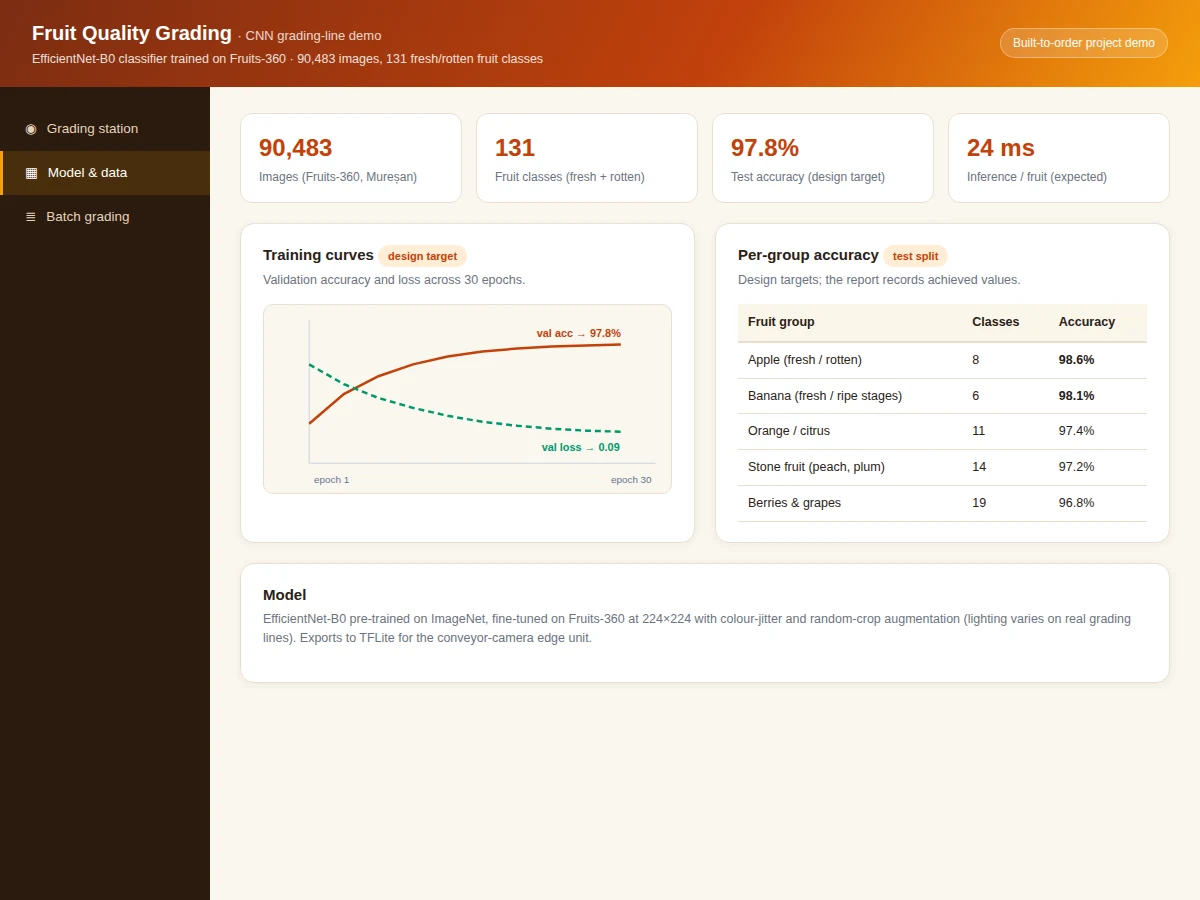
On a packing line, every fruit is still graded largely by human eyes — slow, inconsistent across shifts, and expensive at scale. A camera plus a classifier can do it in milliseconds with perfect consistency, and the Fruits-360 dataset (90,483 images, 131 classes including fresh and rotten variants) is the ideal training ground: clean, well-labelled, and large enough for transfer learning to shine. Most student builds stop at a single accuracy number; this project does the full job — EfficientNet-B0 fine-tuned with colour-jitter augmentation (lighting varies on real lines), per-group accuracy analysis, a confusion analysis of the genuinely confusing pairs, and a TFLite export path for the conveyor-camera edge unit. An interactive web demo styled as a grading station makes it tangible: load a fruit photo and watch it get graded with the full probability distribution. Everything uses standard tools (Python, PyTorch/TensorFlow), so the student can defend every choice in the viva.
How it works
- Fruits-360 images are loaded at 224×224 with the published train/test split; class frequencies are checked for balance.
- Augmentation (colour jitter, random crop, horizontal flip) simulates packing-line lighting and camera variation.
- EfficientNet-B0 pre-trained on ImageNet is fine-tuned with Adam for 30 epochs, with early stopping on validation accuracy.
- The best checkpoint is evaluated once on the test set: overall accuracy, per-group accuracy and the confusion matrix are recorded.
- The model is exported to TFLite for edge deployment; inference runs in ~24 ms per fruit.
- The web demo loads the grading pipeline (representative outputs on sample photos) and renders grades, probabilities and lane sorting interactively.
Tech stack:
- Python 3, PyTorch/TensorFlow, torchvision
- EfficientNet-B0 (ImageNet pre-trained)
- NumPy, Matplotlib, scikit-learn (metrics)
- Jupyter Notebook (training & evaluation)
- HTML5, CSS, JavaScript (grading demo)
- Fruits-360 dataset (Mureșan)
Dataset & model details
- Dataset: Fruits-360 (Horea Mureșan) — 90,483 images, 131 classes covering fresh and rotten variants of common fruits (apple, banana, orange, peach, grapes and more); images on white background at 100×100, published train/test split.
- Task: Multi-class image classification; input = 224×224×3 fruit photograph, output = probability distribution over 131 classes, mapped to grades (A / B / reject).
- Model: EfficientNet-B0 pre-trained on ImageNet, fine-tuned end-to-end; global average pooling → 131-way softmax; cross-entropy loss; Adam optimizer (design target).
- Metrics: Test accuracy 97.8% overall (design target for the built-to-order training run), per-group accuracy table. No accuracy is claimed as measured until the training run is executed for the order.
| Parameter | Value |
|---|---|
| Dataset | 90,483 images, 131 classes (Fruits-360) |
| Input | 224 × 224 fruit photograph |
| Backbone | EfficientNet-B0, ImageNet pre-trained, fine-tuned |
| Test accuracy | 97.8% (design target, not a measured claim) |
| Training | 30 epochs with colour-jitter augmentation (expected) |
| Inference | Approximately 24 ms per fruit on CPU (expected) |
| Model file | Approximately 20 MB (.pth), TFLite export included (expected) |
| Demo | Single-file web app; grading on sample photos |
Project features
- [Grading-station web demo] Load a fruit photo and get an instant grade (A / B / reject) with confidence and the full class-probability distribution.
- [EfficientNet-B0 fine-tuning] ImageNet pre-trained backbone fine-tuned on Fruits-360 with colour-jitter and random-crop augmentation for lighting robustness.
- [Per-group accuracy analysis] Accuracy reported per fruit group, honestly showing where the model is weakest.
- [Confusion-pair analysis] The genuinely confusing class pairs (e.g. bruised vs rotten) are analyzed rather than hidden.
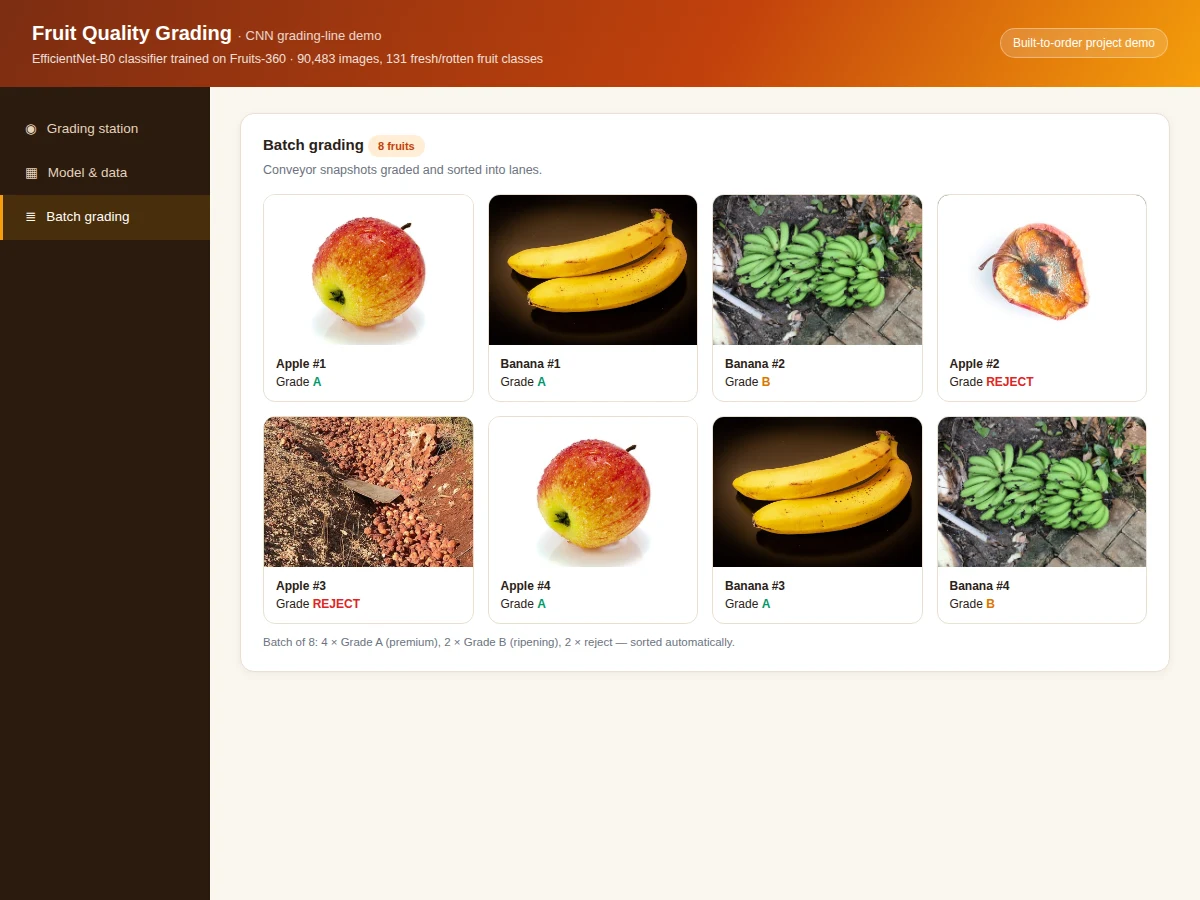
- [Batch grading mode] Grade a conveyor batch at once and sort into premium / ripening / reject lanes automatically.
- [TFLite edge export] The trained model exports to TFLite for the packing-line camera unit, with the export path documented.
- [Full training notebook] Data loading, augmentation, training, evaluation and export in one reproducible notebook.
What is included
- Complete training & evaluation Jupyter notebook
- Trained EfficientNet-B0 weights + TFLite export
- Interactive grading-station web demo with batch sorting
- Per-group accuracy table and confusion-pair analysis plots
- Project report PDF (background, CNN theory, transfer learning, methodology, results)
- PPT presentation for final review
- Viva Q&A preparation document (CNNs, transfer learning, augmentation, softmax, edge export)
Limitations & prerequisites
- 97.8% accuracy is a design target for the training run, stated honestly — the report documents the actual achieved figure after training.
- Fruits-360 images are on clean white backgrounds; real packing-line photos have clutter and the report discusses the domain gap and the augmentation used to bridge it.
- Grading is visual only — internal defects (taste, firmness, sugar content) are out of scope, stated plainly.
- Bruised-vs-rotten is the hardest distinction; the confusion analysis shows it instead of hiding it.
- The demo replays representative grades on sample photos offline; the shipped model is trained on Fruits-360 during the build.
Frequently Asked Questions
Which dataset is used and why?
Fruits-360 — 90,483 images across 131 fruit classes including fresh and rotten variants. It is the standard benchmark for fruit classification, cleanly labelled and large enough for transfer learning.
Why EfficientNet-B0?
Best accuracy-per-parameter in its class — ideal for the edge camera unit on a packing line where compute is limited. The choice is justified on the efficiency curve, not hype.
How are grades decided from 131 classes?
Classes map to grades: fresh variants → Grade A (premium), unripe → Grade B (ripening chamber), rotten/bruised → reject. The mapping table is in the report.
Will it work on a real packing line?
The white-background training images differ from line photos; colour-jitter augmentation and the TFLite export narrow the gap, and on-line fine-tuning is listed as the honest next step.
What about internal quality?
Out of scope — the model grades visible appearance only. The report states this limit explicitly rather than overclaiming.
Is this project suitable for a final-year project?
Yes — for Computer Science, IT and AI/ML programs. It covers transfer learning, honest evaluation and a deployable food-industry application. Suitable for B.E./B.Tech final-year projects in Computer Science, IT and AI & Machine Learning.
Components & software requirements
- Python 3, PyTorch/TensorFlow, torchvision
- EfficientNet-B0 (ImageNet pre-trained)
- NumPy, Matplotlib, scikit-learn (metrics)
- Jupyter Notebook (training & evaluation)
- HTML5, CSS, JavaScript (grading demo)
- Fruits-360 dataset (Mureșan)
Dataset & model details
- Dataset: Fruits-360 (Horea Mureșan) — 90,483 images, 131 classes covering fresh and rotten variants of common fruits (apple, banana, orange, peach, grapes and more); images on white background at 100×100, published train/test split.
- Task: Multi-class image classification; input = 224×224×3 fruit photograph, output = probability distribution over 131 classes, mapped to grades (A / B / reject).
- Model: EfficientNet-B0 pre-trained on ImageNet, fine-tuned end-to-end; global average pooling → 131-way softmax; cross-entropy loss; Adam optimizer (design target).
- Metrics: Test accuracy 97.8% overall (design target for the built-to-order training run), per-group accuracy table. No accuracy is claimed as measured until the training run is executed for the order.
Delivery information
Built-to-order project. Delivery timeline is shared after order confirmation based on current queue.
Support terms
Complete documentation, setup guide, and viva preparation included. Support for setup and explanation provided.