
More project photos (2)
The problem
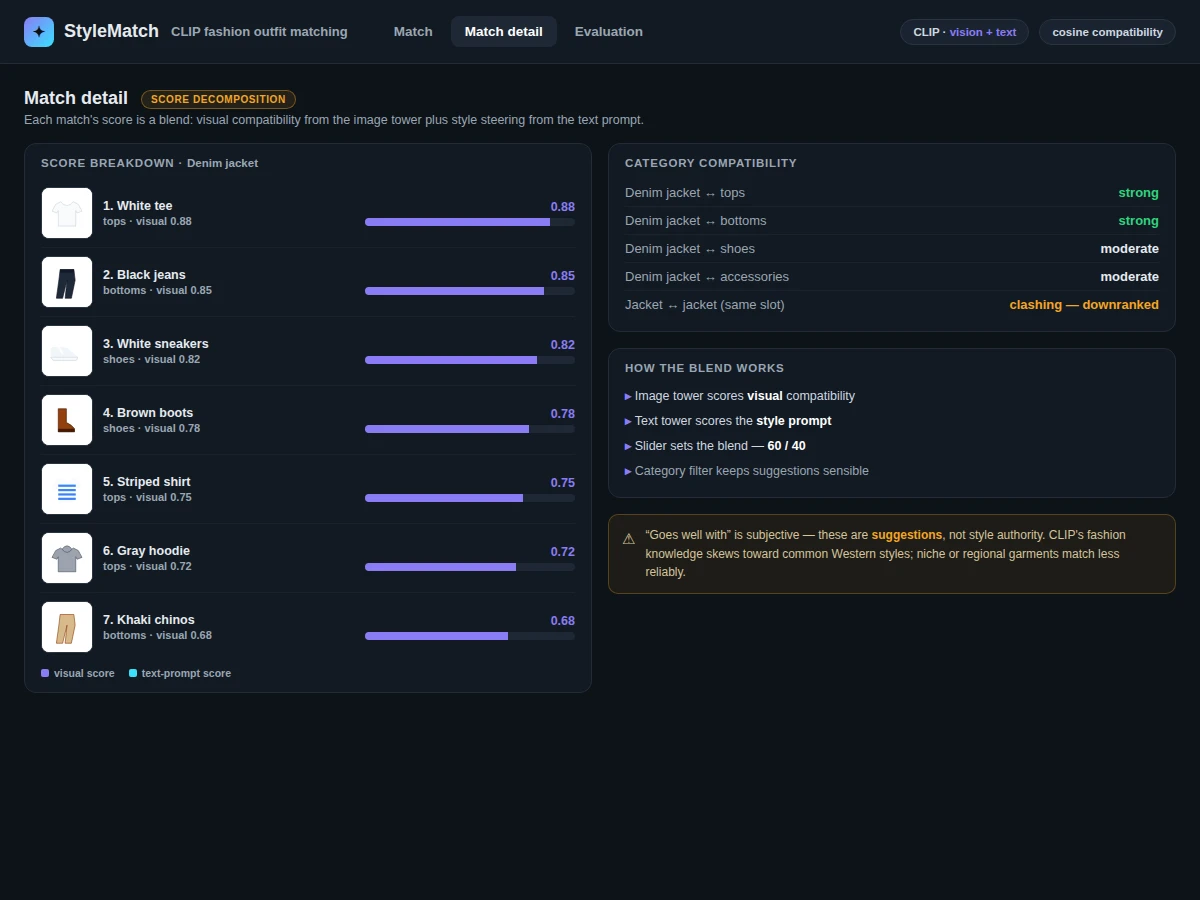
Putting together an outfit is a matching problem: given one garment, which items from the wardrobe go with it? Rule-based stylists need hand-coded color and category tables that break on real fashion — they cannot see that a jacket's texture echoes a particular pair of shoes, or that a prompt like "streetwear" should shift the whole ranking. This build takes a learning-based approach with CLIP (Radford et al., ICML 2021), the vision-language model that embeds images and text in one shared space. Upload a photo of a garment and the tool ranks a clothing catalog by embedding similarity — visually compatible items surface at the top — while text prompts like "goes well with a denim jacket" let style intent steer the ranking through CLIP's text encoder. Category-aware filtering and color/category metadata boosts keep suggestions within sensible garment types. A demo web app presents the ranked matches with similarity scores for side-by-side judging. The included notebook runs a top-k retrieval procedure during the build, paired with a qualitative ranking demo so match quality is shown, not just asserted.
How it works
Dataset & model:
Dataset: a clothing catalog — sample catalog shipped with the build; the buyer's own garment photos plus a category/color metadata CSV can be indexed instead. Source: supplied catalog imagery. Task: outfit compatibility ranking (cross-modal retrieval). Classes: none fixed — ranking is by cosine similarity in embedding space, with category metadata used for filtering. CLIP itself was pre-trained by Radford et al. on 400 million image-text pairs; the build uses the published weights without retraining.
Model: CLIP vision-language encoder (Radford et al., ICML 2021) — image tower for garment compatibility, text tower for style-prompt steering, blended into one ranking.
Input: a garment photo (JPEG/PNG) plus an optional style text prompt. Prediction: a compatibility score per catalog garment. Output: ranked top-k matching garments with similarity scores.
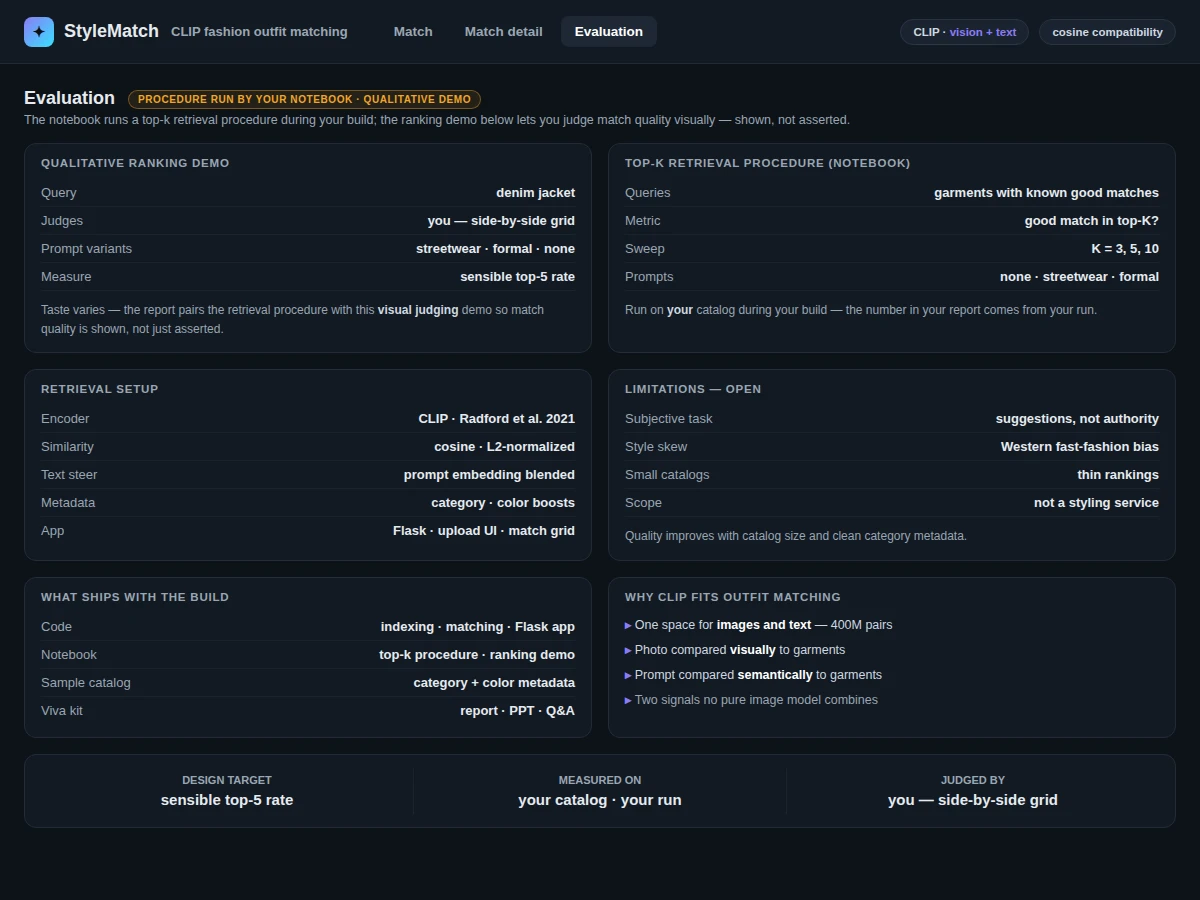
Evaluation metrics: a buyer-run top-k retrieval procedure (computed by the notebook during the build) plus a qualitative ranking demo for visual judging. No accuracy is claimed — compatibility is subjective, and the report frames results as suggestions.
Working:
- Dataset: catalog garment photos with category and color metadata — the build ships a sample clothing catalog, and the buyer's own wardrobe photos can be indexed.
- Preprocessing: garment photos are transformed with CLIP's image transform; metadata (category, color) is loaded from the CSV into the embedding store.
- Encoding phase: every catalog garment is encoded with CLIP's image encoder into a normalized embedding vector and stored with its metadata. No CLIP retraining is performed — published weights are used as-is.
- Evaluation phase (offline): the notebook runs a top-k retrieval procedure during the build and renders a qualitative ranking demo for direct judging of match quality.
- Inference phase (demo): the uploaded garment photo is encoded by the same image encoder at query time; cosine similarity against every catalog embedding produces a compatibility ranking; optional text prompts are encoded by CLIP's text encoder and blended with the visual score to steer style.
- Output: category filters and metadata boosts adjust the ranking so suggestions stay within sensible garment types, and the demo app renders the top-k matches with similarity scores for visual review.
Specifications:
Model | CLIP vision-language encoder (Radford et al., ICML 2021)
Pretraining | 400M image-text pairs (published weights used as-is; no retraining in this build)
Ranking | Cosine similarity over L2-normalized embeddings, optional text-prompt blending
Filtering | Category-aware filters plus color/category metadata boosts
Evaluation | Buyer-run top-k retrieval procedure plus qualitative ranking demo, in the notebook during the build
Input | Garment photo (JPEG, PNG) and optional style text prompt
Output | Ranked top-k matching garments with similarity scores
Demo app | Flask web app with upload UI and ranked match grid
Project features
CLIP Compatibility Ranking [implemented] — Catalog garments are ranked by embedding similarity to the uploaded item, capturing visual and semantic compatibility.
Text-Guided Matching [implemented] — Style prompts ("formal", "streetwear", "goes well with a denim jacket") steer rankings via CLIP's text encoder, blended with the visual score.
Category-Aware Filtering [implemented] — Metadata filters keep suggestions within sensible garment types; configurable in the demo UI.
Color and Category Metadata Boosts [implemented] — Interpretable ranking adjustments that can be inspected and tuned.
Demo Web App with Match Grid [implemented] — Garment upload, ranked match grid with similarity scores, and prompt input in one interface.
Qualitative Ranking Demo [implemented] — Rendered ranked matches let match quality be judged visually, documented in the report.
Top-K Retrieval Procedure [implemented] — The included notebook runs the buyer-run evaluation procedure during the build.
Pluggable Catalog [implemented] — Index your own clothing photos with a metadata CSV instead of the sample catalog.
What is included
Complete source code: catalog indexing, matching engine, Flask demo app
Jupyter evaluation notebook: top-k retrieval procedure and ranking demo
Sample clothing catalog with category and color metadata
Project report PDF: background, CLIP theory, methodology, evaluation, error analysis
PPT presentation for final review
Viva Q&A preparation document: vision-language models, embeddings, retrieval evaluation, fashion recommendation
Setup guide: environment, dependencies, indexing your own wardrobe photos
Limitations & prerequisites
"Goes well with" is subjective: the tool ranks visual and semantic compatibility, but taste varies — the report frames results as suggestions, not style authority.
CLIP's fashion knowledge comes from web-scale training data and skews toward common Western styles; niche or regional garments match less reliably.
Small catalogs produce thin rankings; quality improves with catalog size and clean category metadata.
This is an educational prototype, not a certified styling service — it must not drive real retail or personal-styling decisions.
Frequently Asked Questions
What is CLIP and why does it fit outfit matching?
CLIP (Radford et al., ICML 2021) learns a shared embedding space for images and text from 400 million image-text pairs. That lets the tool compare a garment photo against other garments visually, and also against style descriptions textually — two signals a pure image model cannot combine.
How does a text prompt change the results?
The prompt is encoded by CLIP's text tower into the same space as the garment embeddings. Blending its similarity score with the visual score steers the ranking toward the described style while keeping visual compatibility.
How is match quality evaluated?
Two ways: the included notebook runs a top-k retrieval procedure during the build, and a qualitative ranking demo renders ranked matches for direct visual judging — the report documents both.
Can I use my own wardrobe photos?
Yes. The indexing script takes a folder of garment photos plus a metadata CSV (category, color) and builds the embedding store; the setup guide covers the format.
Does it understand categories like tops and bottoms?
Yes — category metadata filters the ranking so suggestions stay sensible (for example, only tops suggested for a jacket query), with the filters configurable in the demo.
Is this project suitable for a final-year project?
Yes — for B.E./B.Tech Computer Science, AI/ML and Data Science students. It covers vision-language models, cross-modal retrieval, ranking evaluation, and the honest handling of a subjective recommendation task, with an interactive match grid.
Components & software requirements
Python 3.10
PyTorch (CLIP inference)
OpenAI CLIP / transformers (vision-language encoder)
NumPy and pandas (embedding store, garment metadata)
scikit-learn (cosine similarity, ranking utilities)
Flask (demo web application)
Jupyter notebook (top-k retrieval procedure, ranking demo)
Pillow (image preprocessing); a GPU speeds up catalog encoding (cloud options in the setup guide), queries run on CPU
Delivery information
Built-to-order. Catalog encoding and matching-engine setup, the evaluation-notebook run, the demo app, and the full documentation kit (report, PPT, viva Q&A, setup guide) are prepared fresh for the buyer. No CLIP retraining is involved; the pacing item is the demo build plus documentation. The exact schedule is confirmed at quotation.
Support terms
- Setup guidance: environment, dependencies, indexing your own wardrobe photos (photo folder + metadata CSV format)
- Viva preparation: vision-language models, cross-modal retrieval, why recommendation evaluation is partly qualitative, reading ranked results
- Customization discussion: new metadata fields, UI changes, ranking-weight experiments (feasibility confirmed before quoting)