
More project photos (2)
The problem
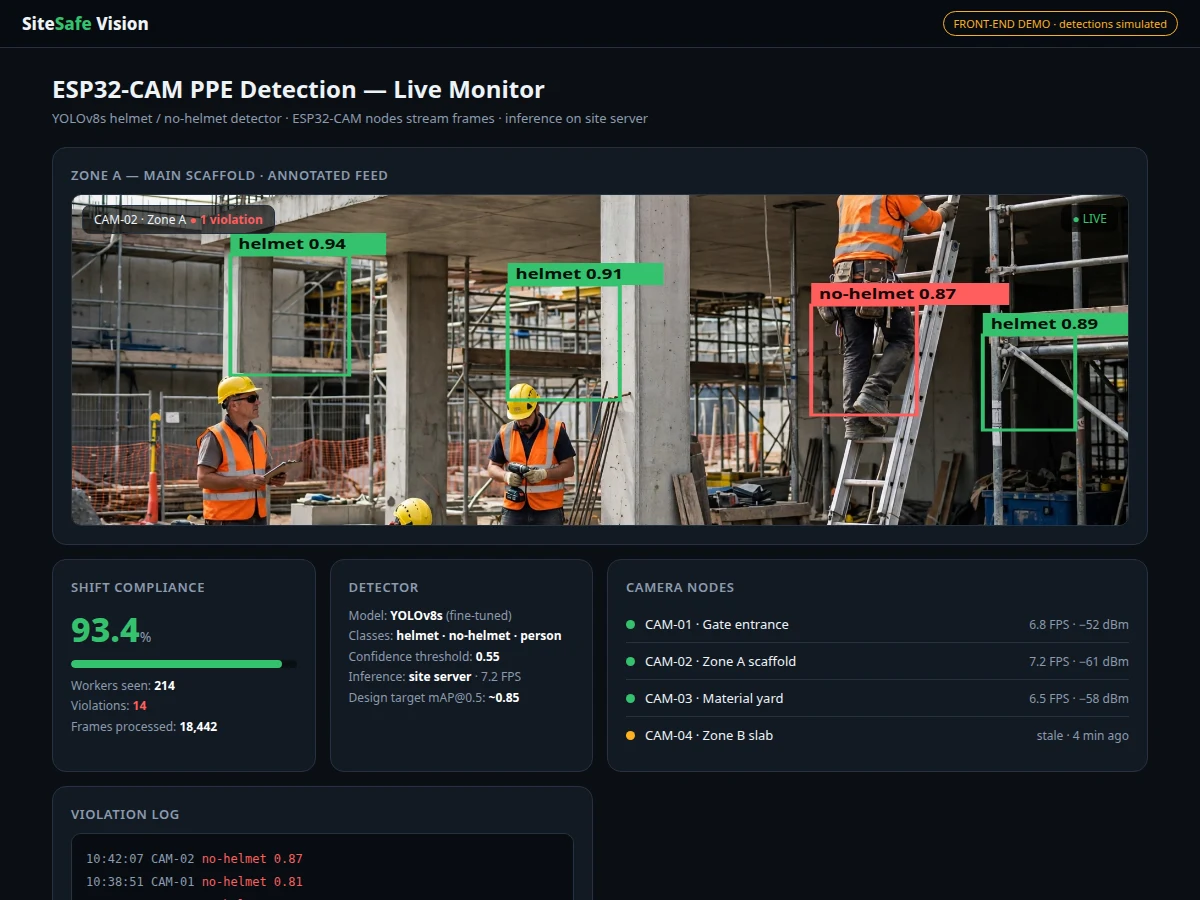
PPE compliance on construction sites is still enforced by supervisors walking the site with a clipboard. A supervisor cannot watch every corner continuously, violations go unrecorded, and there is no auditable evidence trail when an incident is reviewed. Fixed CCTV exists on larger sites, but nobody watches every feed. The engineering fix is to give the cameras a brain: capture frames from cheap ESP32-CAM nodes, stream them over the site Wi-Fi, and run a trained object detector that spots workers and flags missing helmets in near real time. This project builds the complete loop — ESP32-CAM firmware for frame capture and streaming, a YOLOv8s detector fine-tuned on annotated construction-site imagery for the helmet and no-helmet classes, and a web dashboard with the annotated live feed, compliance statistics, violation alerts and daily trend charts. The training notebook logs mAP, precision and recall during the build, so the report presents the student's own evaluation, not a pre-claimed number.
How it works
- Each ESP32-CAM node captures JPEG frames at a configured interval and serves them over Wi-Fi to the site server.
- The Flask/FastAPI server pulls frames from all registered camera nodes and batches them for inference.
- The fine-tuned YOLOv8s model detects workers in each frame and classifies each detection as helmet or no-helmet.
- Non-maximum suppression removes duplicate boxes; detections above the confidence threshold are drawn on the frame with labels.
- The annotated frame, per-camera compliance rate and violation events are pushed to the dashboard over WebSockets.
- No-helmet detections are written to the violation log with timestamp, camera ID, confidence and the evidence frame.
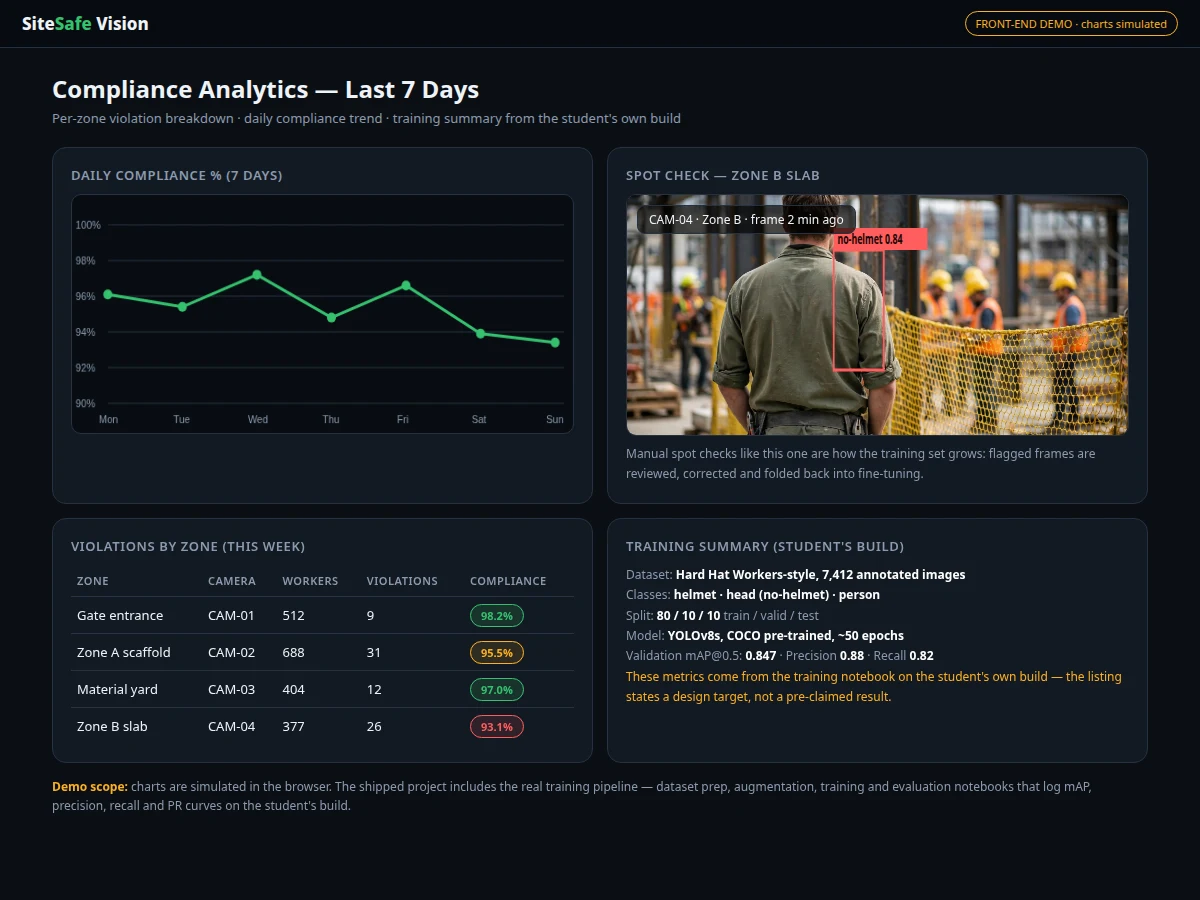
- A nightly job aggregates the day's detections into compliance trend charts and per-zone summaries.
Tech stack:
- ESP32-CAM (AI-Thinker) with Arduino-core capture/streaming firmware
- Python, Ultralytics YOLOv8s (training and inference), OpenCV
- Flask/FastAPI server + WebSocket live feed
- Single-file HTML/CSS/JS dashboard (annotated feed, stats, violation log, trend charts)
- Hard Hat Workers-style annotated dataset (helmet / head / person classes)
- SQLite event store for violations and daily aggregates
| Parameter | Value |
|---|---|
| Camera node | ESP32-CAM (AI-Thinker), OV2640, Wi-Fi streaming |
| Detector | YOLOv8s fine-tuned on annotated construction-site imagery |
| Classes | Helmet, no-helmet (head), person |
| Input | Site frames at 640x640 for inference; capture interval configurable |
| Inference host | Site PC/laptop (CPU or optional GPU); design target ~5-10 FPS on CPU |
| Output | Labelled bounding boxes, confidence scores, per-camera compliance % |
| Alerts | Dashboard alert + optional buzzer/email hook (documented, configurable) |
| Evaluation | mAP@0.5, precision, recall, PR curves — logged by the training notebook on your build |
| Design target | mAP@0.5 approximately 0.85 on the validation split (measured during the build, not pre-claimed) |
Project features
- [Helmet / no-helmet detection] YOLOv8s fine-tuned on annotated site imagery locates workers and classifies helmet usage, drawing labelled boxes with confidence scores.
- [ESP32-CAM capture nodes] Camera firmware grabs frames and streams them over Wi-Fi; nodes are cheap enough to cover multiple site zones.
- [Split architecture] The ESP32-CAM captures and streams only — inference runs on the site PC/laptop, which is stated explicitly so the design is honest about hardware limits.
- [Live annotated dashboard] Real-time feed with detection overlays, per-camera compliance percentage and current shift violation count.
- [Violation log with evidence] Every no-helmet detection is logged with timestamp, camera ID, confidence and the saved frame as evidence.
- [Compliance trends] Daily and weekly compliance charts plus a per-zone heatmap-style breakdown of violation counts.
- [Configurable alerting] Confidence threshold and alert cooldown adjustable from the dashboard; optional buzzer/email alert hooks documented.
- [Complete training pipeline] Dataset preparation, augmentation, training and evaluation notebooks included; mAP, precision, recall and PR curves logged during the build.
What is included
- ESP32-CAM firmware (frame capture, Wi-Fi streaming, multi-node registration)
- YOLOv8 training and evaluation notebooks (dataset prep, augmentation, metrics logging)
- Detection server code (frame ingestion, inference, WebSocket feed, violation logging)
- Web dashboard (live annotated feed, compliance stats, violation log, trend charts)
- Wiring and deployment guide (node placement, Wi-Fi coverage, power options)
- Project report PDF (background, dataset analysis, methodology, evaluation, limitations)
- PPT presentation for final review
- Viva Q&A preparation document (YOLO, mAP, ESP32-CAM limits, streaming, evaluation)
- Setup guide (environment, dataset download, training, running the system)
Limitations & prerequisites
- The ESP32-CAM cannot run the detector itself — inference needs a site PC or laptop; the report states this split architecture explicitly and explains why.
- Detection quality depends on camera angle, lighting and occlusion; backlit, night-time or heavily occluded workers are missed more often, and the evaluation section documents this.
- Public datasets may not match your site's helmets, vests and backgrounds; the notebook includes a fine-tuning path on custom-collected site images.
- Wi-Fi coverage limits node placement; frames drop when the link is weak, and the dashboard marks stale cameras clearly.
- This is a compliance-assist tool, not a safety-certified system — it does not replace supervision, site safety procedures or legal PPE obligations.
- Final mAP and FPS are measured on the student's own hardware during the build; the design target is a target, not a guaranteed result.
Frequently Asked Questions
Which dataset is used?
A Hard Hat Workers-style public annotated dataset of construction-site images with helmet, head (no-helmet) and person bounding boxes. The notebook documents the exact source, class counts and the train/validation split, and includes a path to fine-tune on custom site images.
Can the ESP32-CAM run the YOLO model?
No — the ESP32-CAM captures and streams frames only. Detection runs on the site PC/laptop. The report explains this split architecture honestly; claiming on-device YOLO on an ESP32-CAM would be false.
Is the accuracy guaranteed?
No. The design target is mAP@0.5 of approximately 0.85 on the validation split, but the training notebook measures mAP, precision and recall on your build and the report documents your own numbers.
What happens when Wi-Fi drops?
The camera node keeps capturing but frames cannot reach the server; the dashboard marks the camera stale and logs the gap. Detection resumes automatically when the link returns.
Can it detect safety vests too?
The base build covers helmet / no-helmet / person. Vest detection is a documented extension path using multi-class PPE datasets — available as a customization.
Is this project suitable for a final-year project?
Yes — for Electronics, IoT and AI/ML programs. It demonstrates embedded camera interfacing, Wi-Fi streaming, object-detection training and evaluation, and honest system-level design, all strong viva material. Suitable for B.E./B.Tech final-year projects in Electronics, IoT and AI/ML.
Components & software requirements
- ESP32-CAM (AI-Thinker) with Arduino-core capture/streaming firmware
- Python, Ultralytics YOLOv8s (training and inference), OpenCV
- Flask/FastAPI server + WebSocket live feed
- Single-file HTML/CSS/JS dashboard (annotated feed, stats, violation log, trend charts)
- Hard Hat Workers-style annotated dataset (helmet / head / person classes)
- SQLite event store for violations and daily aggregates
Delivery information
Built-to-order project. Delivery timeline is shared after order confirmation based on current queue.
Support terms
Complete documentation, setup guide, and viva preparation included. Support for setup and explanation provided.