
More project photos (2)
The problem
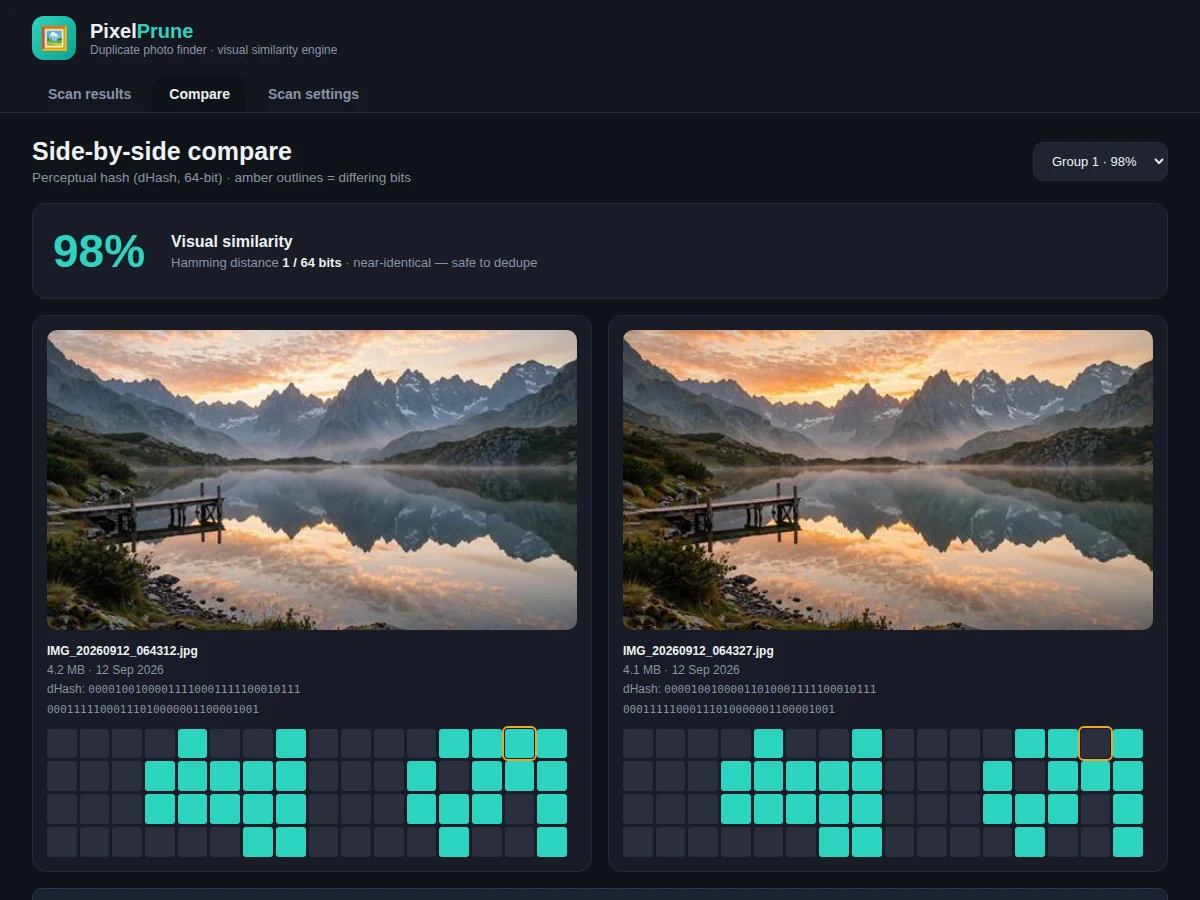
Phone galleries silently accumulate duplicates: burst mode fires 20 shots to get one good one, WhatsApp forwards re-save the same image under new names, and "final_final_edit.jpg" sits next to the original. Byte-exact duplicate finders miss all of these — the files differ, the photos don't. PixelPrune works the way human eyes do: it shrinks each photo to 9×8 grayscale, compares each pixel with its right neighbour, and builds a 64-bit perceptual fingerprint (dHash). Two photos of the same scene produce fingerprints that differ in only a handful of bits even after cropping, re-compression or light retouching; two different scenes differ in roughly half. The Hamming distance between fingerprints becomes a similarity percentage, an adjustable threshold groups the library, and the compare view shows the pair side-by-side with the differing fingerprint bits outlined in amber. Deletion is deliberately conservative: the largest file per group is pre-marked "keep", the user ticks the rest, and everything goes to the recycle bin. The demo is a working web prototype of the desktop tool, running the real dHash pipeline on real photographs in the browser.
How it works
- The user selects folders; the scanner enumerates image files (JPG, PNG, HEIC, WebP) — nothing is uploaded, all hashing is local.
- Each photo is downscaled to 9×8 grayscale and each pixel is compared with its right neighbour to build a 64-bit dHash fingerprint.
- Pairwise Hamming distances are computed; photos within the threshold's bit budget are clustered into duplicate groups.
- Groups are ranked by similarity; the largest file in each group is marked KEEP and the reclaimable MB is totalled.
- The user reviews groups, opens the compare view for any pair to see the similarity score and differing hash bits.
- The user ticks unwanted copies; the delete bar shows the count and MB to be freed.
- Confirmed deletions move files to the recycle bin; the scan summary updates with the new library state.
Tech stack:
- Python (desktop hashing engine + scanner)
- dHash perceptual hashing (64-bit fingerprints)
- Hamming-distance clustering
- Tkinter / PyQt desktop UI (built-to-order app)
- HTML5 · CSS3 · JavaScript (working web demo of the pipeline)
- Canvas-based hash computation in the demo
- Pillow (image loading and downscaling)
- Git version control
| Parameter | Value |
|---|---|
| Fingerprint | 64-bit dHash per photo |
| Comparison | Hamming distance → similarity % |
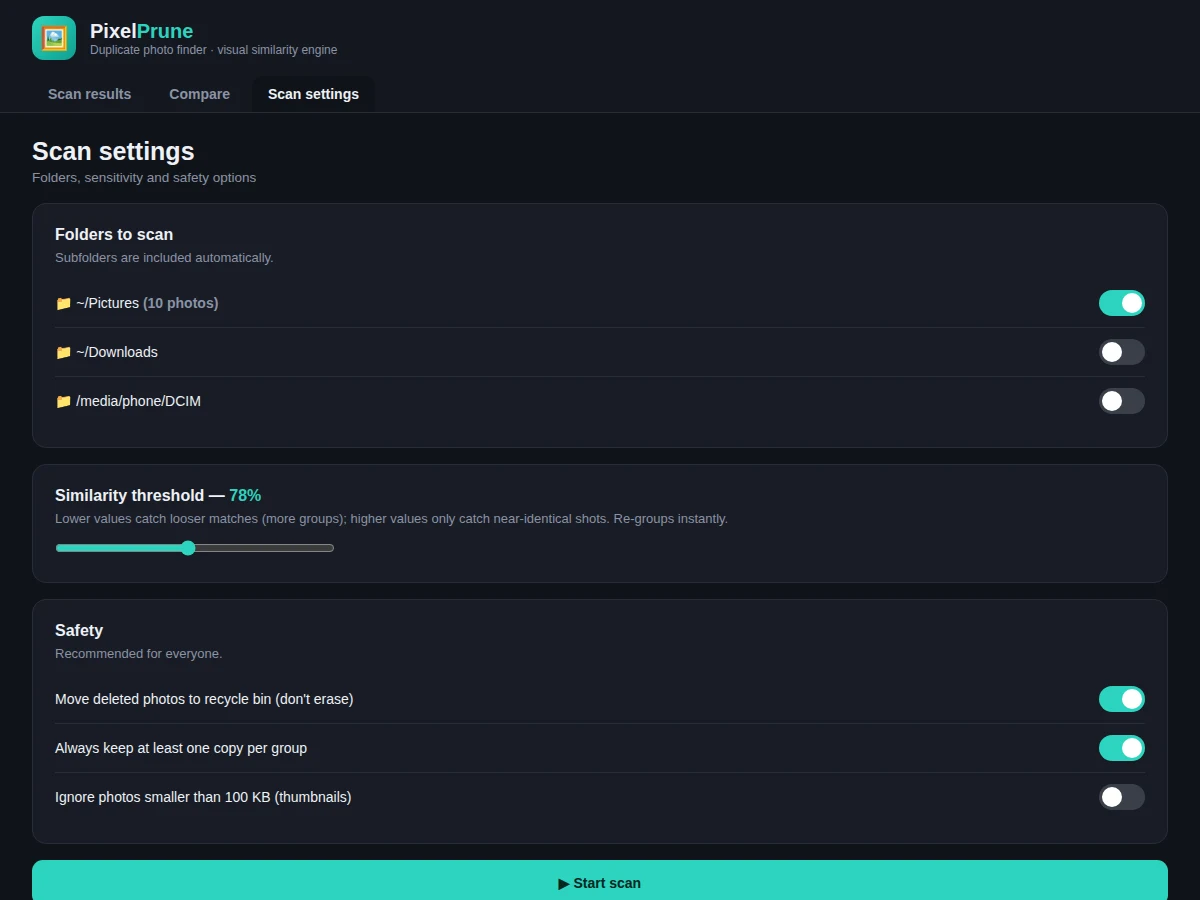
| Default threshold | 78% similarity (adjustable 60–98%) |
| Formats | JPG, PNG, HEIC, WebP (design target) |
| Processing | Fully local — no uploads |
| Delete safety | Recycle bin + keep-one-per-group enforced |
| Library size | 10,000+ photos supported (design target) |
| Demo | Single-file web app running the real pipeline |
Project features
- [Perceptual hashing engine] 64-bit dHash fingerprints computed per photo — robust to re-save, resize and light retouching.
- [Visual similarity grouping] Photos clustered by Hamming distance with a similarity percentage per group (e.g. 97% similar).
- [Adjustable threshold slider] Lower values catch looser matches, higher values only near-identical shots — groups re-compute instantly.
- [Side-by-side compare] Any pair opens large with both 64-bit fingerprints shown and differing bits highlighted.
- [Smart keep suggestion] The largest file in each group is auto-marked KEEP, maximizing the space saved per deletion.
- [Reclaimable-space accounting] Live MB totals per group and overall, so the payoff of cleanup is visible before deleting.
- [Safe delete] Selected copies move to the recycle bin, never hard-erased; "keep at least one per group" is enforced.
- [Folder-scoped scanning] Scan Pictures, Downloads or a phone DCIM folder, with subfolders included automatically.
What is included
- Complete desktop application source code (Python)
- Perceptual hashing + clustering engine
- Scan results, compare and settings screens as designed
- Working web demo running dHash on real photos in-browser
- Sample 10-photo library (3 near-duplicate pairs + 4 unique)
- Project report PDF (problem, dHash theory, clustering, complexity, testing)
- PPT presentation for final review
- Viva Q&A preparation document (perceptual vs cryptographic hashing, Hamming distance, threshold trade-offs)
Limitations & prerequisites
- Similarity is visual, not semantic — two different photos of the same sunset may group at low thresholds; the slider and compare view exist for exactly this.
- Heavy edits (major crops, filters changing most pixels) raise the Hamming distance and may escape the default threshold.
- HEIC support depends on platform codecs on the buyer's machine.
- The demo runs in-browser on a 10-photo sample; the desktop build scales to full libraries with an indexed hash cache.
- Face-aware "same person" grouping is not included — this is pixel-similarity dedup, not face recognition.
Frequently Asked Questions
How is this different from finding byte-identical files?
Cryptographic hashes (MD5/SHA) change completely when one pixel changes. Perceptual hashing (dHash) changes by only a few bits for visually similar photos, so burst shots and re-saved copies are caught.
What does the similarity percentage mean?
It's (64 − Hamming distance) / 64: a 97% pair differs in ~2 of 64 fingerprint bits. The compare view shows exactly which bits differ.
Will it delete photos by itself?
Never. The user ticks copies explicitly, the largest file per group is pre-marked keep, and deletions go to the recycle bin.
Why did two different photos get grouped?
At low thresholds, visually similar scenes (two beach sunsets) can group. Raise the threshold or review the pair in Compare — the differing-bits view makes the call obvious.
Does it upload my photos anywhere?
No — hashing and clustering run entirely on the local machine (and in the demo, entirely in the browser).
Is this project suitable for a final-year project?
Yes — for Computer Science and IT programs. It demonstrates image processing, hashing, distance metrics, clustering and careful destructive-action UX in one working tool. Suitable for B.E./B.Tech final-year projects in Computer Science and IT.
Components & software requirements
- Python (desktop hashing engine + scanner)
- dHash perceptual hashing (64-bit fingerprints)
- Hamming-distance clustering
- Tkinter / PyQt desktop UI (built-to-order app)
- HTML5 · CSS3 · JavaScript (working web demo of the pipeline)
- Canvas-based hash computation in the demo
- Pillow (image loading and downscaling)
- Git version control
Delivery information
Built-to-order project. Delivery timeline is shared after order confirmation based on current queue.
Support terms
Complete documentation, setup guide, and viva preparation included. Support for setup and explanation provided.