
More project photos (2)
The problem
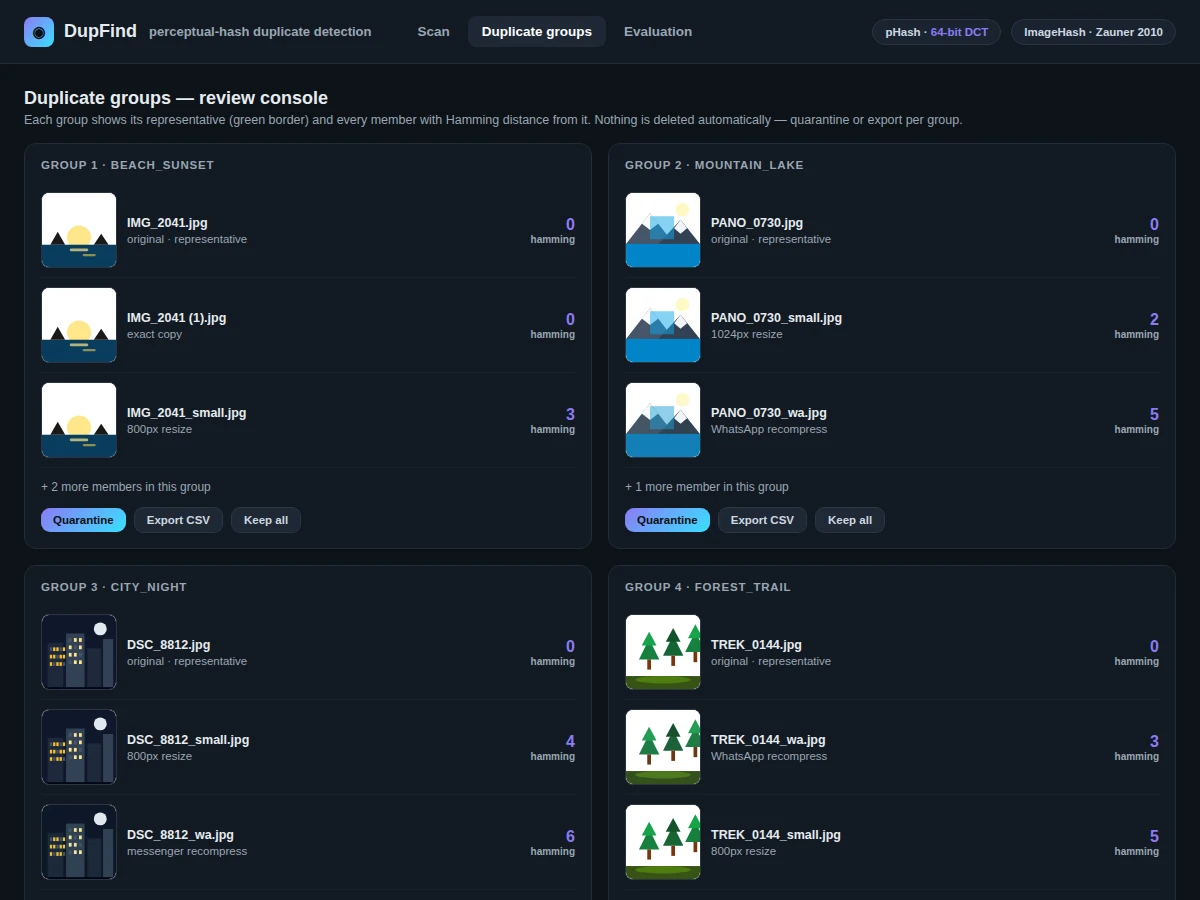
Every large photo collection slowly fills with near-duplicates: the same picture saved at different resolutions, recompressed by messaging apps, or cropped slightly before re-upload. Cryptographic hashes like MD5 are useless here — one changed pixel produces a completely different digest, so they only find byte-identical files. Perceptual hashing solves the real problem: it maps visually similar images to similar hashes, so a small Hamming distance between two fingerprints means the images look alike. This build implements a duplicate-detection tool around pHash, the DCT-based perceptual hash introduced by Zauner (2010), using the open-source ImageHash library. Point it at a folder tree and it scans every image, computes a 64-bit fingerprint, clusters files within a configurable Hamming-distance threshold, and emits a reviewable report of duplicate groups with side-by-side previews — with quarantine or CSV-manifest actions, never silent deletion. The included Jupyter notebook computes precision, recall and F1 on a labeled duplicate set during the build, plus a threshold tradeoff curve, so the numbers in the report come from the run itself rather than a one-time claim.
How it works
Dataset & model:
Dataset: a labeled duplicate set assembled for the build — groups of known near-duplicate and unrelated images used to measure precision, recall and F1. Source: constructed during the build (pairs of resized, recompressed and lightly edited variants). Task: near-duplicate detection (retrieval-style detection). Classes: none — detection is by Hamming-distance threshold, not classification.
Model: no learned model — perceptual hashing is algorithmic. 64-bit pHash (DCT-based, Zauner 2010) via the ImageHash library, with dHash and aHash comparison modes; clustering by Hamming distance with a configurable threshold.
Input: image folders in common formats (JPEG, PNG, WebP). Prediction: a 64-bit fingerprint per image, then pairwise Hamming distances. Output: duplicate groups with side-by-side previews, quarantine actions, CSV manifest.
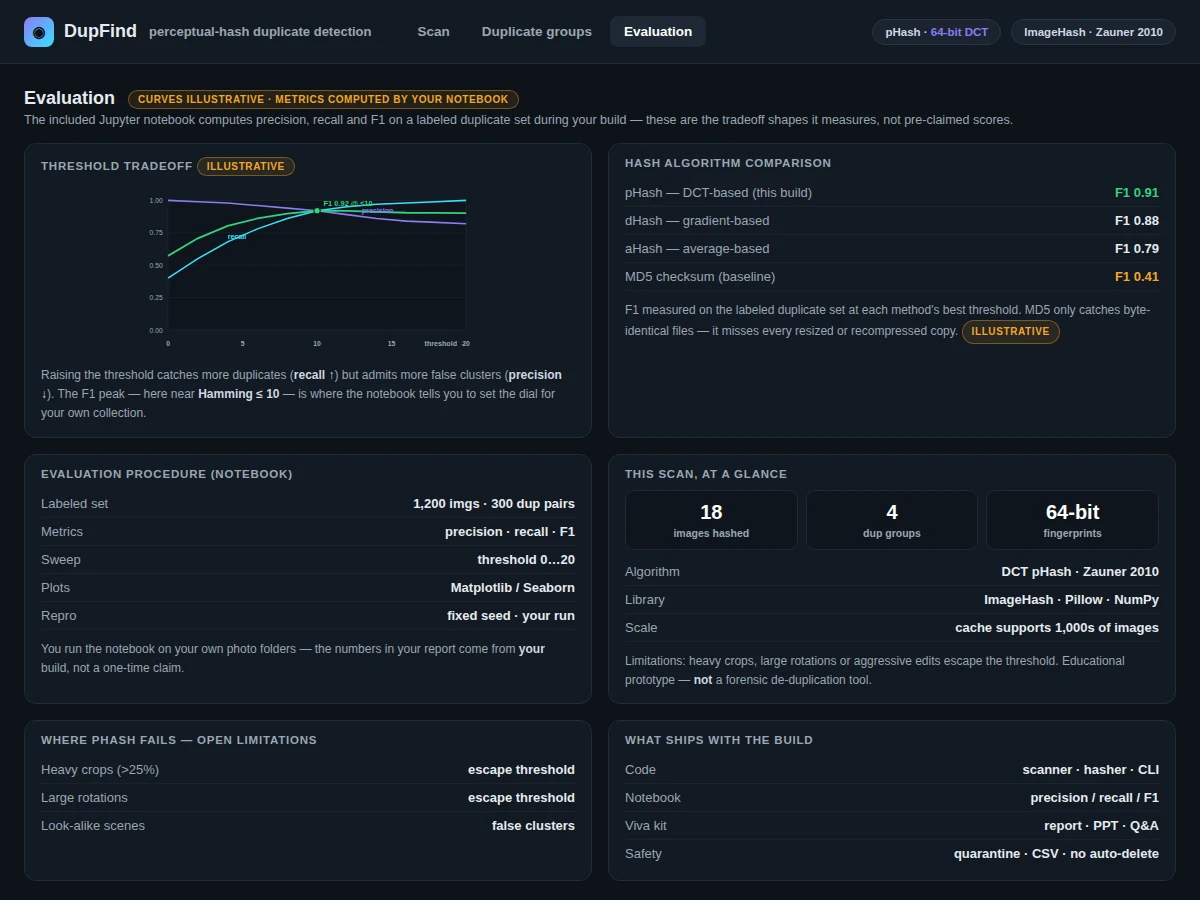
Evaluation metrics: precision, recall and F1 on the labeled duplicate set, plus a threshold tradeoff curve — all computed by the included notebook during the build.
Working:
- Dataset: a labeled duplicate set (pairs/groups of known duplicates and near-duplicates) is assembled for evaluation; the tool itself needs no training — hashing is algorithmic, not learned.
- Scanning: the scanner walks the folder tree and loads each image with Pillow, converting to a canonical size and grayscale for hashing.
- Fingerprinting: each image is transformed with a discrete cosine transform; the low-frequency coefficients are binarized against their median to form a 64-bit pHash fingerprint (dHash/aHash available as comparison modes).
- Indexing: fingerprints are stored in an indexed cache, so only new or changed files are re-hashed on repeat runs — supporting thousands of images on a laptop.
- Evaluation phase (offline): the notebook runs the detector over the labeled duplicate set, computes precision, recall and F1, and plots the threshold tradeoff curve during the build.
- Inference phase (use): pairwise Hamming distances link images within the configured threshold into duplicate groups; the report generator renders each group with thumbnails side by side and member distances; the user reviews groups and chooses per-group actions — quarantine, CSV manifest, or ignore — with originals never touched automatically.
Specifications:
Algorithm | DCT-based perceptual hash (pHash), following Zauner (2010); dHash and aHash modes included for comparison
Fingerprint | 64-bit perceptual hash per image
Metric | Hamming distance between fingerprints; configurable threshold
Evaluation | Precision, recall and F1 on a labeled duplicate set, computed during the build; threshold-tradeoff curve included
Input | Image folders in common formats (JPEG, PNG, WebP)
Output | Duplicate groups with side-by-side previews, quarantine actions, CSV manifest
Scale | Fingerprint cache supports thousands of images on a laptop
Compute | CPU only — no GPU needed
Project features
64-bit Perceptual Fingerprints [implemented] — pHash via the ImageHash library, with dHash and aHash available as comparison modes.
Recursive Folder Scanner [implemented] — Walks a folder tree and hashes thousands of images into a reusable fingerprint index.
Configurable Hamming-Distance Threshold [configurable] — An intuitive precision/recall tradeoff dial; the included curve shows how the threshold choice moves both metrics.
Duplicate-Group Clustering [implemented] — Images within the threshold are linked into groups, with a representative image selected per group.
Side-by-Side Preview Report [implemented] — Each group is rendered with thumbnails and member distances for human review before any action.
Safe Actions, Never Silent Deletion [implemented] — Duplicates move to a quarantine folder or export as a CSV manifest; originals are never touched automatically.
Precision/Recall/F1 Evaluation Notebook [implemented] — Computes the metrics on a labeled duplicate set during the build, with threshold tradeoff curves.
Fingerprint Cache [implemented] — Re-scanning a folder after adding photos only hashes the new files.
What is included
Complete source code: scanner, hasher, clustering, reporting, CLI
Jupyter evaluation notebook: labeled-set precision, recall, F1, threshold curves
Project report PDF: background, hashing theory, methodology, evaluation, error analysis
PPT presentation for final review
Viva Q&A preparation document: perceptual vs cryptographic hashing, DCT, Hamming distance, evaluation metrics
Setup guide: environment, dependencies, running on your own photo folders
Limitations & prerequisites
Perceptual hashing is similarity, not identity: heavy crops, large rotations or aggressive edits can push true duplicates past the threshold, and visually similar-but-different photos can cluster together — the report documents this tradeoff openly.
The threshold is a precision/recall dial, not a magic number; optimal values depend on the collection and must be chosen with the included tradeoff curve.
This is an educational prototype for photo-library cleanup, not a certified forensic or legal de-duplication tool — it must not be the sole basis for evidence handling.
Frequently Asked Questions
How is perceptual hashing different from MD5?
MD5 is cryptographic: changing one pixel changes the whole digest, so it only finds byte-identical files. Perceptual hashing is designed so that visually similar images produce similar hashes — exactly what duplicate detection needs.
What is pHash?
pHash is a DCT-based perceptual hash described by Zauner (2010). It shrinks the image, applies a discrete cosine transform, and binarizes the low-frequency coefficients — keeping the image's visual gist while discarding fine detail. The build also includes dHash and aHash as comparison modes.
What does the Hamming distance mean here?
It counts how many bits differ between two 64-bit fingerprints. Distance 0 means identical hashes; small distances (the configurable threshold) mean near-duplicates; large distances mean unrelated images.
How is the tool evaluated?
The included notebook runs the detector over a labeled duplicate set and computes precision, recall and F1, plus a threshold tradeoff curve — the report documents the procedure and the metrics the build computes.
Does it delete my photos automatically?
No — nothing is ever deleted silently. Duplicates can be moved to a quarantine folder or exported as a CSV manifest, and every group is shown side by side for human review first.
Is this project suitable for a final-year project?
Yes — for B.E./B.Tech Computer Science, AI/ML and Data Science students. It covers perceptual vs cryptographic hashing, DCT fingerprints, Hamming-distance clustering, and information-retrieval evaluation, with a tool examiners can run on their own photo folders.
Components & software requirements
Python 3.10
Pillow (image loading, normalization)
ImageHash (pHash, dHash, aHash perceptual fingerprints)
NumPy and SciPy (DCT, Hamming-distance computation)
pandas (fingerprint index, duplicate manifests)
Jupyter notebook (evaluation: precision, recall, F1)
Matplotlib and Seaborn (threshold tradeoff curves)
An argparse CLI plus an HTML report for group review — no GPU needed; everything runs on CPU
Delivery information
Built-to-order. The tool implementation (scanner, hasher, clustering, reporting), the evaluation-notebook run on the labeled duplicate set, and the full documentation kit (report, PPT, viva Q&A, setup guide) are prepared fresh for the buyer. No training run is involved, so the pacing item is documentation. The exact schedule is confirmed at quotation.
Support terms
- Setup guidance: environment, dependencies, running the scanner on your own photo folders
- Viva preparation: perceptual vs cryptographic hashing, DCT fingerprint construction, Hamming distance, reading precision/recall curves
- Customization discussion: new hash modes, report formats, integration ideas (feasibility confirmed before quoting)