
More project photos (2)
The problem
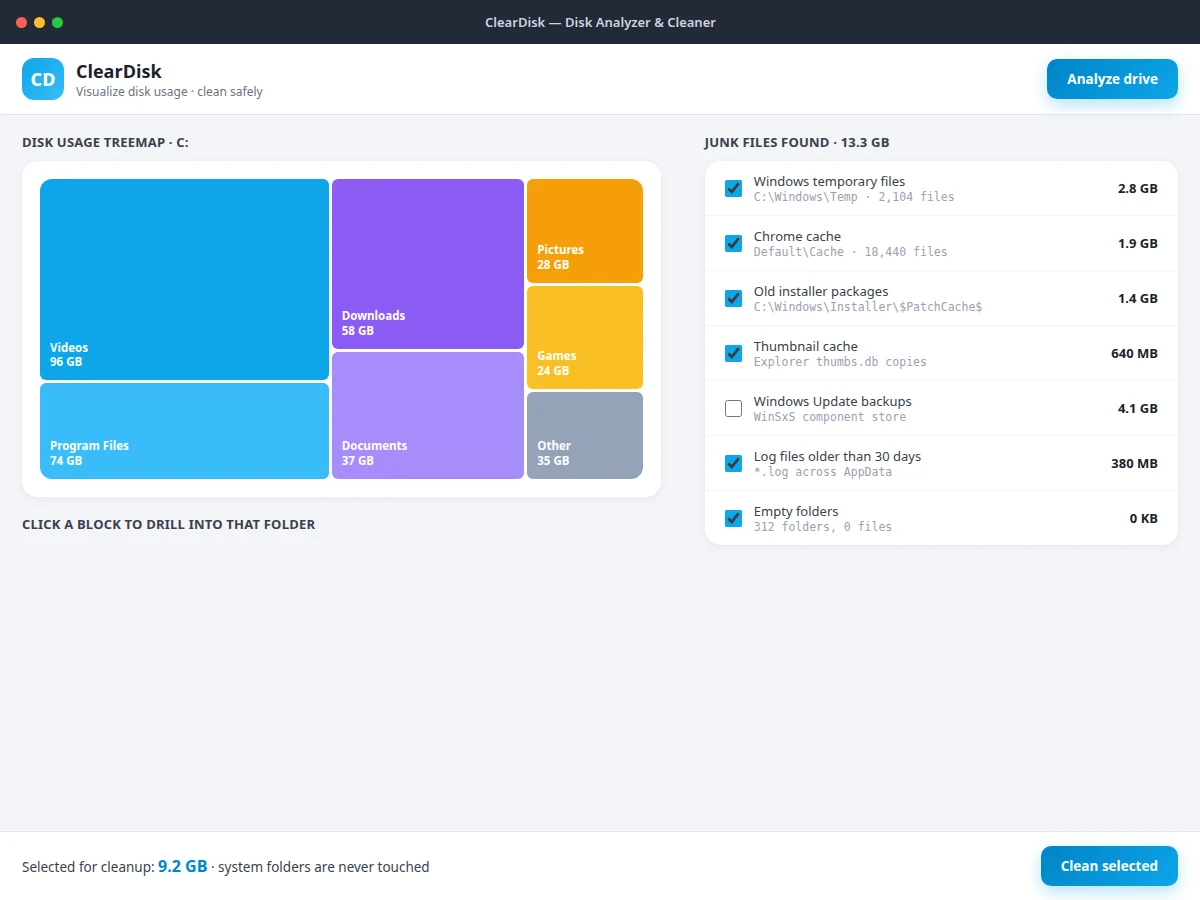
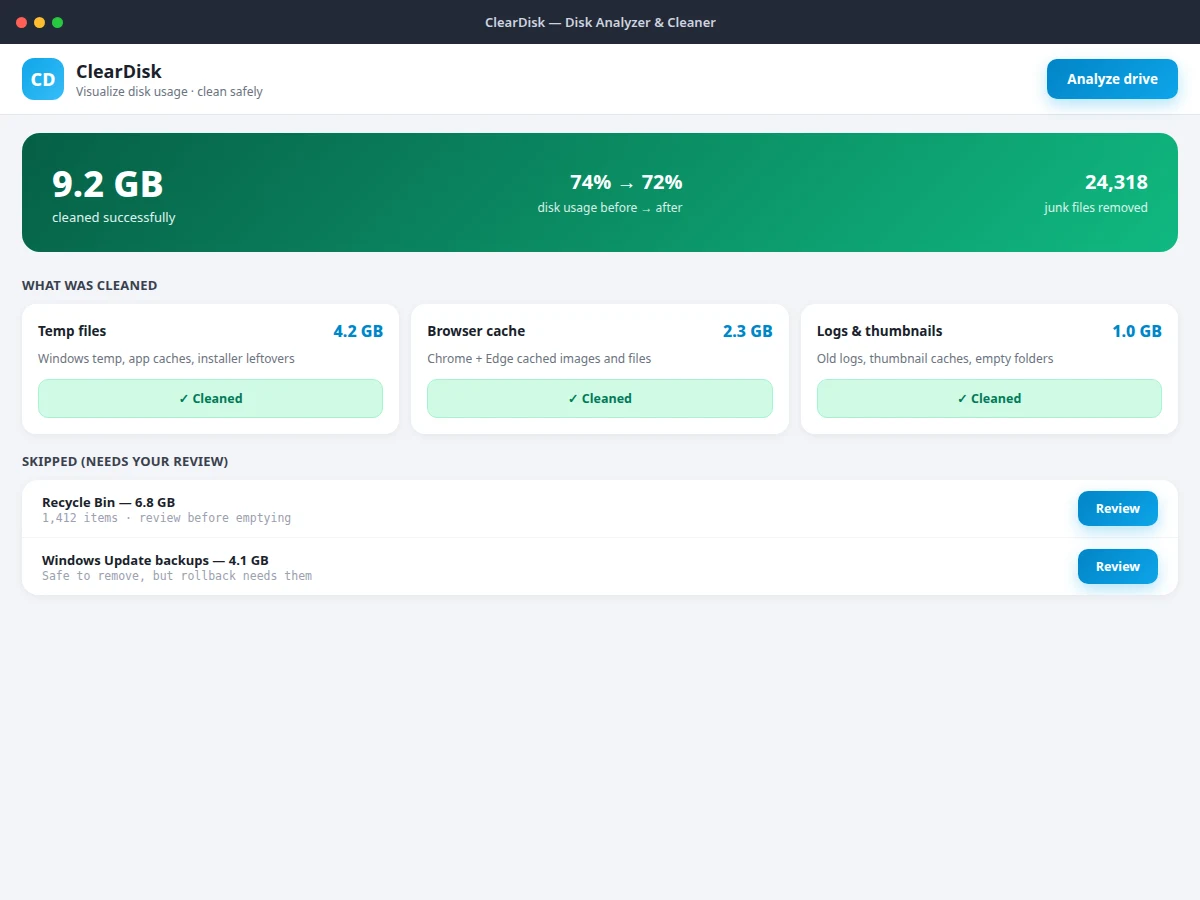
Disk full always arrives at the worst moment — during a project submission or a software install — and the built-in OS tools answer with a single free-space number that explains nothing about where the space went. This project builds the tool that answers the real questions. The analyzer walks the drive bottom-up, accumulating per-folder sizes into a tree, and renders a squarified treemap where block areas are proportional to folder sizes — the 96 GB Videos folder is visibly enormous next to the 640 MB thumbnail cache. A largest-folders ranking gives the drill-down path with file counts. The junk engine applies documented category rules — Windows temp, browser caches, old installer packages, logs older than 30 days, thumbnail caches — each with a plain-language explanation of what it matches and why it is safe, while the Recycle Bin and update backups are parked for human review instead of auto-deleted.
How it works
- The user picks a drive and runs Analyze; the walker accumulates per-folder sizes bottom-up into a size tree.
- The treemap lays out the tree with proportional blocks; clicking a block drills into that folder.
- The largest-folders ranking lists the top consumers with file counts for targeted investigation.
- The junk engine applies its category rules and lists each category with matched size and a plain-language explanation.
- The user selects categories and cleans; safe categories delete immediately while risky ones wait in the review queue.
- A summary reports per-category reclaimed space, total cleaned, files removed and the before/after usage percentage.
Tech stack:
- Python or Electron with file-system APIs
- Squarified treemap layout implementation
- OS disk-usage APIs
- Desktop GUI toolkit
- Category rule engine for junk detection
| Parameter | Value |
|---|---|
| Visualization | Squarified treemap; block area proportional to folder size |
| Junk categories | Temp files, browser caches, old installers, thumbnail cache, old logs, empty folders, Recycle Bin, update backups |
| Review policy | Recycle Bin and update backups require explicit approval |
| Reporting | Per-category bytes, total cleaned, file count, before/after usage % |
| Safety | System-critical paths excluded from cleaning by design |
| Scan speed | Approximately proportional to file count; design target in the low minutes for typical drives |
| Connectivity | Fully offline |
| Platform | Windows, macOS and Linux desktops (expected) |
Project features
- [Treemap visualization] A squarified treemap renders folder sizes as proportional blocks with click-to-drill-down into any folder.
- [Largest-folders ranking] Folders ranked by size with file counts and proportional usage bars for the drill-down path.
- [Categorized junk detection] Temp files, browser caches, old installers, thumbnail caches, logs older than 30 days and empty folders — each with byte counts.
- [Plain-language explanations] Every category states what it matches and why it is safe, so cleaning decisions are informed, not blind.
- [Review queue for risky items] The Recycle Bin and Windows update backups are listed for explicit approval and never auto-deleted.
- [Before/after reporting] Cleaning reports reclaimed bytes per category and the disk-usage percentage before and after.
- [System-folder protection] System-critical paths are categorically excluded from both analysis of deletable items and cleaning.
- [Drive overview dashboard] Used/free ring, total capacity and per-category cleanup cards with individual clean actions.
What is included
- Complete desktop app source code (analyzer, treemap, junk engine, cleaner UI)
- Analyzer documentation (size-tree walk, treemap layout, category rules)
- Sample drive profile for demonstration
- Setup guide (install, usage, safety notes)
- Project report PDF (background, visualization design, methodology)
- PPT presentation for final review
- Viva Q&A preparation document (file systems, treemap algorithms, safe-deletion design)
Limitations & prerequisites
- Junk-category rules are heuristic and OS-version-sensitive; a rule that matches safely on one Windows build should be re-verified after major OS updates.
- The app cannot distinguish a temp file the user actually needs (rare but possible) from junk — categories are explained so the user decides.
- Cleaning browser caches logs the user out of websites; the category explanation states this before cleaning.
- Administrator rights are needed for some system cache paths; those paths are skipped by default rather than prompting for elevation.
- Network and external drives can be analyzed, but cleaning rules target local OS paths.
Frequently Asked Questions
How does the treemap work?
The analyzer builds a folder-size tree, then a squarified tiling algorithm lays it out so each block's area is proportional to its folder's size. Big consumers are instantly visible, and clicking a block drills into that folder.
Is cleaning safe?
Safe categories (temp files, caches, old logs) are documented with what they match and why removal is harmless. Risky categories — Recycle Bin contents, Windows update backups — are never auto-deleted; they wait in a review queue for explicit approval.
Will it delete my personal files?
No. Cleaning targets only junk categories under well-known system and cache paths. Personal folders appear in the analyzer for visualization but are never cleaning targets.
Does it need admin rights?
Not for the standard categories. Some deep system cache paths would need elevation; the app skips those by default instead of asking.
How is this different from the OS disk cleanup?
It visualizes first (treemap + largest folders) so you understand the problem, explains each category in plain language, and separates safe auto-cleaning from review-needed items — the built-in tools do none of this.
Is this project suitable for a final-year project?
Yes — for Computer Science, Information Technology and related branches. It demonstrates file-system traversal, information visualization, heuristic rule design and safety-critical UX. Suitable for B.E./B.Tech final-year projects in Computer Science, Information Technology and related branches.
Components & software requirements
- Python or Electron with file-system APIs
- Squarified treemap layout implementation
- OS disk-usage APIs
- Desktop GUI toolkit
- Category rule engine for junk detection
Delivery information
Built-to-order project. Delivery timeline is shared after order confirmation based on current queue.
Support terms
Complete documentation, setup guide, and viva preparation included. Support for setup and explanation provided.