
More project photos (2)

The problem
The Deepfake Image Detection system is a forensic-AI final-year project that answers one of the defining questions of the AI era: is this face real? Built with a convolutional neural network trained on the FaceForensics++ benchmark dataset, the system detects AI-manipulated faces — face swaps, reenactments and GAN-generated portraits — by combining spatial deep-learning features with frequency-domain artifacts that generative models leave behind.
The accompanying FakeSpot web app accepts an image upload, runs face detection and alignment, and returns a real/fake verdict with a confidence score plus Grad-CAM heatmaps that highlight the exact facial regions (eyes, mouth edges, blending boundaries) the model found suspicious — so the verdict is explainable, not a black box.
This is a built-to-order software project: the code, trained model weights and full documentation are prepared fresh for you, with the complete viva kit (report, PPT, Q&A) included.
How it works
- You upload a photo (or video frames) to the FakeSpot web app.
- The face detector locates and aligns every face in the image.
- Each face crop is fed to the trained CNN (Xception/EfficientNet-style backbone), which scores spatial deep-learning features.
- In parallel, the system computes the image's frequency spectrum (FFT/DCT) — generative models leave distinctive upsampling and blending artifacts that this branch flags.
- The fused score produces a real/fake verdict with confidence; Grad-CAM back-projects the decision onto the face so you can show the examiner exactly which regions triggered the detection.
Project features
- Real/fake binary classification of faces with calibrated confidence score
- Dual-stream detection: spatial CNN features + frequency-domain (DCT/FFT) artifact analysis
- Grad-CAM explainability heatmaps that highlight manipulated facial regions
- Automatic face detection, cropping and alignment (OpenCV / MTCNN pipeline)
- FakeSpot web app — drag-and-drop image analysis in the browser
- Batch mode: scan a folder of images and export a results CSV
- Trained on the FaceForensics++ dataset (1,000+ videos across 4 manipulation methods)
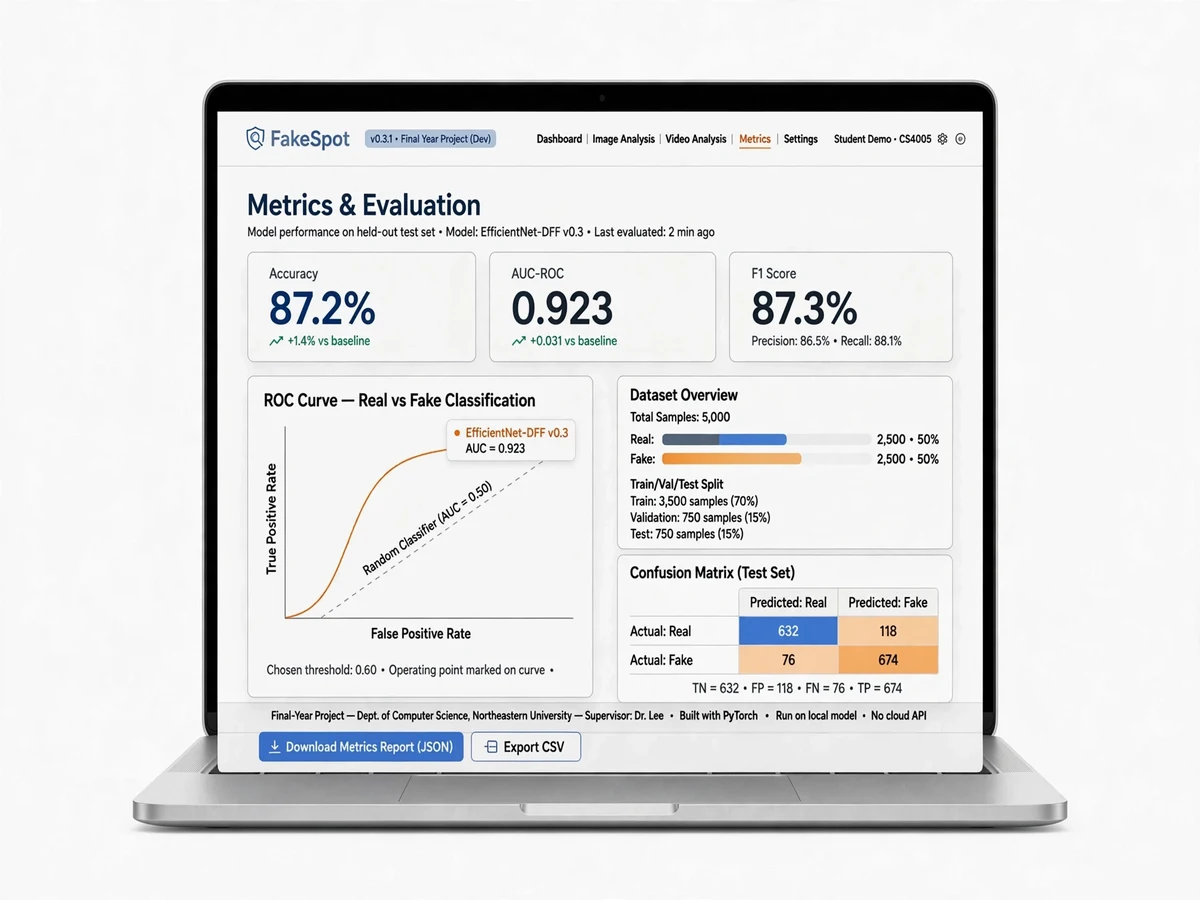
- Training notebooks with loss/accuracy curves and confusion matrix included
- Viva-ready evaluation report: accuracy, precision, recall, F1 and AUC
What is included
- Complete source code (training, evaluation and inference, well-commented)
- Trained model weights (.pth) — demo works without a GPU
- FaceForensics++ data preparation and training scripts
- Project report PDF (problem statement, literature survey, architecture, results)
- PPT presentation for final review
- Viva Q&A preparation document (deepfake types, CNN layers, frequency artifacts, Grad-CAM, metrics)
- Setup guide (environment, dependencies, how to run training vs. inference)
Components & software requirements
- Python 3.10, PyTorch (model training and inference)
- OpenCV + MTCNN/Dlib (face detection, alignment, cropping)
- NumPy, scikit-learn, Matplotlib/Seaborn (metrics and plots)
- Flask web app with HTML/CSS/JS frontend (FakeSpot)
- FaceForensics++ benchmark dataset (training/evaluation)
- Trained weights shipped as .pth checkpoint (no GPU required at demo time)