
More project photos (2)

The problem
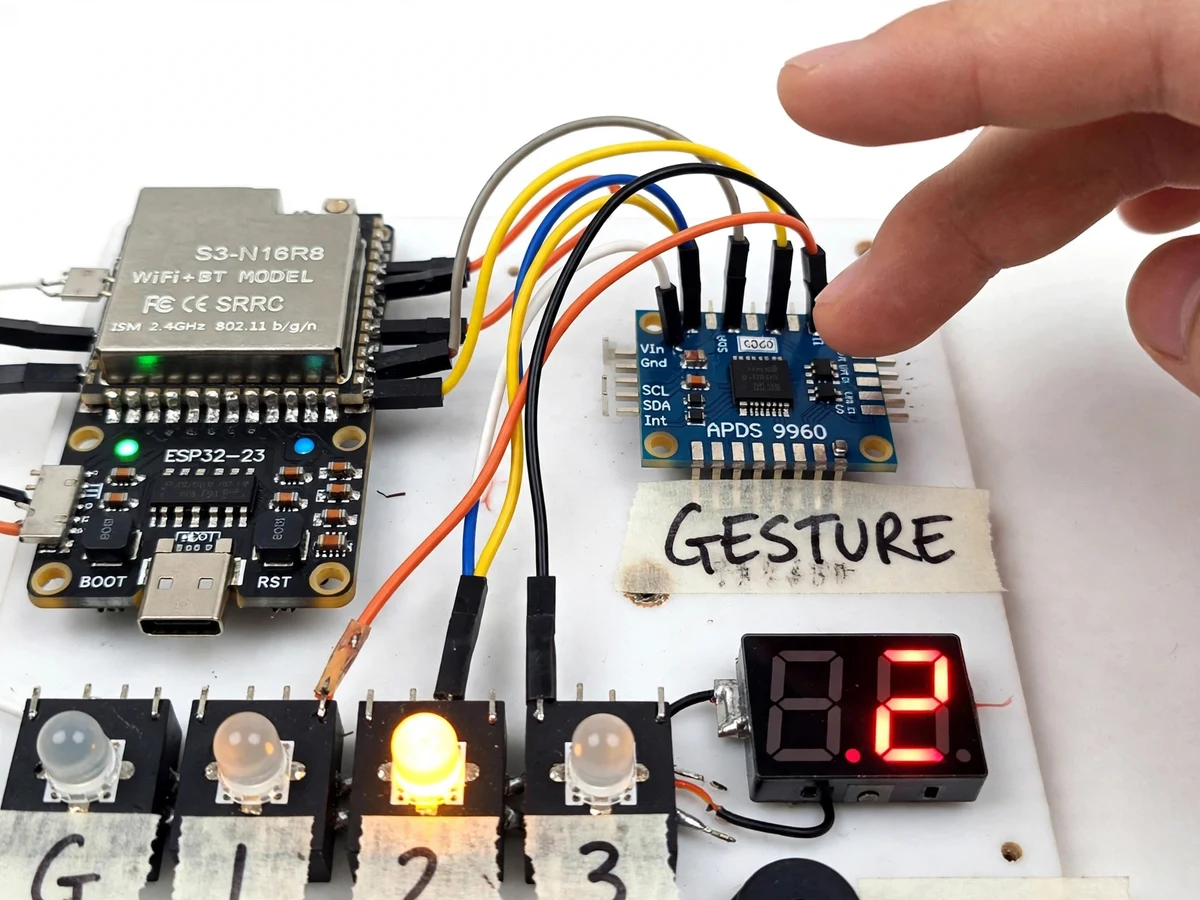
Lift buttons are among the most-touched surfaces in any building, and in hospitals, laboratories and food plants that is a genuine hygiene problem. Touchless elevator panels exist commercially but are proprietary, expensive units that a student can neither open nor explain. This project builds the same idea from accessible parts: an APDS-9960 proximity/gesture sensor mounted behind the panel face detects hand swipes without contact, and an ESP32 translates up, down, left and right swipes into floor selection, door-hold and cancel commands. A row of floor indicator LEDs and a 7-segment display mirror the selection, while a piezo buzzer gives audible confirmation for every recognized gesture. A proximity wake feature lights the panel only when a hand approaches, and a dwell-time guard rejects accidental passes. The gesture decoding runs entirely on the microcontroller — no cloud, no phone app — so the panel works as a standalone drop-in control.
How it works
- The APDS-9960 continuously measures proximity; when a hand enters range it wakes the panel and lights the floor indicators.
- Its on-chip gesture engine reports swipe direction over I2C; the ESP32 reads these reports at 50 Hz.
- Firmware applies the gesture vocabulary: up/down swipe steps the selected floor, right swipe confirms, left swipe cancels — each step flashes the corresponding LED.
- A debounce timer and minimum-dwell check reject accidental or partial swipes before any selection changes.
- The confirmed floor is shown on the 7-segment display and indicator LEDs, and a two-tone buzzer pattern signals confirmation.
- After 10 seconds of no hand presence the panel returns to its low-power idle state; a selection times out unconfirmed if never confirmed.
Tech stack:
- ESP32 dev board
- APDS-9960 gesture/proximity sensor · I2C
- 7-segment display · floor indicator LEDs
- Piezo buzzer
- Arduino IDE · C/C++ firmware
| Parameter | Value |
|---|---|
| Gesture range | Approximately 10–20 cm (expected, sensor datasheet typical) |
| Sensor interface | I2C, 100 kHz |
| Floors supported | 2–8, compile-time configured (4 in the demo build) |
| Gesture poll rate | Approximately 50 Hz (design target) |
| Wake current | Approximately 15 mA idle, 120 mA active (expected) |
| Confirmation timeout | 10 s without confirm returns to idle |
| Display | Single-digit 7-segment + 4 floor LEDs |
| Supply | 5 V DC, approx. 150 mA peak (expected) |
Project features
- [Touch-free floor selection] APDS-9960 gesture engine decodes up/down swipes into floor up/down selection at roughly 10–20 cm range — the panel face is never touched.
- [Gesture vocabulary] Up, down, left and right swipes mapped to floor select, door hold, cancel and confirm, with per-gesture LED flash feedback so the user learns the vocabulary in seconds.
- [Proximity wake] The panel idles dark and wakes its indicators when a hand comes within range, cutting idle current and giving a clear "I see you" cue.
- [Floor indication] Four floor LEDs (G, 1, 2, 3) plus a 7-segment display show the currently selected floor; selection wraps safely and never exceeds the configured floor count.
- [Buzzer confirmation] Distinct beep patterns for gesture accepted, gesture rejected and selection confirmed — usable by visually guided users without looking at the panel.
- [Dwell and debounce logic] Firmware requires the gesture engine's confidence pattern plus a minimum dwell before acting, so walk-by motion does not trigger phantom selections.
- [Configurable floors] Floor count and gesture mapping are compile-time constants with a documented procedure, so the panel adapts to 2–8 floor buildings.
What is included
- Working contactless lift floor selector prototype (ESP32, gesture sensor, display, LEDs, buzzer)
- Complete firmware source with gesture vocabulary and debounce logic
- Wiring diagram and panel layout documentation
- Gesture calibration and range-tuning procedure
- Project report PDF (background, gesture sensing theory, state machine, testing)
- PPT presentation for final review
- Viva Q&A preparation document (I2C, gesture engine, debouncing, state machines)
Limitations & prerequisites
- Gesture range is approximately 10–20 cm per the sensor's typical behavior — it is a near-field panel, not a wave-from-across-the-lobby control; the report documents the buyer-run range measurement procedure rather than claiming a measured figure.
- Strong direct sunlight on the sensor aperture can degrade gesture recognition; the panel is designed for indoor lift lobbies.
- The prototype is a selector panel demonstrator — it does not interface with a real lift controller or its safety interlocks.
- Gloved or very fast swipes may be rejected by the dwell guard; the vocabulary favors deliberate gestures over speed.
- Wet or reflective surfaces near the sensor can cause false proximity wakes.
Frequently Asked Questions
How does it detect gestures without touching?
The APDS-9960 has four photodiodes under an IR LED; a moving hand creates a direction-dependent light pattern that the sensor's engine converts into up/down/left/right swipe reports.
Why not just use push buttons?
In hospitals and labs, shared buttons are a contamination vector. A panel nobody touches removes that path entirely, and there is nothing mechanical to wear out.
What stops accidental triggers from people walking past?
Two layers: the proximity wake needs a hand within ~15 cm, and the firmware's dwell/debounce logic requires a deliberate swipe pattern before any selection changes.
Can it work for more than 4 floors?
Yes — floor count is a compile-time constant supporting 2–8 floors; the demo build uses 4 with G, 1, 2, 3 indicators.
Does it connect to a real elevator?
No — this is a selector-panel prototype demonstrating the sensing and selection logic. Interfacing a certified lift controller is out of scope and would need the lift manufacturer's protocols and approvals.
Is this project suitable for a final-year project?
Yes — for Electronics and IoT & Embedded programs. It combines sensor interfacing, signal interpretation, state-machine design and human-factors thinking in one demonstrator. Suitable for B.E./B.Tech final-year projects in Electronics and IoT & Embedded.
Components & software requirements
- ESP32 dev board
- APDS-9960 gesture/proximity sensor · I2C
- 7-segment display · floor indicator LEDs
- Piezo buzzer
- Arduino IDE · C/C++ firmware
Delivery information
Built-to-order project. Delivery timeline is shared after order confirmation based on current queue.
Support terms
Complete documentation, setup guide, and viva preparation included. Support for setup and explanation provided.